Nifty Lifetime Deal: Client Approvals, Roadmaps and AI Agents
Nifty is a project management tool that keeps all your work in one place. You can plan projects, assign tasks, set due dates, and track progress with ease.
You can also chat with your team, share files, and get client approvals. Everything stays in one place, so you don’t need to switch between tools.
Nifty also has AI tools that help create projects, manage tasks, and update work. It helps teams stay organized and keep their work on track.
KEY Features of Nifty
Nifty helps you manage daily work with less effort. Here are its key features and how they work.
Manage Client Approvals and Requests
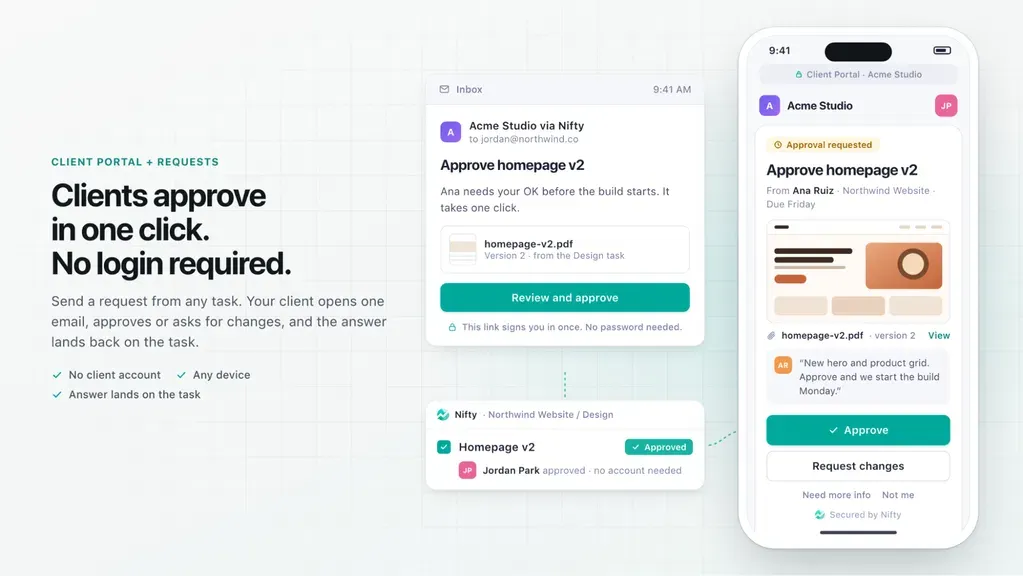
Nifty helps you get client feedback and approvals in one place. You can ask clients to review work, approve files, or send missing details. Each reply stays linked to the right project.
Clients get a secure link by email. They can approve work, request changes, or upload files. They don’t even need a Nifty account. You can see all their replies in Nifty.
How to use it: Open Portals and create a client portal. Invite your client and send a request. They can reply through the link. You can then check their response in Nifty.
Work with AI Agents on Projects
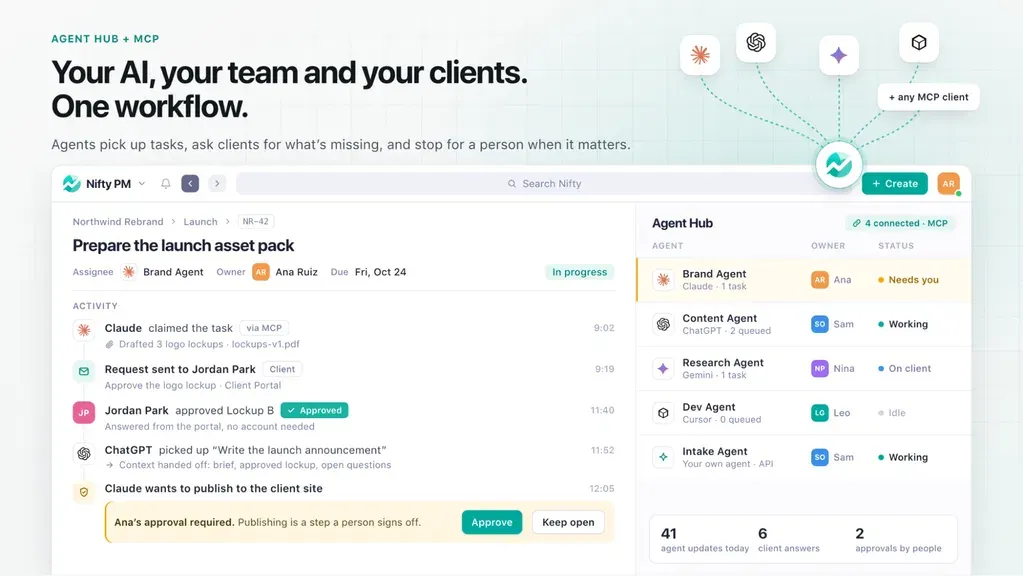
Nifty lets you connect AI tools like ChatGPT and Claude to your projects. These AI agents can create tasks, update work, and check project progress.
You can ask AI agents to assign tasks, set due dates, or write project docs. They can also pass work to another agent or team member. All updates stay in Nifty, so your team can see them.
How to use it: Open Agents in Nifty and click Connect your AI. Choose your AI tool and allow access. Then ask it to create tasks, update projects, or check progress.
Manage Projects in Multiple Views
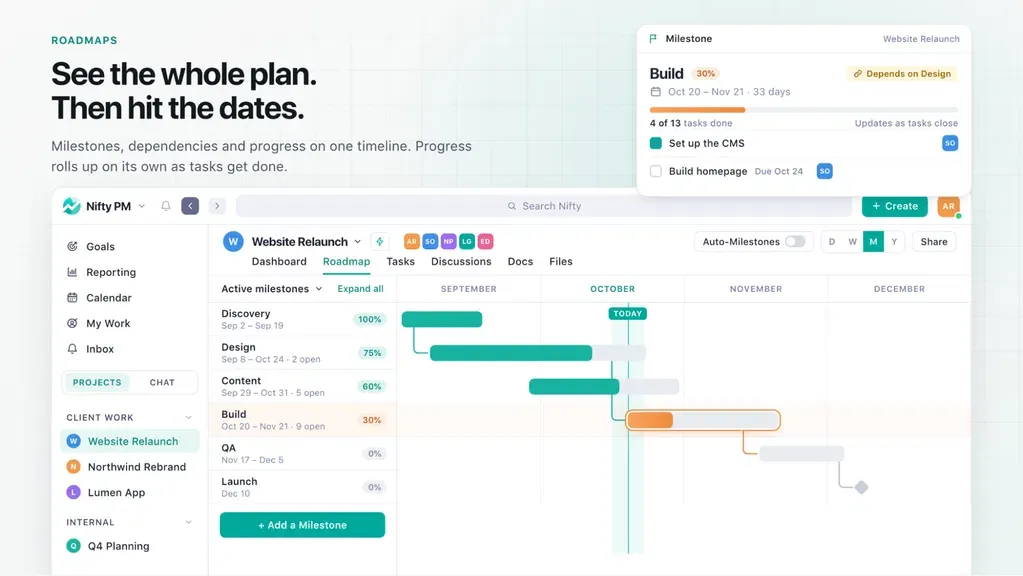
Nifty lets you manage project tasks in different views. You can choose Kanban, List, Timeline, Calendar, or Swimlane. Each view helps you see your work in a new way.
Kanban shows tasks that are pending, in progress, or done. List view shows task details. Timeline and Calendar help you track dates and deadlines. You can also assign tasks and move them as work gets done.
How to use it: Open a project and go to Tasks. Pick a view from the top menu. Add tasks, assign team members, and set due dates. You can switch views anytime to check your work.
Track Team Workloads and Progress
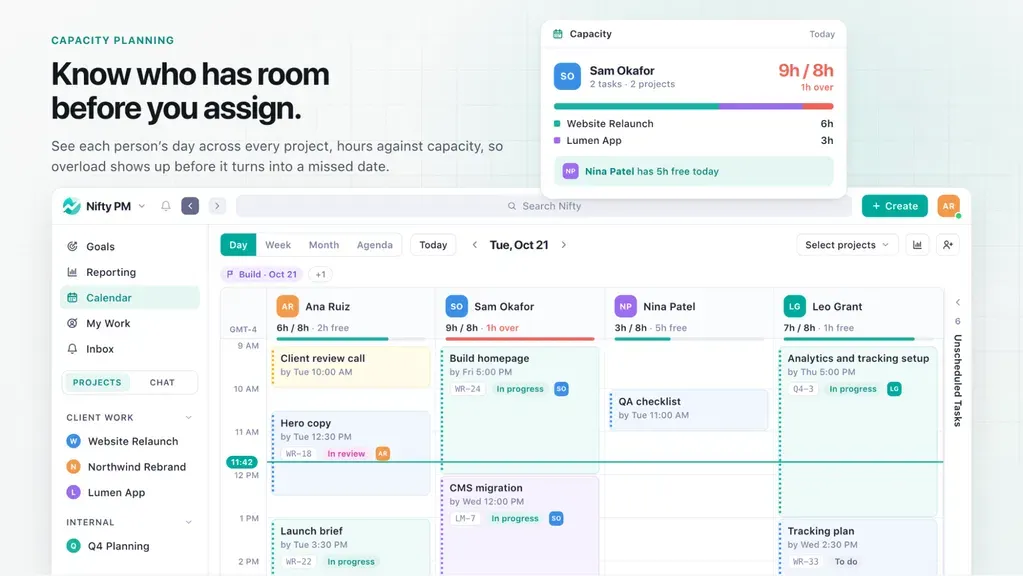
Nifty helps you track your team’s work and project progress. You can see who has too much work and who has time for more. You can also check how tasks are going.
You can view completed tasks, track work hours, and spot delays. Nifty shows live project updates. This helps you plan tasks and share work with your team.
How to use it: Open Reporting from the sidebar. Go to Team Workloads to check each person’s tasks. Use Overview or All Tasks to track progress. You can also check Time reports to see work hours.
Nifty Pros and Cons
Nifty has many useful features, but it also has some limits. Here are its main pros and cons to help you decide.
Pros
- Faster Client Approvals.
- Clear Task Priorities.
- Better Team Workload Balance.
- Less Manual Work.
- Easy Progress Tracking.
- Fewer Tool Switches.
Cons
- Forms Only on Higher Tiers.
- Limited Team Seats.
- Daily AI Template Limit.
- Limited Advanced Automation.
- Notification Issues.
Who Is Nifty Best For?
- Marketing Agencies: Manage client work, get feedback and approvals, and keep all project details in one place.
- Project Managers: Plan projects, assign tasks, set due dates, and see how work is going.
- Remote Teams: Chat with team members, share files, and work together from anywhere.
- Team Leaders: See who has too much work, check progress, and share tasks across the team.
- AI-Focused Teams: Use AI agents to create tasks, update projects, and help the team get work done.
Nifty AppSumo Pricing Plan
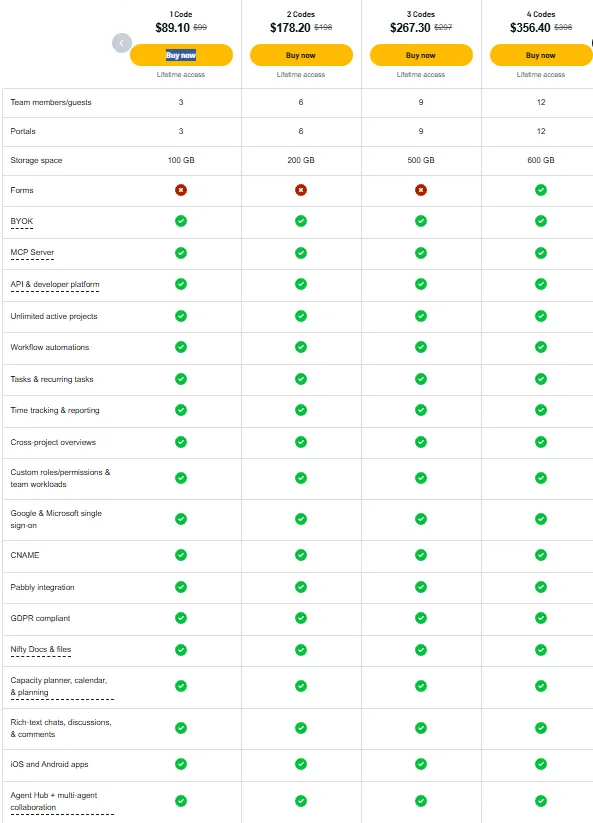
License Tier 1 — $89.10 One-Time
Features:
- 3 team members/guests
- 3 client portals
- 100 GB storage
- Unlimited projects
- Tasks & recurring tasks
- Workflow automation
- Time tracking & reports
- Cross-project views
- Team workloads & roles
- Capacity planning & calendar
- Docs & files
- Team chat & comments
- Google & Microsoft SSO
- Custom domain (CNAME)
- Pabbly integration
- MCP Server
- BYOK
- API & developer tools
- AI Agent Hub
- iOS & Android apps
- GDPR compliant
License Tiers 2–10
Nifty has nine more plans, from Tier 2 to Tier 10. Prices range from $178.20 to $891, paid once. These plans support 6 to 30 team members or guests. You also get 6 to 30 client portals and 200 GB to 2 TB of storage. Forms start at Tier 4 ($356.40). All higher tiers keep the Tier 1 features.
5 Best Nifty Alternatives 2026
1. ClickUp
ClickUp keeps tasks, docs, and team chats in one place. It suits teams that want more control over their work.
- Free Plan: Available.
- Starting Price: $10/user/month, billed monthly.
- Pros: Flexible views, time tracking, and team chat.
- Cons: Free plan has only 60 MB of storage.
- Difference: More ways to set up tasks and workflows.
2. Asana
Asana helps teams plan tasks, set due dates, and track work. It suits teams that want to keep projects on track.
- Free Plan: Available for 2 users.
- Starting Price: $13.49/user/month, billed monthly.
- Pros: Easy task tracking, timelines, and reports.
- Cons: Workload planning needs a higher plan.
- Difference: More focus on task planning and team goals.
3. monday.com
monday.com helps teams plan and track work with visual boards. It suits teams that like to see work at a glance.
- Free Plan: Available for 2 users.
- Starting Price: $9/seat/month, billed annually.
- Pros: Visual boards, templates, and dashboards.
- Cons: Free plan allows only 3 boards.
- Difference: More focus on visual boards and custom layouts.
4. Teamwork.com
Teamwork.com helps agencies manage client projects, work hours, and budgets. It suits teams that do paid work for clients.
- Free Plan: Available for 5 users.
- Starting Price: $9.99/user/month, billed annually.
- Pros: Client management, time tracking, and billing.
- Cons: Free plan allows only 5 projects.
- Difference: More focus on client budgets and paid work.
5. Wrike
Wrike helps teams plan tasks, manage projects, and track progress. It suits teams that need clear reports on their work.
- Free Plan: Available.
- Starting Price: $10/user/month, billed annually.
- Pros: Gantt charts, dashboards, and AI tools.
- Cons: Free plan has a 200-task limit.
- Difference: More focus on project reports and work plans.
Final Thoughts – Nifty Review 2026
Nifty helps you manage projects, tasks, and teamwork in one place. You can plan tasks, track progress, share files, and work with clients. You don’t need to switch between different tools.
Nifty stands out for its client approvals, AI agents, and project views. These tools help save time and keep work on track. Its one-time lifetime deal makes it worth a look for long-term use.