Lunacal Lifetime Deal: Custom Booking Pages and Meetings
Booking client meetings can take a lot of time. You need to manage calls, payments, and reminders. Lunacal helps you handle all these tasks in one place.
With Lunacal, you can make your own booking page. You can link your calendars and set your free time. Clients can then pick a time that works for them. You can also accept payments, send reminders, and manage team bookings.
In this Lunacal review, we’ll cover its key features, benefits, pricing, pros and cons, and AppSumo lifetime deal. This will help you decide if Lunacal is right for you.
KEY Features of Lunacal
Lunacal helps you manage bookings, payments, and team schedules. Here are its key features and how they work.
Create Custom Booking Pages
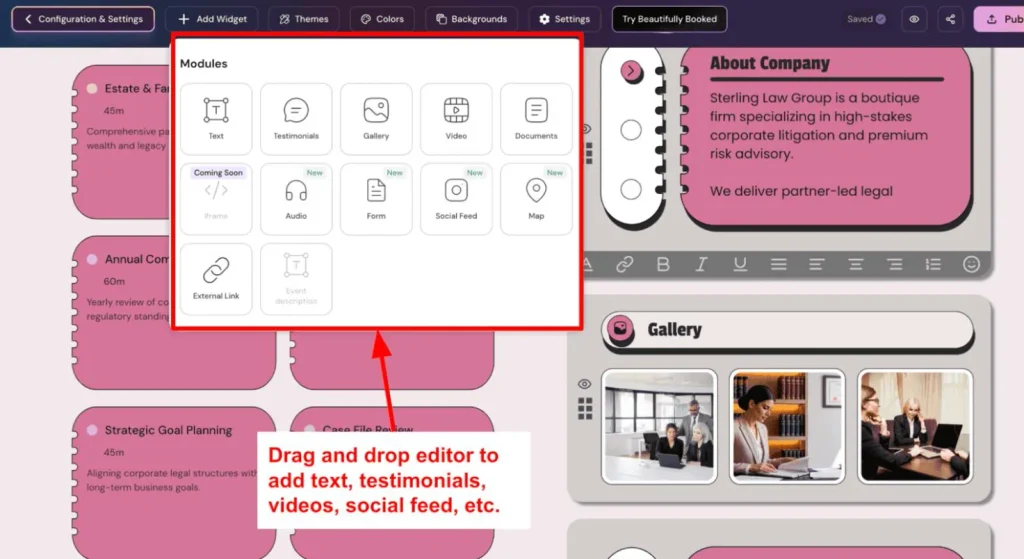
Lunacal lets you make booking pages that match your brand. You can change the colors, themes, and page layout. You don’t need to write any code.
You can add your logo, videos, photos, reviews, and FAQs. You can also add links to your social pages. This helps people learn about your business before they book.
How to use it: Open the booking page editor. Pick a theme and change the colors. Add your logo and use widgets to add more content. Then publish your page and share the booking link. You can also show the booking calendar on your website.
Sell Sessions, Packages, and Subscriptions
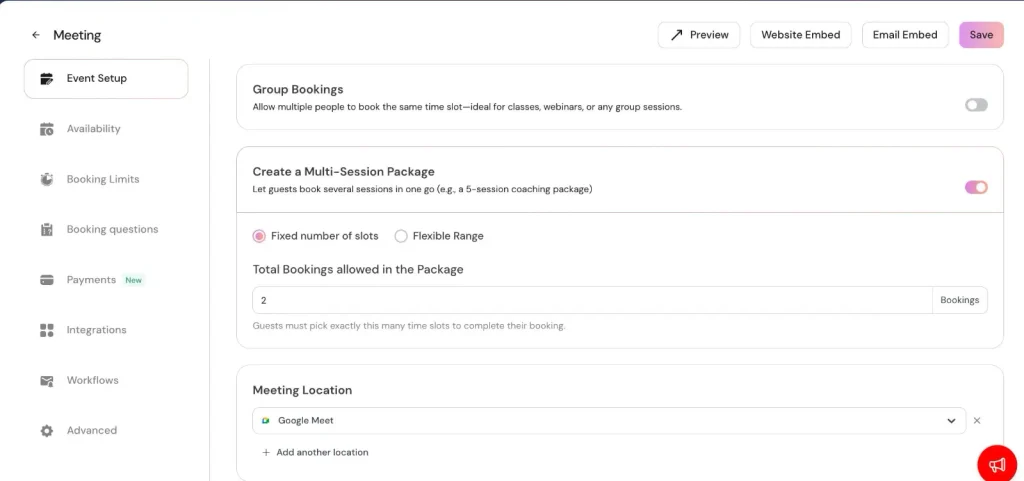
Lunacal lets you sell paid meetings, session packs, and subscriptions. Clients can pay for one meeting or buy many sessions at once.
You can also sell plans that renew each month. Clients get new sessions and book them when they want. Lunacal works with Stripe and PayPal. It also takes 0% commission on bookings.
How to use it: Go to the Packages or Subscriptions section. Create a plan and set the price and session count. Then connect your payment method and share your booking page. Clients can pay and book their sessions online.
Manage Bookings and Automate Workflows
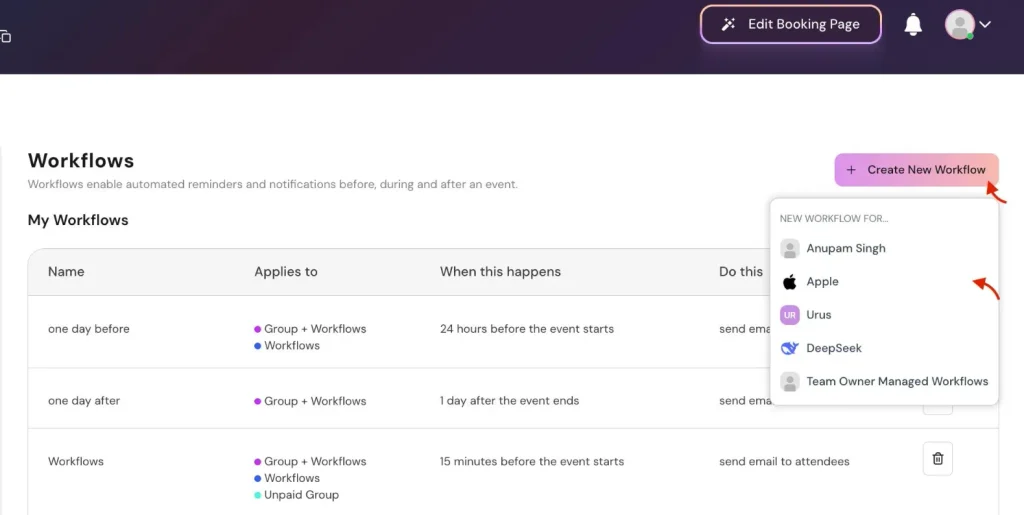
Lunacal helps you manage bookings and send reminders. You can set up one-on-one calls, group sessions, and repeat meetings. You can also set your free hours and add booking questions. You can even choose to approve bookings before they are confirmed.
Lunacal can send email and SMS reminders before each meeting. You can also send follow-up emails after meetings. This keeps clients up to date without extra work.
How to use it: Go to Event Types and pick a meeting. Set your free hours, meeting place, and booking rules. Then open Workflows and add email or SMS reminders. Choose when to send each message and save your changes.
Manage Teams, Locations, and Businesses
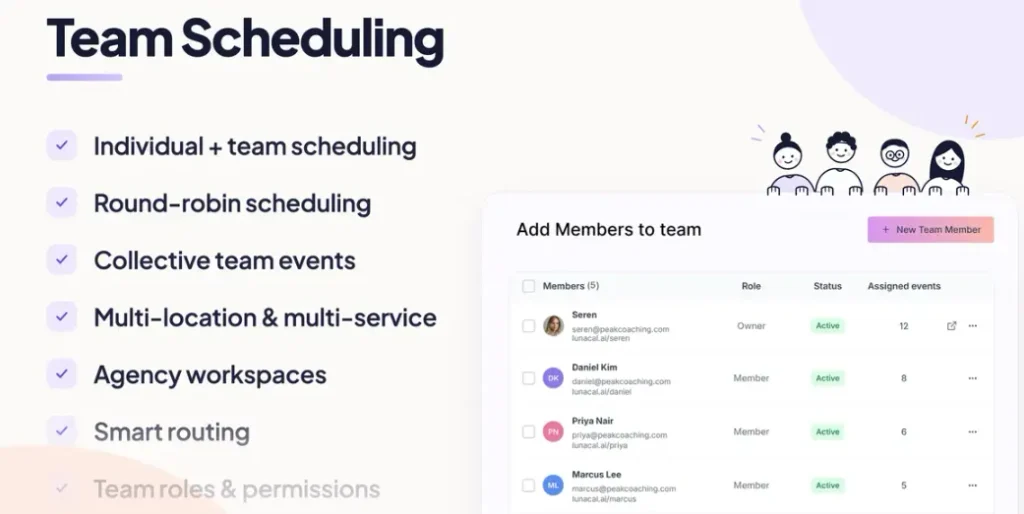
Lunacal helps you manage teams, services, and locations in one place. Clients can pick a service, choose a team member, and book a free time slot.
You can also share bookings among team members in turn. For group meetings, Lunacal helps find a time when everyone is free. If you run more than one business, you can manage each one in its own workspace.
How to use it: Create a workspace and add your team members. Set their work hours, services, and locations. Then choose how to share bookings among your team. You can also let clients pick who they want to meet. Save your settings and share your team booking page.
Lunacal Pros and Cons
Lunacal has useful tools, but it has some limits too. Here are its main pros and cons.
Pros
- Save Time on Bookings.
- Build Client Trust.
- Reduce Missed Meetings.
- Collect Payments Easily.
- Avoid Double Bookings.
- Simplify Team Scheduling.
- Manage Multiple Businesses.
Cons
- Complex Initial Setup.
- Extra SMS Costs.
- Limited Lower-Tier Features.
- Limited Payment Options.
Who is Lunacal Best For?
- Coaches: Coaches can sell private sessions and coaching packages. Clients can also book their own meeting times.
- Consultants: Consultants can offer paid calls, set their free hours, and collect payments before meetings.
- Teachers and Tutors: Teachers can book classes, group lessons, and parent meetings without sending messages back and forth.
- Service Businesses: Businesses with many staff or locations can manage bookings. Clients can also choose who they want to meet.
- Agencies: Agencies can make booking pages for each client. They can also manage client schedules in one place.
Lunacal AppSumo Pricing Plan
Lunacal has six lifetime plans with a one-time payment. Higher plans let you add more users, companies, and tools.
License Tier 1 – $53.10
Features:
- 2 user licenses
- 2 companies
- Remove Lunacal branding
- Custom themes and colors
- SMS and email reminders
- Booking page widgets
- Add calendars to websites
- App integrations
- Paid bookings with 0% commission
- Choose meeting locations
- 13+ languages
- Custom booking questions
- Group sessions
- Auto time-zone detection
- One-time and limited-use links
Lunacal also has five higher plans. Prices range from $152.10 for Tier 2 to $809.10 for Tier 6. These plans support 7 to 50 users and companies. You also get 1 to 7 custom domains. Higher plans add team bookings, session packages, subscriptions, routing forms, AI call reminders, API support, and rebranding options.
Final Thoughts – Lunacal Review 2026
Lunacal is more than a basic booking calendar. You can create booking pages, take payments, and send reminders. You can also manage team bookings in one place. What stands out most is how you can make each page match your brand.
I also like that you can sell paid sessions, packages, and plans that renew. Lunacal takes 0% commission on these bookings. Its one-time lifetime deal is worth a look if you want to manage bookings without paying a monthly fee.