Hedy AI Lifetime Deal: Your Personal Real-Time Meeting Coach
Hedy AI is an AI meeting coach that does more than take notes. It listens as you talk. It suggests what to say, ask, or discuss in real time.
What makes Hedy different is its live support. You can ask questions, get answers, and save key moments. This helps you stay focused on the conversation.
After each session, Hedy creates summaries, transcripts, and task lists. You can also chat with AI about past meetings. It supports over 30 languages and works with online and in-person meetings.
KEY Features of Hedy AI
Let’s take a closer look at the key features of Hedy AI and how they can assist you during everyday conversations.
Choose the Right Session Type
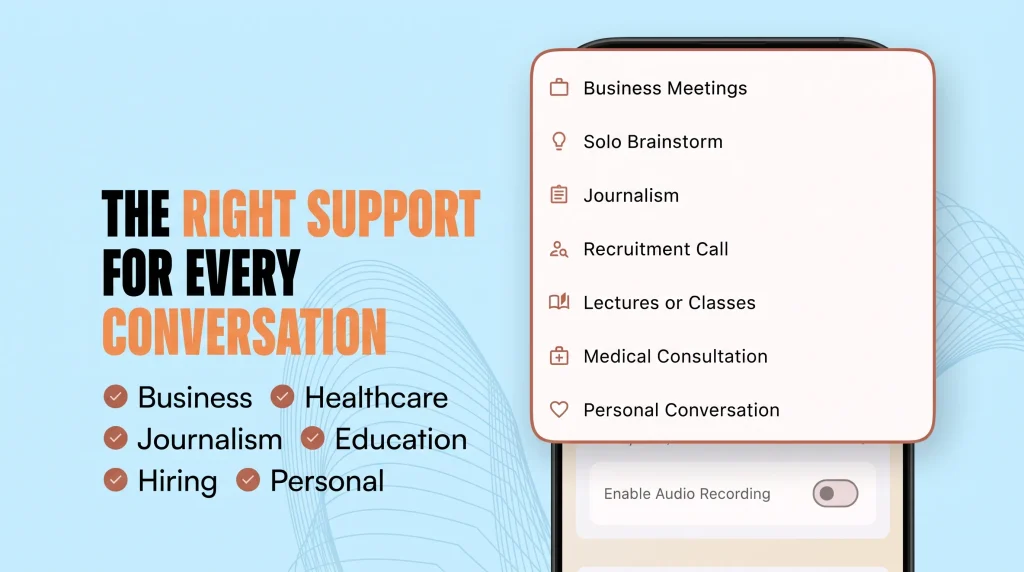
Hedy AI offers 13 session types for different needs. These cover work meetings, job interviews, sales calls, classes, and coaching. With Hedy Pro, you can also create your own session types.
What I like is how Hedy adjusts to each session. For work meetings, it tracks key decisions and next steps. For classes, it explains hard topics and creates study notes.
How to use: Open Hedy AI and choose your session type. Add extra details if needed. Then click Start Session. You can also switch session types during a meeting.
Get Real-Time AI Coaching
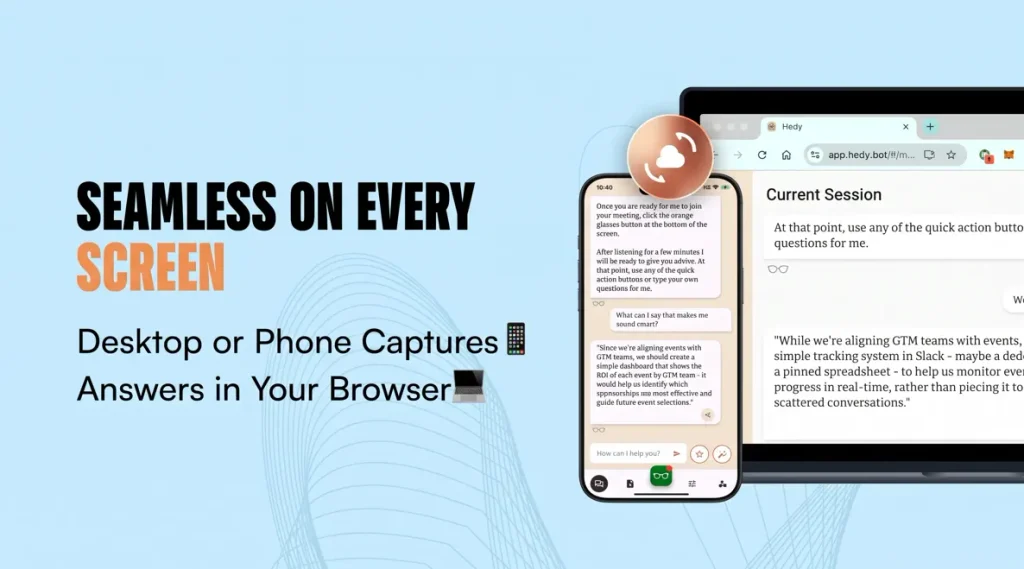
Hedy AI listens as you talk and offers live tips. It helps you ask better questions and find the right words. It also helps you spot details you might miss. Hedy Pro offers live automatic tips for up to 120 minutes per session.
The best part is that you get help during meetings. You can ask questions and use Quick Prompts to get answers. The Highlights feature also lets you save key moments.
How to use: Start a session and open Settings. Turn on Automatic Suggestions to get live tips. You can also use the AI chat or Quick Prompts when you need help.
Organize and Share Your Conversations
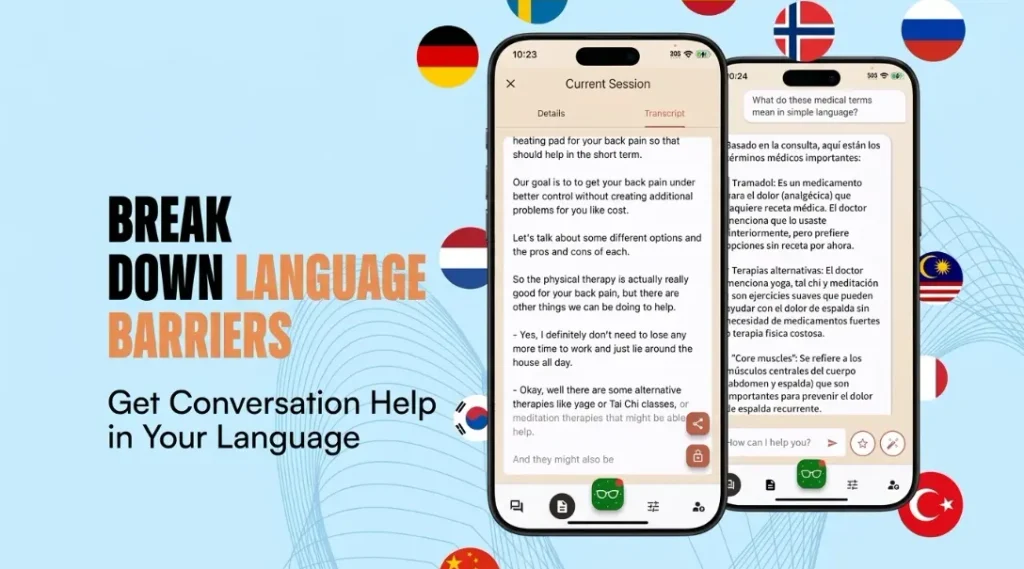
Hedy AI lets you group related meetings using Topics. You can group meetings by client, project, or subject. With Hedy Pro, you can create as many Topics as you need.
What I like about this feature is how Hedy connects past meetings. You can ask questions, get prep notes, and review past decisions. You can also share meeting notes, summaries, and transcripts with others.
How to use: Open Topics and create a new topic. Add your related meetings to it. Use AI chat to find past details or share sessions with others.
Automate Your Workflow
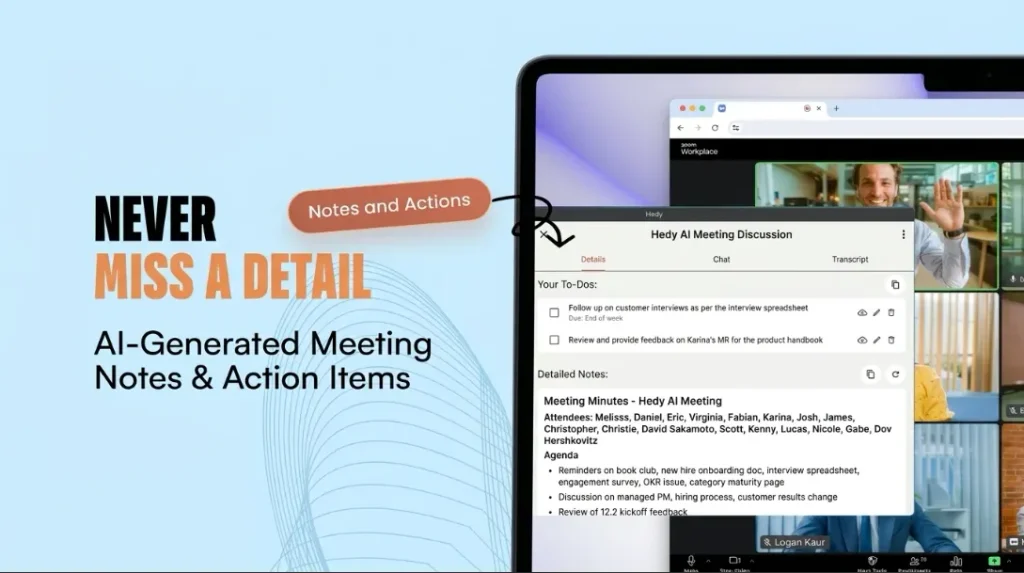
Hedy AI works with Zapier, Make, and n8n. It can send meeting summaries to Notion on its own. You can also turn action items into tasks and share key points in Slack.
What I like about this feature is how it saves time. Hedy also supports REST API, Webhooks, and MCP. You can even access your meeting data through Claude and ChatGPT.
How to use: Connect Hedy to your chosen automation tool. Set a trigger, such as when a meeting ends. Then choose an action, like sending notes to Notion. Once set up, everything runs on its own.
Hedy AI Pros and Cons
Like any tool, Hedy AI has both pros and cons. Here is what you need to know before using it.
Pros
- Speak with more confidence.
- Ask more relevant questions.
- Stay focused during meetings.
- Recall key meeting details easily.
- Prepare better for upcoming meetings.
- Keep track of follow-up tasks.
- Save time on manual work.
- Maintain control over private data.
Cons
- Occasional transcription errors.
- Basic or delayed AI suggestions.
- Limited same-device call capture.
- Two-hour automatic coaching limit.
- Suggestions visible in full-screen share.
Who Is Hedy AI Best For?
- Business Professionals: Manage meetings, share ideas with confidence, and keep track of key tasks and decisions.
- Sales Professionals: Understand client needs, answer tough questions, and keep track of sales discussions.
- Coaches and Mentors: Guide client sessions, ask helpful questions, and track progress over time.
- Recruiters and Hiring Managers: Run job interviews, ask the right questions, and review answers to make better hiring choices.
- Students and Learners: Stay focused in class, understand hard topics, and review study notes later.
Hedy AI AppSumo Pricing Plan
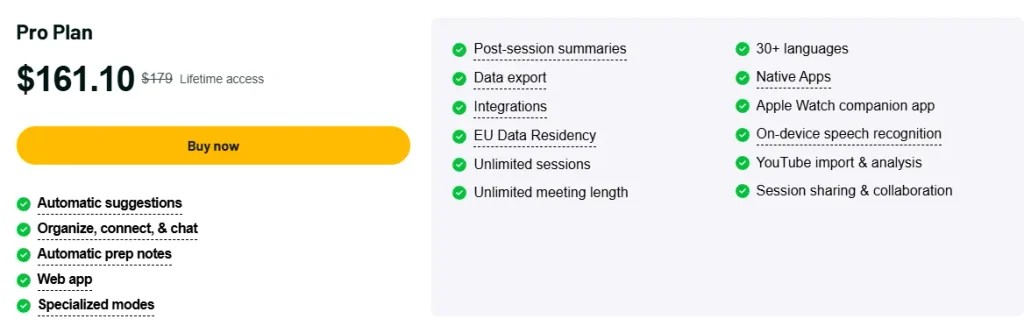
Pro Plan – $161.10
- Automatic AI suggestions
- Organize sessions and chat with AI
- Automatic prep notes
- Web app access
- Specialized session modes
- Post-session summaries
- Meeting data export
- Third-party integrations
- EU data residency
- Unlimited sessions
- Unlimited meeting length
- 30+ supported languages
- Native desktop and mobile apps
- Apple Watch companion app
- On-device speech recognition
- YouTube import and analysis
- Session sharing and collaboration
5 Best Hedy AI Alternatives 2026
1. Fireflies.ai
Fireflies.ai is an AI meeting assistant. It takes notes, creates summaries, and helps manage follow-up tasks.
- Free Plan: Available
- Starting Price: $18/user/month
- Pros: Live transcripts, AI summaries, task tracking, 100+ languages, app integrations.
- Cons: Extra AI credit costs, limited storage on lower plans.
- Key Difference: Fireflies helps teams manage meeting tasks. Hedy focuses more on coaching you during live conversations.
2. Otter.ai
Otter.ai turns spoken words into text. It also creates meeting notes and task lists that are easy to search.
- Free Plan: Available
- Starting Price: $16.99/user/month
- Pros: Live transcripts, speaker detection, AI chat, searchable notes, audio playback.
- Cons: Limited recording minutes, 90-minute meeting limit on Pro.
- Key Difference: Otter focuses on recording and reviewing meetings. Hedy helps you speak and respond during live meetings.
3. Read AI
Read AI takes meeting notes and reviews your conversations. It also helps you understand your speaking habits.
- Free Plan: Available
- Starting Price: $19.75/user/month
- Pros: Live meeting insights, speaking tips, AI summaries, task tracking, app integrations.
- Cons: Five monthly meeting reports on Free, video playback on higher plans.
- Key Difference: Read AI helps you understand how well meetings go. Hedy suggests what to ask or say during meetings.
4. Granola
Granola is an AI notepad that works without a meeting bot. It combines your own notes with AI-generated notes.
- Free Plan: Available
- Starting Price: $14/user/month
- Pros: Bot-free notes, custom templates, AI chat, shared folders, voice typing.
- Cons: 30-day history on Free, limited free integrations.
- Key Difference: Granola focuses on creating and organizing meeting notes. Hedy focuses more on giving live advice.
5. Jamie
Jamie is an AI note-taking tool. It captures online and in-person meetings without a meeting bot.
- Free Plan: Available
- Starting Price: €25/month
- Pros: Bot-free capture, 99+ languages, speaker detection, AI chat, task tracking.
- Cons: Limited meetings on lower plans, no live transcription.
- Key Difference: Jamie helps you review meetings and manage tasks afterward. Hedy provides helpful tips while you talk.
Final Thoughts: Is Hedy AI Worth It?
What I like most about Hedy AI is its live support. It helps you ask better questions and recall past discussions. You can also manage follow-up tasks with less effort.
The Hedy AI Lifetime Deal at $161.10 offers good value. You get unlimited sessions, live AI coaching, and future Pro updates. If you want to avoid monthly fees, this is a great option.