Charla Lifetime Deal – AI Chat & Help Desk in One
You answer the same questions all day. Where is my order? Do you ship here? If you run a website, you know this pain.
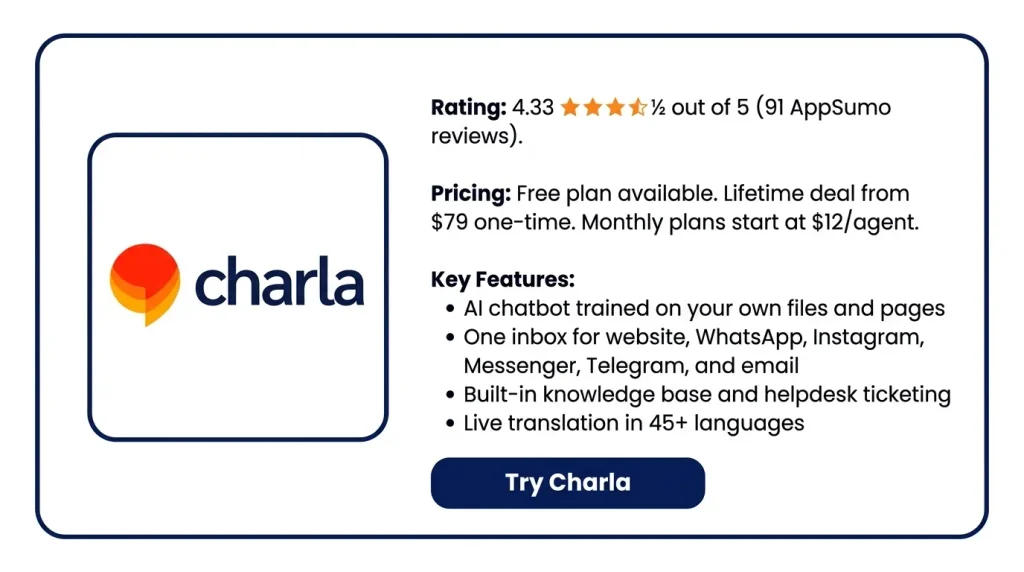
Charla helps with that. It gives you live chat, an AI chatbot, a help desk, and a knowledge base. All in one place. You train the bot on your own files, pages, and articles. It answers the easy stuff. When a chat gets hard, it hands it to your team.
Right now you can grab the Charla Lifetime Deal on AppSumo. You pay one time. You keep it. The normal plans cost $12 per agent each month. That adds up fast.
I went through the tool, the site, and the buyer reviews. Here is what works, what feels rough, and who should buy it.
Features of the Charla Lifetime Deal
Live Chat
You add a chat box to your site. Visitors can message you from any page. Your agents reply from one screen. That screen shows where the visitor is, what device they use, and their past chats.
AI Chatbots
You train a bot on your own data. That means help articles, Word files, PDF files, and web page links. You can add special instructions to guide how it acts. When it cannot answer, it hands the chat to a real agent.
Chatflows
Chatflows connect Charla to other tools or any API. The bot can then act during a chat. For example, it can update a contact or send a notice.
Unified Inbox
You link Messenger, Instagram, Telegram, WhatsApp, and email. All those messages land in one inbox. Your team stays in one app.
Knowledge Base
You write help articles. They sit on your own domain and match your site theme. Visitors can search them inside the chat box. Your bot learns from each article you post.
Helpdesk
Email questions turn into tickets inside Charla. You reply from your own domain. You can assign tickets, add tags, and leave private notes.
Live Translations
Charla translates messages both ways as you chat. It covers 45+ languages. It works on web, desktop, iOS, and Android.
Multi-Site Support
You can run many websites from one account. Each site becomes its own property. You pick which agents handle it.
Reporting Dashboard
The dashboard tracks your support numbers. It shows average reply time and missed chats. It also shows how many chats come in and how many your agents can take.
Pros of Charla
- Fewer Repeat Questions: The bot answers the common ones. It works at night too, when your team is off.
- One Place To Work: Your team stops hopping between apps. Every message shows up in one spot.
- Answers From Your Facts: The bot replies from your own content. It does not make things up.
- Customers In Their Language: People write in their own language. They still get help from you.
- Support On Your Phone: Your agents reply from anywhere. They do not need a desk.
- Your Brand Stays Visible: The chat box and help pages look like your site. They do not look like a rented tool.
- One Bill, Many Sites: You cover many websites with one account. You skip paying for each one.
- Clear View Of Performance: You see how fast your team replies. You also see which chats got missed.
- Human Help When Needed: A hard question goes to a real person. It does not hit a dead end.
Cons of Charla
- Website Training Can Fail: Some buyers said the bot could not read their web pages and PDF files. The founder said sitemap training is still on the to-do list.
- Pages Added One By One: You cannot hand the bot a sitemap or a list of links. A site with dozens of pages means adding each one by hand.
- Setup Feels Scattered: The settings sit in many separate spots. You have Widget, Chatbot, AI Chatflows, Chat Flows, Groups, Notifications, Routing, and Integrations. The first setup gets confusing.
- No DKIM Support: Your ticket emails can land in spam. The founder said DKIM is still on the to-do list. SMTP is the only workaround for now.
- English-Only Backend: Live translation covers the chat box and the messages. The admin panel stays in English. So agents who do not read English must work in English.
Who is Charla best for?
- Solo Founders: You run the business alone. The chat inbox sits on your desk with everything else. A bot handles the basic questions. Your day does not get eaten by the same five replies.
- Online Store Owners: Buyers ask about shipping, sizes, and order status before they buy. The bot pulls those answers from your own policy pages. It can also suggest items from your Shopify or WooCommerce store.
- Marketing Agencies: You look after client websites. One account holds a separate chat box and help pages for each site. You do not buy a fresh tool for every client.
- Small Support Teams: A few agents share the work. Website chat, WhatsApp, Instagram, Messenger, and email all land in one inbox. Messages stop getting lost between apps.
- Sellers With Global Buyers: Your customers write in languages your team does not speak. Live translation works both ways. Each side keeps chatting in their own language.
Charla AppSumo Pricing Plan
Only AppSumo Plus members can buy it.
Price:
- 1 code — $79, was $360. Covers 5 agents.
- 10 codes — $790, was $3,600. Covers 50 agents.
- AppSumo picks 30 agents as the best value.
What You get:
- No limit on AI chatbots, chatflows, sites, widgets, or chats
- No limit on saved replies, chat history, or custom fields
- Help pages and ticket desk built in
- Live translation and customer ratings
- Chatflows that run on their own, pre-chat forms, triggers
- Many sites in one inbox
- iOS and Android apps
- Links up with your other tools
- Charla’s name is gone. You can add your own brand.
Deal Terms:
- Yours for life. Future plan updates are free.
- Use your codes within 60 days.
- You can get a refund within 60 days.
5 BEST Charla Alternatives 2026
Charla vs Tawk.to
Free live chat, tickets, and a help center. No cap on agents, chats, or sites.
- Core benefits: Unlimited agents, chats, and sites. Ticketing, help pages, visitor tracking, saved replies, triggers, and phone and desktop apps.
- Price: Core is free. Badge removal costs $29–39/mo per site. AI Assist is free for 100 messages. After that, it starts at $29/mo per site.
- Limits: Add-ons are billed per site. The AI runs on message credits.
- Best for: Anyone who wants chat at zero cost.
Charla vs Crisp
One flat bill per workspace. It covers a whole set of agents.
- Core benefits: Shared inbox, chat box, email, WhatsApp, Instagram DM, and SMS. Plus a CRM, workflows, an AI bot builder, help pages, reports, routing, and co-browsing.
- Price: Free (2 seats), Mini $45/mo (4), Essentials $95/mo (10), Plus $295/mo (20).
- Limits: Hugo AI runs on credits. They expire each month. Help pages and the AI bot start at $95.
- Best for: A team of 4–10 on one flat price.
Charla vs Tidio
Chat built for Shopify. It bills by chat count, not by agent.
- Core benefits: Live chat, the Lyro AI agent, rule-based Flows, tickets, and live visitor tracking. One inbox holds site chat, Messenger, Instagram, and email. It links with Shopify and WordPress.
- Price: Free (50 chats). Starter ~$29/mo. Growth: ~$59/mo. Lyro AI add-on from ~$32/mo.
- Limits: Caps at 10 agents. The next tier jumps to $749/mo. Branding removal costs extra.
- Best for: Small stores with light chat volume.
Charla vs LiveChat
A clean chat box with a long track record.
- Core benefits: A chat box you can style, page-based messages, agent groups, reports, the Copilot AI helper, saved replies, daily summaries, and web, phone, and desktop apps. Many sites run on one account.
- Price: No free plan. Starter: ~$19 per agent each month on a yearly plan. Team ~$49. Business ~$79.
- Limits: Starter allows one user. The bot, help center, and tickets are sold apart.
- Best for: Teams who want the smoothest chat and will pay per seat.
Charla vs Intercom (now Fin)
A full support platform for bigger teams. Salesforce agreed to buy it in June 2026.
- Core benefits: Shared inbox, messenger, help center, the Fin AI agent, and Fin Copilot for agents. Plus workflows, routing, team inboxes, SLA rules, many languages, and deep reports.
- Price: Essential: $29 per seat per month on a yearly plan. Advanced: $85. Expert: $132. Fin AI adds $0.99 per fix.
- Limits: No free plan. AI cost grows with ticket count, not team size.
- Best for: Funded firms with a real support budget.
Final Thoughts – Charla Review 2026
The best part of Charla is how much sits in one spot. Live chat, an AI bot, a help desk, and help pages. All on one screen. Most tools charge you for each one.
Training the bot took minutes. Point it at your files, pages, and articles. It starts answering. Hard questions go to a real person. Nothing gets lost on the way.
The unlimited part is real. No cap on bots, chatflows, sites, chat boxes, or chats. Run many websites from one account. Your chat box and help pages show your brand, not Charla’s.
One code costs $79 and covers 5 agents. The monthly plans start at $12 per agent. You break even fast. After that, it costs nothing.
You get 60 days to test it. You also get 60 days to ask for a refund. That is a fair window.