Buildin Lifetime Deal: AI Docs, Projects and Content Sales 2026
Buildin is an all-in-one AI workspace for your daily work. You can create docs, take notes, manage projects, and work with others. It also brings mind maps, tasks, and databases into one place.
Its built-in AI Agent helps you write, edit pages, build databases, and create slides, images, and videos. You can also share or sell docs and templates through paid subscriptions.
Buildin works on the web, Windows, Mac, iOS, and Android. Your work stays in sync across all your devices.
KEY Features of Buildin
Buildin helps you create content, use AI, manage projects, and sell your work. Some important features are discussed below.
Sell Content with Paid Subscriptions
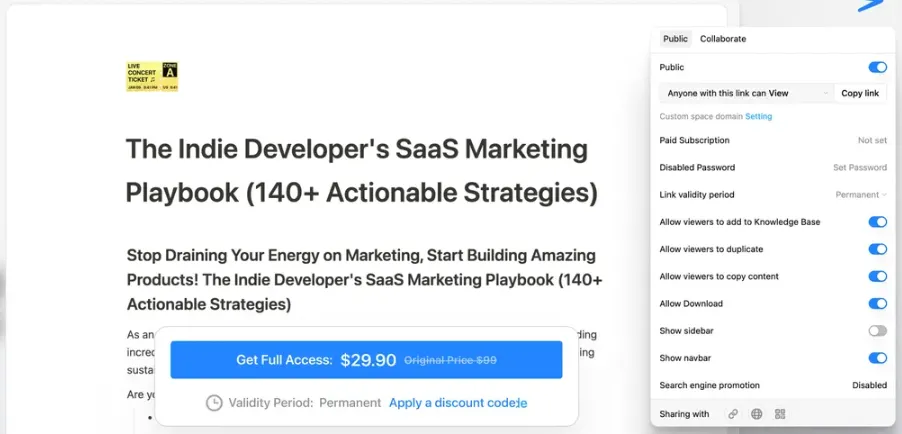
One useful thing about Buildin is that you can sell your content without using another platform. You can create guides, docs, or templates, set your own price, and choose who can view them.
To start, open your page and click Share. Choose Paid Subscription, set your price, and manage access. Then share the link with your audience. Once someone pays, they can view your content right in Buildin.
Work Faster with AI
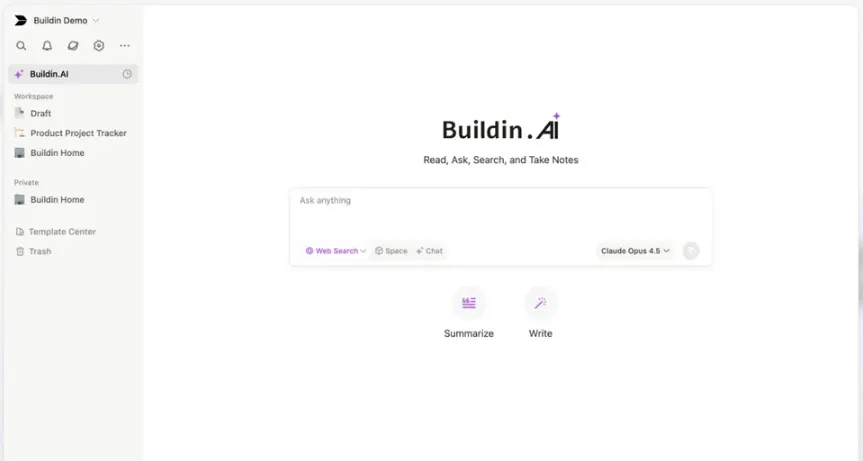
Buildin has built-in AI tools that make daily work easier. You can ask questions, find answers in your docs, sum up long notes, or write new content without leaving your workspace.
To start, open Buildin AI from the sidebar or your page. Type what you need, like a short summary or a new draft. You can also select text and ask AI to rewrite it. Buildin supports GPT, Gemini, and DeepSeek models for these tasks.
Organize All Your Documents
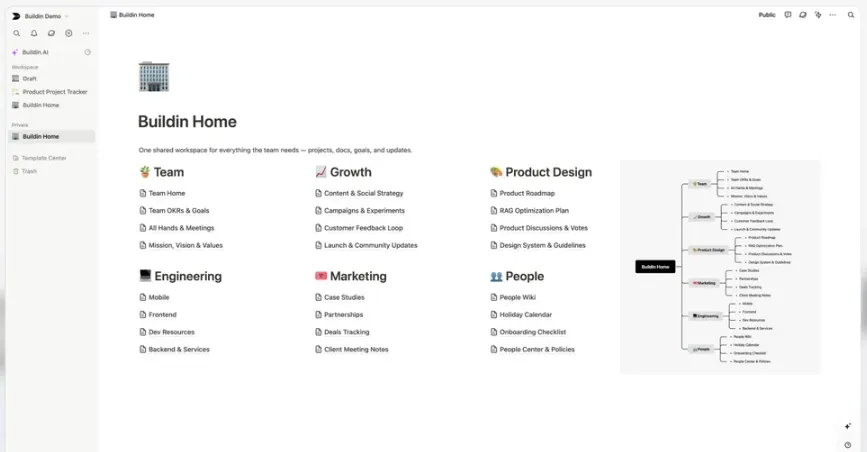
Buildin helps you keep all your docs and notes in one place. You can sort your work with pages, folders, and mind maps. You can also import files from Notion, CSV, HTML, and DOCX.
To start, click the + button in the sidebar to add a page. Type / to add content or create a subpage. You can also pick a ready-made template from the Template Center. This keeps your work neat and easy to find.
Manage Projects and Tasks
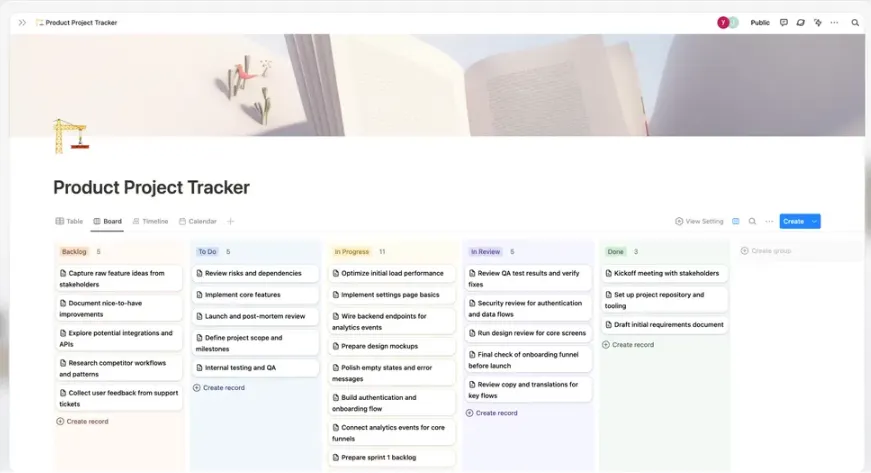
Buildin helps you plan projects and keep track of tasks. You can use boards, lists, and timelines to see your progress. It also keeps your project notes and updates in one place.
To start, create a project database and add your tasks. Set a status for each task, like To Do, In Progress, or Done. Then use a board or timeline to track your work. You can also add comments and work with your team.
Buildin Pros and Cons
Buildin has both good points and some limits. Let us look at its main advantages and disadvantages below.
Pros
- Keep All Work in One Place.
- Save Time on Writing.
- Track Project Progress.
- Work Better With Your Team.
- Earn Money From Your Content.
- Access Work Across Devices.
- Move Notion Data Easily.
Cons
- Some Notion Import Issues.
- Limited AI Credits.
- Extra Setup for Integrations.
- Reported Bugs on Mobile.
- Slow Customer Support.
Who Is Buildin Best For?
- Content Creators: Great for those who create guides, templates, or digital content and want to earn money through paid subscriptions.
- Project Managers: Helpful for planning projects, assigning tasks, tracking progress, and keeping work on schedule in one place.
- Team Leaders: Ideal for sharing documents, keeping team information organized, and working together on daily tasks and projects.
- Writers and Researchers: Useful for collecting ideas, organizing notes, writing content, and using AI to summarize long documents.
- IT Teams: Suitable for teams that want to run Buildin on their own servers and keep control of company data.
Buildin AppSumo Pricing Plan
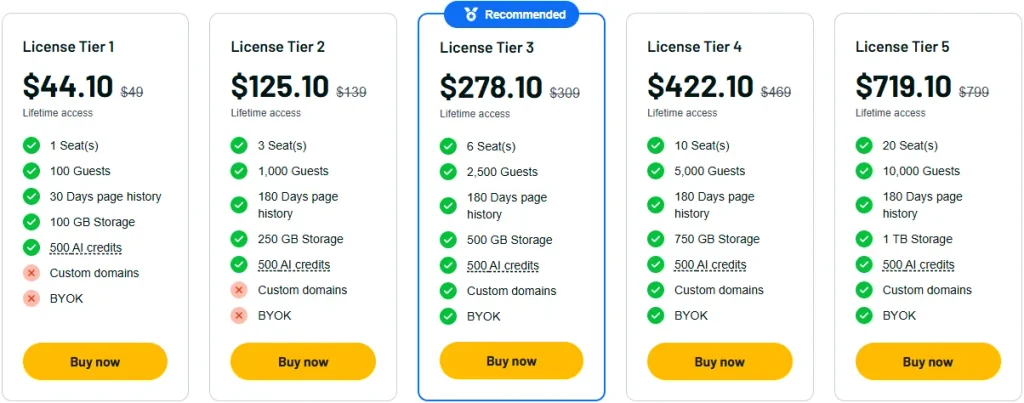
License Tier 1 – $44.10 (One-Time)
Features:
- 1 seat
- 100 guests
- 30-day page history
- 100 GB storage
- 500 AI credits
- Unlimited pages and blocks
- Unlimited mind map nodes
- Unlimited public homepages
- 100,000-block word limit
- Page access controls
- 5 GB per file upload
- Web and app sync
- Bulk file downloads
- Link and password sharing
- Unlimited public templates
- Paid content subscriptions
- Team workspaces
- Member groups
- All database property types
- 5 GB database attachments
- Buildin API and MCP
- Buildin CLI and Skills
- Notion imports
- Buildin AI Agent
- Bot-based knowledge Q&A
License Tier 2 – $125.10 (One-Time)
Features:
- Everything in License Tier 1
- 3 seats
- 1,000 guests
- 180-day page history
- 250 GB storage
License Tier 3 – $278.10 (One-Time)
Features:
- Everything in License Tier 2
- 6 seats
- 2,500 guests
- 500 GB storage
- Custom domains
- Bring Your Own Key (BYOK)
License Tier 4 – $422.10 (One-Time)
Features:
- Everything in License Tier 3
- 10 seats
- 5,000 guests
- 750 GB storage
License Tier 5 – $719.10 (One-Time)
Features:
- Everything in License Tier 4
- 20 seats
- 10,000 guests
- 1 TB storage
5 Best Buildin Alternatives 2026
If Buildin isn’t right for you, try these five alternatives. Each has its own benefits and limits.
1. Notion
Notion is a close alternative to Buildin. You can create docs, manage tasks, and track team projects. Its AI tools also help you write and organize information.
- Free Plan: Available.
- Starting Price: $10/user/month, billed yearly.
- Pros: Flexible databases, docs, and team tools.
- Cons: Free plan limits AI use and uploads to 5 MB per file.
- Difference: Notion focuses on teamwork and knowledge, while Buildin also lets you sell content.
2. ClickUp
ClickUp is a good choice for managing team projects. You can assign tasks, set deadlines, and track work. It helps you keep projects on schedule.
- Free Plan: Available.
- Starting Price: $9/user/month, billed yearly (Core plan).
- Pros: Task tracking, project views, and team tools.
- Cons: Free plan has only 60 MB of storage.
- Difference: ClickUp focuses on projects and tasks, while Buildin also helps you create and sell content.
3. AFFiNE
AFFiNE helps you take notes, write docs, and plan ideas. You can use visual boards to organize your thoughts. It also supports offline work and local data storage.
- Free Plan: Available.
- Lifetime Deal: $499.99 one-time (Believer Plan).
- Pros: Offline editing, visual boards, and data control.
- Cons: Free cloud plan limits uploads to 10 MB per file.
- Difference: AFFiNE focuses on visual planning and local data, while Buildin also supports paid content.
4. Superhuman Docs (Formerly Coda)
Superhuman Docs helps you create docs, tables, and team workflows. You can track projects and keep team data organized. It also has tools to automate tasks.
- Free Plan: Available.
- Starting Price: $15/Doc Maker/month, billed monthly.
- Pros: Connected tables, formulas, and task automation.
- Cons: Free shared docs have size limits and limited AI trials.
- Difference: Superhuman Docs focuses on custom workflows, while Buildin also lets you sell content.
5. Microsoft Loop
Microsoft Loop helps teams plan tasks and work together. You can create shared pages and edit content with others. It also works with Microsoft Teams and Outlook.
- Free Plan: Available for personal Microsoft accounts.
- Paid Plans: Business access requires an eligible Microsoft 365 plan.
- Pros: Shared pages, live editing, and Microsoft app support.
- Cons: Personal accounts can’t use Copilot in Loop.
- Difference: Loop focuses on teamwork in Microsoft apps, while Buildin combines docs, projects, and content sales.
Final Thoughts – Buildin Review 2026
Buildin keeps your docs, notes, projects, and AI tools together. Its new AI Agent helps you create content, edit pages, and build databases. You can get more done without switching apps.
One thing that makes Buildin stand out is its paid subscriptions. You can sell content right from your workspace. Your work also stays in sync across devices.
The Buildin Black Friday Lifetime Deal starts at just $44.10. If you want to keep things simple and gain lifetime access with a one-time payment, you might want to take a look at this.