Acadle Lifetime Deal – Build Your Own Branded Academy
Your students quit your courses halfway through. The platform feels dull and hard to use. You spend hours on your content. But learners still lose interest fast.
Acadle fixes this problem for you. It’s one simple app. Acadle lets you build your own online school. Add courses, quizzes, and certificates under your own brand.
If you’re looking for info on the Acadle Lifetime deal and Acadle Review, you’re in the right place. The Acadle Lifetime deal launched on AppSumo with a big discount. This post shares all the deal details.
This post covers Acadle features. You’ll also learn if Acadle is worth buying, and who it’s best for. You’ll see Acadle pricing plans too. Then you’ll know just what you get.
By the end, you’ll know if Acadle fits your needs. The Acadle Lifetime deal won’t stay this cheap for long. Keep reading before it’s gone.
The Features of Acadle Lifetime Deal
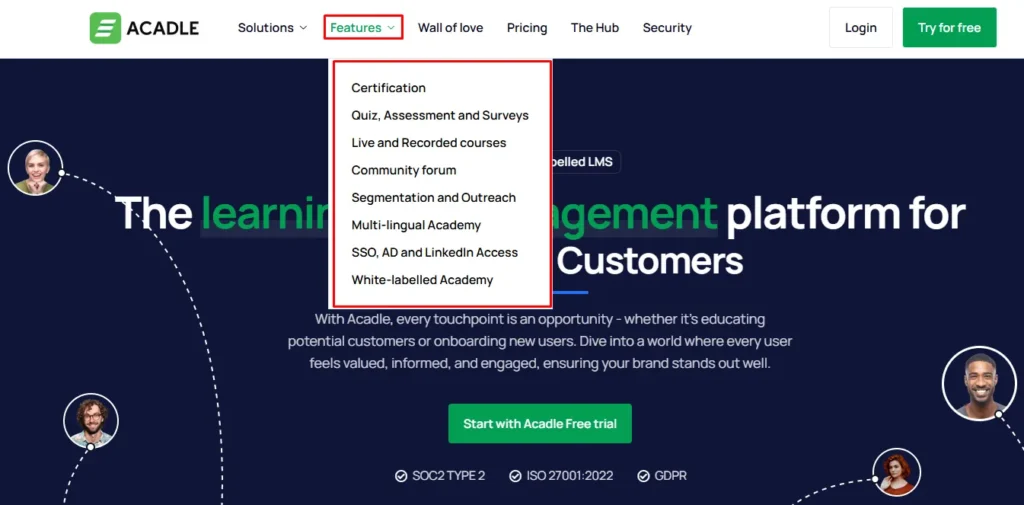
Certification
This lets you make certificates for learners. They finish a course and earn one. You design your own templates. You pick what each certificate shows. There is no limit on how many you give out.
Quiz, Assessment and Surveys
This lets you add quizzes inside your courses. You can also add surveys. Use question types like multiple choice or true/false. You can add essay answers, fill-in-blanks, and file uploads. Surveys help you collect feedback from learners.
Live and Recorded courses
This lets you run live or recorded training. Live streams can hold up to 1,000 people. You can use breakout rooms during sessions. You can record any live session. You can also embed videos from YouTube or Vimeo.
Community forum
This adds a discussion space to your academy. You can pick a social layout or a forum layout. Learners can post and reply freely. You can also run set Q&A sessions.
Segmentation and Outreach
This groups your users based on what they do. It happens automatically inside your academy. Once grouped, you can send them emails. These emails can be automated or targeted.
Multi-lingual Academy
This lets your academy support 100+ languages. You can turn languages on or off. You can customize labels for each language. You can also set a default language.
SSO, AD and LinkedIn Access
This lets users log in through Auth0. They can also log in with Active Directory. LinkedIn login is available too. Content can unlock right after they sign in.
White-labelled Academy
This lets you run the academy under your brand. You can use your own domain with SSL. Add your logo, colors, and fonts. You can white-label the forums too. You can also connect it to other apps through Zapier.
The Benefits of Acadle Lifetime Deal
- Faster Course Setup: You can build course outlines fast. You don’t start from a blank page.
- Proof of Completion: Learners get a certificate. It shows they finished the course.
- Clearer Understanding Checks: Quizzes and surveys show what learners understood. You can see this clearly.
- Learning On Your Schedule: Learners can join live or recorded sessions. They pick a time that fits their day.
- Peer-to-Peer Support: Learners help each other in the forum. They don’t need to wait on you.
- Relevant Communication: Learners get messages based on their own actions. No generic message goes to everyone.
- Wider Language Reach: Many languages are supported. Learners from different regions can join easily.
- Easier Sign-In: Learners log in with LinkedIn or work accounts. They skip making a new password.
- Consistent Brand Experience: Every part of the academy uses your name and look. Your own domain stays in place too.
- Safer Data Handling: Security certifications and encryption protect user data. This builds more trust.
- Learning On The Go: A mobile app keeps learners connected. They can learn even away from a computer.
- Controlled Team Access: Custom roles let you set access levels. You decide what each team member can do.
The Cons of Acadle Lifetime Deal
- Limited Course Organization: Courses only allow two folder levels. This can get messy if you manage many courses.
- Community Forum Locked Behind Higher Tiers: The Community forum only comes with the Advanced plan. Buyers on lower tiers won’t get it.
- Branding Stays On Basic Plan: The Basic plan keeps Acadle branding on your academy. You’d need Essential or higher to remove it.
- Mixed Reliability Feedback: Some reviewers reported bugs like server errors and file issues. Acadle says these were fixed in its 3.0 update.
Who is Acadle best for?
- Educators and Course Creators: You can build paid or free courses with Acadle. Add lessons, quizzes, and certificates once learners finish.
- Product Managers: You can train customers on how to use your product. Set up walkthroughs, live webinars, and videos in one place.
- SaaS Companies: You can support onboarding and reduce churn. Segmentation sends the right training to the right users.
- HR and Employee Training Teams: You can onboard or upskill your staff. Use drip courses, gamification, and certificates to guide them.
- Partner and Channel Managers: You can manage outside partners or resellers. Use the forum and certificates to keep them updated and trained.
Acadle AppSumo Pricing Plan
Basic (1–4 Codes)
One code costs $99. The listed price is $468.
Each extra code raises the price and the room you get.
Two codes cost $198. Three cost $297. Four cost $396.
Listed prices go up to $1,872.
Each code adds 200 users, 2 team seats, and 10 GB storage.
At 4 codes, you get 800 users, 8 seats, and 40 GB.
Everything stays inside one academy.
Features:
- Build unlimited courses and lessons
- Connect your own custom domain
- Add learners in bulk
- Design your own certificates
- Get SSL protection, already turned on
- Link outside tools through APIs, webhooks, and integrations
- Use your own SMTP for email
- Track visitors with pixel tracking
- Run quizzes and give certificates
- Set how long a course stays open
- Add live sessions from other platforms
- Give learners space for private notes and chats
- Make your academy open or invite-only
- Release lessons in stages
- Lock some courses behind access rules
- Accept payments through Stripe
- Offer your academy in many languages
Essential (5–9 Codes)
Five codes cost $495. The listed price is $2,340.
Prices rise to $594, $693, $792, and $891 for 6 to 9 codes.
Listed prices go up to $4,212.
At 5 codes, you get 1,000 users. This grows by 200 per code, up to 1,800.
Team seats go from 10 to 18. Storage goes from 50 GB to 90 GB.
Features:
- Includes everything from the Basic tier
- Your academy site no longer shows the Acadle name
Advanced (10 Codes)
Ten codes cost $990. The listed price is $4,676.
You get 2,000 users, 20 team seats, and 1 TB of storage.
Everything stays inside one academy.
Features:
- Includes everything from the Essential tier
- The Community forum becomes available here
Final Thoughts – Acadle Review
Scattered, unbranded tools make training messy fast. Acadle brings courses, quizzes, certificates, and a forum into one place. Everything sits under your own brand. It also adds user grouping and multi-language support. This makes Acadle a solid pick for educators, product teams, and SaaS companies. You get structured, branded training without juggling many tools. The Acadle Lifetime Deal adds even more value here. You pay once and get long-term use. If you want branded, all-in-one training, Acadle is worth trying.