Agency Handy Lifetime Deal: Manage Clients, Teams and Payments
Agency Handy is back on AppSumo for Black Friday 2026. The lifetime deal starts at just $66.60. It helps you run your agency in one place. You can manage clients, sell services, track projects, assign tasks, and collect payments.
You can create service plans and forms to get client details. Clients can track work and share feedback through their portal. You can also add your own brand to the portal. Plus, you can send invoices and manage monthly payments. This saves time and keeps your daily work on track.
How to Use Agency Handy?
Getting started with Agency Handy is easy. Just follow these steps:
- Sign Up: Create an account and add your agency details.
- Add Services: List your services and set prices.
- Create Forms: Collect client details and project needs.
- Get Orders: Share your service link with clients.
- Manage Work: Assign tasks and track progress.
- Get Paid: Send invoices and collect payments.
Clients can also log in to track their work and share feedback.
KEY Features of Agency Handy
Agency Handy provides tools that make it easy to manage clients, projects, and payments. Its key features are discussed below.
Service Catalog and Multi-Package Pricing
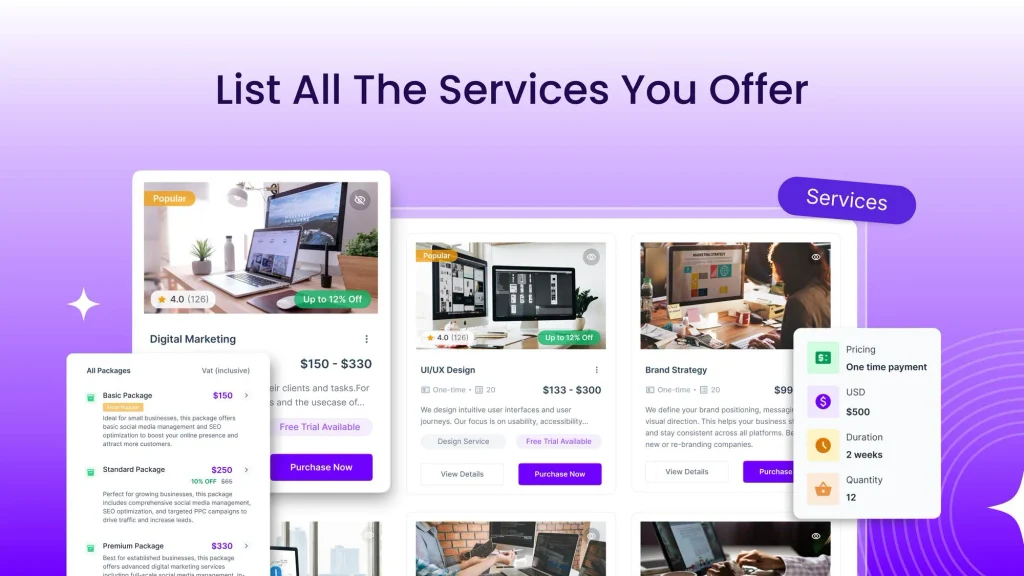
Agency Handy lets you list all your services in one place. You can add up to three plans for each service. Each plan can have its own price and features. This helps clients compare plans and choose the best one.
To start, go to Services and add a new service. Enter its name, image, and details. Then set your prices and choose one-time or recurring payments. You can share the service link or add it to your website. Clients can then place orders directly.
Custom Forms and Client Onboarding
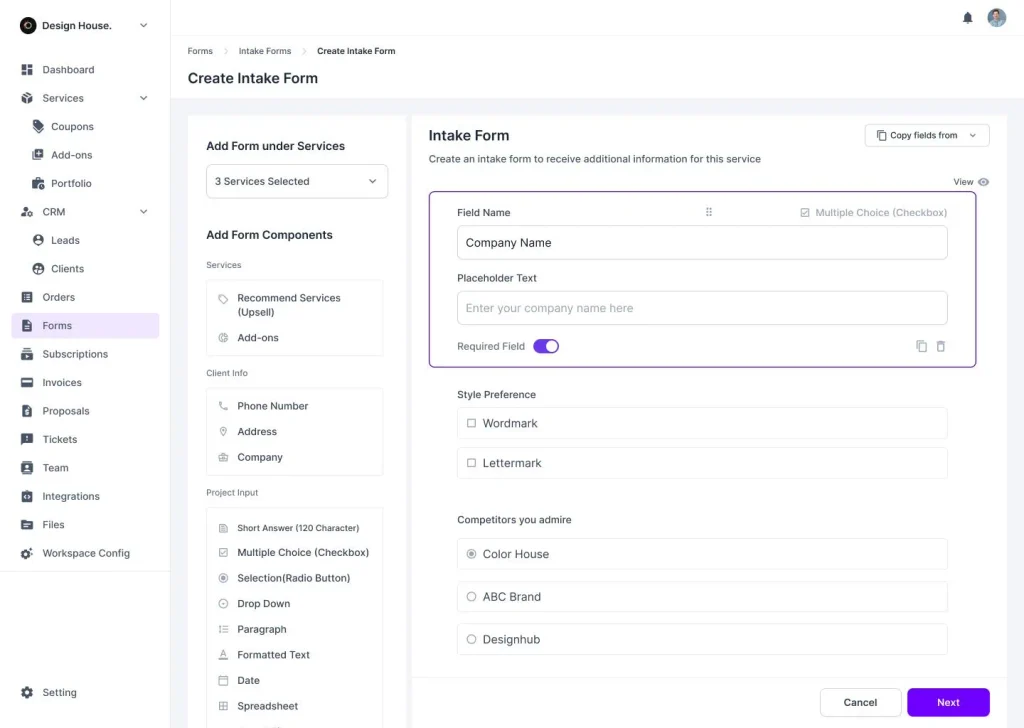
Agency Handy helps you collect client details with custom forms. You can use intake, order, and public forms to get project details, files, and other key info.
To start, go to Forms > Intake Form > Create Intake Form. Pick a service and add fields for text, dates, or files. Once clients buy your service, they can fill out the form. This saves time and cuts down on emails.
CRM and Lead Management
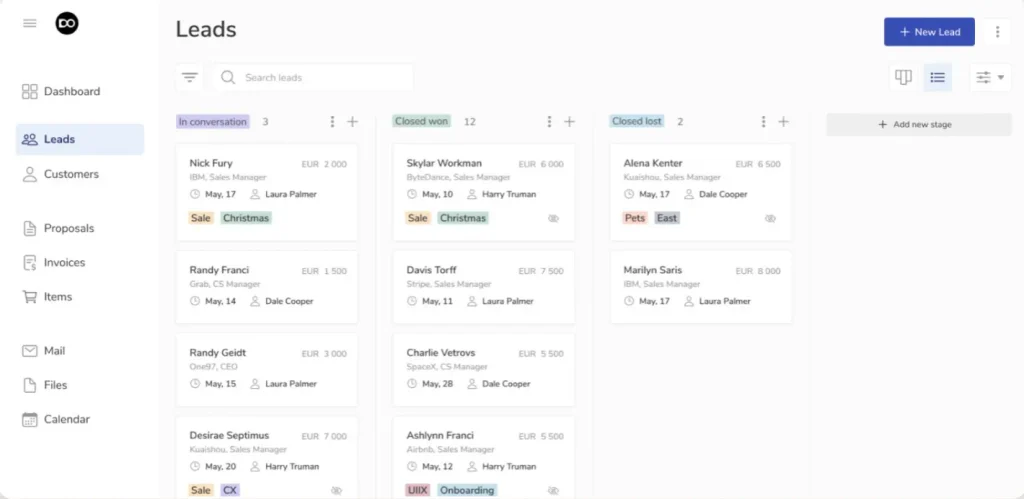
Agency Handy helps you keep track of leads and clients. You can save contact details, track new leads, and see how close they are to a sale.
To start, go to CRM > Leads > Create Lead. Add the person’s name, email, and other details. Then move leads across the Kanban board as they progress. Once a lead is ready, you can turn them into a client with one click.
Project and Task Management
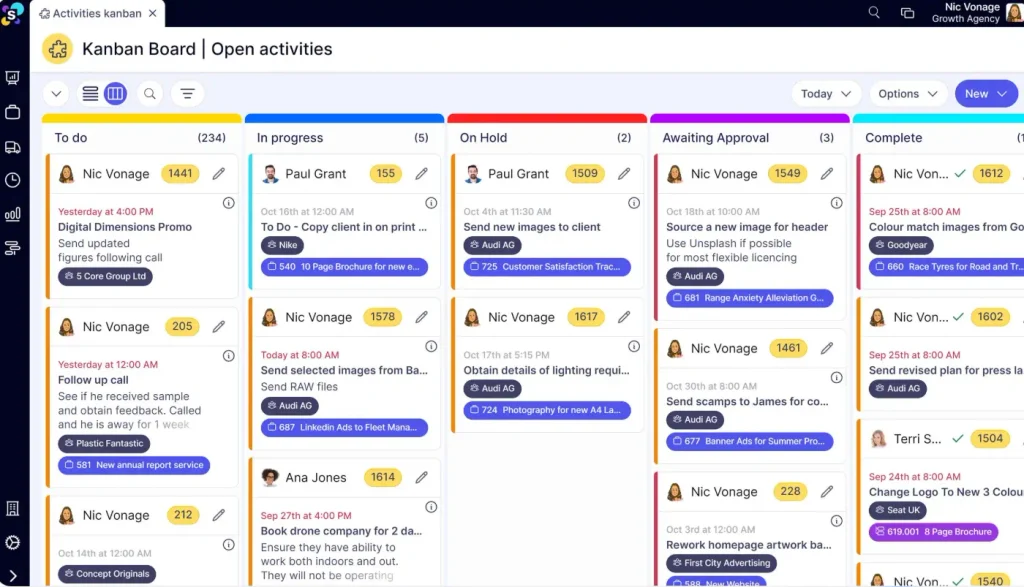
Agency Handy helps you manage all your projects and tasks. You can split big projects into small tasks, assign team members, set due dates, and track progress.
To start, go to Orders and select a project. Add tasks, set due dates, and assign them to your team. Use the Kanban board to see what’s pending, active, or done. Clients can also track progress and approve work.
White-Label Client Portal
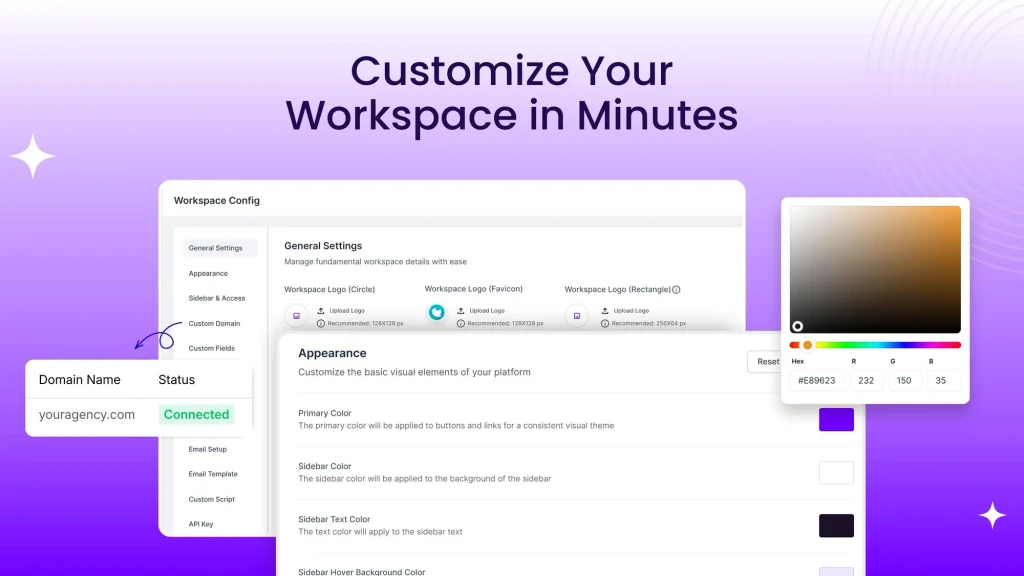
Agency Handy lets you give clients a portal with your brand. They can log in, track work, share files, give feedback, and pay invoices.
To set it up, go to Workspace Config. Add your logo, pick your brand colors, and set your own domain. This makes the portal look like part of your agency.
File Sharing, Feedback, and Approvals
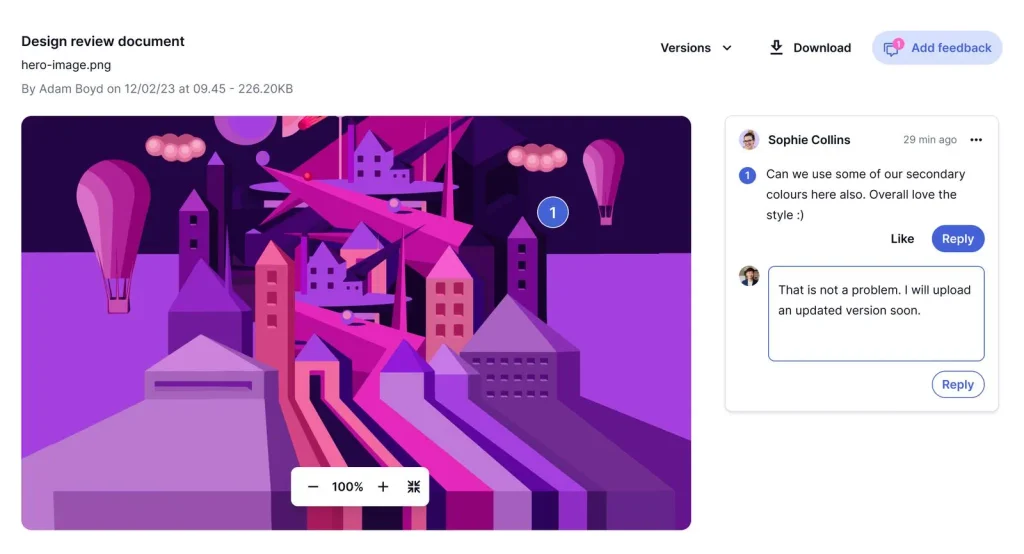
Agency Handy lets you share files with clients in one place. You can keep designs, PDFs, and other files in folders. Clients can view files, leave comments, and approve your work.
To start, open Files or go to a task’s files. Upload your work and share it with your client. They can mark spots that need changes or add notes. You can then upload a new version and track past edits.
Invoicing and Subscription Management
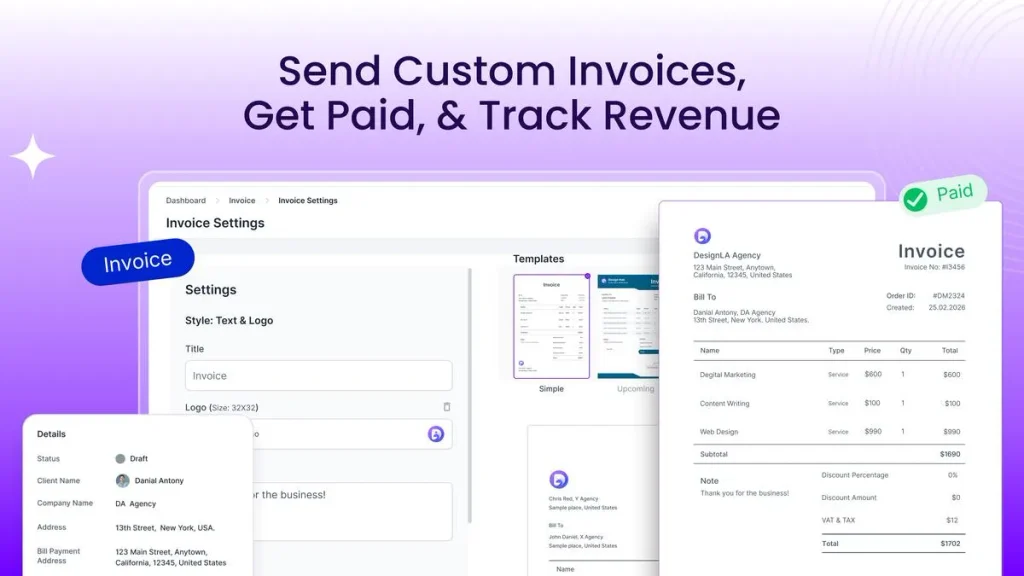
Agency Handy helps you send bills and collect payments. You can charge clients once or set up regular payments. It also tracks paid and unpaid bills and sends reminders.
To start, go to Invoices and create a new invoice. Pick a client, add your services, and set the price. Then send the bill to your client. For monthly payments, go to Services and set up a recurring plan.
Proposals and Contracts
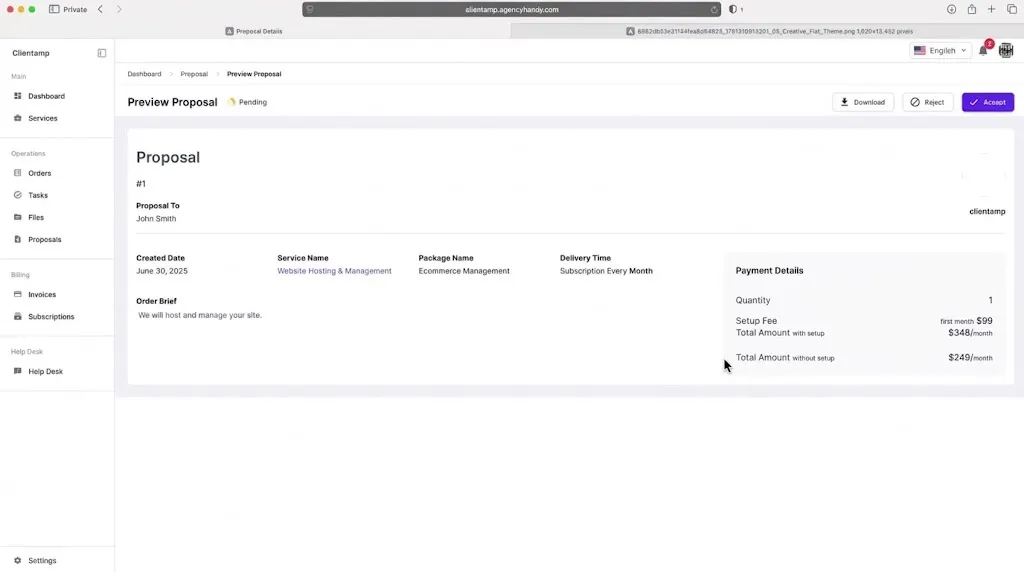
Agency Handy lets you create and send proposals to clients. You can add service details, prices, files, and terms. Clients can review each proposal and accept or reject it.
To start, go to Proposals > Create Proposal. Pick a client and service. Add the price, terms, and a place to sign. Then send the proposal and track its status in one place.
Agency Handy Pros and Cons
Agency Handy has many useful benefits, but it also has some limits. Here are the main pros and cons to help you decide.
Pros
- Saves Time on Daily Work.
- Faster Client Onboarding.
- Easier Team Management.
- Clear Project Updates.
- Faster Client Approvals.
- Simple Payment Tracking.
- Better Brand Image.
- Easier Lead Follow-Ups.
Cons
- No Mobile App.
- Limited Project Planning.
- Limited Design Options.
- No Guest Access.
- Limited Cost and Profit Tracking.
Who Is Agency Handy Best For?
- Digital Marketing Agencies: Teams can manage client campaigns, assign tasks, track progress, and handle monthly bills in one place.
- Web Design Agencies: Teams can collect client needs, share website designs, get feedback, and track changes until the project is done.
- SEO Agencies: Teams can manage client projects, track monthly tasks, share work updates, and send bills on time.
- Creative Agencies: Teams can share designs and files, get client feedback, make changes, and get final approval before they finish the work.
- Small Agency Owners: Owners can manage clients, give tasks to team members, track work, and collect payments without using many tools.
AppSumo Agency Handy Pricing Plan
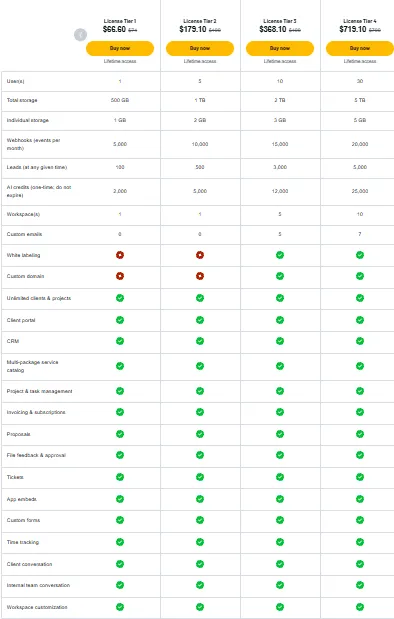
License Tier 1 — $66.60 One-Time
Features:
- 1 user and 1 workspace
- 500 GB total storage
- 1 GB storage per user
- 100 active leads
- 5,000 webhooks/month
- 2,000 AI credits (never expire)
- Unlimited clients and projects
- Client portal and CRM
- Multi-package service catalog
- Project and task management
- Invoices and subscriptions
- Client proposals
- File feedback and approvals
- Support tickets
- App embeds and custom forms
- Time tracking
- Client and team chat
- Workspace design settings
License Tiers 2–7
Agency Handy also has six higher plans, from Tier 2 ($179.10) to Tier 7 ($1,979.10). Each plan gives you more users, storage, workspaces, and higher limits. White labeling and custom domains start at Tier 3. Tiers 6 and 7 also support unlimited users. All prices are one-time payments.
5 Best Agency Handy Alternatives 2026
Here are five Agency Handy alternatives to manage clients, projects, and payments.
1. Queue — Best for Creative Agencies
Queue helps creative teams manage projects, share files, and get client feedback. It also lets you send bills and manage monthly services.
- Starting Price: Free until your first client, then $49/month.
- Pros: Client portal, task boards, file reviews, and payments.
- Limitations: You need a paid plan after your first client.
- Difference: Queue focuses more on design feedback and client requests.
2. Zendo — Best for Selling Services
Zendo helps agencies sell services and track client orders. You can manage both one-time jobs and monthly plans.
- Starting Price: Free plan; paid plans start at $29/month.
- Pros: Service catalog, client portal, order forms, and invoices.
- Limitations: The free plan allows only 3 clients and 1 service.
- Difference: Zendo focuses more on service sales and client orders.
3. HoneyBook — Best for Freelancers
HoneyBook helps freelancers manage clients, book meetings, send contracts, and get paid. It keeps client work in one place.
- Starting Price: $36/month with a 30-day free trial.
- Pros: Lead tracking, proposals, contracts, and booking tools.
- Limitations: Only available in the US, Canada, the UK, and Australia.
- Difference: HoneyBook focuses more on bookings and client contracts.
4. Moxo — Best for Complex Workflows
Moxo helps large teams manage work with many steps. Teams can share files, collect forms, and get client approval.
- Starting Price: $5,000/year.
- Pros: Work automation, file requests, approvals, and e-signatures.
- Limitations: The first plan allows 100 workflows per year.
- Difference: Moxo is better suited to complex business tasks.
5. Orchestra — Best for Subscription Agencies
Orchestra helps agencies manage client tasks, monthly services, and payments. Clients can also track work through their own portal.
- Starting Price: $25/month, billed yearly; 14-day free trial.
- Pros: Client portal, team tasks, monthly plans, and payments.
- Limitations: The Basic plan allows only 5 active clients.
- Difference: Orchestra focuses more on simple monthly service plans.
Final Thoughts – Agency Handy Review 2026
Agency Handy keeps your daily agency work in one place. You can manage client orders, track tasks, get feedback, and collect payments without using many apps.
The client portal gives your agency a more professional look. It also lets clients track their work with ease.
The Agency Handy Lifetime Deal is back on AppSumo for Black Friday 2026. Prices start at just $66.60. You pay once for lifetime access and get a 60-day refund policy. This deal is worth a look.