AI Toolbox Lifetime Deal – Organize ChatGPT, Gemini & Claude
AI Toolbox is a browser extension. It adds folders, search, and saved prompts. It works with ChatGPT, Gemini, and Claude. It works inside these chat tools. You don’t need to switch apps. You don’t need to copy and paste.
Say you use ChatGPT every day. After a few weeks, you have hundreds of chats. You can’t find the one you need. AI Toolbox fixes this problem. You can drop that chat into a folder. You can also search for it later. It searches what the chat said, not just the title.
This tool fits freelancers well. It also fits marketers and solopreneurs. They use AI chat tools often. They want to stay organized.
One useful feature is prompt chaining. You save a set of prompts. You run them one after another. You use just one shortcut. You skip typing each prompt by hand.
Some people use other tools too. Examples include AIPRM and Superpower ChatGPT. Sider and Monica handle similar jobs.
One thing to know: check your browser first. It works on Chrome and Edge. It does not work on Firefox or Safari.
👉 Get AI Toolbox lifetime access for $59
The Features of AI Toolbox Lifetime Deal
Folders & Subfolders
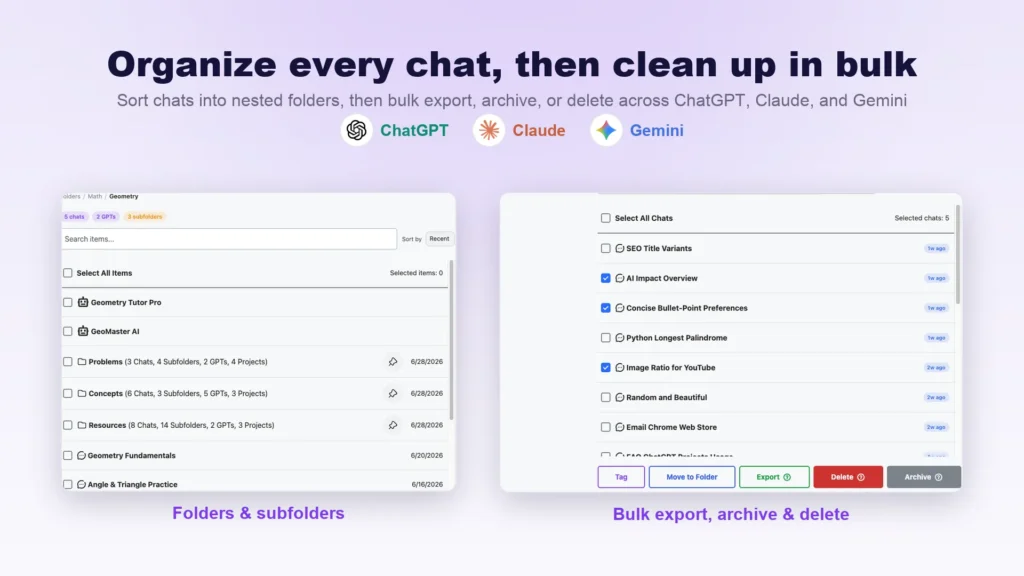
You can place your chats into folders. Folders can hold smaller folders inside them. You search for a chat by name first. Then you add it to your chosen folder.
Bulk Actions
You can select several chats at once. You don’t need to pick one at a time. From that group, you can delete, archive, or export them together.
One-click Export
You can save a chat as a file. One click gets the job done. The file comes as plain text, Markdown, JSON, or PDF. You pick the format you want.
Prompt Management
You can save a prompt for later use. You skip typing it fresh each time. Saved prompts can include blank spots. These are called variables. They get filled in when you use them.
Prompt Library
This is a built-in collection of prompts. It holds over 1,000 prompts in total. They are sorted into groups like marketing, coding, and writing. You open the library and pick one when needed.
Prompt Chaining
You can link up to ten prompts together. They run one after another. You start the chain by typing two dots. Then you select the chain you saved.
Context Mentions
You can pull an older chat into your message. You can also pull in a Claude artifact. It inserts that content into your current prompt.
Message Bookmarks
You can mark one message inside a long chat. You give it a label. Clicking that label later takes you back. It jumps straight to that exact message.
Smart Tags
This feature sorts your chats into categories. Examples include coding, writing, research, or business. It runs in the background as you chat. It assigns each conversation to a category.
Full-text search
You can search for words inside past chats. This goes beyond just the chat titles. It checks the actual message content. It finds matches inside the text itself.
The Benefits of AI Toolbox Lifetime Deal
- Quicker Chat Retrieval: You don’t scroll through hundreds of old chats. You find one chat fast.
- Less Repeated Typing: You don’t retype a prompt again. You already wrote it once before.
- One Tool, Three Platforms: You use one tool for ChatGPT, Gemini, and Claude. You skip juggling separate extensions.
- Simple Conversation Backups: You can keep a copy of your chats. You store it outside the AI tool itself.
- Multi-Step Tasks Automated: A task may need several prompts in a row. It can run on its own once you set it up.
- Quick Access To Key Messages: You jump straight back to one key reply. You skip scrolling through a long chat again.
- Automatic Chat Sorting: Your chats get grouped into categories. This happens on its own, without your help.
- Private, Local Data Storage: Your chats stay stored in your browser. They don’t get sent to an outside server.
The Cons of AI Toolbox Lifetime Deal
- Chrome and Edge Only: Firefox and Safari users cannot install this extension. It does not work on those browsers at all.
- No Mobile Access: This tool only runs on desktop browsers. You cannot manage chats from a phone or tablet.
- Limited Free Exports: Free users can only export 3 times per day. This may not be enough for large chat histories.
Who is AI Toolbox best for?
- For freelancers: Freelancers can keep each client’s chat in a folder. This way, nothing from one project gets mixed up with another.
- For Marketers: Marketers can save prompt templates. These can be used for ad copy or social posts. This eliminates the need to rewrite the same prompts every time.
- Solopreneurs: Solopreneurs run a business alone. They can chain several prompts together. A multi-step task runs in one go.
- Multi-Platform AI Users: Some people switch between ChatGPT, Gemini, and Claude daily. They can use one tool across all three. They skip learning three separate systems.
- Long-term chat users: Some users have months of chat history. They can search by what was said in the chat. An old chat won’t get lost in the long list.
AI Toolbox AppSumo Pricing Plan
License Tier 1 — $59, Lifetime Deal (regularly $149)
Features:
- Use a prompt library with 1,000+ ready-made prompts. There is no usage cap.
- Build your own prompts with blank {{variable}} spots. Keep as many as you want.
- Link prompts into multi-step chains. There is no limit on chains.
- Sort chats into folders. Add subfolders inside them. There is no limit either way.
- Pin your top chats to the list. Pins are unlimited.
- Export hundreds of chats at once. There is no batch-size cap.
- Clear out old chats in bulk. Skip doing it one by one.
- Archive groups of chats together. There is no limit on groups.
- Bookmark single messages in long threads. Bookmarks are unlimited.
- Manage all labels from one dashboard. There is no cap on labels.
- Keep every chat image in one gallery. Storage is unlimited.
- Search the real text inside your messages. This goes past just chat titles.
- Let chats sort into topics on their own. This happens automatically.
- Download chats as TXT, Markdown, JSON, or PDF. Pick the format you need.
- Keep folders and prompts the same everywhere. This works across every device and browser.
- Get Gemini images with the watermark already removed.
- Run ChatGPT, Gemini, and Claude tools together. One license covers all three.
👉 60% off AI Toolbox, lifetime access now
Final Thoughts – AI Toolbox Review
Do your ChatGPT, Gemini, and Claude chats feel like a messy pile? Can you never search through them? AI Toolbox offers a real fix. It brings folders, full-text search, and prompt chains into one tool. You stop retyping prompts. You stop digging through old chats. Freelancers, marketers, and solopreneurs get one simple system. It covers all three platforms. You skip using three separate tools. The price is $59 for lifetime access. It comes with a 60-day guarantee. This makes it a low-risk way to bring order to your AI work.