Acti Lifetime Deal – Run Tasks Across 300+ Apps & APIs
Acti is an AI keyboard and desktop assistant that helps you write, translate, find information, and get tasks done without switching apps.
Unlike a normal keyboard, Acti can do more than type. For example, you can create a Google Meet link, write a reply, or save notes to Notion right from your keyboard.
Acti works with 300+ apps and APIs. You can also build your own AI tools without coding. It is available for iOS, Android, and Mac.
KEY Features of Acti
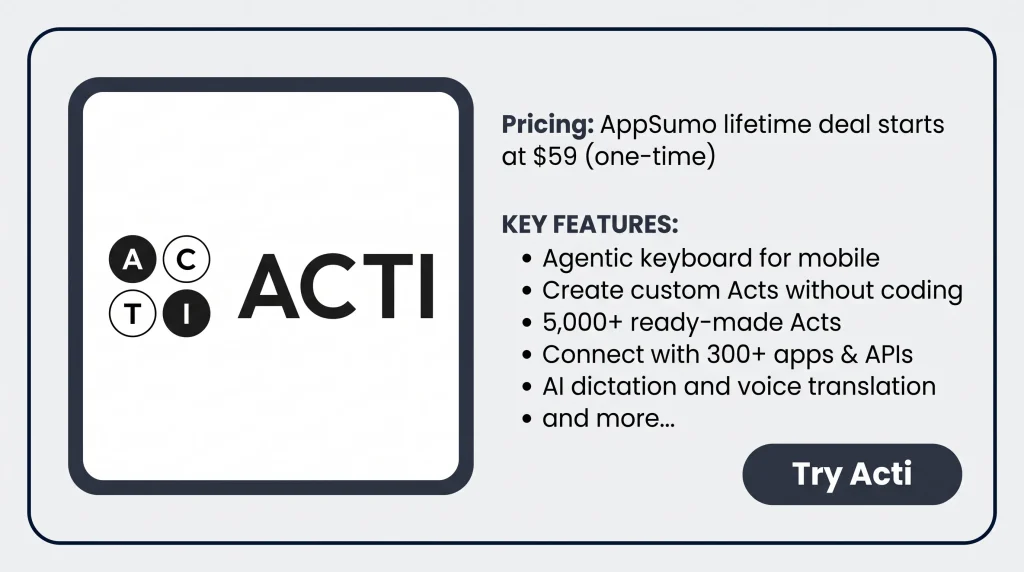
Acti AI & Acti Wheel
Acti AI helps you find things and get tasks done from your keyboard. You can find a place to eat, check the weather, or write a reply without leaving your app.
To use it, type what you need. Then, hold the space bar to open the Acti Wheel. Slide your finger to Acti AI or a saved Act. Let go to run it.
Acti shows the result right on your keyboard. You can check it and add it to your message without switching apps.
Act Builder Agent – Create Custom Acts Without Coding
Act Builder Agent helps you create your own AI tasks without coding. You can use it to write replies, fix grammar, or run tasks with linked apps.
To get started, open Act Builder Agent in the Acti app. Tell it what you want in simple words. It will make a plan for your task. You can edit the plan, test it, and save it as an Act.
Once saved, you can run the Act from your keyboard. You can also share it with the Acti Community.
Acti Community – Access 5,000+ Ready-Made Acts
Acti Community gives you access to over 5,000 ready-made Acts. You can use them to write emails, translate text, create meeting links, and more.
To get started, open the Acti app and go to the Community. Find an Act you need and tap Add. It will show up in the Act Panel on your keyboard, ready to use.
You can also make your own copy of an Act and change it to fit your needs. Plus, you can keep your own Acts private or share them with others.
Connect with 300+ Apps & APIs
Acti can connect with 300+ apps and APIs, such as Gmail, Slack, Notion, and Google Calendar. You can use these tools right from your keyboard.
To get started, open Act Builder Agent. Tell it what you want to do, like saving text to Notion. Link your account, test the Act, and save it.
Acti also has built-in tools for weather, maps, sports, and more. These need no setup. It asks for your approval before taking action in a linked app.
AI Dictation, Voice Commands & Translation
Acti lets you type, give commands, and translate with your voice. It turns speech into text, fixes grammar, and makes your words clearer.
To use it, open Voice Dictation on your keyboard and start speaking. You can also use voice commands to rewrite text or run an Act without typing.
With Voice Translate, you can speak in one language and get text in another. Acti supports 60+ languages for dictation and 100+ languages for voice translation.
Acti Desktop for Mac
Acti Desktop brings AI tools to your Mac. You can write, translate, fix text, and run saved Acts without switching apps.
To use it, select text in any app. Then, ask Acti AI to rewrite, translate, or explain it. You can also use AI Dictation to turn speech into text or run saved Acts on your Mac.
Acti also lets you use your phone as a Mac microphone. Your saved Acts and Clips can sync across both devices.
Acti Pros and Cons
Pros of Acti
- Less App Switching: Find answers and get things done without leaving your app.
- Better Writing: Fix mistakes and write clear emails, messages, and replies.
- Easy Language Support: Speak in one language and get text in another.
- No Coding Needed: Make your own tasks without writing any code.
- Work Across Devices: Use your saved Acts and Clips on your phone and Mac.
- More Control Over Tasks: Check results and approve actions before Acti makes changes in linked apps.
Cons of Acti
- Typing Needs Improvement: Some users report typing lag, poor swipe typing results, and awkward key layouts.
- Monthly AI Credit Limits: AI tasks use monthly credits, and unused credits expire each month.
- Limited App Actions: Some tasks only work with certain apps, APIs, or account access.
- No Windows Support: Acti Desktop works on Mac, but Windows support is not ready yet.
- No BYOK Support: You can’t use your own AI API keys or choose your AI provider.
Who Is Acti Best For?
- Content Creators: Turn ideas into X posts, write replies, and improve content right from the keyboard.
- Digital Marketers: Write clear emails, fix mistakes, and change how messages sound.
- Solopreneurs: Create meeting links, add calendar events, and save notes while working.
- Multilingual Users: Speak in one language and get text in another to chat with people abroad.
- Frequent Travelers: Check flight details, find hotels, and plan trips without leaving the current app.
Acti Lifetime Deal Pricing
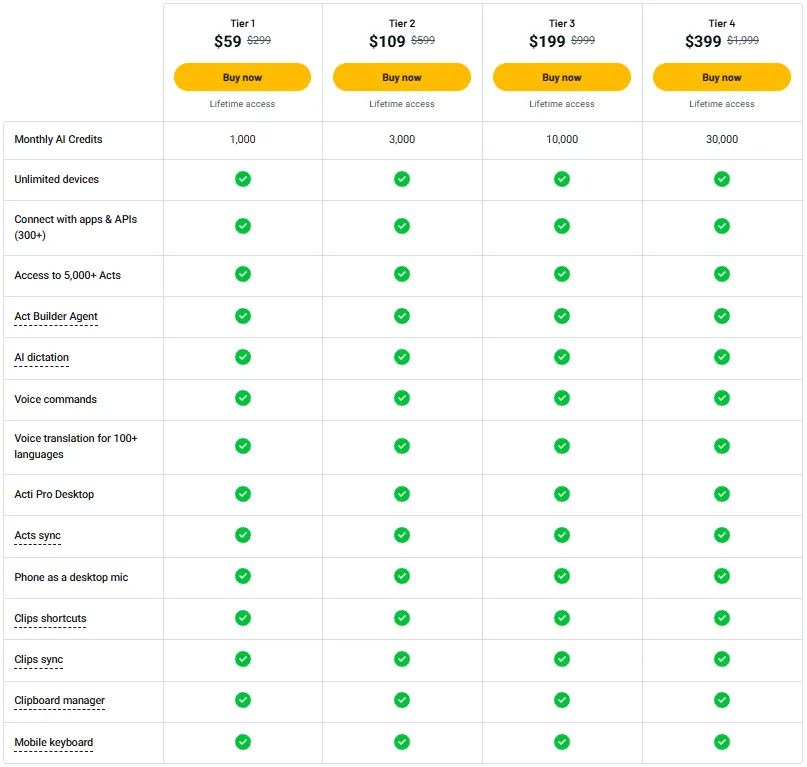
License Tier 1 – $59 (One-Time)
Features:
- 1,000 AI credits per month
- Use on unlimited devices
- Connect to 300+ apps and APIs
- Choose from 5,000+ ready-made Acts
- Create custom Acts with AI
- Turn speech into text with AI
- Run tasks using voice commands
- Translate speech in 100+ languages
- Use Acti Pro Desktop
- Sync Acts across devices
- Use your phone as a desktop microphone
- Save frequently used text as Clips shortcuts
- Sync Clips across devices
- Store copied text and links
- Acti mobile keyboard
License Tier 2 – $109 (One-Time)
Features:
- Everything in License Tier 1
- 3,000 AI credits per month instead of 1,000
License Tier 3 – $199 (One-Time)
Features:
- Everything in License Tier 1
- 10,000 AI credits per month instead of 1,000
License Tier 4 – $399 (One-Time)
Features:
- Everything in License Tier 1
- 30,000 AI credits per month instead of 1,000
Final Thoughts: Is Acti Worth It?
What I like most about Acti is how it puts AI right on your keyboard. You can write, find answers, create meeting links, and get tasks done without leaving your app.
The best part is Act Builder Agent. You can create your own Acts without coding or choose from 5,000+ ready-made Acts. Acti also works with 300+ apps and APIs, making it more than a basic AI keyboard.
With lifetime access starting at $59 on AppSumo, Acti is worth a look. Its mix of AI tools, voice features, and custom Acts can make daily tasks much easier.