Syncupp Lifetime Deal – Manage Tasks and Team Chats
Syncupp helps teams manage their work in one place. You can create projects, assign tasks, set due dates, and track progress. It also brings team chats, attendance, and meetings together.
What makes Syncupp different is its reward system. Team members earn coins and XP for finishing tasks on time. They can also move up the leaderboard. Plus, Syncupp sends task updates through WhatsApp, so your team can stay informed without opening the app.
Syncupp KEY Features
Syncupp helps you manage tasks and keep your team on track. Here are its key features and how to use them.
Project & Task Management
Syncupp keeps all your team’s tasks in one place. Go to Projects → Boards and create a new board. Add tasks, assign team members, set due dates, and choose priorities.
You can drag tasks between Backlog, In Progress, and Completed. Switch to List View to see task dates and status. You can also set tasks to repeat on their own.
Coins, XP & Leaderboards
Syncupp gives your team coins and XP for finishing tasks on time. Members can build daily streaks and climb the leaderboard. The weekly XP rankings reset every Monday.
To set it up, go to Settings → Points & Leaderboards. Choose how many coins each task earns. Then go to Rewards → Create Coupon to add perks like gift cards or free coffee. Team members can use their coins to claim these rewards.
WhatsApp Integration
Syncupp lets you manage tasks right from WhatsApp. To get started, go to Settings → Notification Preferences. Verify your WhatsApp number and turn on alerts. You don’t need a WhatsApp Business account.
You’ll get task alerts, due date reminders, and daily updates. You can also use Syncupp AI to add tasks, update them, or approve leave requests right from WhatsApp.
AI Assistant & Automations
Syncupp has a built-in AI assistant to help manage tasks. You can ask it to create tasks, find task details, or give quick work updates.
To set up automations, go to Settings → Integrations. You can connect Zapier, Make, or Pabbly to link your apps. You can also set tasks to repeat and send due date alerts on their own.
GPS Attendance & Time Tracking
Syncupp helps you see who’s working and track work hours. Team members can check in and out with one click. It also logs their work time, location, and breaks.
You can use Time Tracking to track hours spent on tasks or projects. Go to Attendance to view team records. You can also export reports for payroll or client bills.
Team Chat & Calendar Sync
Syncupp keeps all your team chats in one place. You can send private messages, start group chats, and share files. You can also chat right inside a project board.
Open Calendar to see meetings, due dates, and team leave. Link your Google Calendar to sync meetings with Google Meet links. Syncupp also sends alerts before each meeting.
Client Viewers & Permissions
Syncupp lets you invite clients as Viewers for free. You choose which project boards they can see. Clients can view tasks, download files, and leave comments when added. They can’t see private team chats or time logs.
To set team access, go to Team → Roles & Permissions. Create a role and choose what members can view, add, edit, or approve.
What I Like About Syncupp
- Less App Switching: Keep tasks, chats, and meetings in one place. You won’t need to switch between apps to manage daily work.
- Fewer Missed Deadlines: Get alerts before tasks are due. This helps your team stay on track and finish work on time.
- Fairer Workloads: See how much work each team member has. You can then share tasks more fairly.
- Better Team Motivation: Coins, rewards, and friendly competition make work more fun. They give your team a reason to stay active.
- Easier Client Updates: Clients can check their project progress on their own. You won’t need to send the same updates again and again.
- Simpler Work Records: Keep track of work hours, breaks, and attendance. You can also export reports for payroll or client bills.
What Could Be Better
- Limited AI Credits: Each plan gives 300 to 5,000 AI credits per month, which may be too few for teams that use AI a lot.
- AI Assistant Issues: One AppSumo buyer said the AI could answer only a few types of questions.
- Reported UI Bugs: A verified buyer found bugs and issues with the app’s design that made daily work harder.
- Workspace Limits: Even the highest lifetime plan has only four workspaces, which may not be enough for agencies with many clients.
- Business-Only Access: Syncupp’s terms allow business use only, so you can’t use it as a personal task manager.
Who Is Syncupp Best For?
- Marketing Agencies: Great for teams that run campaigns, assign tasks, and need to meet client deadlines.
- IT Agencies: Helps teams manage software projects, track each stage, and keep clients up to date.
- Sales Teams: Good for teams that want to track daily tasks and use friendly contests to keep staff engaged.
- Creative Teams: Helps design and content teams plan projects, track tasks, and manage reviews.
- Remote & Field Teams: Useful for teams that work in different places and need to track work hours, attendance, and tasks.
AppSumo Syncupp Pricing Plan
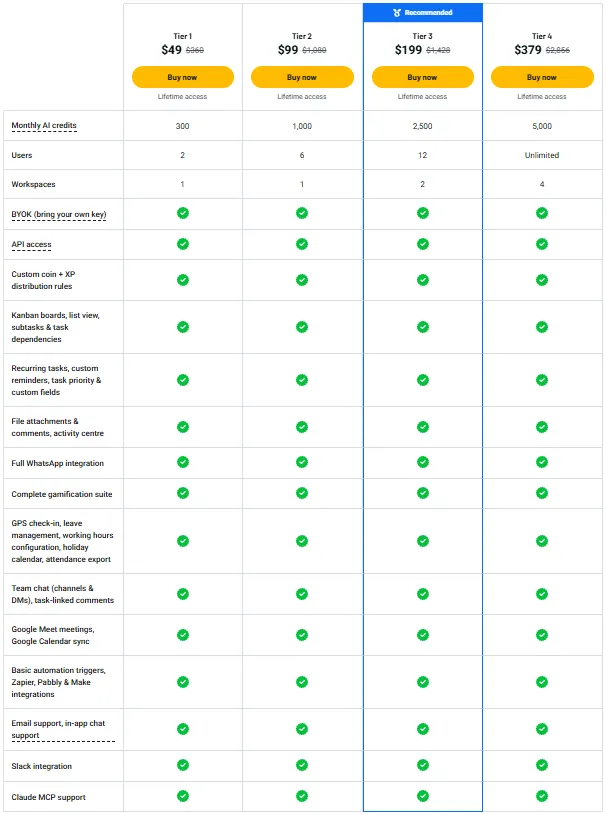
License Tier 1 – $49
Features:
- 2 users and 1 workspace
- 300 AI credits per month
- Kanban and list views, subtasks, and task links
- Repeat tasks, reminders, priorities, and custom fields
- File uploads, comments, and task history
- Full WhatsApp and Slack support
- Coins, XP, streaks, leaderboards, and custom reward rules
- GPS attendance, work hours, leave, holidays, and reports
- Team chats, group channels, and direct messages
- Google Meet and Calendar sync
- Zapier, Make, and Pabbly integrations
- BYOK, API access, and Claude MCP support
- Unlimited free client viewers
- Email and in-app chat support
License Tier 2 – $99
Features:
- All Tier 1 features
- Up to 6 users
- 1,000 AI credits per month
License Tier 3 – $199
Features:
- All Tier 2 features
- Up to 12 users
- 2 workspaces
- 2,500 AI credits per month
License Tier 4 – $379
Features:
- All Tier 3 features
- Unlimited users
- 4 workspaces
- 5,000 AI credits per month
Final Thoughts: Is Syncupp Worth It?
Syncupp is worth a look if your team uses too many apps. I like how it keeps tasks, WhatsApp updates, and team rewards in one place.
The $49 lifetime deal may suit small teams. Still, keep in mind the user limits, AI credits, and bugs some buyers have reported.
My advice? Try it with your team before you decide. AppSumo’s 60-day refund window gives you time to see if it fits your daily work.