Soku Lifetime Deal – Manage Google, Meta & TikTok Ads
Soku AI is an AI marketing agent that helps you manage Google, Meta, and TikTok ads from one place.
What I like is that it does more than show numbers. You can ask where your ad money is going. Soku checks your ads, finds issues, and suggests fixes.
It can also make changes for you, based on the approval rules you set.
KEY Features of Sokuai
Soku AI helps you make ads, run campaigns, and track results. Let’s see how its main tools work.
AI Marketing Agent
Soku’s AI Marketing Agent lets you manage tasks through chat. You don’t need to write code.
To start, link your ad account and open Chat. Ask, “Where did I waste ad money last month?” Soku checks your data, finds issues, and suggests fixes.
What I like is that it gives clear answers, not just charts and numbers.
AI Ad Campaign Management
Soku helps you run Google, Meta, and TikTok ads from one place. You can plan, launch, and track ads without switching apps.
First, link your ad account in Integrations. Open Chat, share your goal and budget, and ask Soku to create a campaign plan.
Review the plan and approve the launch. Soku can then track results and suggest ways to cut wasted ad spend.
AI Ad Creative and Video Generation
Soku lets you make ad images and videos with AI. You can also resize ads, add text, and edit clips.
To start, open Creatives. Describe what you need or upload a photo. Pick an AI model, make your ad, and edit it as needed.
What I like is having all these tools in one place. But keep in mind that AI video generation needs a paid plan.
Competitor Research and Analysis
Soku helps you see what your rivals are doing online. You can check their ads, keywords, and websites.
To start, open Free Competitor Analysis and enter your website link. Sign up for free. Soku finds your rivals and shows where your site needs work.
What I like is that it also suggests clear next steps. You get a useful report, not just a list of rivals.
Ad Account Audits and Performance Monitoring
Soku checks your ads for wasted money and rising costs. It also spots ads that no longer work well.
To start, link Google or Meta Ads in Integrations. Open Chat and ask Soku to check your ads. It finds issues and shows you what to fix.
You can also set daily or weekly checks in Automations. What I like is that Soku explains the issues, not just the numbers.
Autopilot and Automated Reporting
Soku can watch your ads, suggest fixes, and run tasks on its own. You choose how much control it gets.
To start, an Admin must turn on Autopilot in Settings → Labs. Then open Autopilot and pick a level. You can approve changes or let tasks run under your rules.
For reports, open Automations, add a task, and set a daily or weekly time. Soku will run it for you.
What I like is that it saves time while you stay in control.
What I Like About Soku
- Less Manual Work: Spend less time checking ad accounts and writing reports. Soku handles these tasks, so you can focus on other work.
- Early Problem Detection: Spot rising ad costs and poor results early. This gives you time to fix issues before wasting more money.
- Better Budget Decisions: See which ads work well and which waste money. This helps you decide where to spend more or less.
- Faster Ad Creation: Turn images and videos into fresh ad versions. You can try new ideas without starting from scratch.
- More Control: Choose which changes need your approval. You can also let some tasks run on their own, based on your rules.
What Could Be Better
- Monthly Credit Limits: AI tasks use credits, and unused credits expire each month. Heavy users may need to buy more.
- Broad Account Access: Meta and TikTok need permission to manage your ads, even if you only want to check results.
- Limited Campaign Creation: Soku can manage Google Shopping ads, but it can’t create new Shopping or feed-based retail Performance Max campaigns.
- Limited Privacy Options: AppSumo Tier 1 and 2 don’t include the No-Training option. Both use the Standard data setting.
Who Is Soku Best For?
- Freelance Ad Managers: Freelancers can manage Google, Meta, and TikTok ads in one place. They can track results and find wasted ad spend.
- Marketing Agencies: Agencies can manage ads for many clients in one account. Each brand has its own data and reports.
- Online Store Owners: Store owners can see which ads bring good results. They can also find ads that waste money.
- In-House Marketing Teams: Teams can track ad results and get clear reports. This saves time spent checking each ad account by hand.
- Small Business Owners: Owners can use simple chat prompts to plan ads. They can also review ideas and approve changes.
Soku AppSumo Pricing Plan
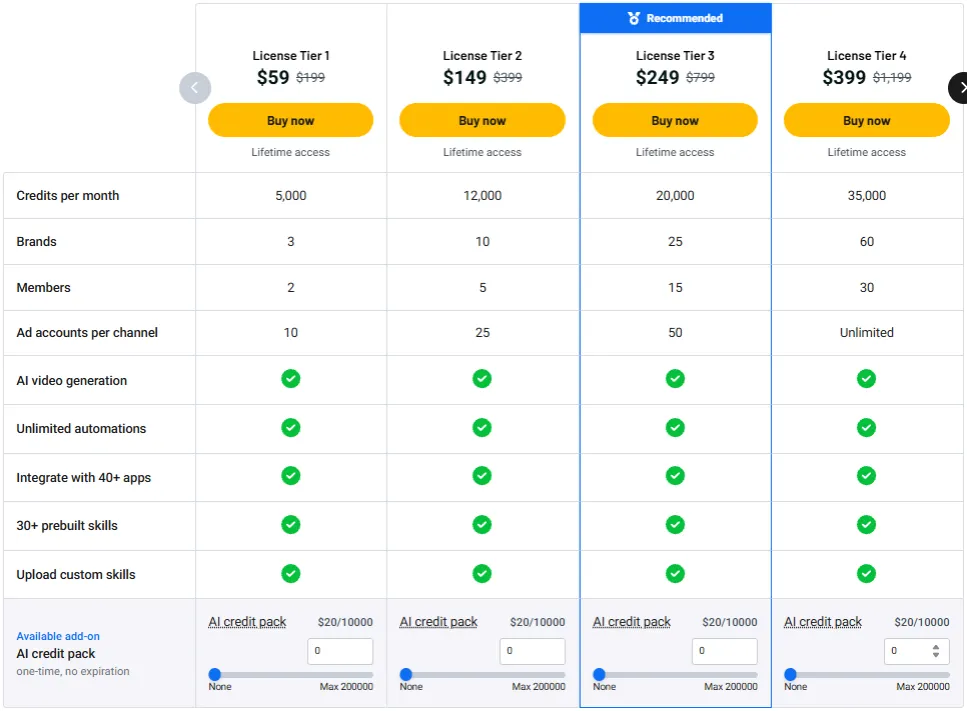
License Tier 1 — $59
- 5,000 AI credits/month
- 3 brands, 2 team members
- 10 ad accounts per channel
- AI image and video creation
- Unlimited automations
- 40+ integrations and 30+ AI skills
- Upload custom AI skills
- Lifetime access
License Tier 2 — $149
- Everything in Tier 1
- 12,000 AI credits/month
- 10 brands, 5 team members
- 25 ad accounts per channel
License Tier 3 — $249
- Everything in Tier 2
- 20,000 AI credits/month
- 25 brands, 15 team members
- 50 ad accounts per channel
- Eligible for No-Training privacy setting
License Tier 4 — $399
- Everything in Tier 3
- 35,000 AI credits/month
- 60 brands, 30 team members
- Unlimited ad accounts per channel
License Tier 5 — $699
- Everything in Tier 4
- 60,000 AI credits/month
Final Thoughts – Soku Review 2026
What I like most about Soku is that it does more than show ad results. It spots wasted spend, finds issues, and suggests fixes. It can also run tasks based on the rules you set.
I also like having ad creation, campaign tools, and reports in one place. This saves time and makes daily work much easier.
The Soku Lifetime Deal stands out for its one-time price. It’s worth a look if you want AI to help with real ad tasks, not just give advice.