TaskMagic Lifetime Deal – Automate Tasks in Plain English
TaskMagic helps you automate tasks. You don’t need to write any code. You just describe what you want. You use plain English. TaskMagic builds it for you.
It works in two ways. It connects to apps you already use. It can also work inside your browser. This works even on sites without an API.
Here’s an example. Say new leads come in from a form. You want them in a Google Sheet each morning. You also want a Slack message with a summary. You describe this once. TaskMagic builds the steps. Then it runs on its own.
This tool suits sales managers. It also suits small business owners. Solopreneurs like it too. It helps you save time on repeat tasks.
One useful feature stands out. TaskMagic shows you the full plan first. Nothing runs until you say so. You can check or change each step.
People often compare it to other tools. Make, Zapier, and Openclaw are common picks. Expect a small learning curve at first.
The Features of TaskMagic Lifetime Deal
Let AI build your automations in plain English
You describe what you want. TaskMagic builds the full flow for you. You don’t need to set it up by hand. Once it’s built, it runs on a schedule or trigger. It won’t use AI credits each time. It works with thousands of apps. It also works on sites with no API.
Hit the ground running with templates
You can browse ready-made workflows. These cover common tasks like lead enrichment. They also cover competitor monitoring and abandoned cart recovery. You can copy any template into a new flow. Then you customize the steps. Some templates connect apps like Stripe, HubSpot, Mailchimp, and Airtable.
Build your workflows visually
You can set up browser steps yourself. This includes clicks, typing, and scraping. You use the browser block to do this. No coding or APIs are needed. You can also add filters, delays, and loops. Custom JavaScript is available too. You can test each step before you publish it.
All your flows, in one place
You can organize your automations easily. Use workspaces and folders as your list grows. You can check run history from your dashboard. You’ll see the status of each flow. The Import Flow button adds ready-made workflows. These come straight from the template library.
How does TaskMagic work?
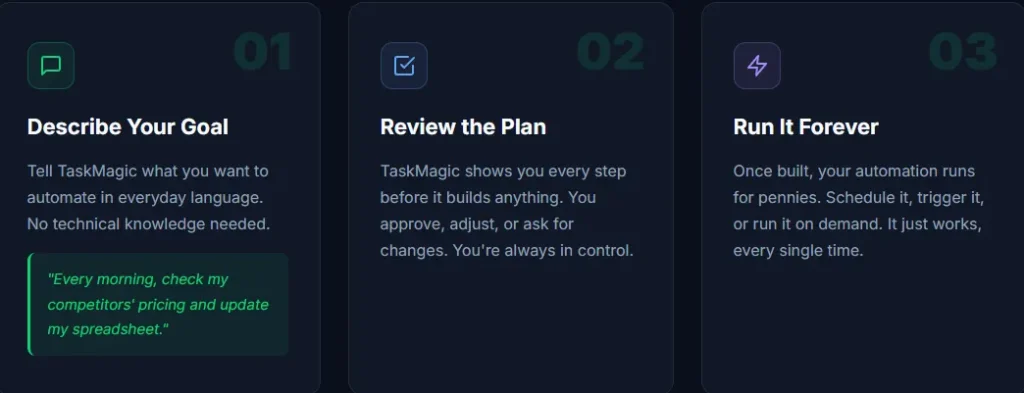
Getting started with TaskMagic is very easy. It only takes three steps to follow.
1. Describe Your Goal
You tell TaskMagic what you want. Use everyday language to explain it. For example, say this: “Every morning, check my competitors’ pricing and update my spreadsheet.” No coding is needed. No technical knowledge is needed either.
2. Review the Plan
TaskMagic shows you every step first. Nothing runs before you see it. You can approve the plan as is. You can also adjust any part of it. You can ask for changes too. You stay in control the whole time.
3. Run It Forever
Once built, the automation runs on its own. It costs very little to keep running. You can schedule it whenever you like. You can trigger it too. Or you can run it on demand. It works the same way every time.
The Benefits of TaskMagic Lifetime Deal
- Less Manual Setup: You describe what you want. It gets built for you. You don’t build it step by step.
- Lower Ongoing Cost: A workflow runs on schedule once it’s built. It won’t use up AI credits each time.
- Wider Task Coverage: You’re not limited to apps with an API. Almost any website task can be automated.
- Faster Starting Point: Ready-made templates cover things like lead enrichment. Others cover competitor monitoring. You skip the blank screen.
- More Control Over Automations: You can add filters, delays, and loops. You can edit steps by hand too. Your workflow can match your exact process.
- Fewer Surprises Before Launch: You can test each step before publishing. This helps you catch problems early. You won’t find them after launch.
- Easier Long-Term Organization: Workspaces and folders keep things tidy. A run history dashboard helps too. Finding and tracking automations stays simple.
The Cons of TaskMagic Lifetime Deal
- Slight Learning Curve: New users may need some time to adjust. The plain English builder and browser steps work together in their own way.
- Depends on System Resources: Automations run through real browser actions. So performance depends on your device’s memory and power.
- Not Built for Large Enterprises: Some teams need advanced customization. Others need deep integrations or enterprise controls. These features may feel limited here.
- Credit Limits on Lower Tiers: Each new automation build uses a set number of credits. So lower-tier plans only allow a few builds each month.
Who is TaskMagic best for?
- Solopreneurs: Running a business alone takes up every hour. Automations handle repeat tasks in the background. This frees up time for real work.
- Small Business Owners: Small teams often have no developer. You can describe an automation in plain English. This fits right into daily work.
- Sales Managers: Leads need constant work to organize. Automating this pulls leads into a CRM or sheet. This saves time each day.
- Agencies: Agencies handle similar tasks for many clients. One automation can be built once. Then it’s reused or adjusted for each account.
- Marketing and Growth Teams: Tasks like price tracking take time. Scraping web data and pulling reports do too. This tool handles repetitive browser work well.
TaskMagic AppSumo Pricing Plan
License Tier 1 — $89 (originally $588)
Features:
- Pay once. Get lifetime access. No monthly bills.
- Get 3,000 credits every month.
- Get 2,000 starter credits. Use them to build your first automations.
- This is a solo plan. No extra team seats.
- You get one workspace.
- Run up to 10 automations at once.
- Connect up to 5 apps or accounts.
- Store data in one table.
- Use browser automation with no limit.
- Works on Mac and Windows desktop apps.
License Tier 2 — $169 (originally $878)
Includes License Tier 1, plus:
- Credits move up to 6,000 a month.
- Add 2 teammates.
- Run up to 25 automations.
- Connect up to 10 apps or accounts.
- Store data in 3 tables.
License Tier 3 — $359 (originally $1,148)
Includes License Tier 2, plus:
- Credits go up to 15,000 a month.
- Add up to 20 team members.
- Set up as many teams as you want.
- Run up to 75 automations.
- Connect up to 25 apps or accounts.
- Store data in 5 tables.
License Tier 4 — $599 (originally $1,658) (Recommended)
Includes License Tier 3, plus:
- Credits jump to 30,000 a month. Get 5,000 starter credits too.
- Add unlimited team members and teams.
- Run up to 250 automations.
- Connect as many apps as you want.
- Store data in 25 tables.
- Unlock MCP access.
License Tier 5 — $1,099 (originally $2,288)
Includes License Tier 4, plus:
- Credits rise to 75,000 a month. Get 7,500 starter credits too.
- Run up to 500 automations.
- Store data with no table limit.
License Tier 6 — $1,599 (originally $3,198)
Includes License Tier 5, plus:
- Credits jump to 150,000 a month. Get 15,000 starter credits too.
- Run unlimited automations.
License Tier 7 — $2,499 (originally $5,238)
Includes License Tier 6, plus:
- Get the highest credit limit: 300,000 a month.
- Unlock BYOK. Bring your own API key.
Final Thoughts – TaskMagic Review
Repeat online tasks eat up hours. Those hours could go toward real work. TaskMagic offers a practical way to hand them off. You just describe what you need in plain English. You get a working automation. There’s no code to touch. There’s no API to set up. It keeps running at a low cost too. It won’t burn credits on every run. It also reaches websites other tools can’t. This works through browser-based automation. It comes with ready-made templates. Lifetime access starts at a fair one-time price. TaskMagic is worth trying. It helps when repeat tasks slow you down.