Webclaw Lifetime Deal: Turn Web Pages Into AI-Ready Data
Collecting clean data from websites can be quite a hassle. That is precisely why the lifetime deal for ‘Webclaw’ caught my eye.
It turns messy web pages into clean Markdown or JSON. You can collect product details, track price changes, and crawl websites. It also gives AI tools like Claude and Cursor fresh web data.
KEY Features of Webclaw
Hosted output formats
Webclaw turns web pages into Markdown, JSON, plain text, and more. Its LLM format removes menus, extra links, and unwanted content.
LLM integration
Enter a website URL and tell Webclaw what you need. It uses AI to collect data in JSON or create a short summary.
Crawling and sitemap discovery
Webclaw finds page links from websites and sitemaps. You can also set how many pages it should read.
Web search with optional page scraping
Enter a keyword or question to search the web. Webclaw finds matching pages and can collect their content.
Research
Enter a topic and choose how many sources to check. Webclaw reads several websites and creates a report with source links.
Watch
Add a website URL and set how often to check it. Webclaw looks for changes and can send an alert.
Handles protected pages
Some websites block tools that try to collect their data. Webclaw’s cloud API can handle some blocked pages, but not all.
JS-rendered pages
Some websites use JavaScript to load their content. Webclaw’s cloud API can load these pages before collecting the data.
MCP Server
Connect Webclaw to Claude, Cursor, Codex, or other MCP apps. Your AI agents can then scrape, search, crawl, and extract web data.
Open source, self-hostable
Run Webclaw’s CLI, REST server, or MCP server on your own computer. Local use needs no cloud credits but lacks cloud rendering and bot protection.
What I Like About Webclaw
- Less Manual Work: You don’t need to make a new scraper for each site.
- Cleaner Data for AI: Your AI tools get useful text without ads, menus, or clutter.
- Predictable Scraping Costs: Standard page tasks cost one credit, even with AI extraction or rendering.
- Fresher Information: Your AI agents can read fresh web data, not just old information.
- Easier Website Tracking: Track price, stock, and page changes without checking by hand.
- More Hosting Control: Run Webclaw on your own server without using cloud credits.
What Could Be Better
- Blocked Website Access: Some sites still block Webclaw or return empty pages, even with the cloud API.
- Inconsistent Data Extraction: Some tools return empty fields or miss product details, logos, and brand colors.
- Limited Self-Hosting Features: The local version lacks JavaScript rendering, bot protection, and cloud monitoring.
- Extra Search Credit Usage: Webclaw scrapes search results by default, so one search may use extra credits.
Who is Webclaw best for?
- AI Agent Developers: They can give tools like Claude and Cursor fresh web data for their projects.
- E-commerce Researchers: They can track product prices, stock levels, and changes across online stores.
- Market Research Analysts: They can collect data from many websites and create reports with source links.
- Job Board Creators: They can collect job posts from supported company websites without copying each one.
- Open-Source Developers: They can run Webclaw on their own servers and manage web data tasks locally.
Webclaw AppSumo Pricing Plan
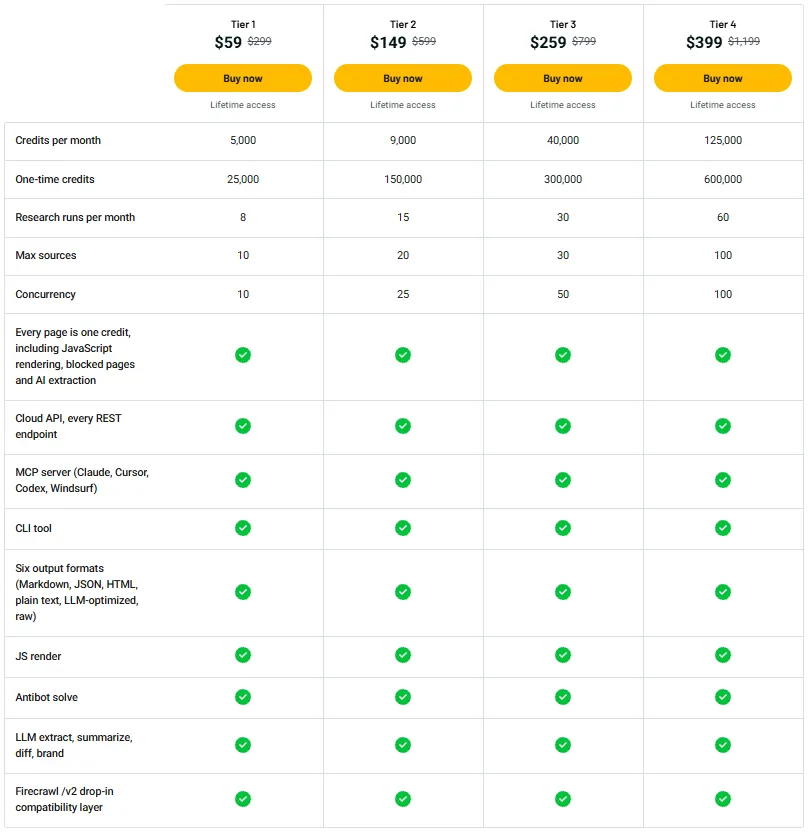
License Tier 1 — $59 (One-Time)
Features:
- 5,000 monthly credits
- 25,000 one-time credits
- 8 research runs/month
- 10 research sources max
- 10 concurrent tasks
- Web scraping, crawling & mapping
- Web search & research
- Full Cloud API
- MCP Server integration
- CLI Tool
- 6 output formats
- JavaScript rendering
- Anti-bot protection
- AI extraction & summaries
- Content comparison & brand data
- Firecrawl /v2 compatibility
- 1 credit/page (AI & rendering included)
License Tier 2 — $149 (One-Time)
Features:
- Everything in License Tier 1
- 9,000 monthly credits
- 150,000 one-time credits
- 15 research runs/month
- 20 research sources max
- 25 concurrent tasks
License Tier 3 — $259 (One-Time)
Features:
- Everything in License Tier 2
- 40,000 monthly credits
- 300,000 one-time credits
- 30 research runs/month
- 30 research sources max
- 50 concurrent tasks
License Tier 4 — $399 (One-Time)
Features:
- Everything in License Tier 3
- 125,000 monthly credits
- 600,000 one-time credits
- 60 research runs/month
- 100 research sources max
- 100 concurrent tasks
5 Best Webclaw Alternatives 2026
If Webclaw is not the right fit for you, here are five alternatives. Each of these collects web data, though they differ slightly in how they operate.
1. Firecrawl
Firecrawl is a close alternative to Webclaw. It can scrape, search, and crawl websites. It also turns web pages into clean data for AI tools.
- Starting Price: Free plan with 1,000 credits/month. Paid from $19/month.
- Pros: Clean Markdown, structured JSON, web crawling, and MCP support.
- Cons: JSON extraction may use extra credits.
- Key Difference: Webclaw charges one credit per standard page request, even with AI extraction and rendering.
2. Crawl4AI
Crawl4AI is an open-source web crawler for Python developers. You can run it on your computer or use its cloud API.
- Starting Price: Free self-hosting and 1,000 cloud credits/month. Paid from $10/month.
- Pros: Browser control, clean Markdown, and structured data.
- Cons: Self-hosting takes some setup and your own resources.
- Key Difference: Crawl4AI uses Python, while Webclaw uses Rust for its core.
3. Apify
Apify helps you collect data from specific websites. It has ready-made scrapers called Actors. These can gather product details, job posts, and other web data.
- Starting Price: Free plan with $5 monthly usage. Paid from $19/month, plus usage costs.
- Pros: Ready-made scrapers, scheduled tasks, and data exports.
- Cons: Costs depend on the Actor and how much you use it.
- Key Difference: Apify runs scraping jobs, while Webclaw focuses on a web data API.
4. ScrapingBee
ScrapingBee helps developers scrape sites that use JavaScript or block requests. It also supports AI data extraction.
- Starting Price: $19/month.
- Free Trial: 1,000 API credits.
- Pros: Rotating proxies, location-based scraping, and JavaScript support.
- Cons: JavaScript and premium proxies cost extra credits.
- Key Difference: Webclaw covers these tasks within its standard one-credit page rate.
5. Scrapfly
Scrapfly helps collect data from sites with complex pages or bot protection. It also supports browser rendering and structured data extraction.
- Starting Price: $30/month.
- Free Trial: 1,000 API credits.
- Pros: Browser rendering, residential proxies, and AI extraction.
- Cons: Browser and proxy options can use more credits.
- Key Difference: Scrapfly’s credit cost changes with request settings, while Webclaw uses one credit per standard page request.
Final Thoughts: Is Webclaw Worth Buying?
What I like most about Webclaw is how much it does in one place. It turns messy web pages into clean Markdown or JSON. You can also collect data from many pages and give AI tools fresh web content.
The pricing is another thing that stands out to me. A standard page request costs one credit, even with JavaScript rendering and AI extraction.
With the Webclaw Lifetime Deal starting at just $59 on AppSumo, I think it’s worth a closer look. You get useful tools, clear credit costs, and lifetime access with a one-time payment.