Vexp Lifetime Deal – Cut AI Coding Token Costs Fast
Vexp helps AI coding agents understand your code. It saves you time. It also saves you tokens.
It builds a local map of your code. This map shows how files connect. It shows how functions and classes link too. Your AI agent does not need to read everything. Vexp gives it only the parts it needs.
Say you ask your agent to add rate limits. This is for your login system. Without Vexp, the agent may scan many unrelated files first. With Vexp, it goes straight to the right files. You get answers faster and spend fewer tokens.
Vexp is built for developers. It also suits SaaS teams and solopreneurs. These are people who already use AI coding agents daily.
One key feature stands out. Vexp runs fully on your own computer. Your code never leaves your machine.
Other tools do similar work. GitHub Copilot is one option. Tabnine is another. Cursor and Windsurf are also common choices.
Keep one thing in mind. If you are new to AI agents, results may feel small. Small projects may not show big changes either.
👉 Try Vexp Free — Give Your AI Agent Context
The Features of Vexp Lifetime Deal
Local Dependency Graph
This feature turns your codebase into a graph. The graph shows functions, classes, and types. It maps how these pieces connect. It tracks calls and imports between them. This lets an AI agent look at specific files. It can check exact symbols too. It does not need the whole project.
Offline Functionality
This feature runs on your own machine. It makes no network calls. Your source code stays on your computer. It never leaves your device.
Integration with Multiple Agents
This feature connects Vexp to several AI agents. These include Claude Code, Codex, and Cursor. It works through one MCP server. Different agents can share the same setup.
Session Memory
This feature keeps a record of past sessions. It stores what your AI agent did before. If the related code changes, that record gets flagged. It shows up as outdated.
Easy Setup and Configuration
This feature offers a guided setup process. It covers indexes, agents, and git hooks. All steps happen in one flow. You do not handle them separately.
How Vexp Works?
Vexp works in three simple steps. These are Index, Traverse, and Capsule.
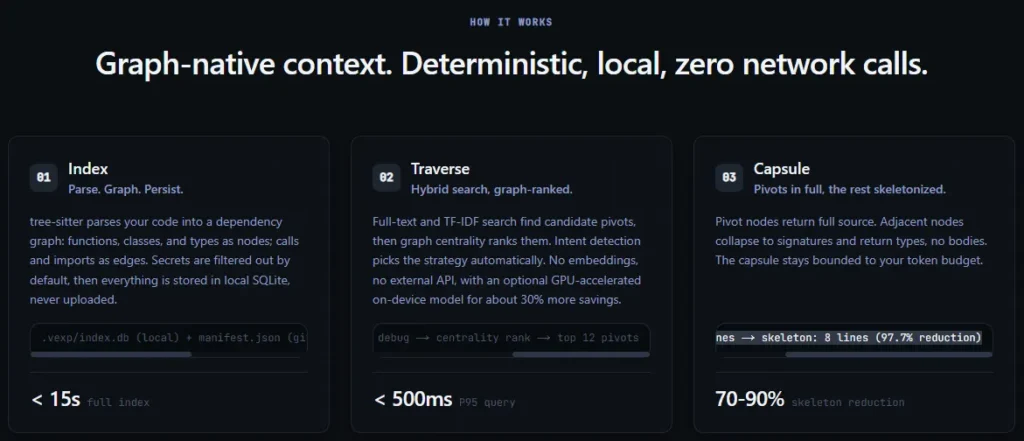
Step 1: Index — Parse. Graph. Persist.
Vexp uses Tree-sitter to scan your code. It builds a dependency graph from this scan. Functions, classes, and types become nodes. Calls and imports become edges. These edges connect everything together. Secrets get filtered out by default. Nothing sensitive gets stored. Everything is saved locally in SQLite. It never gets uploaded.
📁 .vexp/index.db (local) + manifest.json (git) · 34.8k nodes | 89.2k edges
⏱️ Under 15 seconds for a full index
Step 2: Traverse — Hybrid search, graph-ranked.
Vexp combines full-text search with TF-IDF. Together, they find candidate files. Then Vexp ranks these files. It uses graph centrality to do this. The most connected code rises to the top. Vexp also detects your intent automatically. It adjusts its strategy for each task. There are no embeddings involved. There are no external API calls either. You can turn on an optional on-device model. This adds about 30% more savings.
🔍 FTS5 + TF-IDF → 423 candidates → intent: debug → centrality rank → top 12 pivots
⏱️ Under 500ms per query (P95)
Step 3: Capsule — Pivots in full, the rest skeletonized.
The most important files are called pivots. These come back with full source code. Related files collapse into skeletons instead. A skeleton keeps just signatures and return types. It drops the function bodies completely. The whole capsule stays within your token budget.
📄 350-line pivot → 8-line skeleton (97.7% reduction)
📉 70–90% typical skeleton reduction
The Benefits of Vexp Lifetime Deal
- Lower Token Costs: Your AI agent spends less time on each task. It only reads the important code.
- Code Stays Private: You never have to worry about exposure. Your code stays on your own computer.
- Works Across Tools: Switching between AI agents feels easier. One setup connects to several agents at once.
- Less Repeating Yourself: You don’t need to explain context again. Past work gets remembered on its own.
- Faster Time to Start: Getting started takes less effort. Indexes, agents, and git hooks are set up together.
The Cons of Vexp Lifetime Deal
- Limited Team Seats: Lower-priced tiers only allow one user. This may not work well for larger teams.
- Local-Only Setup: Everything runs on your own machine. Teams in different locations may find it harder to work together.
- Not Beginner-Friendly: Developers new to AI coding agents may find it confusing. It can feel like a lot to learn at first.
- Needs an Active Codebase: Small codebases may not show much difference. Users need enough code for the tool to matter.
Who is Vexp best for?
- Solo Developers: Coders working alone get direct answers from their AI agent. They don’t need to sift through unrelated files.
- SaaS Teams: Teams building software can keep their AI agent focused. This helps as the project grows bigger.
- Solopreneurs: People running solo coding projects can save time. Vexp handles the context their AI agent needs.
- Privacy-Conscious Coders: Developers who avoid sending code online can rely on Vexp. Everything stays on their own machine.
- Multi-Agent Users: Developers who switch between AI agents can use one setup. It connects to several tools at once.
Vexp AppSumo Pricing Plan
License Tier 1 — $49 (was $100)
Features:
- Handles codebases up to 10,000 nodes.
- Built for one person working solo.
- Links to one repository per workspace.
- Skips shared workspace and git-index syncing.
- Skips priority-path ranking and usage analytics.
- Detects your intent and shows CodeLens hints.
- Bridges into your language server for deeper checks.
- Remembers what your AI agent did before.
- Searches your code using a hybrid method.
- Learns from a feedback loop over time.
- Watches your coding patterns in the background.
- Unlocks all 12 MCP tools.
- Keeps your git manifest in sync.
- Includes lifetime access and a 60-day refund.
License Tier 2 — $119 (was $240)
Features:
- Scales up to 50,000 nodes. That’s five times Tier 1.
- Still built for one seat.
- Connects up to three repos in one workspace.
- Adds shared workspace and git-index syncing.
- Still skips priority-path ranking and analytics.
- Carries over CodeLens, LSP bridge, and session memory.
- Also keeps hybrid search, feedback loop, and passive observation.
- Includes all 12 tools and git manifest sync.
- Backed by lifetime access and the 60-day guarantee.
License Tier 3 — $199 (was $1,800) · Recommended
Features:
- Expands capacity to 100,000 nodes.
- Opens up to 5 team seats.
- Removes the repo limit. Connect as many as you need.
- Turns on priority-path ranking and usage analytics.
- Keeps shared workspace and git-index syncing active.
- Bundles in CodeLens, LSP bridge, and session memory.
- Also includes hybrid search, feedback loop, and passive observation.
- Comes with all 12 tools and git manifest sync.
- Includes the same lifetime deal and refund terms.
License Tier 4 — $399 (was $3,600)
Features:
- Drops the node cap completely. No size limit.
- Fits teams of up to 10 people.
- Keeps repositories unlimited, just like Tier 3.
- Includes every feature from the lower tiers.
- Rounds out with lifetime access and a 60-day refund.
👉 Get Vexp Now — Cut AI Coding Costs Today
Final Thoughts – Vexp Review
Is your AI agent burning tokens on code it doesn’t need? Vexp offers a practical fix. It builds a local map of your codebase. Your agent gets only the files that matter. This cuts costs and keeps your code fully private. Setup is guided and quick. It connects with several AI agents through one system. This saves you time switching between tools. Developers, SaaS teams, and solopreneurs already using AI agents will find Vexp easy to adopt. It’s a solid addition to your daily workflow.