Rocky AI Lifetime Deal: Build Your AI Coaching Business 2026
Running a coaching business takes time. You need to help clients, create courses, and track their progress.
Rocky AI brings all these tasks into one place. You can build your own AI coach, create courses, practice with AI role-plays, and track client goals.
What makes Rocky AI useful is its ability to remember past chats and follow up on goals. You can also run your coaching app under your own brand.
Build AI Coaches and Practice with Roleplays
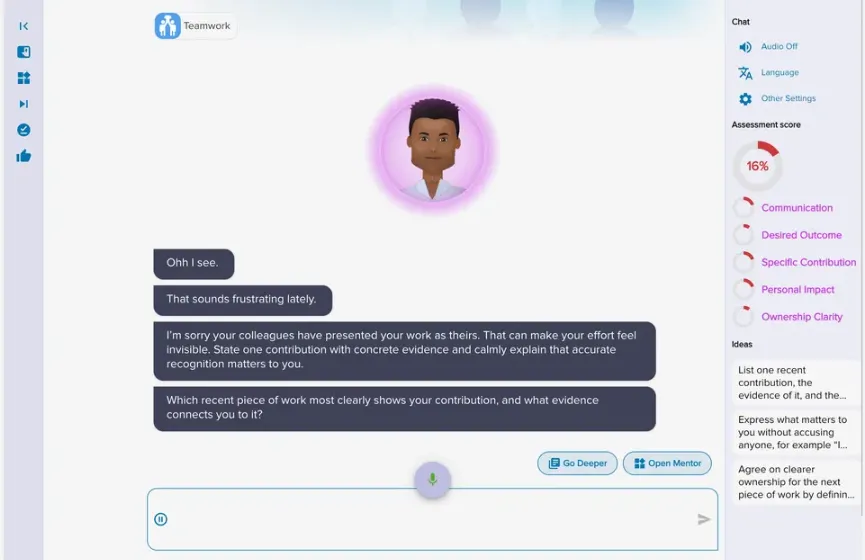
Rocky AI lets you build an AI coach that fits your style. Set its tone, add your questions, and use your own content. The coach also remembers past chats and checks on client goals.
How to use it: Open Creator Studio and set up your AI coach. Add your coaching program, choose its tone, and test it. Then share it with your clients.
You can also use AI roleplays to practice real talks. Pick from 40+ templates or create your own. Choose how the AI person should act. Then practice by text or voice with a talking avatar. After each session, you get feedback and scores based on your rules.
Create AI Courses and Assessments
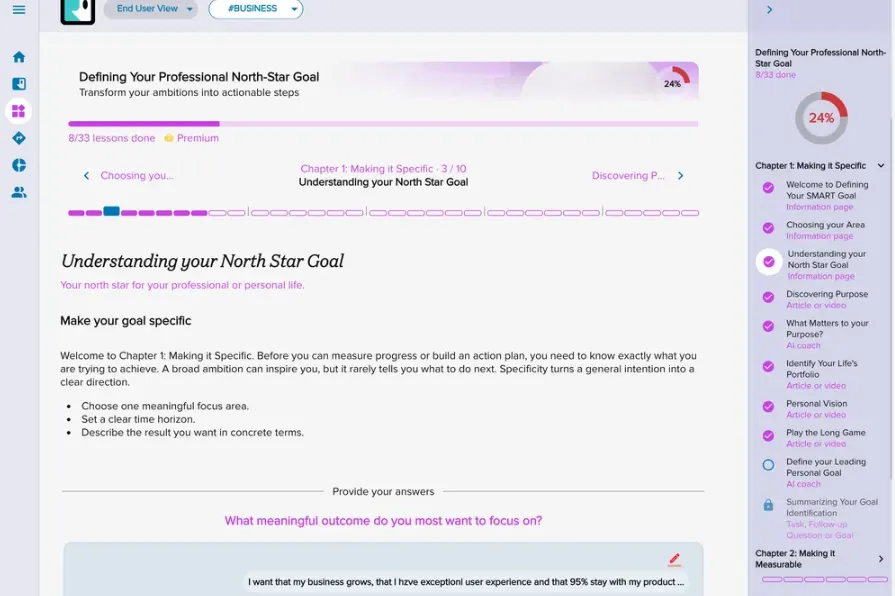
Rocky AI helps you build online courses with AI. Just add a course topic and choose the number of chapters. The AI writes lessons and quizzes for you. You can also add coaching chats and roleplays for practice.
How to use it: Open the AI Course Builder and add your course details. Edit the lessons, add quizzes, and set the rules. Then publish the course for your learners.
You can also create tests to check learners’ skills. The AI helps you write questions, and you set the scoring rules. Learners see their scores in charts. The AI coach then uses these results in future chats.
Manage Cohort Coaching Programs
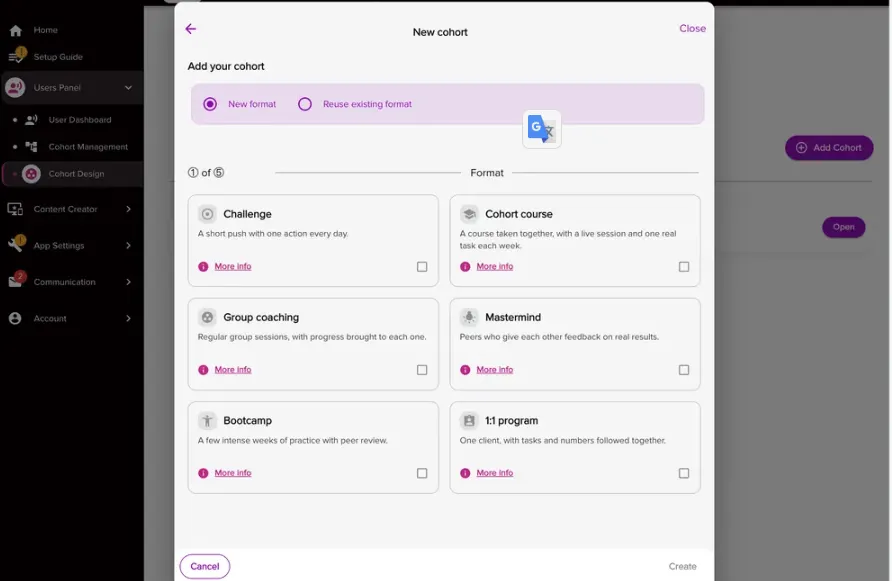
Rocky AI helps you run group coaching in one place. You can plan weekly tasks, host live sessions, and track progress. AI also helps create tasks, check-ins, and learning materials.
How to use it: Create a cohort and pick one of six program types. Let AI plan weekly tasks. Set up live sessions with Zoom, Google Meet, or Microsoft Teams.
You can also create small groups for members to support each other. The Today queue shows who needs help or has gone quiet. You can then send them a message to check in.
Launch and Sell Your Branded Coaching App
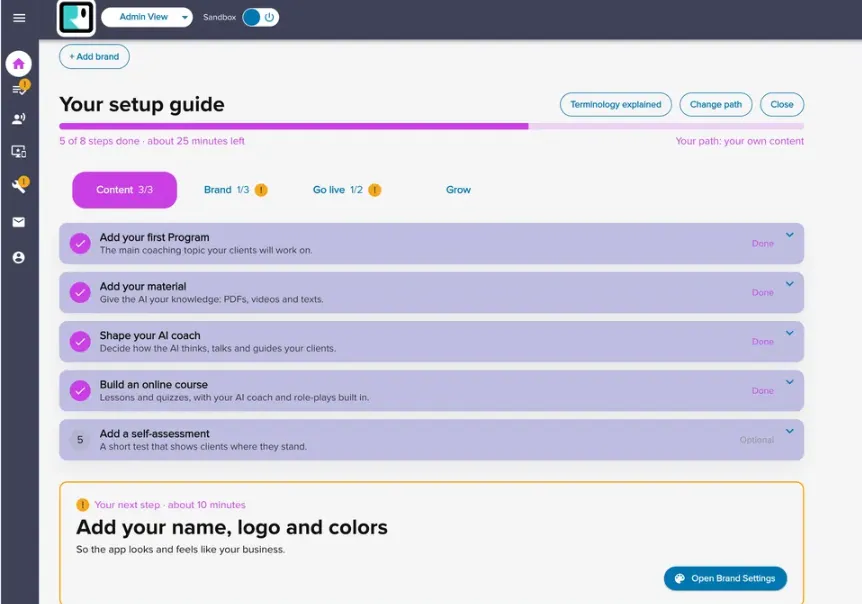
Rocky AI lets you build a coaching app under your own brand. Add your logo, colors, and domain. You can also give each client their own space with custom content and settings.
How to use it: Open Creator Studio and set up your brand. Add your logo, pick your colors, and link your domain. Then add your coaching programs and invite clients.
You can also sell coaching plans and courses through Stripe. Offer monthly plans, one-time payments, free trials, or discount codes. Clients can pay through your app on desktop or mobile.
Rocky AI Pros and Cons
Rocky AI has both good and bad points worth knowing. Here are the main pros and cons to help you decide if it’s right for you.
Pros
- Reach More Clients.
- Save Time on Course Creation.
- Better Goal Tracking.
- Practice Difficult Conversations.
- Track Client Skill Growth.
- Coach Clients in 29 Languages.
- Sell Coaching Under Your Brand.
Cons
- Learning Curve.
- Inconsistent AI Responses.
- Limited User Seats.
- Limited Features on Lower Tiers.
- No Native Branded Mobile App.
Who Is Rocky AI Best For?
- Life and Career Coaches: Help clients set goals for life or work and track their progress. The AI coach also checks in between sessions.
- Business Coaches: Create coaching programs based on their own methods. They can share these programs with more clients under their own brand.
- Course Creators: Build online courses with AI-made lessons and quizzes. They can also add coaching chats and role-plays so learners can practice.
- HR and L&D Teams: Help staff build skills in sales, leadership, and other work areas. They can track progress and see who needs more help.
- Coaching Companies: Run coaching programs for many clients from one place. Each client can have their own brand, content, and settings.
Rocky AI AppSumo Pricing Plan
License Tier 1 — $53.10 One-Time
Features:
- 1 premium user
- 1 course
- 1 self-assessment
- AI coaching chats
- Soft-skills coaching tips
- Personal growth plans
- Goal and progress tracking
- 30 built-in coaching modules
- Coaching content library
- Custom AI training
- Unlimited coaching programs
- Unlimited articles with videos
- Course builder
- Branded web app and subdomain
- Coach panel and creator accounts
- MCP servers with BYOK
- Option to add users
License Tier 2 — $179.10 One-Time
Features:
- All License Tier 1 features
- 10 premium users
- 2 courses
- 2 self-assessments
License Tier 3 — $341.10 One-Time
Features:
- All License Tier 2 features
- 25 premium users
- 5 courses
- 5 self-assessments
- Stripe integration
- AI website widget with BYOK
- Unlimited demo and trial users
License Tier 4 — $629.10 One-Time
Features:
- All License Tier 3 features
- 50 premium users
- 10 courses
- 10 self-assessments
- Custom domain with CNAME
License Tier 5 — $1,079.10 One-Time
Features:
- All License Tier 4 features
- 100 premium users
- 20 courses
- 20 self-assessments
Final Thoughts – Rocky AI Review 2026
Rocky AI brings coaching chats, courses, roleplays, and goal tracking into one place. These tools work together to help clients make progress.
I like how the AI coach remembers past chats and checks on goals. It also follows your own coaching methods. You can build a branded coaching app and sell your programs through Stripe. With the AppSumo Lifetime Deal, Rocky AI is worth a look for long-term use with a one-time payment.