
LeadOcean Lifetime Deal: 693M B2B Profiles and AI Tools
LeadOcean is a B2B lead generation tool. It helps businesses find people, companies, and contact details. It has over 693 million people profiles and 67 million company records.
You can search by job title, location, industry, or company size. It also helps you find work emails and phone numbers. You can fill in missing contact details and export lead lists as CSV files.
LeadOcean also works with AI tools like ChatGPT, Claude, and Cursor. You can use simple prompts to find leads and get more details. It is not a CRM or an email marketing tool. Instead, it gives you the data you need to reach potential customers.
KEY Features of LeadOcean
LeadOcean helps you find B2B leads, get contact details, and build lead lists. Here are its main features and how they work.
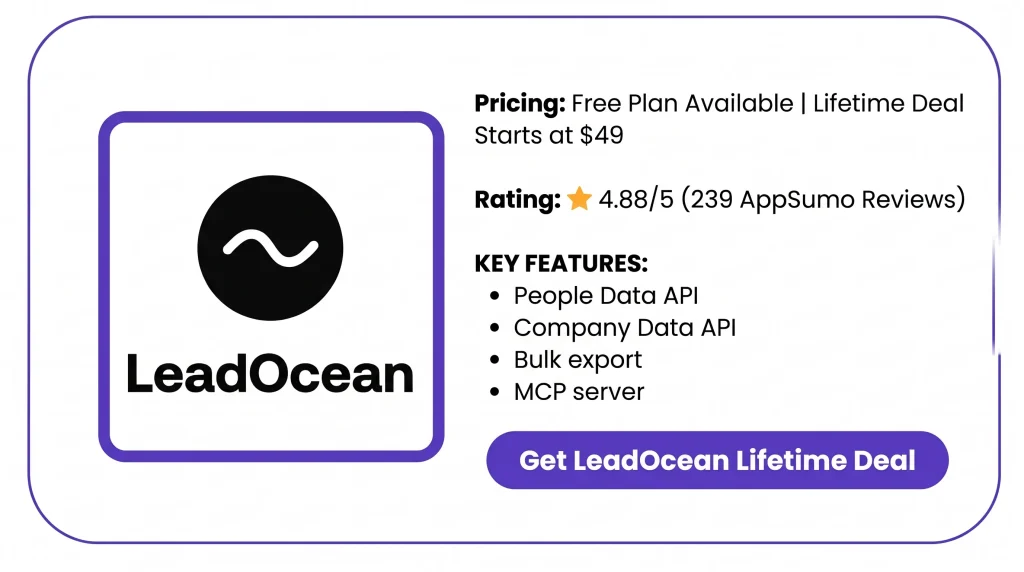
Search People and Companies
LeadOcean helps you find people and companies that fit your needs. You can search 693 million people profiles and 67 million companies. You can also filter results by job title, location, industry, and company size.
For example, you can search for sales managers in the USA. Just choose the job title and country. LeadOcean will show matching profiles, job roles, company names, and whether contact details are available.
How to use it: Go to the Exports page in LeadOcean. Set your filters and check the lead count for free. You can also use the API, Claude, or ChatGPT to search for companies by industry, size, or location.
Enrich Leads with Contact Details
LeadOcean helps you fill in missing details about your leads. You can use a LinkedIn profile link, email, or phone number to find more details about a person.
It can show their job title, company, location, work history, skills, and education. You can also find work emails and phone numbers if they are available. This helps you learn more about a lead before you reach out.
How to use it: Connect LeadOcean to Claude or ChatGPT. Share a LinkedIn profile link and ask it to find more details. LeadOcean will show the data it has, including contact details if you ask for them. You can also use its API.
Find Verified Work Emails and Phone Numbers
LeadOcean helps you find work emails and phone numbers for your leads. It has emails for 366 million people and phone numbers for 166 million people.
It also shows each email’s status, such as verified, risky, or invalid. You can check this before you reach out. Phone numbers are also shown when available.
How to use it: Connect LeadOcean to Claude or ChatGPT. Share a LinkedIn profile link and ask for work emails and phone numbers. Check the email status before adding the lead to your contact list.
Export Lead Lists to CSV
LeadOcean lets you save your lead lists as CSV files. You can export up to 50,000 rows in one file, based on your plan limits.
You can choose what details to include, such as names, job titles, companies, work emails, and phone numbers. You can then use this data in other tools.
How to use it: Open the Exports page in LeadOcean. Set your search filters and check the lead count for free. Next, pick the columns you want and start the export. Once the file is ready, download it as a CSV.
Connect AI Agents with MCP
LeadOcean works with AI tools like ChatGPT, Claude, and Cursor through its MCP server. You can use simple prompts to find people, search for companies, and get lead details.
You don’t need to write code. Just tell your AI tool what kind of leads you need. LeadOcean will search its data and show matching results. You can also get contact details when available.
How to use it: Add LeadOcean’s MCP server to Claude or ChatGPT. Sign in to your LeadOcean account. Then ask the AI to find leads by job title, industry, or location. You can also ask for work emails and phone numbers.
LeadOcean Pros and Cons
LeadOcean has some useful benefits, but it also has a few limits. Here are its main pros and cons to help you decide if it’s right for you.
Pros
- Faster Lead Research.
- More Targeted Outreach.
- Fewer Email RISKS.
- Less Manual Work.
- Easy Lead Data Export.
- Predictable Data Costs.
Cons
- Outdated or Incorrect Records.
- Many Emails Not Verified.
- Limited Small Business Coverage.
- Fair-Use Usage Limits.
- No Built-in Sales Workspace.
Who Is LeadOcean Best For?
- Lead Generation Agencies: Agencies that build lead lists for clients in different markets.
- Sales and Marketing Teams: Teams that find people by job title, industry, or location before reaching out.
- RevOps Teams: Teams that fill in missing details and keep customer records up to date.
- AI Agent Builders: Users who want AI tools to find leads and look up company details.
- SaaS App Developers: Developers who need people and company data for their apps or daily workflows.
LeadOcean AppSumo Pricing Plan
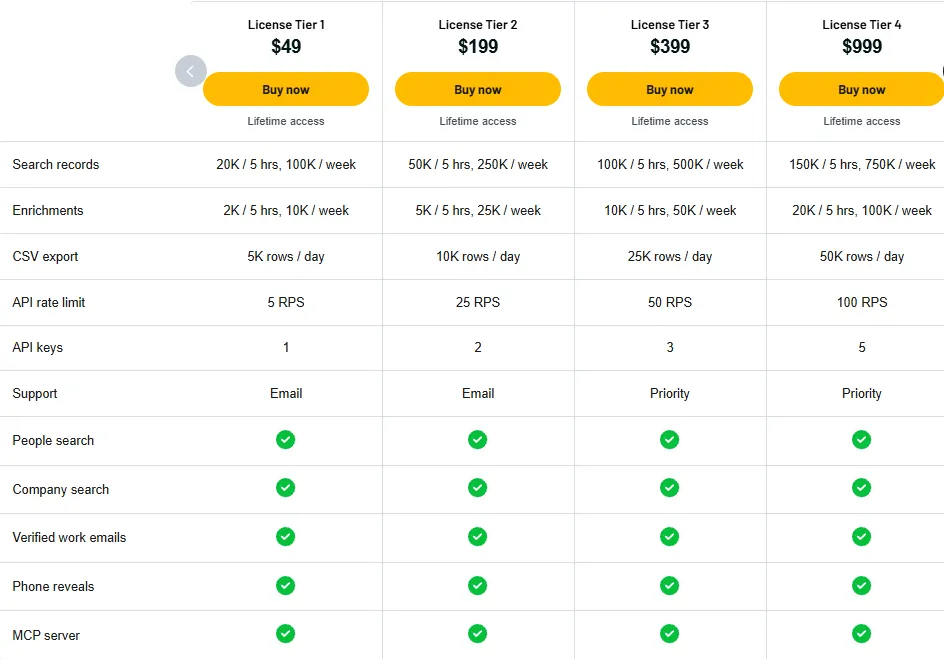
License Tier 1 – $49
- Search: 20K/5 hours, 100K/week
- Enrichments: 2K/5 hours, 10K/week
- CSV export: 5K rows/day
- API speed: 5 requests/second
- 1 API key
- People and company search
- Verified work emails
- Phone number lookup
- MCP server access
- Email support
License Tier 2 – $199
Includes everything in License Tier 1, plus:
- Search: 50K/5 hours, 250K/week
- Enrichments: 5K/5 hours, 25K/week
- CSV export: 10K rows/day
- API speed: 25 requests/second
- 2 API keys
License Tier 3 – $399
Includes everything in License Tier 2, plus:
- Search: 100K/5 hours, 500K/week
- Enrichments: 10K/5 hours, 50K/week
- CSV export: 25K rows/day
- API speed: 50 requests/second
- 3 API keys
- Priority support
License Tier 4 – $999
Includes everything in License Tier 3, plus:
- Search: 150K/5 hours, 750K/week
- Enrichments: 20K/5 hours, 100K/week
- CSV export: 50K rows/day
- API speed: 100 requests/second
- 5 API keys
License Tier 5 – $1,999
Includes everything in License Tier 4, plus:
- Search: 25M records/month
- Enrichments: 1M/day
- CSV export: 150K rows/day
- API speed: 200 requests/second
5 Best LeadOcean Alternatives 2026
Here are five LeadOcean alternatives worth a look. Each has its own tools, prices, and limits.
1. Apollo.io
Apollo.io helps you find B2B leads and manage sales outreach. Unlike LeadOcean, it also has email tools, calling, and a sales workspace.
- Free Plan: Available
- Starting Price: $49/user/month (billed yearly)
- Pros: Lead search, email outreach, and calls.
- Cons: Credit limits and per-user fees.
- Best For: Sales teams that need leads and outreach tools.
2. ZoomInfo
ZoomInfo helps you find B2B contacts and research companies. It also tracks buyer interest and gives more sales data than LeadOcean.
- Free Plan: 1,000 data and 1,000 AI credits at signup.
- Starting Price: $20 credit top-up; Sales plans need a quote.
- Pros: Buyer signals, company data, and CRM links.
- Cons: Credit fees and custom pricing.
- Best For: Teams that need more buyer details.
3. Clay
Clay helps you find leads and fill in missing details. It pulls data from many sources and lets you build workflows in a visual workspace.
- Free Plan: Available
- Starting Price: $185/month
- Pros: Many data sources and visual workflows.
- Cons: Separate limits for Data Credits and Actions.
- Best For: Teams that build custom lead workflows.
4. People Data Labs
People Data Labs helps you find people and company details through APIs. It also provides large data files for your own apps and systems.
- Free Plan: 100 records/month
- Starting Price: $98/month for person data
- Pros: APIs, detailed profiles, and bulk data files.
- Cons: Pay per record; free contact data is hidden.
- Best For: Developers and data teams.
5. SalesIntel
SalesIntel helps sales teams find B2B contacts and company details. It uses both AI and human checks to verify contact data.
- Free Plan: No public free plan listed.
- Starting Price: Custom quote
- Pros: Human-checked contacts and CRM links.
- Cons: No public price or usage limits.
- Best For: Teams that need checked emails and phone numbers.
Final Thoughts – LeadOcean Review 2026
LeadOcean makes B2B lead research easier. You can find work emails, phone numbers, and company details from a large database.
Its ChatGPT and Claude integrations help you find leads with simple prompts and less manual work. The AppSumo Lifetime Deal is also worth considering, as you can use its lead data tools with a one-time payment instead of a monthly fee.


