Keyshift AI Lifetime Deal – AI That Types Where You Type
Keyshift AI works inside apps you already use. Think Slack, Gmail, Discord, or Notion. Just type “keyshift” and your instruction. It rewrites, translates, or answers your text right there. No copying. No switching tabs.
Say you’re chatting on Discord. You want your reply to sound more professional. Just type your message. Add a quick instruction. Keyshift cleans it up in place.
This tool is built for content creators and copywriters. Solopreneurs who write a lot will like it too. It helps you save time. One standout feature is the keyshift trigger. You never leave the app to get an AI result.
Looking for similar tools? You might know Copy.ai, Grammarly, or WisprFlow.
One thing to know: Keyshift AI only works on Windows and Mac. It won’t help you on your phone.
👉 Try Keyshift AI once, use it forever
The Features of Keyshift AI Lifetime Deal
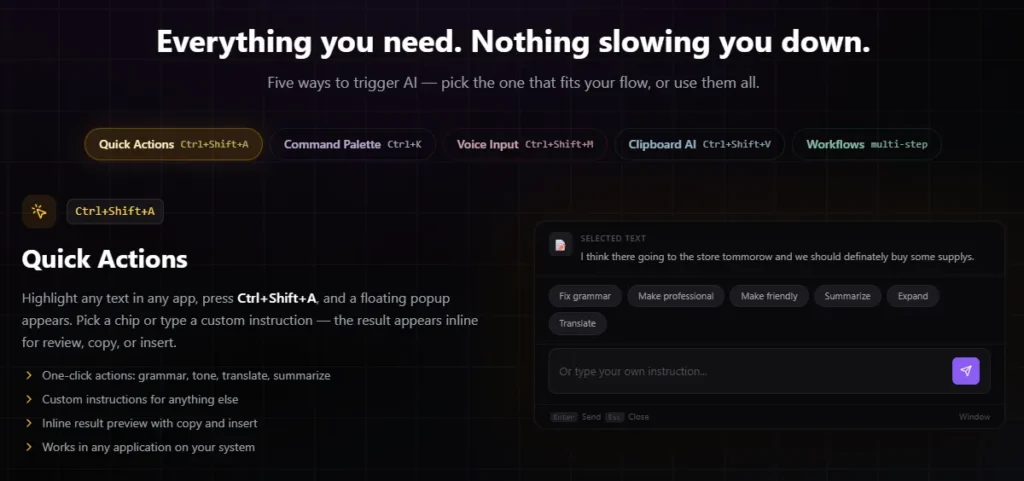
Quick Actions
Highlight text in any app. Press Ctrl+Shift+A to open a popup. Pick a one-click option like grammar, tone, translate, or summarize. Or type your own instruction. The result appears for you to review, copy, or insert.
Command Palette
Press Ctrl+K to open a search launcher. Look up any AI action or workflow. You can also type a plain instruction. It runs on your selected text.
Voice Input
Press Ctrl+Shift+M and speak. Your words appear as text with a waveform. When you stop, press Enter to clean it up. Press Tab to paste it as spoken. Or send it to another AI action.
Clipboard AI
Press Ctrl+Shift+V to open your clipboard history. It shows your last 50 items, with app and time. Quick-paste any item with a number key. Pin ones you want to keep. Run rewrite, summarize, or translate on any item.
AI Workflows
AI Workflows chain several AI steps together. One step’s result feeds into the next. Build your own workflow in the dashboard. Or run one from the Quick Actions panel. Just select text and pick the workflow.
The Benefits of Keyshift AI Lifetime Deal
- Less App Switching: You stay in one window. No jumping between apps to fix your text.
- Quicker Message Cleanup: A messy draft turns clear in seconds.
- More Professional Messages: Non-native English speakers can check their tone. Messages sound clear before you send them.
- Control Before Sending: You see the result first. Then you decide what replaces your text.
- Room To Undo Mistakes: Past actions can be undone. Try a change without losing your original text.
- Hands-Free Writing Option: Speak instead of typing. Get your thoughts into text with no keyboard.
- Privacy You Can Check: Your clipboard stays on your device. It’s never used to train AI models.
- Free To Start: Start without entering payment details. There’s no cost to try it out.
The Cons of Keyshift AI Lifetime Deal
- Occasional First-Try Bugs: Some actions didn’t work the first time. Users may need to try again.
- Weak Voice Dictation: The dictation feature still needs work. This may frustrate users who rely on voice input.
- Short Workflow Limit: Workflow prompts are capped at 1,000 characters. That can feel too low for longer prompts.
- Rougher Mac Experience: Mac users may notice a few issues. The command palette can feel less smooth. The result window doesn’t always move properly. The Mac version is still being improved.
Who is Keyshift AI best for?
- Content Creators: They rewrite, translate, or summarize text in the app they’re already using. This fits a fast content workflow.
- Copywriters: They turn a rough draft into cleaner copy right inside Slack or Gmail. No need to jump to another tool.
- Solopreneurs: They usually handle writing alone. AI actions in every app help them move through drafts on their own.
- Non-Native English Speakers: They can check that a message sounds clear and professional. No need to second-guess their wording.
- Users Who Build Repeatable Workflows: Some people do the same multi-step task often, like meeting notes to a follow-up email. They can chain those steps into one action.
Keyshift AI AppSumo Pricing Plan
License Tier 1 — $19 (regularly $70)
0 credits per month. Lifetime access.
Features:
- Pay once. Get lifetime access. No monthly fees.
- Highlight text anywhere. Clean it up with Quick Actions.
- Speak your instructions. No typing needed.
- Open a command menu. Search and run any AI action.
- Keep a history of your copied text. Reuse it anytime.
- Connect your own API key. It won’t touch your credit balance.
License Tier 2 — $59 (regularly $139) Recommended
1,000 credits per month. Lifetime access.
Features:
- Get everything in Tier 1. Plus 1,000 credits each month.
License Tier 3 — $119 (regularly $280)
2,000 credits per month. Lifetime access.
Features:
- Get everything in Tier 2. Plus double the monthly credits.
- Link AI steps together. Run them as one workflow.
👉 Get Keyshift AI now, up to 73% off
Final Thoughts – Keyshift AI Review
Switching apps just to fix a message wastes time. Keyshift AI solves this. It puts AI actions right where you type, in Slack, Gmail, or Discord. You get Quick Actions, voice input, and workflows that link steps together. It fits how content creators, copywriters, and solopreneurs already work. The AppSumo lifetime deal adds real value too. It’s a one-time cost, not a monthly bill. If you write a lot, Keyshift AI is worth trying.