Hello Aria Lifetime Deal – Manage Your Day in WhatsApp
My day used to be a mess. My reminders were in one app, and my notes were in another. I also forgot half of every meeting.
Then I tried Hello Aria. It’s an AI assistant that works inside WhatsApp and Telegram. You just text it like a friend.
I typed “remind me to call the bank at 3 pm,” and it was done. There were no forms or menus. When my hands were full, I sent a voice note. Aria turned it into a task for me. Each evening, it sent me a summary of what I finished and what was left.
It also connects with Google Calendar, Gmail, Drive, and Outlook. Everything shows up in one dashboard. Right now, the Hello Aria Lifetime Deal is on AppSumo. You pay once instead of every month.
In this review, I’ll cover its features, benefits, and pricing. I’ll also share alternatives and who it’s best for.
Features of the Hello Aria Lifetime Deal
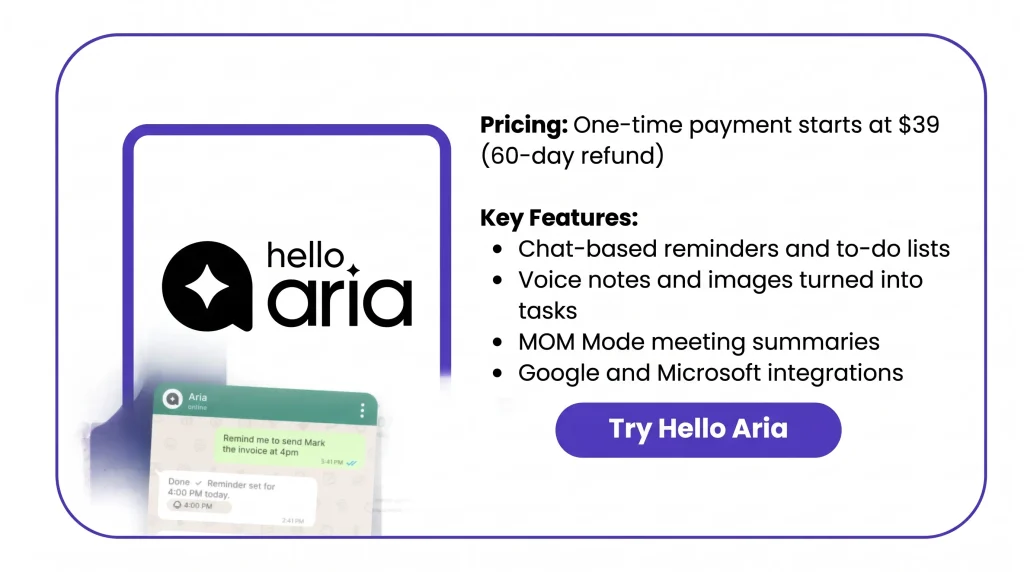
Smart Reminders
You can set one-time reminders. You can also set ones that repeat daily, weekly, or monthly. Share them with friends, plan them for contacts, or tie them to to-dos with due dates. You can even add a link for quick access.
Todo Lists
You can keep one main to-do list. Or you can make named lists for different parts of your life. Each task can have a due date and go to a contact. Aria sorts tasks by priority and tracks your progress.
Image & Voice Intelligence
You can send Aria a photo or voice note in any language. You don’t have to type. Aria turns your voice into text. It also pulls the key details out of your photos and audio.
Unified Dashboard & App
The dashboard shows your reminders, to-dos, notes, and events in one place. It pulls them in from every channel. You can also manage contacts, Circles, tasks, and settings here. It shows your activity stats too.
Meeting Summaries (MoM)
You can record a meeting right in the chat. Aria turns it into text in many languages. It shows who spoke. It also lists the action items.
Smart Notes
Send any info to Aria, and it saves it as a note. Aria tags each note by topic. It suggests related notes. You can find any note with a quick search.
Circle
A Circle is a group for your team, family, or friends. You can add people and give them tasks. You can send reminders to the whole group. You can also share links at a set time.
Pros of Hello Aria
- No New App Needed: You can track your tasks inside WhatsApp or Telegram. You already use these apps every day.
- Fewer Missed Deadlines: Reminders reach you on time in chat or on your phone. So key dates are less likely to slip by.
- Hands-Free Task Capture: Driving, cooking, or hands full? Just send a quick voice note to save a task.
- Clear Meeting Follow-Ups: After a meeting, you know who needs to do what. You don’t have to write notes by hand.
- Easier Group Coordination: Your team or family gets the same tasks and reminders. So you don’t have to keep chasing people.
- Fewer Apps to Juggle: Your reminders, to-dos, notes, and calendar stay in one place. You don’t have to jump between apps.
- Works in Your Language: You can type or speak in your own language. Aria supports over 100 languages.
Cons of Hello Aria
- Basic Task Management: Tasks have no subtasks or checklists. There is no board view or full details box either. So big projects with many steps are hard to run.
- Plain Text Notes: Notes are saved as plain text. You can’t add styles, pictures, or files to a note.
- Rigid Task Input: Aria often asks for every detail when you add a task. One buyer also had to split requests into more than one message. This slows down quick task capture.
- Calendar Sync Issues Reported: One early buyer said their Google or Outlook events did not show up in Aria. They also did not sync the right way.
Who is Hello Aria best for?
- Startup Founders: Founders hop from investor calls to team meetings all day. Aria turns each meeting into next steps. They can give tasks to their team in a Circle.
- Freelancers: Freelancers work with many clients at once. They can track each due date. They can set bill reminders too. After a call, they can save next steps in WhatsApp.
- College Students: Students can track homework and test dates in WhatsApp. For group work, they can share tasks in a Circle.
- Busy Parents: Parents deal with school runs, family plans, and chores. They can share tasks and reminders with their partner. A family Circle keeps it all in one spot.
- People With ADHD: Some people lose track of tasks fast. They can just text or send a voice note. They don’t need to open an app. They also get repeat reminders for daily habits.
Hello Aria AppSumo Pricing Plan
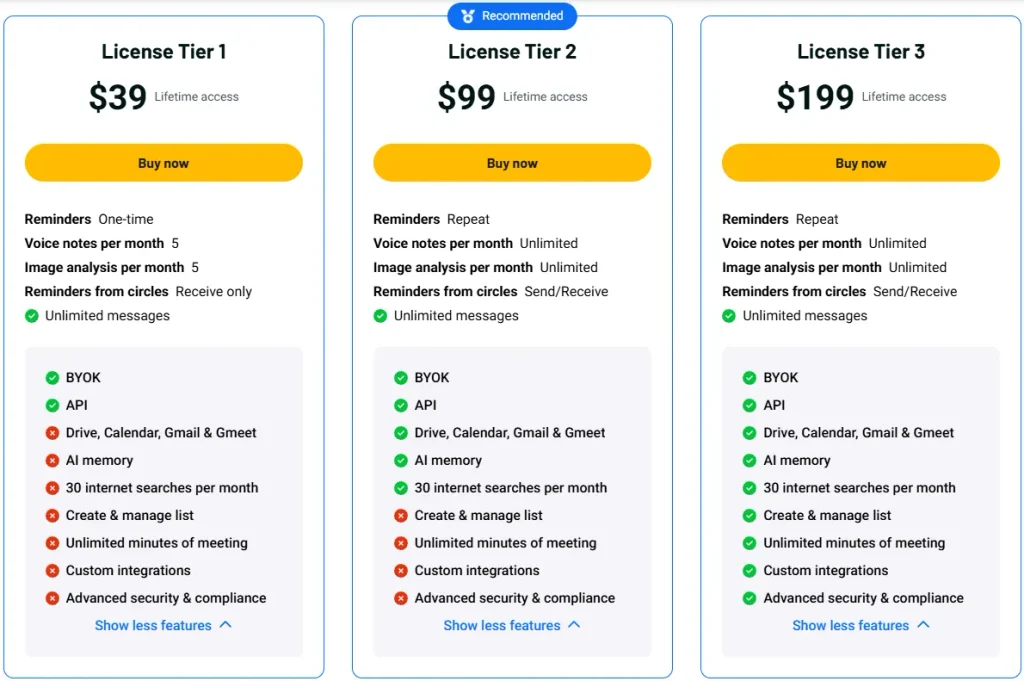
License Tier 1 ($39, one-time)
- One-time reminders
- 5 voice notes and 5 image scans a month
- Receive-only Circle reminders
- Unlimited messages
- BYOK and API access
License Tier 2 ($99, one-time ) – Recommended
Includes License Tier 1, plus:
- Repeat reminders
- Unlimited voice notes and image scans
- Send and receive Circle reminders
- Google Drive, Calendar, Gmail, and Meet
- AI memory
- 30 web searches a month
License Tier 3 ($199, one-time)
Includes License Tier 2, plus:
- Create and manage lists
- Unlimited meeting minutes (MoM)
- Custom integrations
- Advanced security and compliance (coming soon)
5 Best Hello Aria Alternatives in 2026
The top Hello Aria alternatives are Any.do, Todoist, TickTick, Notion, and Microsoft To Do. Everyone carries out their work in their own way. Their comparative positions are given below.
Hello Aria vs Any.do
Any.do is a to-do app with lists, a calendar, and a WhatsApp bot. It’s the closest match to Hello Aria. But it’s an app first, and WhatsApp is an add-on.
- Starting Price: There is a free plan. Premium is $4.99 a month if you pay yearly. It’s $7.99 if you pay monthly.
- Pros: Its WhatsApp bot can create tasks and send reminders. It can also turn messages into tasks. A Family plan for 4 people costs $8.25 a month, paid yearly.
- Cons: The free plan has no repeat tasks or WhatsApp reminders. It also lacks location reminders and color tags.
- Key Difference: Hello Aria runs mostly in the chat. Any.do gives you a daily planner and its own calendar.
Hello Aria vs Todoist
Todoist is a task app built around projects. You type tasks in plain words. It sorts them into projects and lists.
- Starting Price: The free plan allows 5 projects. Pro is $5 a month if you pay yearly. It’s $7 if you pay monthly.
- Pros: It has Kanban boards and project templates for big projects.
- Cons: The free plan stops at 5 projects. It has no calendar layout or AI tools. Prices also went up in December 2025.
- Key Difference: Todoist doesn’t work in WhatsApp or Telegram. It can’t read voice notes or take meeting notes.
Hello Aria vs TickTick
TickTick is a low-cost to-do app. It has focus and habit tools built in.
- Starting Price: There is a free plan. Premium is $35.99 a year, or $2.99 a month. Paying monthly costs $3.99.
- Pros: It has a Pomodoro timer and a habit tracker. Hello Aria has neither.
- Cons: The free plan allows 9 lists, 99 tasks per list, and 1 calendar. You can’t try Premium for free.
- Key Difference: You do everything inside the TickTick app. With Hello Aria, you can use voice notes, photos, and chat.
Hello Aria vs Notion
Notion is a workspace for pages, wikis, and databases. It’s made for sorting info, not for quick reminders.
- Starting Price: There is a free plan. Plus is $10 per person per month if you pay yearly. It’s $12 if you pay monthly.
- Pros: It has database views and wiki pages for team knowledge.
- Cons: Full Notion AI comes only with Business, at $20 per person a month. It also takes longer to learn.
- Key Difference: Hello Aria helps you save tasks fast in chat. Notion helps you build a full workspace.
Hello Aria vs Microsoft To Do
Microsoft To Do is a simple, free task list. It works best if you already use Outlook.
- Starting Price: It’s free with any Microsoft account. You don’t need a Microsoft 365 plan.
- Pros: My Day gives you a fresh plan each day. Flag an email in Outlook, and it shows up as a task.
- Cons: It has no Google Calendar link. It also has no AI chat, voice notes, or meeting notes.
- Key Difference: Hello Aria works with Google and Microsoft tools. Microsoft To Do sticks to Microsoft.
Final Thoughts – Hello Aria Review 2026
Hello Aria made my day much simpler. I just send a message, and my reminders, to-dos, and notes run from one chat.
I use voice notes the most. I talk, and the task is saved. After calls, MOM Mode gives me the summary and action items.
I love seeing my whole day in one dashboard. It also works with my Google and Microsoft tools.
The Hello Aria Lifetime Deal starts at $39 as a one-time payment on AppSumo. You also get a 60-day refund window. I use it every day, so paying once just makes sense.