Fraud Blocker Lifetime Deal: Stop Fake Ad Clicks and Bots
Fraud Blocker helps stop fake ad clicks and cut wasted ad costs. It works with Google and Meta ads. It finds clicks from bots, competitors, and other fake traffic.
To get started, add its tracking pixel to your site. Then connect your ad account. Fraud Blocker checks your traffic and stops suspicious users from seeing your ads again.
You can also spot fake leads, track blocked clicks, and see how much money you may have saved. It offers a 7-day free trial and an AppSumo lifetime deal starting at $79.
KEY Features of Fraud Blocker
Fraud Blocker helps spot fake ad clicks and cut wasted costs. Here are its key features and how to use them.
Detect and Block Fake Ad Clicks
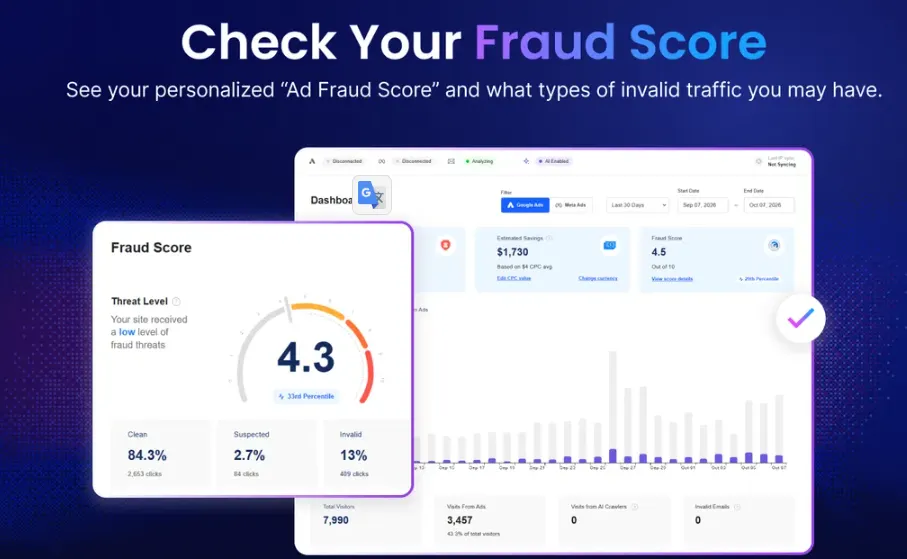
Fraud Blocker helps stop fake ad clicks from bots, competitors, and click farms. It checks over 50 signs, such as IP addresses, devices, and repeat clicks.
To get started, add its tracking pixel to your website. Then connect your Google or Meta Ads account. Fraud Blocker checks each visit and blocks bad IPs from seeing your ads again.
You can also view fraud scores in your dashboard. Plus, you can change the blocking rules to fit your needs.
Detect Advanced Fraud with AI
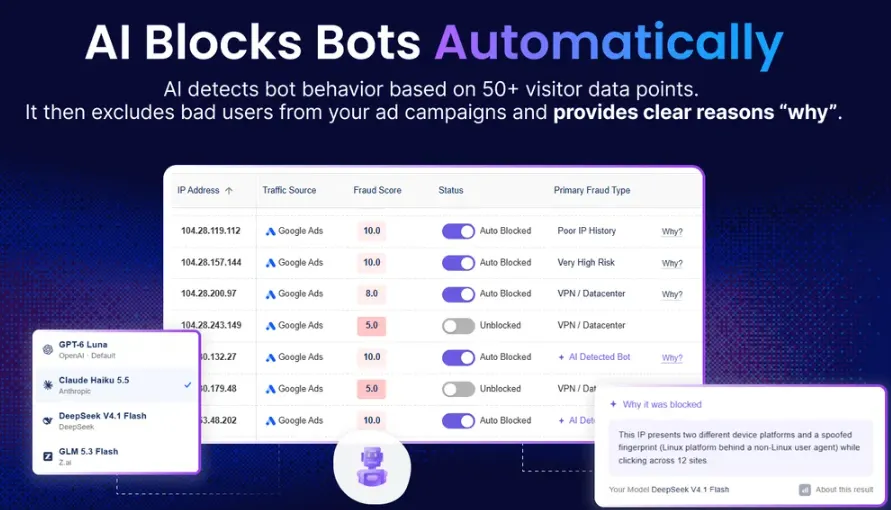
Fraud Blocker uses AI to spot fake clicks that look real. It checks how people click and browse your site to find hidden fraud.
To use it, open your dashboard and select your website. Go to Customizations and turn on AI-Powered Detection. You can then choose an AI model, like OpenAI or Claude.
The AI checks each ad click for fraud. It also shows why an IP was blocked. This helps you review fake clicks and understand the results.
Verify Emails and Block Fake Leads
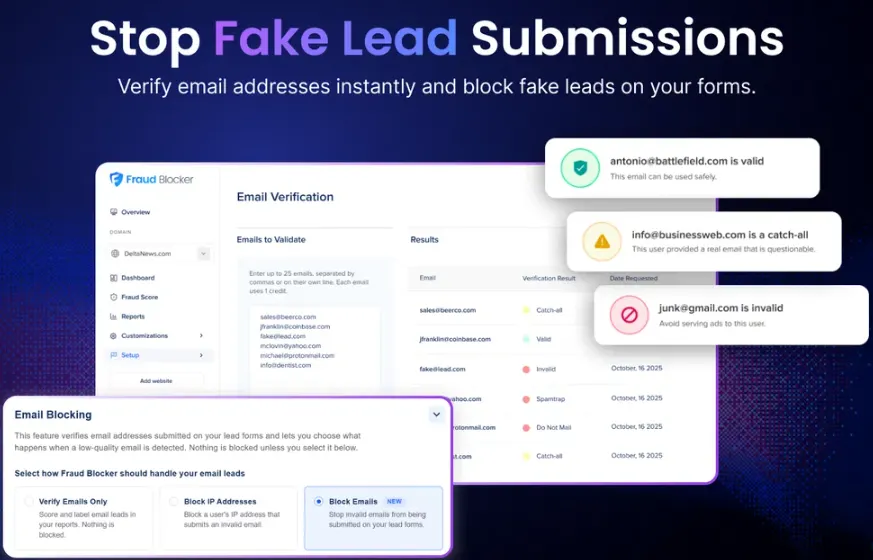
Fraud Blocker helps you spot fake emails and block bad leads. It checks email addresses when someone fills out your forms.
To use it, turn on Email Verification and add your lead form pages. Then choose to block fake emails or stop those users from seeing your ads again.
You can also check many emails at once and view the results in your dashboard. This helps keep fake leads off your sales list.
Track Ad Savings and Fraud Reports
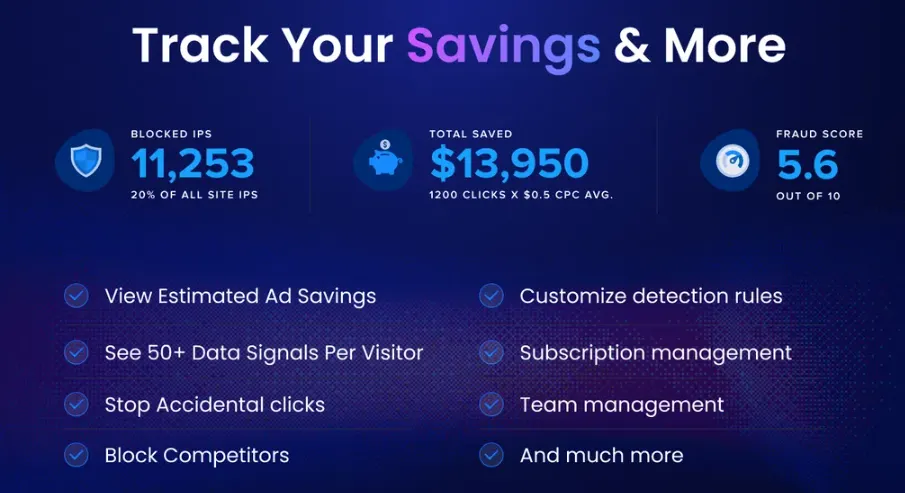
Fraud Blocker shows how many fake clicks it finds and blocks. It also shows your estimated ad savings and where bad clicks come from.
To use it, open your dashboard to check your savings. Then go to Reports or Fraud Score to see blocked IPs, devices, and visitor details.
You can also use AI Research to ask about your traffic. Plus, you can export IP lists to check later.
Fraud Blocker Pros and Cons
Fraud Blocker has both good points and some limits. Here are its main pros and cons to help you decide.
Pros
- Lower Wasted Ad Spend.
- Fewer Fake Leads.
- Less Manual Work.
- Clearer Ad Traffic Insights.
- Easier Client Reporting.
Cons
- Monthly Ad Click Limits.
- Limited Ad Platform Support.
- Ad Account Connection Issues.
- Estimated Savings, Not Exact.
Who Is Fraud Blocker Best For?
- Google Ads Managers: Helps them stop fake clicks and save money on Google Ads.
- Digital Marketing Agencies: Helps agencies track fake clicks across many client websites in one place.
- Ecommerce Store Owners: Helps online stores cut fake ad traffic and reach real shoppers.
- Local Service Businesses: Helps plumbers, electricians, and other local businesses avoid wasted ad clicks.
- Lead Generation Teams: Helps teams block fake emails and spend less time on bad leads.
Fraud Blocker AppSumo Pricing Plan
Fraud Blocker has seven lifetime plans on AppSumo, starting at $79. Each plan has different monthly limits.
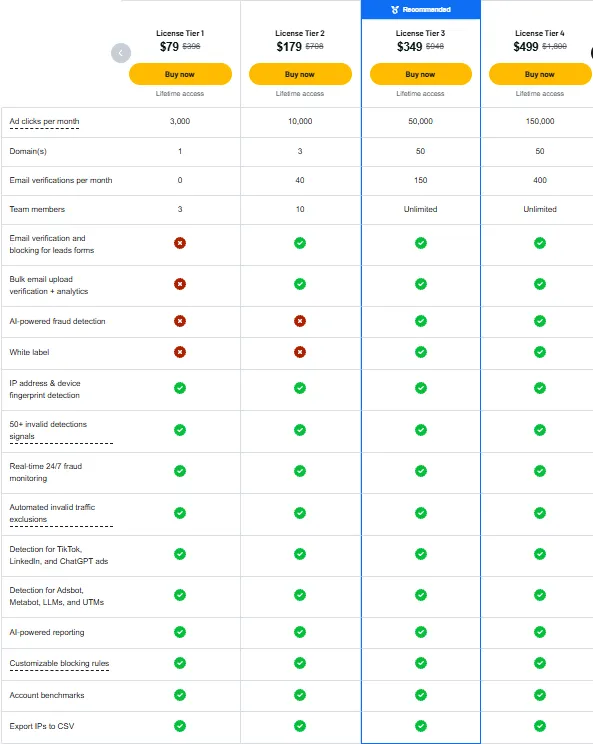
License Tier 1 – $79
Features:
- 3,000 ad clicks/month
- 1 domain
- 3 team members
- IP and device tracking
- 50+ fraud detection signals
- 24/7 fraud monitoring
- Automatic traffic blocking
- TikTok, LinkedIn, and ChatGPT ad detection
- Adsbot, Metabot, LLM, and UTM detection
- AI-powered reports
- Custom blocking rules
- Account benchmarks
- Export IPs to CSV
License Tiers 2–7
Fraud Blocker has six more lifetime plans. Tier 2 costs $179, Tier 3 costs $349, and Tier 4 costs $499. Tier 5 is $799, Tier 6 is $1,299, and Tier 7 is $1,999.
These plans cover 10,000 to 2 million ad clicks per month. Higher tiers let you protect more sites and check more emails. Email checks start at Tier 2. AI fraud detection and white-label branding start at Tier 3.
Final Thoughts – Fraud Blocker Review 2026
Fraud Blocker helps stop fake ad clicks and save money. I like how it tracks fake clicks, blocks bad IPs, and shows your estimated savings in one place.
Its AI tools also help spot fraud and block fake leads. With a 7-day free trial and a lifetime deal starting at $79, it’s worth a look.