FeedBoss Lifetime Deal – AI Posts That Sound Like You
You tell yourself you’ll post today. The day ends. The post never gets written. You stare at a blank box. You try to think of something smart. Then you close the tab instead.
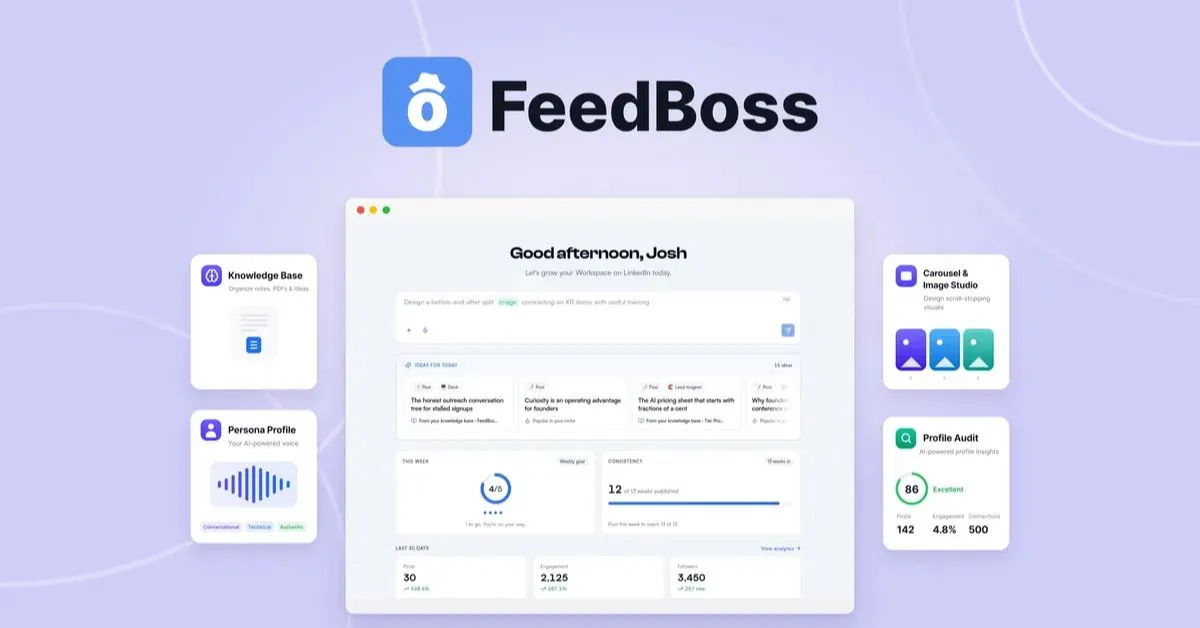
FeedBoss writes LinkedIn posts for you. It also makes carousels and images. Every post sounds like you, not a robot. First, it reads your profile and old posts. Then it learns your voice.
If you want facts on the FeedBoss Lifetime deal, you’re in the right place. This is also a full FeedBoss Review. AppSumo launched the FeedBoss deal at a big discount. This post shares all the deal details.
This post shows what FeedBoss can do. You’ll see what it costs. You’ll learn if it’s worth your money. You’ll also learn who FeedBoss is built for. Then you’ll know fast if it fits you.
By the end, you’ll know what FeedBoss brings to your LinkedIn game. But don’t wait too long. This FeedBoss deal on AppSumo won’t stay at this price forever.
Features of the FeedBoss Lifetime Deal
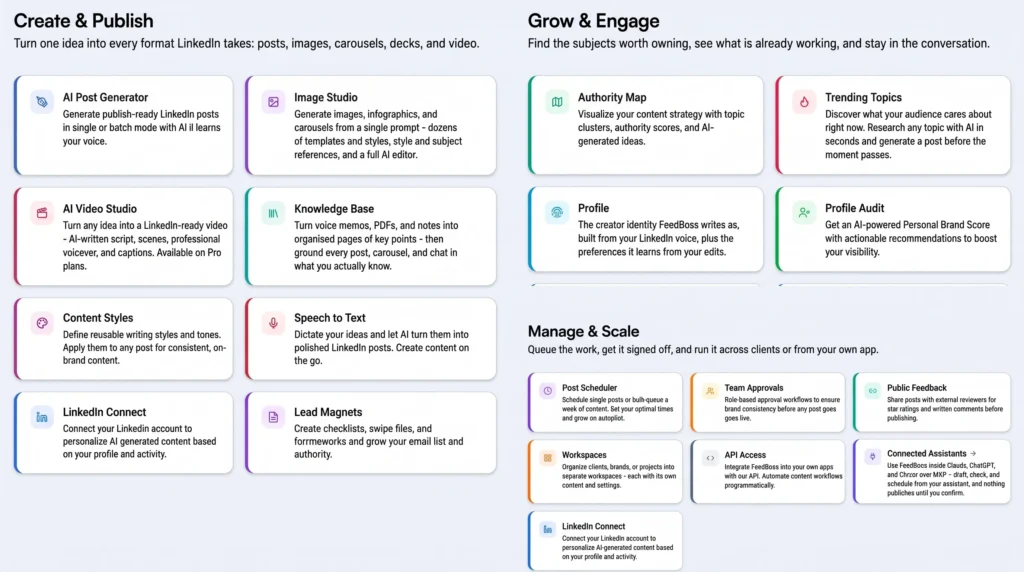
Profile
FeedBoss reads your own LinkedIn posts. It builds a Profile from them. It also watches the edits you make before you publish. Repeated patterns become rules for future drafts.
AI Post Generator
You give it a topic, a link, or a file. It writes a LinkedIn post from that input. You can create one post at a time. Or ask for five versions in batch mode.
Image Studio
You type one prompt. Then pick a format: image, infographic, or carousel. It generates the result. You can then edit the result. You can remove an object. You can change the background. Or edit the text inside it.
Slide Decks
You describe a topic. It writes a full slide deck. You can edit the text directly. You pick a template, or let it choose. Then export the deck as PowerPoint or PDF.
AI Video Studio
You type one idea. It writes a script and plans the scenes. Then it adds an AI voiceover. The result is an MP4 file. You can download it or attach it to a post.
Lead Magnets
You pick a magnet type: checklist, swipe file, template, framework, or resource list. Then add your niche and audience. FeedBoss writes the content for you. You can export the result as a PDF. Or as a Markdown file.
Content Calendar
You can schedule posts weeks ahead from one calendar view. You can also give it a topic. Or a PDF, YouTube link, or article. It fills a week or month with posts at once.
Slop Check
This tool reads a finished post three times. It marks lines that sound machine-written. Each flagged line gets a reason and a fix. You can accept it or edit it.
Pros of the FeedBoss Lifetime Deal
- No More Blank Page: A fresh idea is always ready. You never face a blank screen.
- Sounds Authentically Like You: Your posts read like your own words. They match your real profile.
- One Place, Every Format: You turn one idea into a post. Or an image, carousel, deck, or video. You skip extra tools.
- Easier to Stay Consistent: Your ideas and plans sit in one place. Weekly posting gets easier.
- Fewer Repeated Corrections: Fix a mistake once. It stays fixed. You won’t see it again.
- Content Stays Accurate: Posts use your own notes and files. They stay true, not made up.
- Control Before Publishing: Nothing posts until you say yes. You have the final say.
Cons of the FeedBoss Lifetime Deal
- LinkedIn Only: FeedBoss only works with LinkedIn. It won’t help you post on other apps.
- One Media Item Per Post: Each post can carry only one item. It could be an image, a carousel, or a video. You can’t mix two together.
- Key Tools Locked By Tier: Some tools cost more to use. You need a higher plan for AI Video Studio. The same goes for Lead Magnets and Authority Map.
- Short Video Length: Videos from the AI Video Studio stay short. They run for 60 seconds at most.
Who is FeedBoss best for?
- Founders & Executives: They post updates often. They share their view. They skip hiring a writer.
- Consultants & Coaches: Their posts match their profile. They sound like their real self.
- Marketing & Agency Teams: They create posts for clients. Each brand gets its own space. Posts get checked first.
- Solo Creators & Personal Brands: They turn one idea into a post. Or an image. Or a carousel. They skip extra tools.
- Sales Professionals: They track prospects and clients. They stay active. They post and comment often.
FeedBoss AppSumo Pricing Plan
License Tier 1 — $59 (one-time)
Features:
- 400 AI credits monthly, plus 2,000 to start.
- Up to 5 profile audits a month.
- 1 LinkedIn account, 1 workspace, 1 team member.
- Track 10 profiles for engagement.
- 25 GB storage.
- 2K image quality.
- Knowledge Base: voice + text only.
- No API key needed, or bring your own.
- AI chat assistant + profile voice matching.
License Tier 2 — $149 (one-time)
Includes License Tier 1, plus:
- 1,200 credits monthly, plus 5,000 to start.
- Up to 15 profile audits a month.
- 5 LinkedIn accounts, 5 workspaces, 2 team members.
- Track 30 profiles.
- 100 GB storage.
- Knowledge Base adds PDFs + talk-it-out.
- Premium image templates.
License Tier 3 — $299 (one-time) — Recommended
Includes License Tier 2, plus:
- 3,200 credits monthly, plus 10,000 to start.
- Up to 25 profile audits a month.
- 10 LinkedIn accounts, 10 workspaces, 10 team members.
- Track 60 profiles.
- 500 GB storage, 4K images.
- AI Video Studio.
- API access.
- Lead Magnets.
- Authority Map.
- Post approval workflow.
License Tier 4 — $499 (one-time)
Includes License Tier 3, plus:
- 5,000 credits monthly, plus 20,000 to start.
- Up to 50 profile audits a month.
- 25 LinkedIn accounts, 25 workspaces, 30 team members.
- Track 100 profiles.
- 1 TB storage.
FeedBoss Alternatives
The 5 best alternatives to FeedBoss discussed below are all very popular tools, and viewers are very comfortable using them.
FeedBoss vs Taplio
Taplio is a LinkedIn-only AI tool. Lempire built it, the team behind Lemlist. It writes posts from a topic, URL, or video link. It also builds carousels. The Pro tier adds a 3M+ contact database.
- It runs through a Chrome extension. Login uses cookies, not LinkedIn’s official API.
- Pricing starts around $39 a month.
- Best for: creators who also want lead tools built in.
FeedBoss vs Supergrow
Supergrow is a LinkedIn AI writing tool. It captures your voice as you write. Its top feature is PostCast. You talk for 15 minutes. It turns that into 5 to 7 posts.
- Content DNA learns your tone and opinions from past posts.
- Pricing starts at $19 a month. Carousels and analytics need the Pro plan.
- Best for: people who would rather talk than type.
FeedBoss vs AuthoredUp
AuthoredUp does not write content with AI. It’s a Chrome extension for LinkedIn’s editor. It adds formatting tools and a live preview. The preview shows where “see more” cuts your post.
- No AI writing, no idea generation, formatting and analytics only.
- Priced at $19.95 a month for one profile.
- Best for: writers who want sharper posts, not new ones.
FeedBoss vs MagicPost
MagicPost connects through LinkedIn’s official API. This means no ban risk from browser automation. It studies your past posts to write like you. It also tracks up to 49 profiles in one feed.
- Comes with a large inspiration library and a hook generator.
- Creator plan runs about $69 a month, or $39 billed yearly.
- Best for: creators who want API safety and voice-matched writing.
FeedBoss vs Buffer
Buffer isn’t just for LinkedIn. It’s a general scheduler. It manages LinkedIn, Instagram, TikTok, X, and more. You get one shared calendar. FeedBoss’s own AppSumo page names Buffer as an alternative.
- No AI voice-matching, no authority map, no slop check.
- A free plan is available. Paid tiers add more channels and features.
- Best for: people managing several social platforms, not just LinkedIn.
Final Thoughts – FeedBoss Review 2026
Staying seen on LinkedIn takes time. Most people don’t have enough. FeedBoss fixes this. It turns one idea into a post, image, carousel, or video. Every piece sounds like you. It also checks for AI lines first. The FeedBoss Lifetime Deal adds flexible plans and a real calendar. It suits creators, coaches, and teams. You get steady posts, minus the daily grind. Take a good look.