Bit Form Lifetime Deal – Lightweight WordPress Forms
Making forms in WordPress should be easy. But many form plugins charge you every year. Then they want more money for extras. Think payments or file uploads.
So I tried Bit Form. It’s a WordPress form builder by Bit Apps. You just drag and drop fields to build a form. No coding needed.
It has 50+ form fields and conditional logic. It also supports multi-step forms. You can take payments with PayPal, Stripe, Razorpay, or Mollie. You can also send form data to 50+ apps. These include Google Sheets and Mailchimp. Yet a simple form loads only about 20 KB of code. So your site stays fast. I also like that you can view and edit submitted entries.
Right now, the Bit Form Lifetime Deal on AppSumo costs $79. You only pay once. In this review, I’ll cover its features and benefits. I’ll also explain pricing and who it’s best for.
Features of the Bit Form Lifetime Deal
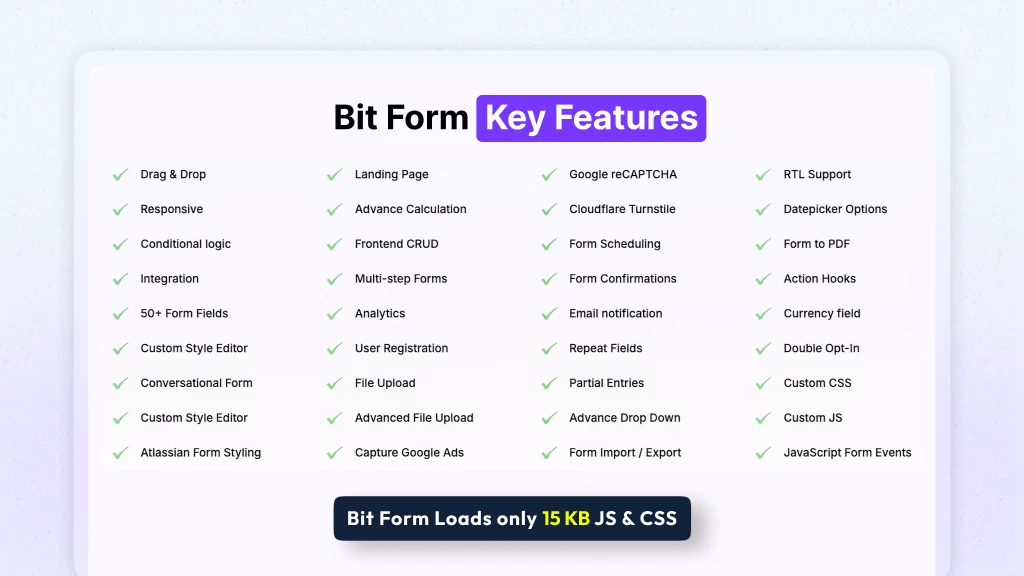
- Drag & Drop Form Builder: Click a field or drag it into your form. You can pick from 50+ field types. No coding is needed.
- Advanced Field: These fields collect more detailed data. Think signatures, file uploads, and dropdowns. Users can even sign with a mouse or touchscreen.
- Form Style Editor: This built-in editor changes how your form looks. Change colors, fonts, spacing, buttons, and backgrounds. You can also save your own themes.
- Payment Form: Users can pay right inside your form. It works with PayPal, Stripe, Razorpay, and Mollie. The money goes straight to your own account.
- Spam Protection: It blocks fake and bot entries. Use Google reCAPTCHA, hCaptcha, or Cloudflare Turnstile. A honeypot trap is also there.
- Conditional Logic: It shows or hides fields based on user answers. It can also change a field’s value. It can even send a different email.
- Multi-step form: It splits a long form into small steps. Next and Previous buttons move users between steps.
- Conversational Form: It shows one question at a time. You can share it with a direct link. Or you can add it to a page.
- Repeater Field: Users can add, copy, or remove a group of fields. For example, they can list many past jobs.
- Calculator: It does math with the numbers users enter. Use it for order totals, shipping costs, or loan estimates.
- Integration: It sends your form data to other apps. Bit Form connects with 50+ platforms. Some are Google Sheets, Mailchimp, Zapier, and Zoho CRM.
Pros of Bit Form
- No Coding Needed: Even beginners can build forms. No developer is needed.
- Faster Website Pages: A simple form adds little code. Your pages still load quickly.
- Fewer Fake Entries: Less spam reaches you. Your inbox stays cleaner.
- Less Manual Data Work: Form answers flow into your other tools. No more copying by hand.
- Easier-to-Finish Long Forms: Visitors see fewer questions at once. Long forms feel less tiring.
- Forms That Match Your Site: Your forms match your website. No broken styles or messy layouts.
- Simple Online Payments: Customers pay right inside the form. The money reaches your own account.
- Easy Entry Updates: You can fix wrong details later. No new form is needed.
- Lower Long-Term Costs: You pay just once. There’s no yearly bill or add-on fee.
Cons of Bit Form
- Takes Time to Learn: Some tools, like linking other apps, need extra setup. You may need some tech skills too. So beginners may take longer to start.
- Key Features Need Pro: The free version leaves out payments and PDF files. It also skips saving half-filled forms. You need a paid plan for these.
- Occasional Bugs: Some users have hit small bugs. They often show up after updates or site moves. They can affect forms that are already live.
- Past Security Issues: Security flaws were found in past versions. That matters for a tool that holds user data.
Who is Bit Form best for?
- Web Design Agencies: You build sites for lots of clients. Your forms can match each site’s look. They also work with each client’s page builder.
- Freelance Web Designers: You often make booking, quote, or order forms. You just drag fields into place. No code is needed.
- Small Business Owners: You get leads and help requests on your site. One form tool takes messages, bookings, and payments.
- Membership Site Owners: You run a course site, a private group, or a client portal. Your forms can handle sign-ups and logins. They can also reset passwords.
- Email Marketers: You grow email lists. New sign-ups go right to Mailchimp or your CRM.
Bit Form AppSumo Pricing Plan
License Tier 1 – $79 one-time (regular $251)
- Up to 5 websites
- Future Plus (Tier 1) updates
- 40+ form fields
- Drag-and-drop builder
- Show or hide fields based on answers
- Style editor to change your form’s look
- Forms that ask one question at a time
- Users can edit their own entries
- Atlassian form style
- Forms match your site’s theme
- Built-in email sending (SMTP)
- Manage all your form entries
- Put fields side by side
- Split forms into steps
- Landing pages for forms
- Do math with form answers
- Charts from your entries
- More file upload options
- Allow or block users by IP
- Set when forms open and close
License Tier 2 – $158 one-time (regular $499)
Includes License Tier 1, plus:
- Unlimited websites
- Future Agency (Tier 2) updates
What Are the Best Bit Form Alternatives?
The best Bit Form alternatives are WPForms, Gravity Forms, Fluent Forms, Formidable Forms, and Typeform. All but Typeform are WordPress plugins. They are discussed below.
Bit Form vs WPForms
WPForms is a well-known WordPress form plugin. Many beginners start with it. It’s easy to use. But you pay every year, and many tools sit in higher plans.
Starting price: $49.50 a year for one site. Elite costs $299.50 a year with no site limit.
Pros:
- Basic and Plus have templates, logic, alerts, and spam checks. You can also manage entries.
- A free Lite version is on WordPress.org.
Cons:
- First-year prices are intro deals. Renewals cost about twice as much.
- The free Lite version has no payments or CRM links. It also shows WPForms branding.
- One reviewer said Zapier needs Pro, at $199 a year.
How it differs from Bit Form:
- WPForms has no lifetime plan.
- Bit Form’s free version links to 50+ apps. WPForms Lite can’t link to a CRM.
Bit Form vs Gravity Forms
Gravity Forms is an older, trusted plugin for big, complex forms. It has no free version. You must pay before you can try it.
Starting price: $59 a year for one site. Pro is $159 for three sites. Elite is $259 with no site limit.
Pros:
- It has 30+ official add-ons.
- Its conditional logic is well tested.
- Elite has no site limit.
Cons:
- There’s no free plan and no monthly option.
- Many top add-ons are Elite-only. These include Signature, Conversational Forms, and Partial Entries.
How it differs from Bit Form:
- Gravity Forms is yearly only. It has no lifetime license.
- Bit Form’s plans don’t need extra add-ons.
Bit Form vs Fluent Forms
Fluent Forms is the closest match to Bit Form. Both have a strong free version and a pay-once option. Many say Fluent Forms is easier to set up. But its lifetime plans cost more.
Starting price: $79 a year for one site. Lifetime starts at $349 for one site. No site limit costs $899.
Pros:
- Logic rules and one-question forms work for free.
- It sells lifetime licenses.
Cons:
- Free Stripe payments add an extra 1.9% fee.
- Its lifetime plans cost far more than Bit Form’s deal on AppSumo.
How it differs from Bit Form:
- One AppSumo reviewer said Bit Form is less plug-and-play than Fluent Forms.
- Bit Form costs less to own for life.
Bit Form vs Formidable Forms
Formidable Forms is known for math. It can also show form data on your site. It suits forms that work with numbers. But renewal prices jump.
Starting price: $39.50 the first year for one site. It renews at $79.
Pros:
- Calculated fields start from the Basic plan.
- Views show submitted entries on your site.
Cons:
- All plans are yearly. First-year prices are 50% off. Elite renews at $599.
- Calculators, payments, signatures, and one-question forms need Business or higher.
How it differs from Bit Form:
- Formidable keeps many tools in higher plans.
- Both Bit Form AppSumo tiers share the same features. That includes one-question forms and math.
Bit Form vs Typeform
Typeform is an online form tool, not a WordPress plugin. It shows one question at a time. People often use it for surveys.
Starting price: There’s a free plan. Basic costs $28 a month, billed yearly.
Pros:
- A free plan lets you test it.
- Forms show one question per screen.
Cons:
- Each plan caps monthly responses. Free gets 10, and Basic gets 100. Plus gets 1,000, and Business gets 10,000.
- Once you hit the cap, the form stops taking responses.
- Removing branding starts on Plus, at $56 a month.
How it differs from Bit Form:
- Typeform runs outside WordPress and bills monthly.
- Bit Form runs inside WordPress. Even its free version has no limit on forms or entries.
Final Thoughts – Bit Form Review 2026
Bit Form surprised me. I expected a basic form plugin. But it handled contact forms, multi-step forms, payments, and math in one builder. It also stayed light. A simple form loads about 20 KB, so my pages stayed fast.
I liked that entries went straight to Google Sheets, Mailchimp, and more. I could also edit them later. New updates added a fresh builder and email code checks. Forms now work in many languages.
With the Bit Form Lifetime Deal, you pay $79 once. You keep getting updates. You also get 60 days to try it. For all it does, paying once feels like a smart move.