
Billbooks Lifetime Deal: Send Invoices and Quotes in Seconds
Billbooks is an online invoicing tool for freelancers and small businesses. It helps you create invoices, send quotes, track payments, and manage all your billing in one place.
You can add your logo, share payment links, and see when clients open or pay invoices. It also offers automatic reminders, recurring invoices, expense tracking, and business reports.
Billbooks works on computers, iOS, and Android devices. It supports many currencies and languages, so you can bill clients worldwide.
Sagar Kogekar founded Billbooks in 2010. It is made by Billbooks Pty Ltd in Sydney, Australia. The tool makes daily billing easier without the need for complex accounting software.
KEY Features of Billbooks
Billbooks has several features; I have highlighted a few key ones below.
Create and Send Invoices and Quotes
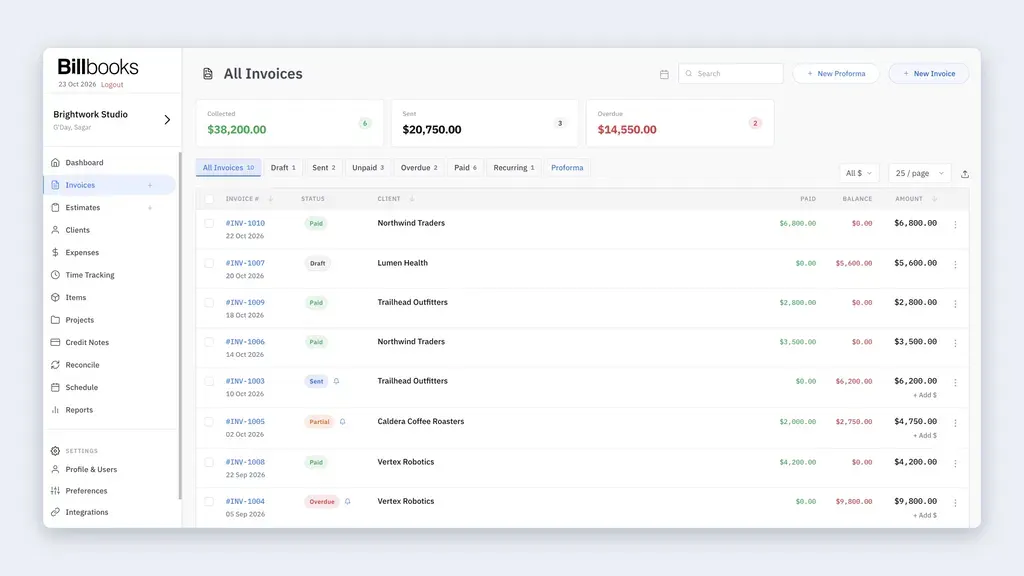
Billbooks helps you create and send invoices and quotes fast. You can add your logo, taxes, payment terms, and payment links.
To make an invoice, go to Invoices and select a client. Add items and prices, then click Send. You can send it by email, WhatsApp, or Messenger.
You can also turn approved quotes into invoices with one click. Billbooks shows when clients open invoices. It also sends reminders for unpaid bills.
Manage Items and Expenses
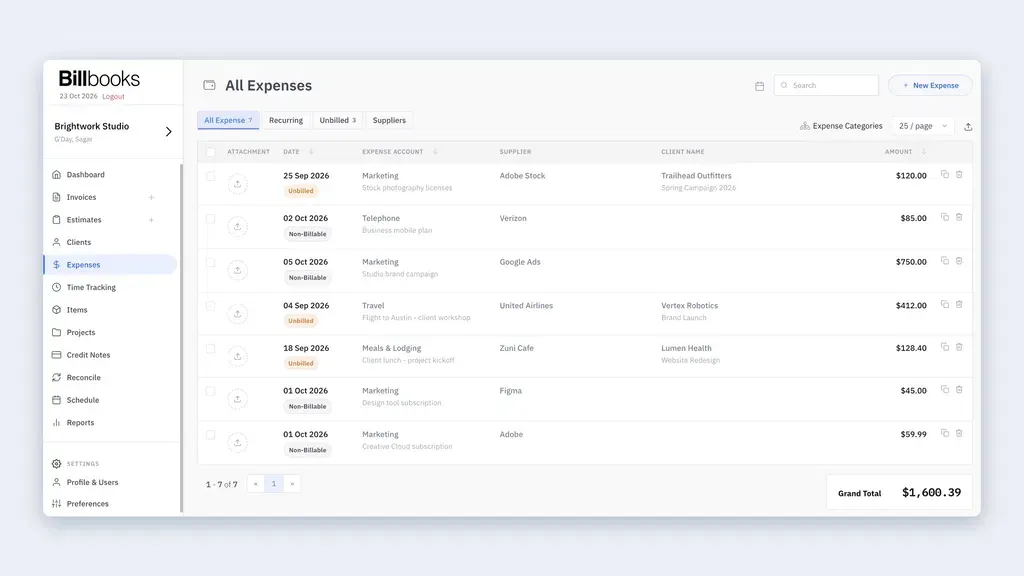
Billbooks helps you track what you sell and spend. You can manage products, services, stock, and costs in one place.
To add a product or service, go to Items. Enter its name and price, then save it. You can use it again on invoices.
For costs, go to Expenses, add the amount, and upload a receipt. You can add these costs to client invoices and set up repeat expenses.
Track Projects and Reports
Billbooks helps you track projects, work hours, and payments. You can keep all quotes, invoices, and costs for each project in one place.
To start, go to Projects and select a project. Add your work details and track your hours. You can then add unpaid work hours to an invoice.
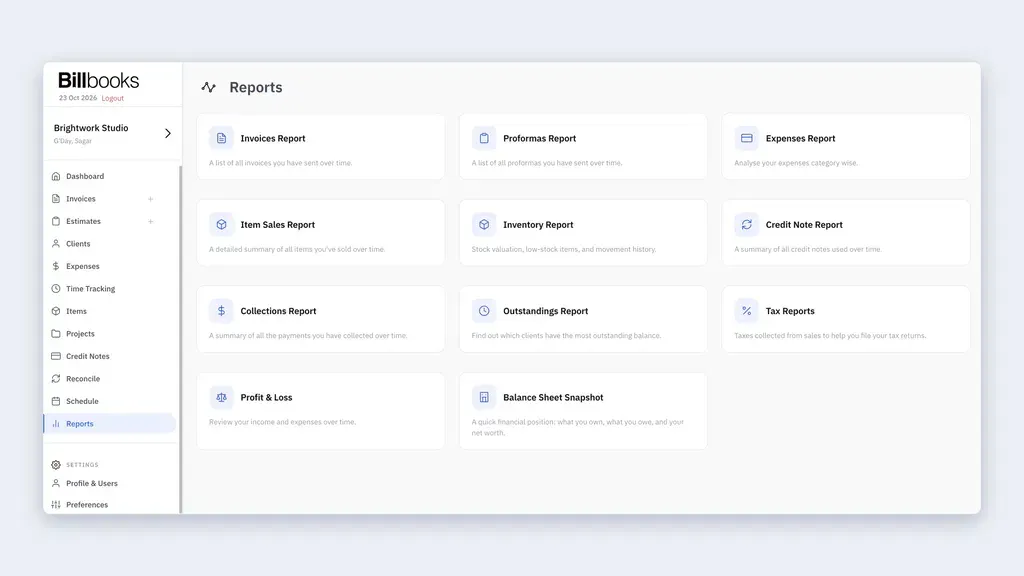
Go to Reports to check sales, costs, taxes, and profit. You can also see how much money clients still owe you.
Manage Your Business from One Dashboard
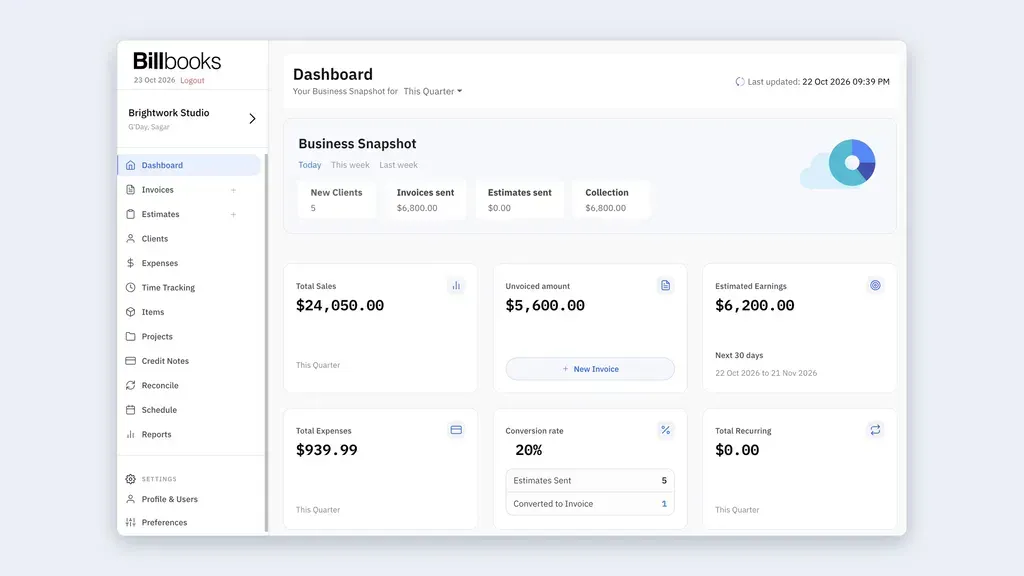
Billbooks shows your key business details in one place. You can check sales, costs, unpaid bills, and income at a glance.
To start, open the Dashboard and pick a time range. You can see how much you earned, spent, and still need to collect.
You can also check your business from your phone. The iOS and Android apps sync with the web app.
Billbooks Pros and Cons
Based on my own experience and feedback from the audience, I will outline the advantages and potential disadvantages of using Billbooks.
Pros
- Faster and Easier Billing.
- Less Time Chasing Payments.
- Easy Online Payments.
- Better Business Tracking.
- Fewer Missed Billable Hours.
- Professional Business Image.
- Manage Billing From Anywhere.
Cons
- No Full Accounting.
- Limited Report Filters.
- Lifetime Plan Limits.
- No Xero or QuickBooks Sync.
- Extra OCR Scanning Costs.
Who Is Billbooks Best For?
- Freelancers: Designers, writers, and developers who send bills, track work hours, and get paid.
- Small Business Owners: Shop owners and service providers who need to track sales, costs, and unpaid bills.
- Agencies and Studios: Marketing and design teams that manage client jobs, quotes, bills, and payments.
- Consultants and Advisors: People who charge clients for their time and need clear work and payment records.
- Contractors and Tradespeople: Plumbers, builders, and electricians who send quotes and bills while working on-site.
Billbooks AppSumo Pricing Plan
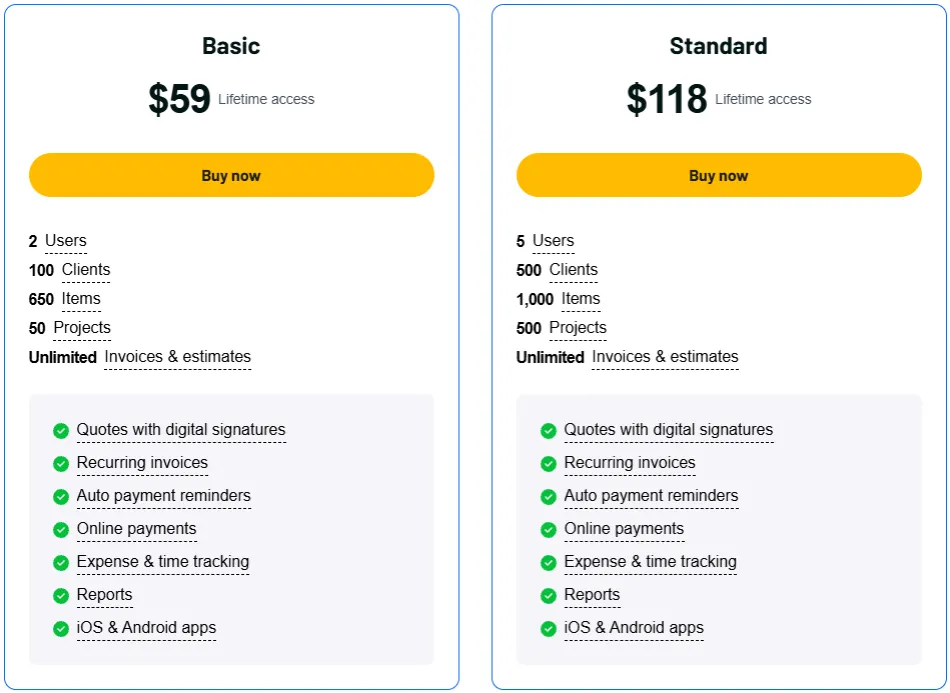
License Tier 1 – $59
One-time payment: $59
Features:
- 2 users
- 100 clients
- 650 items
- 50 projects
- Unlimited invoices and estimates
- Quotes with digital signatures
- Automatic recurring invoices
- Auto payment reminders
- Accept online payments
- Track expenses and work hours
- Manage stock and billable costs
- Match bank records with payments
- Sales, tax, and profit reports
- Invoice open and payment alerts
- Multi-currency billing
- iOS and Android apps
- Zapier integration
License Tier 2 – $118
One-time payment: $118 (2 codes)
Features:
- Everything in License Tier 1
- 5 users
- 500 clients
- 1,000 items
- 500 projects
5 Best Billbooks Alternatives 2026
Here are five Billbooks alternatives worth considering for invoicing, payments, and business billing.
1. FreshBooks
FreshBooks is useful for freelancers and small businesses that need invoicing, expense tracking, and full accounting.
- Starting Price: $23/month (30-day free trial).
- Pros: Invoices, expenses, time tracking, and accounting.
- Cons: Lite plan allows only 5 clients; extra users cost more.
- KEY Difference: More accounting tools than Billbooks, but costs more.
2. Zoho Invoice
Zoho Invoice is a free billing tool for freelancers and small businesses with basic invoicing needs.
- Starting Price: Free forever.
- Pros: Invoices, quotes, payments, and time tracking.
- Cons: Limited to 500 invoices yearly, 2 users, and 3 projects.
- KEY Difference: Free to use, but Billbooks allows unlimited invoices.
3. Wave
Wave suits small businesses that want to manage invoices and basic accounting in one place.
- Starting Price: Free plan; Pro at $19/month.
- Pros: Unlimited invoices, estimates, and bookkeeping.
- Cons: Branding and some billing tools require Pro.
- KEY Difference: Has free accounting tools, while Billbooks focuses on billing.
4. Invoice Ninja
Invoice Ninja is useful for freelancers who manage client invoices, projects, and payments.
- Starting Price: Free plan; Pro at $14/month.
- Pros: Recurring bills, online payments, and time tracking.
- Cons: Free plan allows 5 clients; auto reminders require Pro.
- KEY Difference: Free entry plan, but Billbooks supports more clients on paid plans.
5. Square Invoices
Square Invoices suits service businesses that send estimates, collect deposits, and accept payments.
- Starting Price: Free plan; Plus at $49/month.
- Pros: Unlimited invoices, estimates, and payment tracking.
- Cons: Online payment fees apply.
- KEY Difference: Focuses on payments, while Billbooks has broader billing tools.
Final Thoughts – Billbooks Review 2026
Billbooks makes daily billing simple and easy. You can create invoices, send quotes, track payments, and set up auto reminders in one place.
It saves time on tasks you do again and again. The clean dashboard and mobile apps help you manage billing from anywhere.
The Billbooks Lifetime Deal starts at just $59. You pay once and use these tools without monthly fees.


