Academy LMS Lifetime Deal – Build and Sell Online Courses 2026
When I look at an LMS, I want more than a course builder. I also need to manage students, quizzes, progress, and payments.
Academy LMS brings these tools into WordPress. Its AI course builder, live classes, and certificates caught my eye. Still, some features need extra plugins or setup.
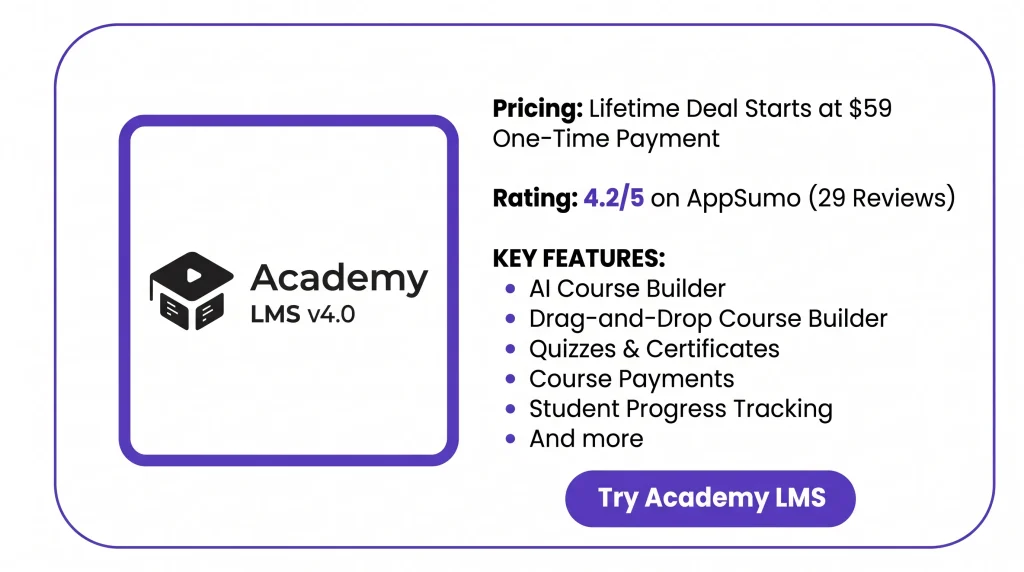
The Academy LMS Lifetime Deal starts at $59 for one site. But what do you get for that price? To determine whether it is worth buying, let’s take a look at its features, costs, and limitations.
KEY Features of Academy LMS
Course Builder
Build courses with a drag-and-drop tool. Add lessons, quizzes, tasks, videos, and live classes. You can also arrange them into sections and smaller groups.
AI Course Builder
Use AI to create course outlines, titles, and descriptions. Just connect your OpenAI API key and use your own API credits.
Quiz Builder
Create quizzes with different question types, time limits, and pass marks. Set points, mix up questions, and reuse them from a shared question bank.
Certificate Builder
Make course certificates using templates or your own designs. Add student names, course titles, dates, and QR codes. Pro also lets you verify certificates.
Student & Instructor Dashboards
Students can view courses, track progress, and access lessons. Instructors can manage their courses and check student results from their own dashboards.
Live classes & meetings
Host live classes through Zoom or Google Meet. The Pro Meeting add-on creates meeting links and adds them to your courses.
Analytics
Track course sign-ups, student progress, quiz scores, and sales. Pro also shows where students stop learning and helps you follow up with them.
Monetization & Revenue
Sell courses through StoreEngine, WooCommerce, or SureCart. You can also offer subscriptions, memberships, and course bundles through supported tools.
Customization
Change your course layouts, colors, and lesson page designs. You can also edit course cards, dashboard menus, and page sections without coding.
Pros of Academy LMS
- Easier Course Setup: Start with ready-made templates and reuse old lessons. This cuts down the work needed to build your site and add new courses.
- Clear Learning Paths: Students can take lessons in a set order. They must finish the required work before moving to the next topic.
- Faster Quiz Grading: You don’t have to check every quiz answer yourself. The tool grades supported questions, so you can focus on other tasks.
- Easier Progress Tracking: See how well students are doing in each course. Reports show where they get stuck or stop learning.
- Flexible Selling Options: Sell single courses, bundles, or paid plans. You can choose how to charge students based on your needs.
- Better Student Engagement: Students can ask questions, join live classes, and share ideas. This helps teachers stay in touch with their students.
- Proof of Course Completion: Give students certificates they can share after a course. With Pro, others can check if those certificates are real.
- Easier Instructor Management: Manage several teachers and their courses in one place. You can also track their earnings, commissions, and student results.
Cons of Academy LMS
- WordPress Only: Academy LMS works only with WordPress. You can’t use it on sites built with other platforms.
- Course Editing Issues: Some AppSumo users found the course editor hard to use. They also had trouble managing course content.
- Quiz and Lesson Bugs: Some users reported quiz errors and issues with lesson auto-completion. The team has since released updates to address these problems.
- Extra Tool Costs: AI course tools need paid OpenAI credits. WooCommerce Subscriptions also requires a separate paid plugin.
- Manual Content Translation: WPML can’t translate lessons, quizzes, or assignments on its own. You must translate them by hand.
- WordPress Editor Limits: To edit lessons with Gutenberg, you must change a setting. The faster lesson storage mode must be turned off.
Who is Academy LMS Best For?
- Online Course Creators: Great for those who want to build and sell courses. They can also manage lessons, quizzes, and student progress.
- Tutors and Coaches: A good fit for tutors who teach live classes. They can also book sessions and track how students are doing.
- Schools and Colleges: Useful for schools that need to manage courses, tasks, student records, and classwork in one place.
- Employee Training Teams: A good choice for teams that train staff. They can set up lessons, give quizzes, and track course progress.
- Course Marketplace Owners: Ideal for site owners who work with many teachers. They can manage courses, students, and teacher earnings in one place.
Academy LMS AppSumo Pricing Plan
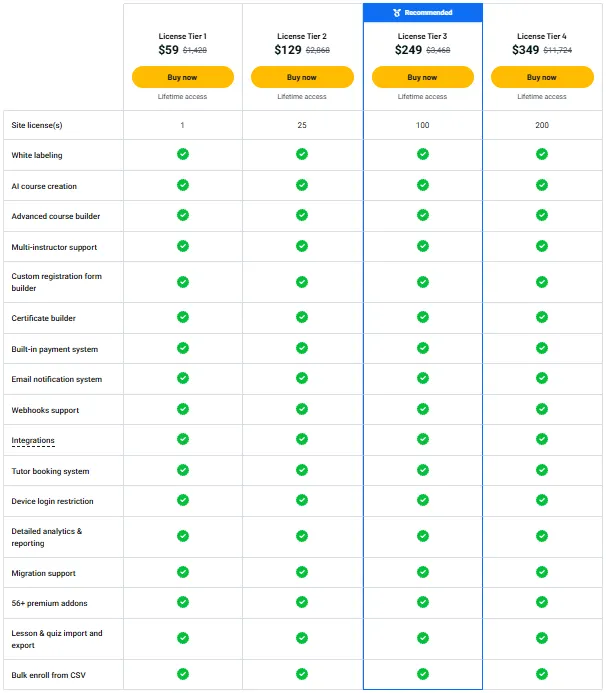
License Tier 1 – $59
Features:
- 1 WordPress website
- Use your own branding
- Build courses with AI and advanced tools
- Manage multiple instructors and custom sign-up forms
- Create certificates and take payments
- Email alerts, webhooks, and app integrations
- Tutor bookings and device login limits
- Track course data with detailed reports
- LMS migration help and 56+ premium add-ons
- Import and export lessons and quizzes
- Add students in bulk using CSV files
License Tier 2 – $129
Features:
- Includes everything in License Tier 1
- Up to 25 WordPress websites
License Tier 3 – $249
Features:
- Includes everything in License Tier 2
- Up to 100 WordPress websites
License Tier 4 – $349
Features:
- Includes everything in License Tier 3
- Up to 200 WordPress websites
5 Best Academy LMS Alternatives 2026
Looking for an Academy LMS alternative? Tutor LMS, LearnDash, LifterLMS, MasterStudy LMS, and LearnPress are five WordPress options with different features and pricing.
1. Tutor LMS
Tutor LMS is a close alternative to Academy LMS. You can build and sell courses, manage teachers, and track students. It’s a good fit for creators who run online schools.
- Starting Price: Free plan; Pro starts at $199/year for one site.
- Advantages: Course builder, quizzes, certificates, teacher dashboards, and multiple instructors.
- Disadvantages: Some tools need Pro, while AI Studio needs your own OpenAI API key.
- Key Difference: Tutor LMS has a free core plugin, plus yearly and lifetime Pro plans.
2. LearnDash
LearnDash is a WordPress LMS for online courses and staff training. It suits schools and teams that teach groups of students. You can also track how well they learn.
- Starting Price: $199/year for one WordPress site.
- Advantages: Drag-and-drop course builder, quizzes, certificates, Focus Mode, and group learning.
- Disadvantages: Advanced reports and teacher management need extra paid add-ons.
- Key Difference: LearnDash focuses more on group training and step-by-step learning.
3. LifterLMS
LifterLMS works well for coaches who sell courses and paid memberships. You can manage lessons, check student progress, and reward students for finishing their work.
- Starting Price: Free core plugin; Earth Bundle starts at $199/year at the listed sale price.
- Advantages: Course builder, memberships, quizzes, certificates, and progress tracking.
- Disadvantages: Online payments and some teaching tools need paid add-ons.
- Key Difference: LifterLMS focuses on courses and memberships, with add-ons for extra tools.
4. MasterStudy LMS
MasterStudy LMS helps you build an online school with WordPress. It has ready-made site designs and AI tools for course content. This makes it useful for teachers who want their own course site.
- Starting Price: Free version; paid plan starts at $149/year for one site.
- Advantages: Drag-and-drop course builder, quizzes, AI Lab, course templates, and live classes.
- Disadvantages: The free plan has fewer designs, while advanced tools need paid plans.
- Key Difference: MasterStudy focuses more on ready-made course sites and AI tools.
5. LearnPress
LearnPress is a WordPress LMS with free basic course tools. You can build lessons, add quizzes, and manage students. It’s a good fit for small course sites that want to add more tools later.
- Starting Price: Free core plugin; paid add-ons start at $19, while the Pro Bundle costs $299.
- Advantages: Course builder, lessons, quizzes, student tracking, and many add-ons.
- Disadvantages: Certificates, advanced payments, and tasks may need paid add-ons.
- Key Difference: LearnPress lets you buy add-ons one by one instead of one full paid package.
Final Thoughts – Academy LMS Review 2026
What I like most about Academy LMS is how it keeps everything in one place. You can build courses, make quizzes, take payments, and track students. Its AI tools, live classes, and certificates add even more value.
The Academy LMS Lifetime Deal starts at just $59 with a one-time payment. I think it’s worth a look if you want to build and grow your online course business.