Shareables Lifetime Deal: Build No-Code Websites and Widgets
Do you use Google Sheets, Airtable, or Notion? Want to show that data on your website? Building a site can take time and coding skills. Shareables makes this easier.
Shareables helps you turn your data into websites, directories, product catalogs, and widgets. No coding is needed. Your website updates when you change your data.
The Shareables lifetime deal is available on AppSumo. It starts at $62.10 with a one-time payment.
In this Shareables review, I’ll cover how it works, its key features, pros and cons, and pricing. I’ll also help you decide if it’s worth buying.
KEY Features of Shareables
Below, I’ll share the key features of Shareables. I’ll also explain how they help you build and manage websites without coding.
Build Auto-Updating Websites
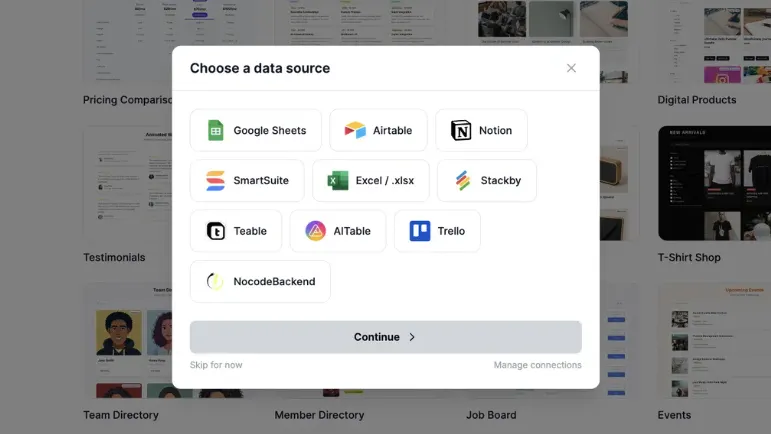
Shareables lets you build websites using data from Google Sheets, Airtable, Notion, Excel, and other supported tools. You don’t need any coding skills.
You can add pages, menus, and ready-made content blocks. You can also create separate pages for products and listings.
Your website updates when your data changes. For example, change a product price in Google Sheets, and your website shows the new price.
How to use this feature: Connect your data source and add the pages you need. Choose what to show, adjust the design, and publish your website on your own domain.
Create Widgets with Ready-Made Templates
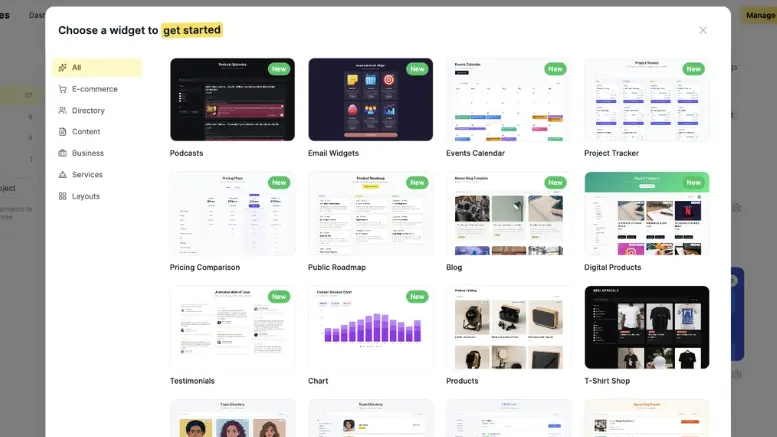
Shareables offers over 25 ready-made widget templates. You can create product catalogs, team directories, job boards, event calendars, blogs, charts, and more.
Change colors, fonts, layouts, and spacing to match your brand. You can also choose which data to show or hide.
Add search, filters, and sorting to help visitors find what they need. Visitors can also compare items side by side. You can even create widgets for email newsletters.
How to use this feature: Choose a template and connect your data source. Choose what to show, adjust the design, and add the widget to your website.
Accept Payments and Protect Content
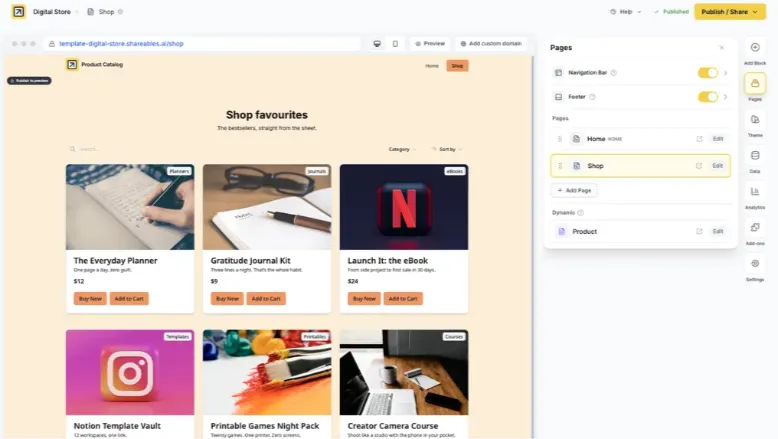
Shareables lets you sell products directly from your website. It has a built-in shopping cart and checkout. You can accept payments through Stripe, PayPal, or Razorpay.
You can also take orders without online payments. This lets you check and confirm each order yourself.
You can lock any page or your entire website with a password. This is useful for client portals, member areas, and private content.
How to use this feature: Turn on the payment add-on and connect your payment account. To keep content private, turn on password protection and set a password.
Track Performance and Reach Global Audiences
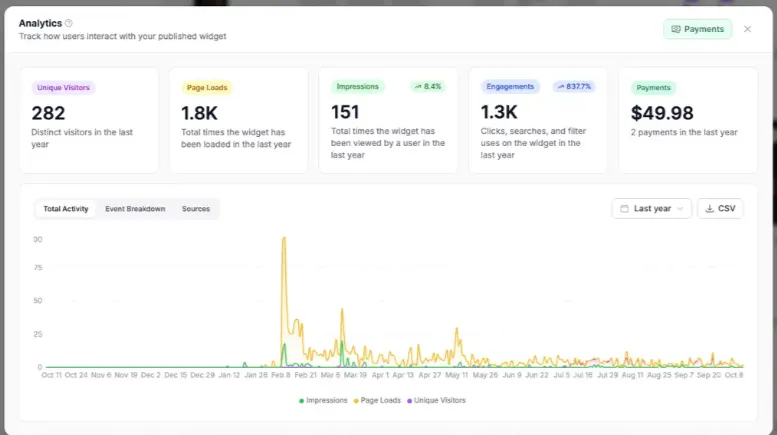
Shareables lets you see how people use your widgets. You can track views, clicks, searches, and filter use. You can also save this data as a CSV file.
Shareables can translate your content into over 100 languages. This helps visitors read your content in their own language.
Built-in SEO tools, detail pages, and sitemaps help search engines find your content. You can also use custom CSS and JavaScript to change your design.
How to use this feature: Open the analytics dashboard to track widget performance. Turn on translation and set up SEO to help more people find and read your content.
Shareables Pros and Cons
Below, I’ll share the main pros and cons of Shareables. This will help you decide whether it is suitable for you.
Pros
- Save time on website updates.
- Build websites without coding.
- Reduce manual work.
- Lower website development costs.
- Make data easier to browse.
- Simplify client content updates.
- Improve search engine visibility.
Cons
- No individual member logins.
- Limited form submission support.
- Relies on external data sources.
- KEY features require higher tiers.
Who Is Shareables Best For?
- Small Business Owners: Create product catalogs, service lists, and team pages without hiring a developer.
- Freelancers and Agencies: Build websites for clients and let them update content through spreadsheets.
- Content Creators: Publish blogs, resource libraries, and digital products using their existing data.
- Community Organizations: Share member lists, upcoming events, and helpful resources with their communities.
- No-Code Website Builders: Add content from spreadsheets and databases to existing websites without coding.
Shareables AppSumo Pricing Plan
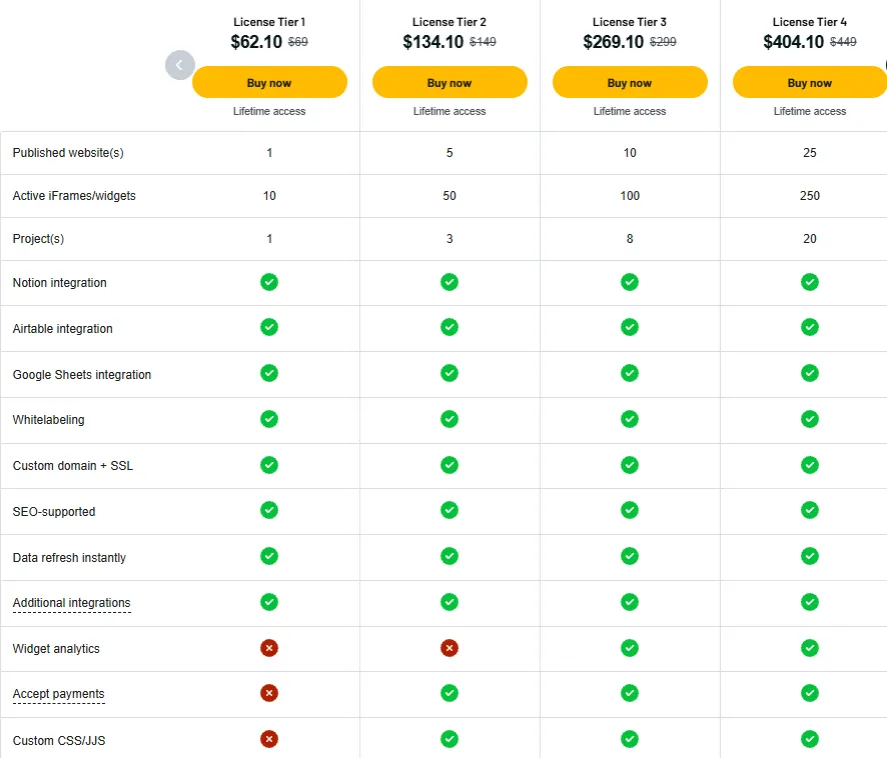
License Tier 1 — $62.10 (One-Time)
- 1 published website
- 10 active widgets or iFrames
- 1 project
- Notion integration
- Airtable integration
- Google Sheets integration
- White-label branding
- Custom domain with SSL
- Built-in SEO support
- Instant data updates
- Additional integrations
License Tier 2 — $134.10 (One-Time)
- Includes License Tier 1
- 5 published websites
- 50 active widgets or iFrames
- 3 projects
- Accept online payments
- Custom CSS and JavaScript
License Tier 3 — $269.10 (One-Time)
- Includes License Tier 2
- 10 published websites
- 100 active widgets or iFrames
- 8 projects
- Widget analytics
License Tier 4 — $404.10 (One-Time)
- Includes License Tier 3
- 25 published websites
- 250 active widgets or iFrames
- 20 projects
License Tier 5 — $584.10 (One-Time)
- Includes License Tier 4
- 50 published websites
- 500 active widgets or iFrames
- 40 projects
License Tier 6 — $764.10 (One-Time)
- Includes License Tier 5
- 100 published websites
- 1,000 active widgets or iFrames
- Unlimited projects
5 Shareables Alternatives 2026
Here are five Shareables alternatives for building websites, online stores, directories, and business apps without coding.
1. SpreadSimple
SpreadSimple turns Google Sheets into websites, product catalogs, and online stores. Your website updates when you change your spreadsheet.
- Free Plan: Available
- Starting Price: $17.90/month
- Pros: Shopping cart, checkout, search, and filters.
- Cons: Only works with Google Sheets.
- Key Difference: SpreadSimple builds websites from Google Sheets. Shareables works with more data sources and offers more widget types.
2. Softr
Softr lets you build business apps, directories, and client portals. You can use your existing data without writing code.
- Free Plan: Available
- Starting Price: $25/month
- Pros: User accounts, forms, and data editing.
- Cons: Advanced access controls require higher plans.
- Key Difference: Softr lets users create accounts and edit data. Shareables mainly helps you display data on websites through widgets.
3. Sheet2Site
Sheet2Site turns Google Sheets into websites. You can build directories, job boards, and listing pages without coding.
- Free Trial: Available (15 records)
- Starting Price: $348/month (listed price)
- Pros: Search, filters, and detail pages.
- Cons: Only works with Google Sheets.
- Key Difference: Sheet2Site builds websites using Google Sheets. Shareables connects with more data sources and offers more widget options.
4. Pory
Pory helps you build member portals, directories, and resource libraries. You can control what each user can see.
- Free Plan: Available
- Starting Price: $119/month
- Pros: Member logins and access controls.
- Cons: Only five members on the free plan.
- Key Difference: Pory lets members log in and view specific content. Shareables mainly helps you share and display data online.
5. Glide
Glide turns spreadsheets and other data into business apps. You can build tools to manage daily tasks without coding.
- Free Plan: Available
- Starting Price: $25/month
- Pros: Business apps, workflows, and tool connections.
- Cons: Limited usage credits.
- Key Difference: Glide helps you build apps to manage daily business tasks. Shareables focuses on websites, directories, and interactive widgets.
Final Thoughts – Shareables Review 2026
What I like most about Shareables is its simple approach. You can turn your data into websites and widgets without coding. Ready-made templates, automatic updates, and built-in SEO tools help you build and manage websites with less work.
The Shareables lifetime deal starts at $62.10 on AppSumo. You only need to pay once. With its useful features and the time it can save, I think Shareables is worth the investment.