Rival Ads Lifetime Deal: AI Ad Tracking, Research and Reports
Rival Ads is an AI tool that helps you track competitor ads. It shows ads from Meta, Google, TikTok, LinkedIn, Microsoft Ads, and Pinterest in one place.
Just add a competitor’s website and choose the platforms. Rival Ads then collects their ads for you. You can see which ads are new, stopped, or still running. AI also helps you find ad hooks, key messages, and target groups.
You can spot changes, find new ad ideas, and get reports. This saves you from checking each ad library by hand.
KEY Features of Rival Ads
Rival Ads helps you track competitor ads and find new ideas. Here are its key features and how they work.
Find Ad Hooks and Angles to Test
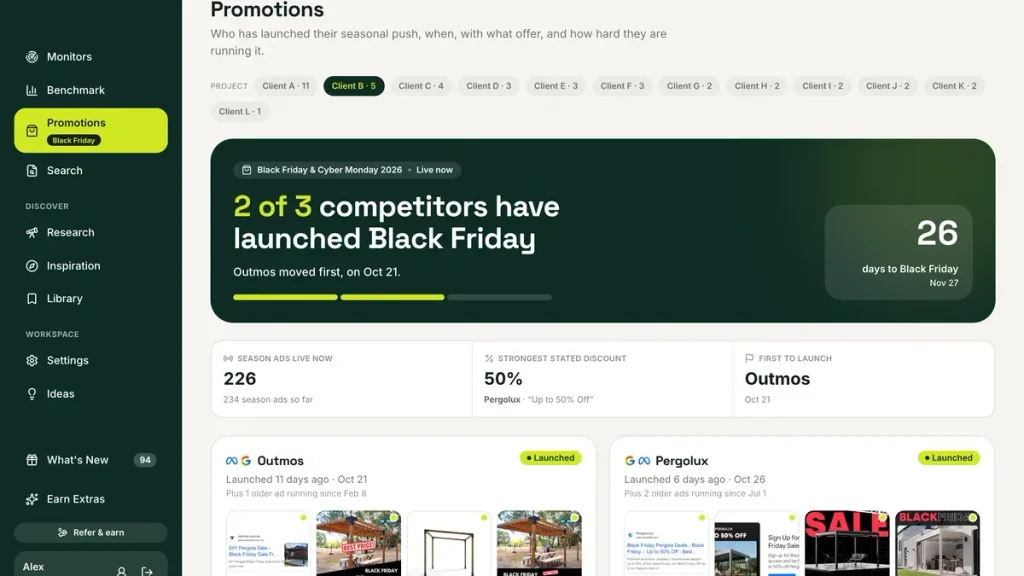
Rival Ads helps you see how other brands grab attention. Its AI finds each ad’s hook, main message, and target audience. It also reads video text to help you find new ad ideas.
How to use it: Go to Monitors and pick a competitor. Open Ads and click Intelligence on any ad. You can see its hook, angle, and target audience. You can also filter ads by angle or run time.
This helps you find useful ad ideas without watching every video. You can use these ideas to plan your own ad tests.
Research Ads and Discover Rising Advertisers
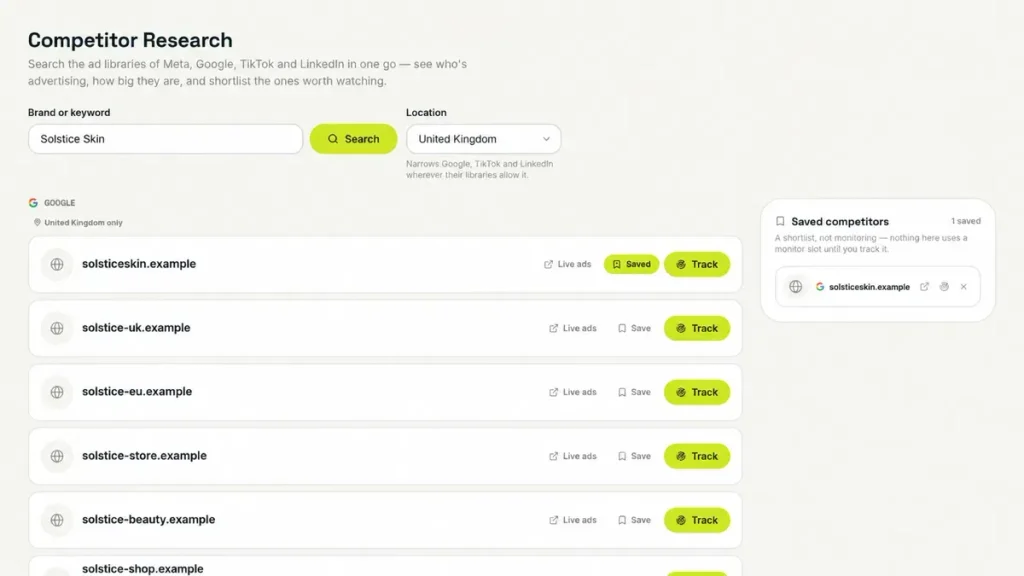
Rival Ads helps you find new brands and ad ideas. You can search for brands across ad platforms. You can also save the ones you want to track.
The Inspiration feature shows ads shared by other users. Its Rising tab helps you spot brands launching new ads. You can also see which ads keep running.
How to use it: Open Research and search for a brand. Then go to Inspiration and turn on sharing. Open Rising to explore active brands. You can view their ads, save good ideas, or track them.
This helps you find fresh ad ideas beyond your competitors.
Create Branded Competitor Reports for Clients
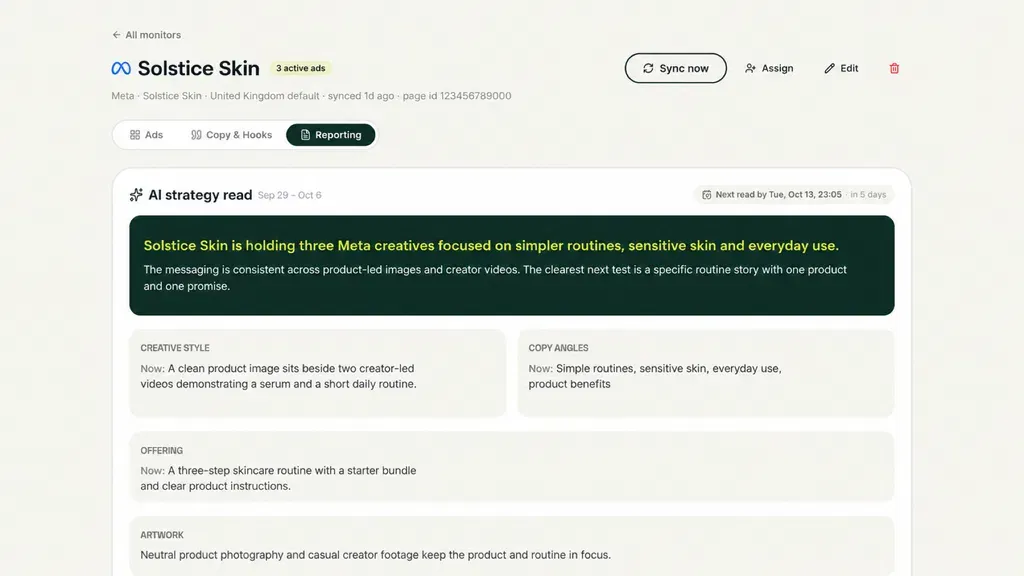
Rival Ads helps you create and share ad reports with clients. Its AI checks ad changes, key messages, and offers. It then creates reports with useful tips and ideas.
You can save reports as PDFs or share them through links. Agency, Max, and Ultra plans also let you add your logo, colors, and domain.
How to use it: Open Monitors and pick a competitor. Go to Reporting to view the AI report. Then use Share & export to save a PDF or share a link. You can add your brand under Settings → Branding on supported plans.
This saves time and makes client reports easy to share.
Connect Competitor Data with ChatGPT and Claude
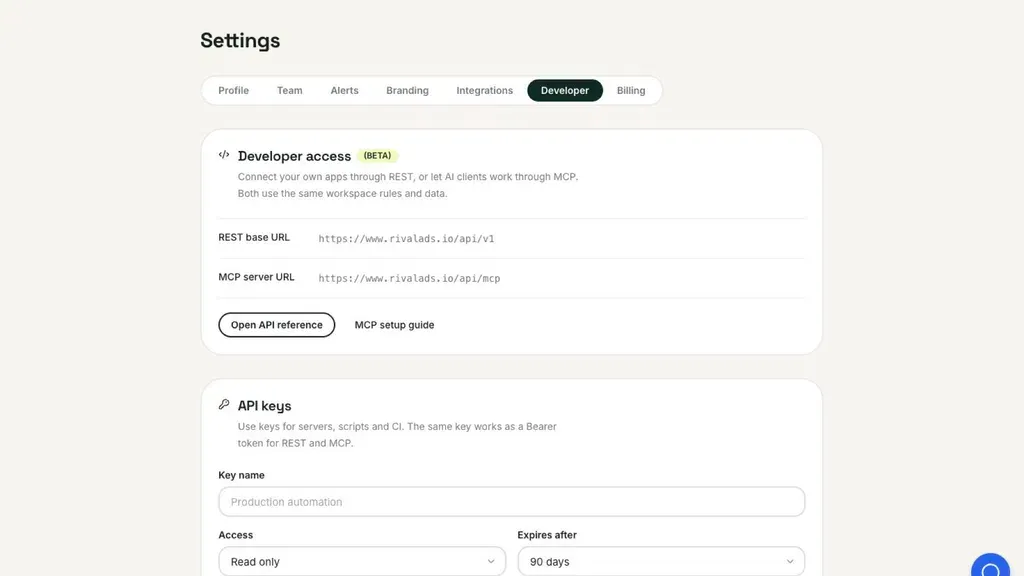
Rival Ads lets you use ChatGPT and Claude to study competitor ads. You can ask questions about ad hooks, messages, and changes. The AI uses your saved competitor data to answer.
It also helps you find ads, review reports, and manage your ad research through AI chat.
How to use it: Open Settings → Developer in Rival Ads. Then add the MCP server URL to ChatGPT or Claude. Sign in and approve access. You can now ask your AI tool about your competitors and their ads.
This makes it easier to study competitor ads without checking each report by hand.
Rival Ads Pros and Cons
Rival Ads has useful benefits, but it also has some limits. Here are its main pros and cons to help you decide.
Pros
- Saves time on competitor research.
- Helps spot new ad trends.
- Finds fresh ad ideas.
- Helps plan better ad campaigns.
- Makes client reporting easier.
- Improves team collaboration.
Cons
- No real ad performance data.
- Limited competitor monitoring.
- Delayed ad updates.
- No full ad edit history.
- Basic AI strategy advice.
Who Is Rival Ads Best For?
- Marketing Agencies: Helps agencies track ads from their clients’ competitors, spot new trends, and share clear reports with clients.
- Digital Marketers: Great for studying competitor ad hooks, messages, and creative ideas to plan better ad campaigns.
- Ecommerce Store Owners: Helps store owners see what rival brands promote, track price changes, and find new product ad ideas.
- Freelance Marketers: Useful for researching client competitors, saving good ad examples, and creating reports without doing everything by hand.
- SaaS Founders: Helps software founders see how other SaaS brands promote their products, present offers, and reach new customers.
Rival Ads AppSumo Pricing Plan
License Tier 1 – $49
Features:
- 6 competitor monitors
- Ad updates every 7 days
- Monthly AI reports
- 5 locations per monitor
- Multi-platform ad tracking
- New, active, and stopped ads
- AI ad hooks and insights
- Video transcripts
- Brand and ad research
- Rising advertiser discovery
- Shared ad library
- Landing page and offer tracking
- Ad alerts and email updates
- PDF reports and shareable links
- Unlimited users and projects
- ChatGPT and Claude via MCP
- REST API support
License Tier 2 – $99
Features:
- Everything in License Tier 1
- 12 competitor monitors
- Ad updates every 3 days
- Weekly AI reports
License Tier 3 – $199
Features:
- Everything in License Tier 2
- 30 competitor monitors
- Custom logo and colors
- Custom workspace domain
- White-label client reports
License Tier 4 – $399
Features:
- Everything in License Tier 3
- 75 competitor monitors
- Priority ad syncing
License Tier 5 – $649
Features:
- Everything in License Tier 4
- 150 competitor monitors
5 Best Rival Ads Alternatives 2026
Here are five tools you can use instead of Rival Ads. Each has different features, prices, and uses.
1. Foreplay
Foreplay helps you save ad ideas and track rival ads. Its Spyder tool tracks new Meta ads and changes.
- Starting Price: 7-day free trial; $59/month.
- Pros: Ad tracking, creative boards, and AI tools.
- Cons: Spyder tracking costs $175/month.
- Key Difference: Focuses more on ad ideas and teamwork.
- Best For: Meta marketers and ad agencies.
2. BigSpy
BigSpy helps you find ads from many platforms. You can search ads, spot trends, and study rival brands.
- Starting Price: Free plan; paid from $69/month.
- Pros: Large ad library and useful search filters.
- Cons: Free plan allows only 10 searches daily.
- Key Difference: Focuses more on finding ads than client reports.
- Best For: Marketers who study ads across platforms.
3. Panoramata
Panoramata helps you track rival ads, emails, and marketing campaigns. You can see how other brands promote their products.
- Starting Price: Limited free access; $99/month.
- Pros: Tracks ads, emails, and marketing trends.
- Cons: Startup plan tracks up to 20 competitors.
- Key Difference: Tracks more types of marketing activity.
- Best For: Brands and marketing agencies.
4. AdSpy
AdSpy helps you find Facebook and Instagram ads. You can search by keywords and study ad comments.
- Starting Price: $149/month.
- Pros: Large Meta ad library and detailed search.
- Cons: Only covers Facebook and Instagram ads.
- Key Difference: Focuses on detailed Meta ad research.
- Best For: Meta advertisers and affiliate marketers.
5. Minea
Minea helps online sellers find products and study rival ads. You can explore product trends and track other stores.
- Starting Price: $49/month.
- Pros: Product research, ad search, and store tracking.
- Cons: Starter limits AI ad analysis to 10 uses monthly.
- Key Difference: Focuses more on finding products to sell.
- Best For: Ecommerce sellers and dropshippers.
Final Thoughts: Is Rival Ads Worth It?
Rival Ads makes it easy to track rival ads and find fresh ideas. It brings ads from many platforms into one place. You can see what other brands promote, study their ad hooks, and spot new trends. This saves time on research.
Its AI insights, ad alerts, and ready-made reports make your work easier. You can also use ChatGPT and Claude to explore rival ads by asking simple questions.
The Rival Ads lifetime deal is worth considering. You pay once and get long-term access to its tools. It helps you learn from rival ads and plan your next campaigns with more confidence.