MeetMouse Lifetime Deal: Granola Alternative and AI Coach
MeetMouse is an AI meeting tool for Mac. It takes notes and helps you speak better on calls. It works with Zoom, Google Meet, Teams, and more. No bot joins your calls.
MeetMouse also gives you helpful tips while you talk. After each call, it creates a short summary and lists the next steps.
The best part is that your meeting data stays on your Mac by default. It also works offline after setup. You can start for free or get a lifetime deal.
How to Use MeetMouse
MeetMouse is easy to set up. You just need a Mac with macOS 14.2 or later. Follow these steps to get started.
- Download MeetMouse: Go to meetmouse.com and get the free app.
- Set Up the App: Drag it into your Applications folder. Open it, get the AI model, and allow access when asked.
- Join a Meeting: Start a call on Zoom, Google Meet, or Teams. MeetMouse can hear the call without adding a bot.
- Get Live Tips: See the live text and get tips as you talk. These tips help you speak less and ask better questions.
- Check Your Notes: Stop the session when your call ends. MeetMouse gives you a short summary, key points, and next steps.
Once you set it up, MeetMouse can work offline. You don’t need Wi-Fi to use its local AI model.
KEY Features of MeetMouse
MeetMouse helps you take notes and do better in meetings. Here are its key features and how to use them.
Get Live Coaching During Meetings
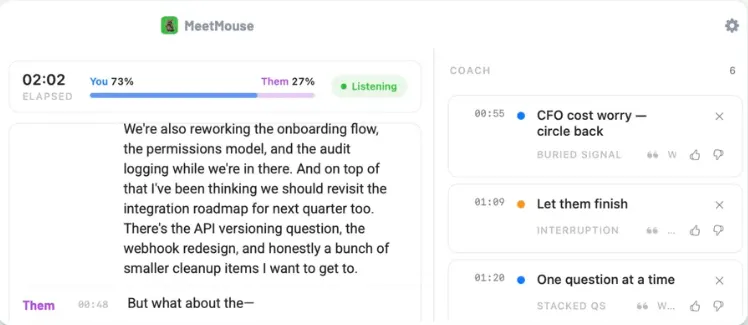
MeetMouse helps you speak better during calls. It gives you quick tips as you talk. This helps you spot and fix mistakes right away.
To use it, start a call on Zoom, Google Meet, or Teams. Keep MeetMouse running to see live text and tips.
For example, it may tell you to let others finish speaking. It can also remind you to ask one question at a time or return to a missed point. You can change the Coaching Style to choose the tips you need.
Get Meeting Summaries and Next Steps
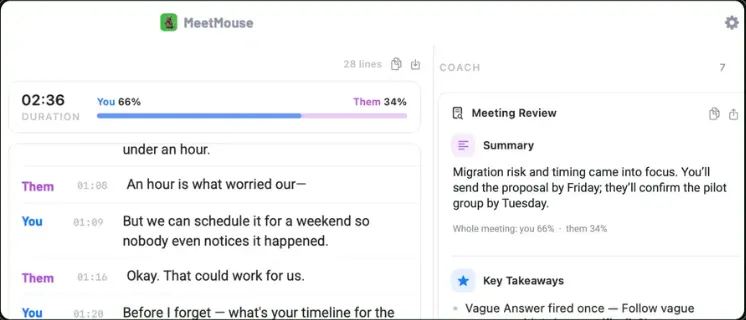
MeetMouse helps you review your calls with ease. After each meeting, it gives you a short summary, key points, and next steps.
To use it, stop the session when your call ends. Open Meeting Review to see what you talked about and what to do next.
You can also see who needs to do each task. Plus, it shows what to cover in your next meeting. This saves time and helps you stay on track.
Track Your Meeting Habits
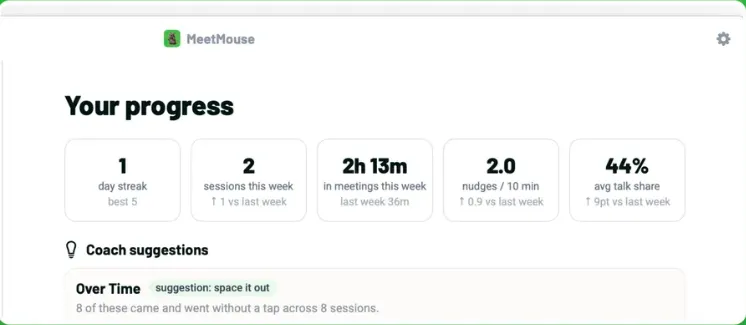
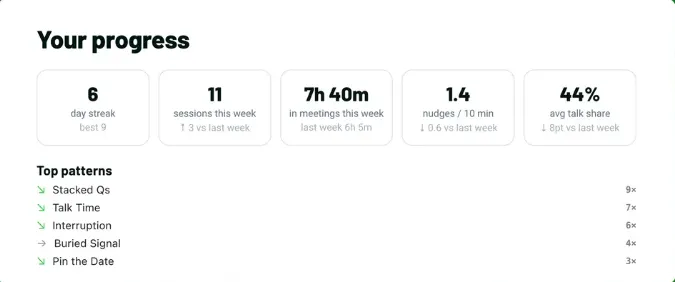
MeetMouse helps you see how you speak during calls. It tracks your talk time, coaching tips, and progress.
To use it, open the Progress Dashboard after a meeting. You can check how much you spoke, how many tips you got, and your weekly stats.
It also shows habits you can work on. This helps you spot weak points and do better in your next meeting.
Keep Your Meetings Private
MeetMouse keeps your meeting data on your Mac. It turns speech into text and runs AI on your device. Your call audio never goes to the cloud.
To use it, open AI Settings and select Local (on this Mac). Once you get the AI model, it works without Wi-Fi.
No bot joins your calls. Your coaching tips also stay hidden when you share your screen. You can share meeting notes without sharing the full transcript.
MeetMouse Pros and Cons
MeetMouse has some useful benefits, but it also has a few limits. Here are its main pros and cons to help you decide if it’s right for you.
Pros
- Speak Better During Meetings.
- Save Time on Meeting Notes.
- Stay Clear on Next Steps.
- Improve Your Speaking Habits.
- Keep Meeting Data Private.
- Find Past Meeting Details Fast.
- Save Money with a One-Time Payment.
Cons
- Mac-Only Support.
- Speaker Detection Errors.
- Limited Language Support.
- High Memory Usage.
- Meeting Start/Stop Issues.
Who Is MeetMouse Best For?
- Sales Professionals: Helps you listen to clients, address their concerns, and ask better questions.
- Business Consultants: Helps you track key points, decisions, and tasks from client calls.
- Team Leaders: Helps you see what your team discussed and who needs to do each task.
- Coaches and Mentors: Helps you listen more, speak clearly, and ask better questions during calls.
- Privacy-Focused Professionals: Keeps private client details on your Mac without sending call audio to the cloud.
MeetMouse AppSumo Pricing Plan

1 Code – $12 (One-Time Payment)
Features:
- Live AI tips during calls
- AI and speech-to-text on your Mac
- No data tracking
- Works without Wi-Fi
- No account needed
- Tips hidden during screen sharing
- Works on macOS 14.2+
- Free future plan updates
Deal Terms:
Pay $12 once to use MeetMouse for life. You must redeem your code within 60 days of purchase. You cannot stack codes. AppSumo also gives you a 60-day money-back guarantee.
MeetMouse FAQs
Is MeetMouse free to use?
Yes. You get unlimited meetings for the first week. After that, you can use it for 3 free meetings each week.
Does MeetMouse work on Windows?
No. MeetMouse only works on Macs with macOS 14.2 or later. Apple Silicon Macs are the better choice.
Does MeetMouse work without Wi-Fi?
Yes. Once you download the AI model, it can run on your Mac without Wi-Fi.
Does MeetMouse support Zoom and Google Meet?
Yes. It works with Zoom, Google Meet, Teams, FaceTime, and Slack calls.
Does MeetMouse add a bot to meetings?
No. MeetMouse runs on your Mac. It can hear your calls without adding a bot or extra guest.
Is my meeting data private?
Yes. Your call audio stays on your Mac. Meeting text also stays local by default. If you use Claude or OpenAI, the text goes to that service.
Is MeetMouse a one-time purchase?
Yes. The AppSumo lifetime deal costs $12 once. There are no monthly fees. You must redeem your code within 60 days.
Final Thoughts – MeetMouse Review 2026
What makes MeetMouse stand out is its live AI coaching. It helps you speak better during calls. After each meeting, you get clear notes, key points, and next steps.
I also like how MeetMouse keeps your calls private. Your meeting data stays on your Mac by default. No bot joins your calls. For just $12 once on AppSumo, you get lifetime access with no monthly fees.