VistaCreate Lifetime Deal: 200K+ Templates and 70M+ Assets 2026
Good news! VistaCreate Lifetime Deal may return to AppSumo on November 11, 2026, for Black Friday.
The last deal sold out. But this could be your chance to get VistaCreate Pro with a one-time payment.
The past deal included premium templates, a background remover, Brand Kits, and more. You could use these tools without paying each month.
What Is VistaCreate?
VistaCreate is an online tool for making designs. You can create social media posts, ads, YouTube thumbnails, logos, and print designs. You don’t need any design skills to get started.
It offers 200K+ templates and 170M+ stock photos, videos, and graphics. Just pick a template, add your own text or photos, and change the colors to fit your brand.
You can also use AI tools, edit photos, and add animations. It’s a useful tool for content creators, marketers, and small business owners.
KEY Features of VistaCreate
VistaCreate has many tools that make design work easy. Let’s explore its key features and see how to use them.
200K+ Design Templates & 170M+ Stock Assets
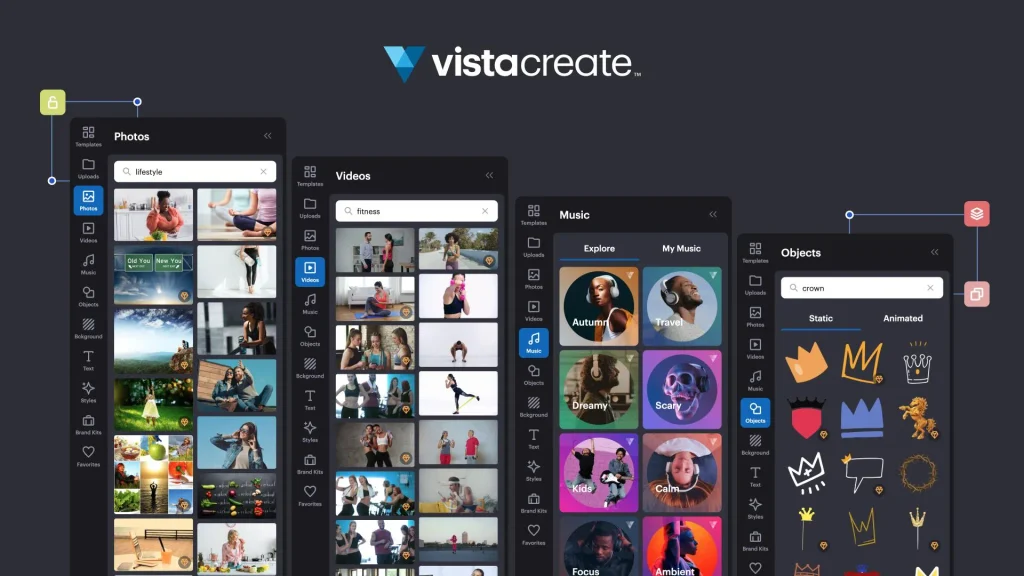
VistaCreate Pro offers 200K+ design templates and 170M+ stock photos, videos, and graphics. You can use them to make social media posts, ads, YouTube thumbnails, flyers, and more.
To start, search for the type of design you need. Pick a template and change the text, colors, or photos. You can also add stock photos or videos from the library.
It saves time because you don’t have to start from the very beginning.
AI Design Tools & Background Remover
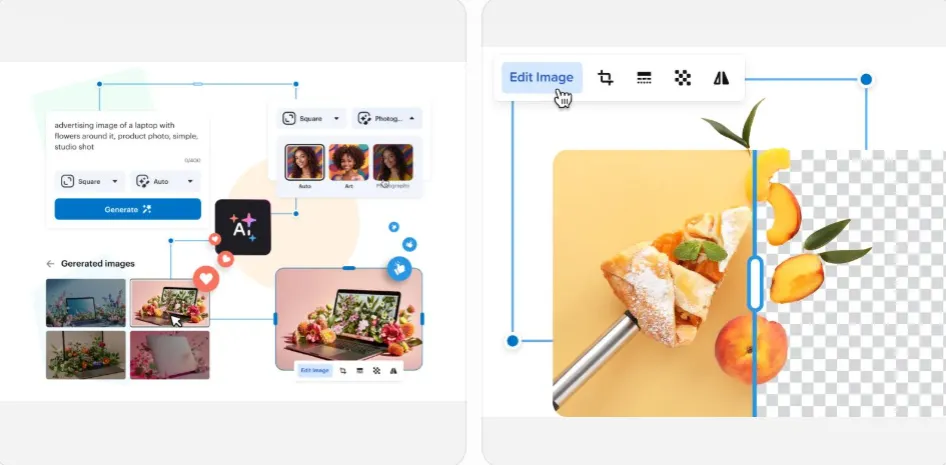
VistaCreate has AI tools to help you make images and write text. Just type your idea into the AI Image Generator. You can also use AI Writer to write or edit text.
The Background Remover lets you remove backgrounds from photos. Just upload a photo, select it, and click “Remove Background.” You can then add a new background or leave it with no background.
These tools help you create and edit designs with less effort.
Brand Kits & Team Collaboration
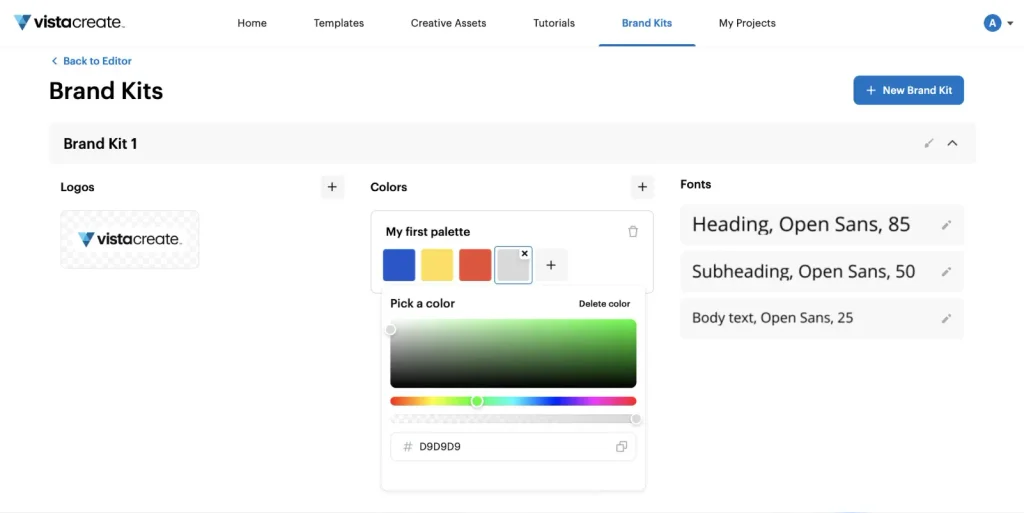
VistaCreate Pro helps you keep the same look across all your designs. With Brand Kits, you can save your logo, colors, and fonts in one place.
To start, open Brand Kits and add your brand details. You can then use them in new designs without adding them again.
You can also create a team account and invite up to 10 members. Your team can work on shared designs in one place.
Design Editor & One-Click Resize
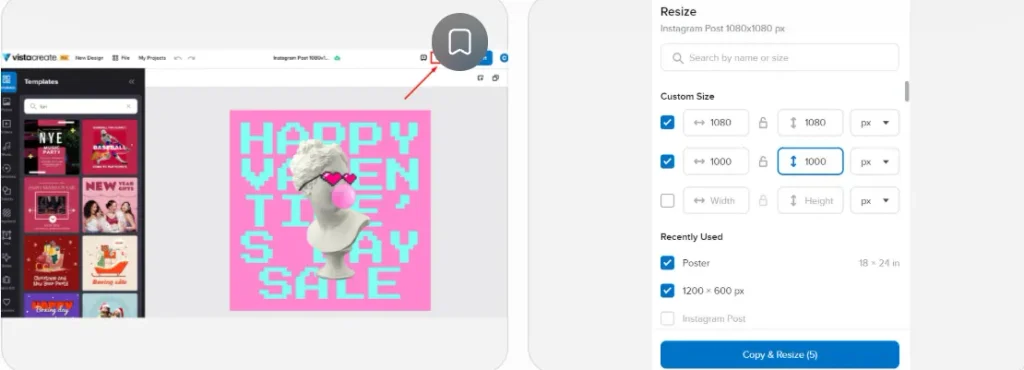
VistaCreate has a simple editor. You can change text, colors, fonts, and photos. You can also add shapes, stickers, and other design elements.
With One-Click Resize, you can use the same design in many sizes. Just open your design, click “Resize,” and pick a new size. You can also set your own size. Then click “Copy & Resize.”
Your new design will open in a new tab. You can make more edits if needed.
Social Media Scheduling & Publishing
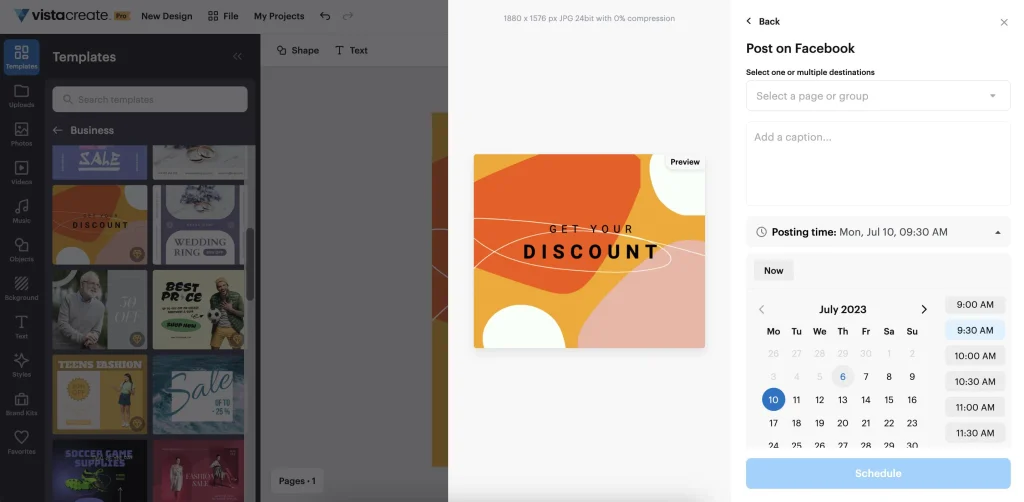
VistaCreate lets you share posts on Facebook, Instagram, and Pinterest. You can post right away or set a time for later.
To start, finish your design and click “Export.” Link your social account, choose where to post, and add a caption. Then post it now or pick a date and time.
You can also check or edit planned posts in My Projects → Post Planner. This helps you plan your posts ahead of time.
How to Use VistaCreate (Step-by-Step)
VistaCreate is easy to use, even if you’re new to design. Just follow these steps:
- Create an Account: Go to VistaCreate and sign up for free. If you have an account, just log in.
- Choose a Template: Search for a design, like an Instagram post or YouTube thumbnail. Pick a template or start from scratch.
- Edit Your Design: Change the text, colors, and photos. You can also add your own images and logos.
- Make Final Changes: Check your design and make any changes you need.
- Download or Share: Click “Export” and then “Download as…” to save your design. You can also share it on social media.
VistaCreate Pros and Cons
Pros
- Save Time on Designs
- Lower Design Costs
- Consistent Brand Look
- Cleaner Product Photos
- Easier Teamwork
- Better Social Media Planning
Cons
- Editor Can Lag
- No SVG or WebP Export
- No Real-Time Team Editing
- 100 AI Images per Month
Who Is VistaCreate Best For?
- Small Business Owners: Create flyers, ads, and brand designs on your own without hiring a designer for every project.
- Online Store Sellers: Edit product photos and create clean listing images for eBay, Amazon, and Etsy.
- Social Media Managers: Create social media posts, resize them for different platforms, and plan when to share them.
- YouTube Creators: Make custom thumbnails, channel banners, and video intros that match your channel’s style.
- Marketing Teams: Work on shared projects and use the same logos, colors, and fonts to keep designs consistent.
VistaCreate AppSumo Pricing Plan
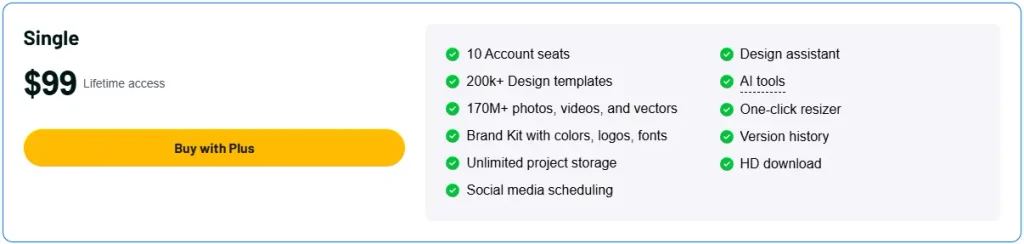
Single Plan – $99
Features:
- 10 team seats
- 200K+ design templates
- 170M+ photos, videos, and vectors
- Save brand colors, logos, and fonts
- Unlimited design storage
- Schedule social media posts
- AI Design Assistant
- AI design and editing tools
- Resize designs in one click
- View past design versions
- HD design downloads
Deal Terms
Pay $99 once for lifetime Pro access and future updates. Get a 60-day refund window and redeem within 60 days. Codes cannot be stacked. Open to new and existing users, with early access for AppSumo Plus members.
VistaCreate vs Canva: Which Is Better?
Both tools are good, but for different needs.
1. VistaCreate
- Price: Free; Pro $10/month
- Templates: 200K+
- Stock Assets: 170M+
- Tools: AI, Resize, Background Remover
- Team: Up to 10 members
- Cons: No SVG or WebP export
- VistaCreate Lifetime Deal: $89 one-time
2. Canva
- Price: Free; Pro $144/year
- Templates: 3.6M+
- Stock Assets: 141M+
- Tools: More AI and editing options
- Brand Kits: 5 with Pro
- Cons: Pro requires ongoing payments
Final Verdict: Is VistaCreate Lifetime Deal Worth It?
Yes, the VistaCreate Lifetime Deal is worth a look. What I like most is that it puts many useful design tools in one place.
With 200K+ templates, millions of stock assets, AI tools, and a simple editor, you can make clean, professional-looking designs with less effort.
The best part is the one-time payment. You get Pro tools without paying each month. This makes VistaCreate a good choice for long-term design work.