Zavi AI Lifetime Deal: Write, Translate and Edit by Voice
Typing emails, messages, and documents takes time. That’s why Zavi AI caught my eye. You just speak, and it turns your words into clear text in Gmail, WhatsApp, Google Docs, and other apps.
What I like is that it also fixes grammar, translates text, and lets you edit with voice commands. The Zavi AI Lifetime Deal starts at just $39 on AppSumo. You pay once and get a set number of cloud words each month.
Zavi AI KEY Features
Voice Typing
Tap the mic and speak in Gmail, Slack, or WhatsApp. Zavi writes your words, removes fillers, and fixes grammar and punctuation.
Live Translation
Speak in one language and get text in another. Zavi supports 100+ languages, even when you mix them.
Magic Wand
Select text and say what you want to change. Zavi can shorten, rewrite, translate, or sum it up in the same app.
Voice Agent
Tell Zavi to send an email or post in Slack. It uses linked apps to do the task and can read the result aloud.
Style & Tone Engine
Choose a melody: Professional, Casual, Chat, or Witty. Zavi uses it to change how your text sounds.
Pros of Zavi AI
- Faster Everyday Writing: Speaking can be quicker than typing each word. You can write emails, messages, and long notes with less effort.
- Less Time Fixing Text: Zavi cleans up your words as you speak. You spend less time fixing errors before sending your text.
- Easier Global Communication: You can write to people who speak other languages. This makes it easier to send emails and messages worldwide.
- No App Switching: You can write and edit text in the same app. There’s no need to copy and paste between tools.
- Consistent Writing Style: Your work emails can sound formal, while chats stay casual. This helps you match the tone to each message.
- Better Voice Data Privacy: On-device mode keeps your audio off the cloud. Zavi says it deletes audio after use and never uses it to train AI.
Cons of Zavi AI
- Missed Voice Transcriptions: One Google Play user said Zavi sometimes failed to turn speech into text.
- Grammar Fixes Can Vary: One user said Zavi did not always fix grammar mistakes.
- Unclear Data Processing: Zavi can process audio on your device, but its privacy policy says some audio and text may go to outside AI services.
- Monthly Word Limits: Each AppSumo lifetime plan has a set monthly cloud word limit, which may not be enough for heavy users.
Who Is Zavi AI Best For?
- Busy Professionals: Ideal for those who send work emails, Slack updates, and team messages daily.
- Writers and Content Creators: Great for turning spoken ideas into blog posts, scripts, and other written content.
- Multilingual Professionals: Helpful for those who speak one language but need to write in another.
- Students: Useful for writing class notes, essays, and study materials by voice.
- Customer Support Teams: Good for teams that answer customer questions and write replies all day.
Zavi AI AppSumo Pricing Plan
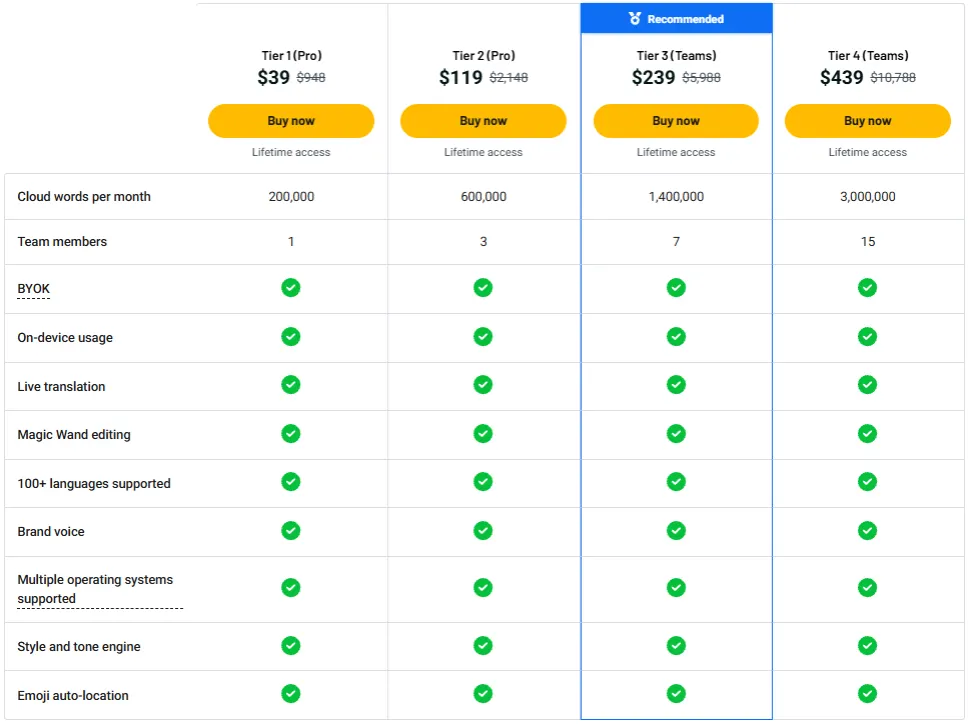
License Tier 1 (Pro) – $39
- 200,000 cloud words/month
- 1 team member
- AI voice typing
- Magic Wand editing
- 100+ languages
- Live translation
- On-device processing
- Style & Tone Engine
- Emoji auto-location
- Mac, Windows, iOS & Android
License Tier 2 (Pro) – $119
- Everything in License Tier 1
- 600,000 cloud words/month
- 3 team members
- Shared brand voice
License Tier 3 (Teams) – $239
- Everything in License Tier 2
- 1,400,000 cloud words/month
- 7 team members
- BYOK (Your Own API Keys)
- Your Keys mode
License Tier 4 (Teams) – $439
- Everything in License Tier 3
- 3,000,000 cloud words/month
- 15 team members
Final Thoughts – Zavi AI Review 2026
What I like most about Zavi AI is how easy it makes writing. Just speak, and it turns your words into clear text right in your apps. No need to type or copy text between tools.
Magic Wand also stands out to me. You can shorten text, change its tone, or translate it by voice. The Zavi AI Lifetime Deal starts at $39 on AppSumo, making it worth a look if you want to write more by speaking.