TexAu Lifetime Deal – 110+ LinkedIn, Maps & X Automations
Finding leads on LinkedIn or Google Maps takes time. You have to find people, save their details, and contact them. TexAu helps you do these tasks without all the manual work.
What I like is how easy the steps are. Just pick a task, add a URL or CSV file, and run it. TexAu saves the results on your computer. It can also send LinkedIn requests and messages.
The TexAu Lifetime Deal starts at $69 on AppSumo. If you frequently work with leads, you might want to take a look at this.
TexAu KEY Features
TexAu helps you find leads, collect data, and send messages. It saves you from doing each task by hand. Here are its key features and how they work.

LinkedIn & Sales Navigator Lead Generation
TexAu helps you find leads on LinkedIn without much work. You can get names, job titles, and profile links without copying each one.
First, connect your LinkedIn account. Then, choose LinkedIn Company Employees Export and enter the company details. You can also use Sales Navigator to find leads.
Once the task is done, TexAu saves your list as a CSV file. This is useful when you need to find key people at many companies.
Google Maps & Website Data Extraction
TexAu helps you find local business leads on Google Maps. You can get business names, addresses, ratings, and websites in one list.
Just choose Google Maps Search Results and type something like “dentists in Austin.” Then, use the website tool to find emails, phone numbers, and social links listed on those sites.
TexAu saves the results as a CSV file. This makes it easy to build local business lead lists.
LinkedIn & X Outreach Automation
TexAu helps you send LinkedIn requests and messages without doing them by hand. You can also send DMs on X (Twitter).
First, link your account with the TexAu Chrome extension. Then, choose LinkedIn Auto Connect or an X message task. Add your profile links, write a message, and run it. TexAu sends messages based on your account limits.
What I like is that TexAu can skip people who have already replied on X. This helps you avoid sending them more follow-up messages.
Data Cleaning & CSV Export
Messy names and job titles can make lead lists hard to use. TexAu helps you clean up this data before you share it.
Just choose Company Name Cleaner or Personal Name Cleaner and add your data. TexAu can fix names and clean LinkedIn headlines. It can also split them into job titles and company names.
Once done, TexAu saves your data as a CSV file. You can also rerun old tasks from the History tab.
Multi-Account & Proxy Management
TexAu lets you manage many client accounts in one place. This helps when you run lead tasks for different clients.
First, link each account with the TexAu Chrome extension. Then, open the Proxies tab and add a proxy for each client. This gives each account its own IP address.
What I like is that TexAu checks if your proxies work. If one goes down, TexAu stops the jobs using it. This keeps those jobs from using your home IP.
Local Data Security & Rate Limits
TexAu keeps your account logins on your computer. It uses your system’s keychain to keep them safe. TexAu never gets your login data.
You can also set limits for each account. Just open Rate Limits, pick a task, and set a daily or hourly limit.
What I like is that TexAu pauses jobs when they hit the limit. You can start them again later, right where they stopped.
How to Use TexAu Desktop?
Using TexAu is quite simple. Here is how to get started:
- Install TexAu: Download the desktop app and Chrome extension. Log in to LinkedIn or another site in Chrome. Then, link your account to TexAu.
- Pick a Task: Choose a task like LinkedIn Company Employees Export. Add a profile link, search, or CSV file.
- Run and Save: Start the task and let TexAu do the work. It saves the results as a CSV file in your chosen folder.
You can also view past tasks in the History tab and run them again.
Who Is TexAu Best For?
- Lead Generation Agencies: Build lead lists for clients and handle their outreach in one app.
- Sales Teams: Find key people at target companies and send LinkedIn requests.
- Local SEO Agencies: Get business names, phone numbers, and website details from Google Maps.
- Freelance Researchers: Find startup founders on Product Hunt and collect their contact details for clients.
- B2B Marketers: Find developers on GitHub and check what tools competitors use on their websites.
TexAu AppSumo Pricing Plan
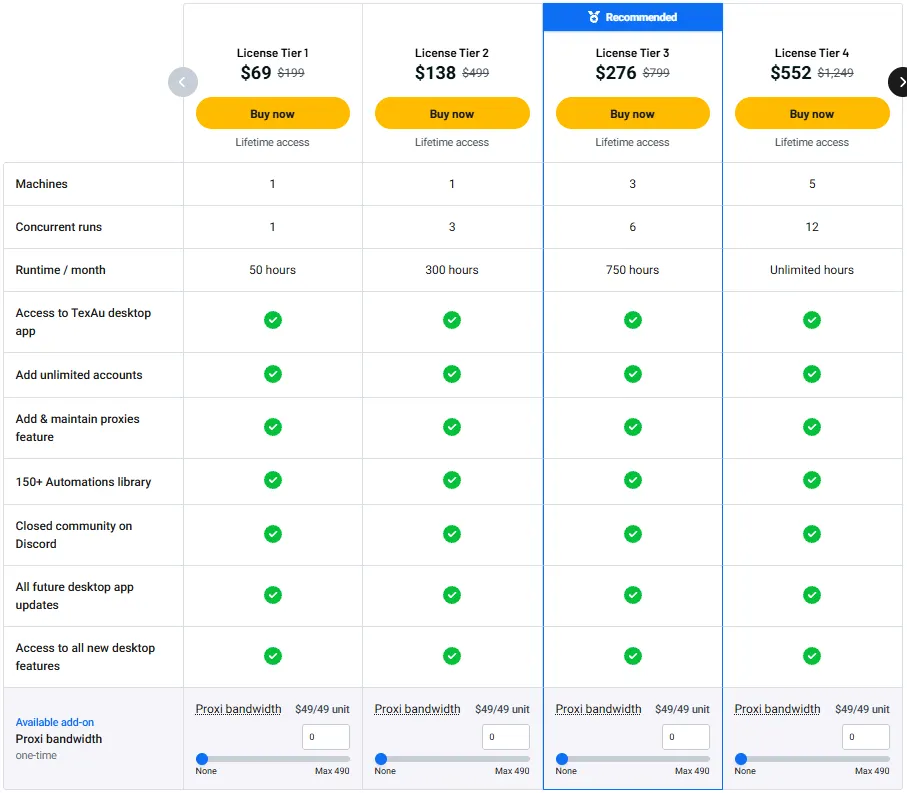
License Tier 1 — $69
- 1 machine, 1 task at a time
- 50 run hours/month
- TexAu desktop app
- Unlimited connected accounts
- Add and manage proxies
- 150+ ready-made automations
- Private Discord community
License Tier 2 — $138
- Everything in Tier 1
- 3 tasks at once
- 300 run hours/month
License Tier 3 — $276
- Everything in Tier 2
- Up to 3 machines
- 6 tasks at once
- 750 run hours/month
License Tier 4 — $552
- Everything in Tier 3
- Up to 5 machines
- 12 tasks at once
- Unlimited monthly run hours
License Tier 5 — $999
- Everything in Tier 4
- Up to 10 machines
- Unlimited tasks at once
5 Best TexAu Alternatives 2026
TexAu isn’t the only tool for finding leads and sending messages. Here are five other tools you can try.
1. PhantomBuster
PhantomBuster is a close alternative to TexAu. It helps you find leads on LinkedIn, Google Maps, and other sites. You can also send LinkedIn requests and follow-up messages.
- Starting Price: Free trial; paid plans start at $56/month, billed yearly.
- Pros: 100+ automations, cloud-based tasks, and scheduled runs.
- Cons: Limits on monthly run hours and tasks.
- vs. TexAu: Runs in the cloud, not on your computer.
2. Linked Helper
Linked Helper is a good choice if you mainly use LinkedIn. It helps you collect profiles, send connection requests, and follow up with leads.
- Starting Price: $15/month for a one-month Standard license.
- Pros: LinkedIn tasks, CSV exports, and built-in lead management.
- Cons: Daily task limits on the Standard plan.
- vs. TexAu: Focuses on LinkedIn rather than many sites.
3. Waalaxy
Waalaxy helps sales teams find and contact leads on LinkedIn. You can import leads from Sales Navigator and send follow-up messages.
- Starting Price: From €19/user/month, with a 14-day free trial.
- Pros: Ready-made campaigns, reply tracking, and email outreach on higher plans.
- Cons: The Pro plan allows 300 LinkedIn invites per month.
- vs. TexAu: Focuses on LinkedIn and email outreach, not broad web scraping.
4. Apify
Apify helps you collect data from websites. It has ready-made tools for Google Maps and other sites. You can use the data to build lead lists.
- Starting Price: Free plan; Starter costs $19/month plus usage fees.
- Pros: Many scraping tools, CSV exports, and scheduled tasks.
- Cons: Costs depend on the tool and how much you use it.
- vs. TexAu: Focuses more on web scraping than social outreach.
5. Clay
Clay helps you build lead lists and find more details about each contact. It works with LinkedIn, Google Maps, GitHub, and other sources.
- Starting Price: Free plan; Launch starts at $185/month or $167/month billed yearly.
- Pros: Lead research, extra contact details, and CRM links.
- Cons: Paid plans have limits on actions and data credits.
- vs. TexAu: Focuses more on lead data than desktop outreach tasks.
Final Thoughts – TexAu Review 2026
What I like most about TexAu is how it puts lead research and outreach in one app. You can find leads on LinkedIn or Google Maps, send messages, and save clean CSV files. This cuts down on manual work.
The ready-made tasks are also easy to start. You can manage many accounts in one place, while your login data stays on your computer.
With the TexAu Lifetime Deal starting at $69 on AppSumo, it’s worth a look if you want to save time on daily tasks.