TubeOnAI Lifetime Deal – Summarize Videos & Podcasts
I used to save long YouTube videos and podcasts to “watch later.” But I rarely got to them. So I tried TubeOnAI.
TubeOnAI is an AI tool. It turns long content into short summaries. It works with videos, podcasts, articles, and PDFs. You get the main points in seconds.
You can do more with each summary. Listen to it, or translate it into 40+ languages. Ask the AI questions about it. Or turn it into a blog post, thread, or script.
My favorite part is the auto summaries. Just subscribe to a channel you like. Each new video gets summarized for you.
This review covers the features, benefits, and pricing. It will help you decide if the TubeOnAI Lifetime Deal is right for you.
Features of the TubeOnAI Lifetime Deal
YouTube Summarizer
Paste a YouTube link to get a summary. You also get a transcript and timestamps. It works on videos with no captions, too. You can even summarize a full playlist at once.
Podcast Summarizer
Paste an episode link, or search for a show. It works with Spotify, Apple Podcasts, and YouTube. You get a summary with the key points. You also get the full transcript and timestamps.
Web Content Summary
Paste the link to any public web page. This can be a blog, news story, or guide. TubeOnAI reads the page for you. Then it gives you a short summary of the main points.
Google Drive Summary
Share the link to a Google Drive file with full access. TubeOnAI then sums it up for you. It works with Google Docs, slides, and videos. For video and audio files, you also get a full transcript.
Auto summaries from favorite creators
Follow your favorite YouTube channels or podcasters. You can also import your channels in one click. When they post something new, TubeOnAI makes a summary. Then it sends you an alert.
Repurpose Content
Pick a summary and choose a prompt. TubeOnAI turns it into a blog post, thread, newsletter, script, and more. Use one of the 150+ ready-made prompts. Or write your own custom prompt.
Collections
Put videos, podcasts, PDFs, and articles into one group. You can sort them by topic, project, or client. Then ask one question across all of them. The answer shows which source each point came from.
Ask Follow-Ups
Once you have a summary, you can chat with it. Type any question about the content. The AI answers based on what it says. You can save the chat to check later.
Audio Summaries
TubeOnAI reads your summaries out loud. The voice sounds like a real person. It works on the web and in the mobile app.
Translated Insights
You can translate your summaries into 40+ languages. You can also set a default language. Then your summaries come in that language each time.
AI models
You can pick from different AI models. These include GPT-5, DeepSeek V3.1, and Grok 4 Fast. You can switch models based on the task you are doing.
Pros of TubeOnAI
- Learn Key Points Faster: Get the main ideas of a long video, podcast, or article. It takes minutes, not hours.
- Keep Up With Creators: Stay current with the channels and podcasts you follow. You don’t have to check each one for new posts.
- More Content From One Source: Turn one video or podcast into a blog post, social post, and newsletter. You don’t have to start each one from scratch.
- Learn in Your Language: Read content made in other languages. It shows up in the language you know best.
- Learn While on the Go: Take in new ideas while you commute, work out, or do other tasks.
- All Research in One Place: Keep your videos, papers, and articles in one spot. No more digging through lots of tabs to find them.
- Clear Up Hard Topics: Stuck on something hard? Ask about it. You get a simple explanation until it makes sense.
- Easy to Check Sources: Go back to the exact minute or page a point came from. Then check it for yourself.
- Fewer AI Subscriptions Needed: Use top AI models from different companies in one place. You don’t need to pay for separate tools.
Cons of TubeOnAI
- Bugs and Failed Summaries: Some users say summaries fail or features stop working. So you may need to try some tasks twice.
- Credits Used on Failed Tasks: A few users say credits were still used when a task failed. But the TubeOnAI team says this does not happen.
- Slow Support Replies: Some users had to ask support more than once. Only then did they get a reply.
- BYOK Doesn’t Cover Everything: The TubeOnAI team says some new tools don’t work with your own API key. This includes Podcasts and Slide Decks.
Who is TubeOnAI best for?
- Content Creators: Do you post on YouTube, a blog, and social media? Turn one video or podcast into posts for every site. You don’t have to write every post by hand.
- Course Creators: Do you make lessons from videos, talks, and readings? Turn them into notes, quizzes, and lesson plans. Then share them with your students.
- Students: Do you have long lectures and readings to get through? Turn them into short study notes and quizzes. Then go over them before exams.
- Researchers: Do you read lots of papers and watch talks for one project? Keep every one of them in one place. Then trace each idea back to where it came from.
- Marketers and Agencies: Do you work with many clients or campaigns? Keep a library for every one. You can also follow what creators in your niche post.
TubeOnAI AppSumo Pricing Plan
All tiers are a one-time payment with lifetime access and a 60-day refund.
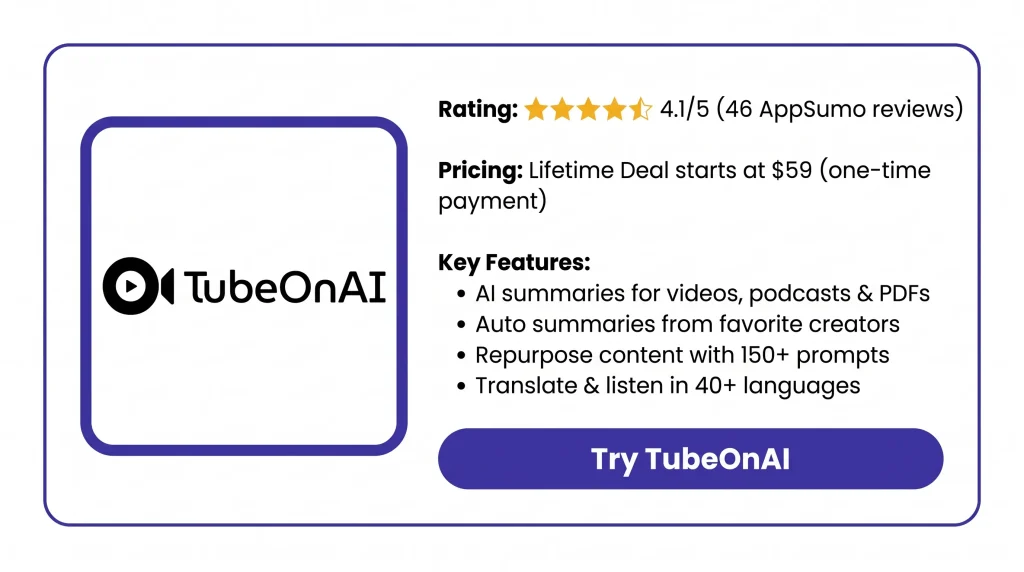
License Tier 1: $59
- 3,000 credits per month
- Auto summaries from 3 channels
- Transcribe, summarize, and repurpose content from 25+ sources
- Custom prompts, Ask AI Agent, and real-time voice chat
- Audio summaries and translation in 40+ languages
- Content library, media uploads, Chrome extension, and mobile apps
License Tier 2: $149
Includes License Tier 1, plus:
- 10,000 credits per month
- Auto summaries from 10 channels
- Bulk video summary, content editor assistant, and BYOK
License Tier 3: $379
Includes License Tier 2, plus:
- 60,000 credits per month
- Unlimited channel auto summaries
- Interactive content and webhooks
What Are the Best TubeOnAI Alternatives?
The top TubeOnAI alternatives are NotebookLM, Recall, NoteGPT, Eightify, and Castmagic. The best one for you depends on what you need most. It could be price, study tools, YouTube, or podcasts.
1. NotebookLM: Best Free Alternative for Research
NotebookLM is a research tool from Google. It is now called Gemini Notebook. You add your files and chat with them.
- Starting price: Free, or $4.99 a month with Google AI Plus.
- Pros: The free plan has audio recaps, mind maps, flashcards, quizzes, and deep research.
- Cons: You can’t buy it on its own. It also does not work offline.
- Key difference: It runs on Gemini. TubeOnAI lets you pick your AI model. It also sums up new posts from channels you follow.
2. Recall: Best for a Personal Knowledge Library
Recall saves YouTube videos, podcasts, PDFs, and notes. Then it sums them up and sorts them for you.
- Starting price: Free, or $10 a month paid annually.
- Pros: You can save as much as you want for free. It works on the web, in your browser, and on your phone.
- Cons: The free plan gives you just 10 AI summaries a month.
- Key difference: Recall links your saved items in a map of ideas. TubeOnAI puts more focus on turning them into new posts.
3. NoteGPT: Best for Students
NoteGPT turns lectures, PDFs, articles, and audio into notes, flashcards, and mind maps.
- Starting price: Free with 15 credits a month, or $9.99 a month.
- Pros: Study tools are built in. Yearly plans do not renew on their own.
- Cons: You can only get your money back in the first 24 hours. It must also be due to a bug.
- Key difference: NoteGPT is made for study. TubeOnAI is made for summaries and new posts.
4. Eightify: Best for Quick YouTube Summaries
Eightify is a Chrome add-on. It sums up YouTube videos right on the video page.
- Starting price: A 7-day free trial, then $59.99 a year.
- Pros: It works on videos up to 10 hours long. It also works in 40+ languages.
- Cons: It only works with YouTube.
- Key difference: TubeOnAI also works with podcasts, articles, PDFs, and Google Drive files.
5. Castmagic: Best for Podcast Repurposing
Castmagic turns podcasts and long audio into show notes, blog posts, social clips, and newsletters.
- Starting price: $21 a month, paid each year.
- Pros: It makes many types of content from one audio file at once.
- Cons: The Hobby plan gives you just 5 hours of audio-to-text each month.
- Key difference: TubeOnAI also sums up articles and docs. It can post right to WordPress and LinkedIn, too.
Final Thoughts – TubeOnAI Review 2026
TubeOnAI has changed how I handle long content. I get the key points in minutes. New videos from channels I follow show up already summarized.
I can listen to summaries on the go. I can turn one video into a blog post or thread. I can also ask questions across all my sources in one place. Plus, I get top AI models without paying for each one.
With the TubeOnAI Lifetime Deal, you get all of this for a single payment. Prices start at $59, with no monthly bills.