ZeroWork Lifetime Deal: No-Code AI Browser Automation
ZeroWork is a no-code tool that helps you automate tasks in your web browser. You can use it to collect website data, find leads, fill out forms, and handle social media tasks.
You can build a TaskBot with drag-and-drop blocks or AI. It then runs on your computer through the Desktop Agent. You can also set run times, manage multiple accounts, and reduce the risk of bot detection.
KEY Features of ZeroWork
ZeroWork helps you build TaskBots and use AI for web tasks. Here are its main features and what they do.
Automate Websites with No-Code and AI
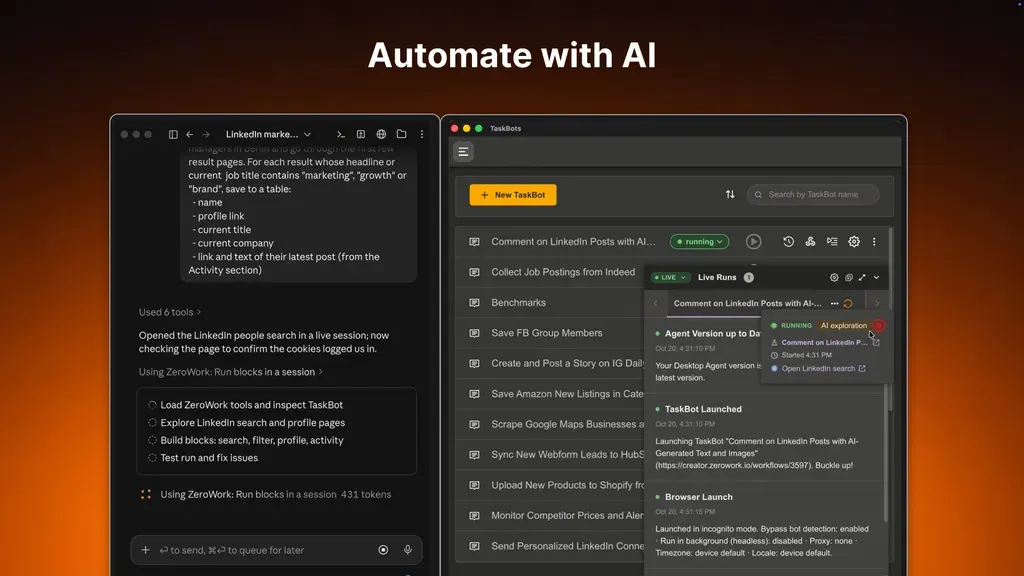
ZeroWork helps you automate website tasks without coding. You can build a TaskBot by dragging and linking blocks. Each block can open pages, click buttons, or collect data.
You can also use AI tools like Claude or ChatGPT. Just tell the AI what you want to do. It can build, test, and fix your TaskBot in a browser.
How to use it: Install the Desktop Agent and open ZeroWork. Build a TaskBot with blocks or AI. Then click Run to test it.
Use AI in Your Workflows
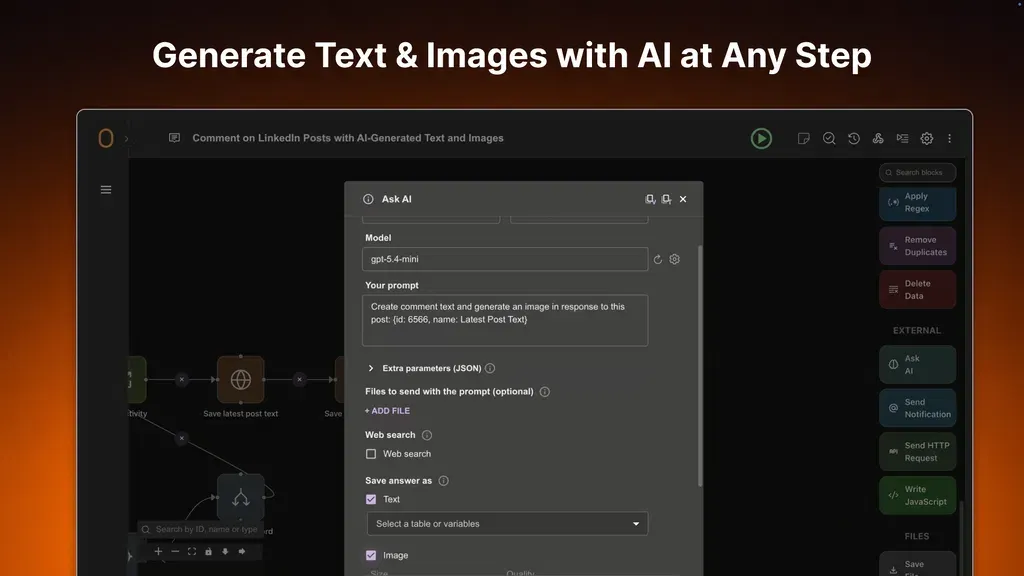
ZeroWork lets you add AI to any TaskBot step. You can use it to write posts, comments, and replies. The AI uses data your TaskBot collects from websites. It can also create images. You can choose OpenAI, Claude, Gemini, or other AI tools.
How to use it: Add an Ask AI block to your TaskBot. Choose an AI model and add your API key. Then write what you want the AI to do. You can use data from earlier steps. Save the result as text or an image.
Bypass Bot Detection and Fix Errors with AI
ZeroWork helps lower the risk of websites blocking your TaskBots. Its Bypass Bot Detection mode hides signs of bot activity. You can also add random delays, natural clicks, and typing to make tasks act more like a real person.
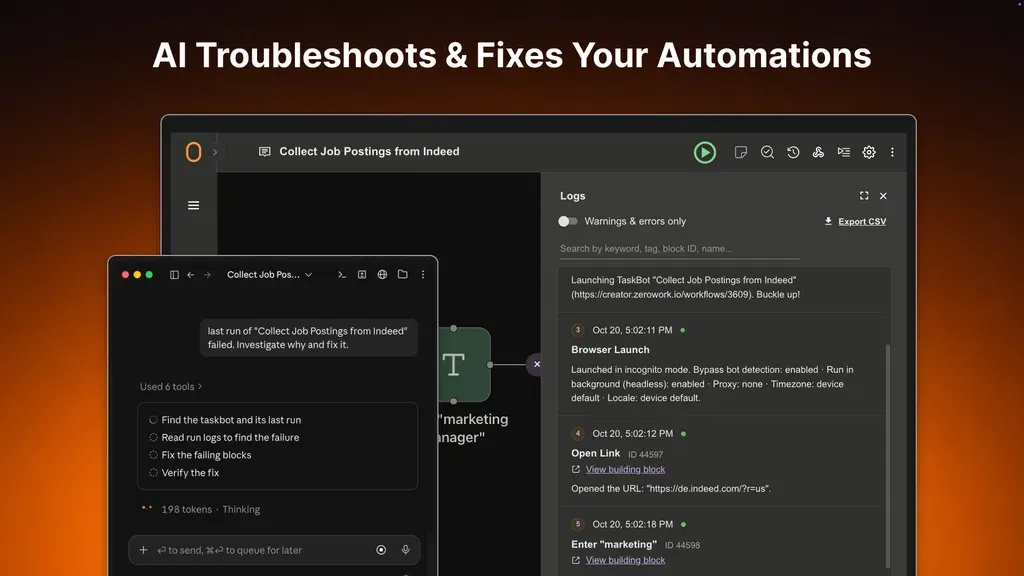
If a TaskBot fails, ZeroWork saves error logs and screenshots. You can use a linked AI assistant to find and fix the issue.
How to use it: Open Browser Launch Settings and turn on Bypass bot detection. If a task fails, check its Run Reports. Then ask your linked AI assistant to find and fix the problem.
Automate Multiple Accounts with Sticky Profiles
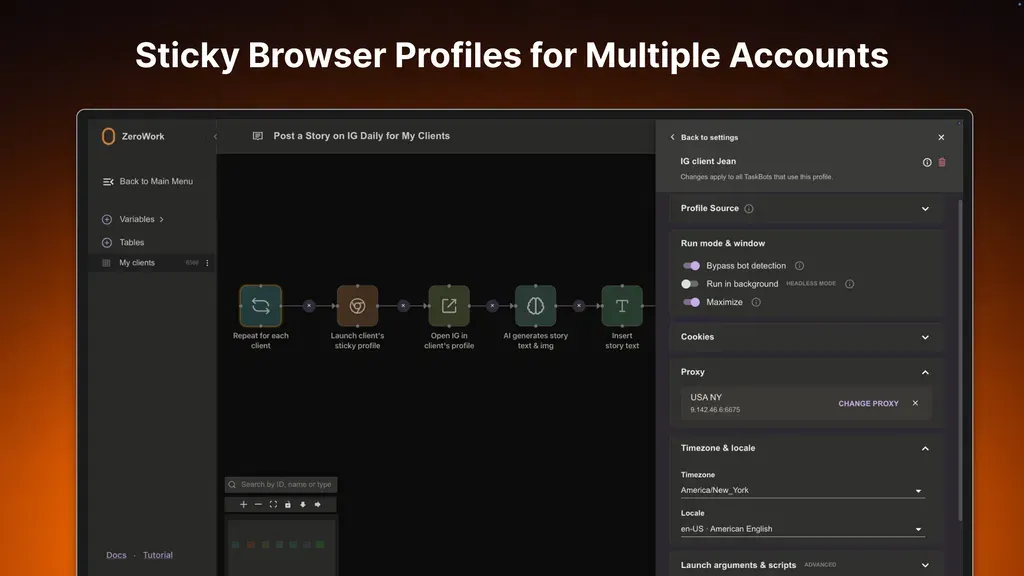
ZeroWork lets you manage multiple accounts with Sticky Profiles. Each profile saves its own login, cookies, and browser data. So you can stay logged in between runs.
You can also use a different proxy and time zone for each account. This keeps accounts separate and helps lower the risk of getting flagged.
How to use it: Open Browser Launch Settings and select Sticky profile. Create a profile and log in to your account. Do the same for other accounts and add a proxy to each one.
ZeroWork Pros and Cons
ZeroWork has some useful benefits, but it also has a few limits. Here are its main pros and cons to help you decide.
Pros
- Save Time on Repetitive Tasks.
- Build Tasks Without Coding.
- Reduce AI Running Costs.
- Manage Multiple Accounts Easily.
- Find and Fix Errors Faster.
- Lower Risk of Website Blocks.
- Keep More Data on Your Device.
Cons
- Steep Learning Curve.
- No Cloud Execution.
- No Ready-Made Templates.
- Limited Email Support.
- No Desktop App Automation.
Who Is ZeroWork Best For?
- Social Media Managers: Schedule posts, reply to comments, and manage social media accounts.
- Lead Generation Specialists: Find business details and contact information on websites without searching by hand.
- E-commerce Sellers: Collect product names, prices, and images from online stores for research.
- Marketing Agencies: Manage client accounts and run tasks with separate browser profiles.
- Admin Teams: Save time by collecting invoices, filling out forms, and doing routine website tasks.
ZeroWork AppSumo Pricing Plan
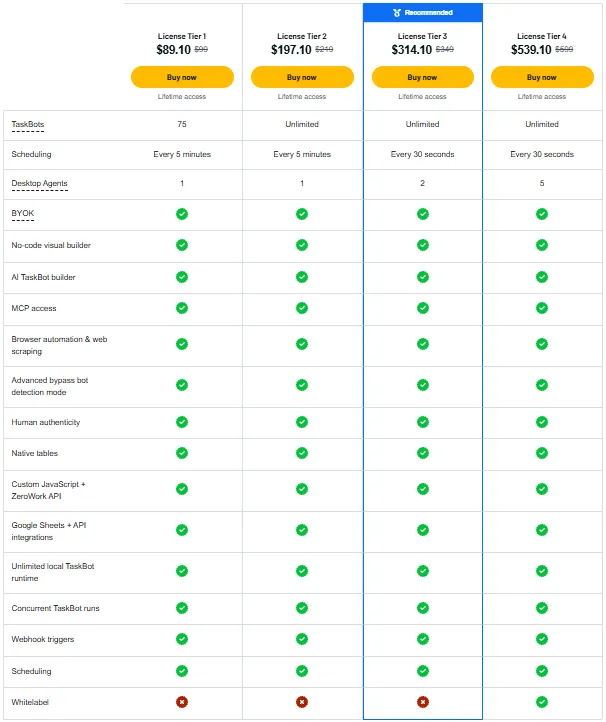
License Tier 1 – $89.10 (One-Time)
Features:
- Up to 75 TaskBots
- Run tasks every 5 minutes
- 1 Desktop Agent
- Bring your own AI key (BYOK)
- No-code workflow builder
- AI TaskBot builder
- AI assistant support via MCP
- Website automation and scraping
- Advanced bot detection bypass
- Human-like clicks and typing
- Built-in data tables
- Custom JavaScript and API
- Google Sheets and API integrations
- Unlimited local runtime
- Run multiple TaskBots at once
- Webhook support
License Tier 2 – $197.10 (One-Time)
Features:
- All License Tier 1 features
- Unlimited TaskBots
License Tier 3 – $314.10 (One-Time)
Features:
- All License Tier 2 features
- Run tasks every 30 seconds
- 2 Desktop Agents
License Tier 4 – $539.10 (One-Time)
Features:
- All License Tier 3 features
- 5 Desktop Agents
- White-label branding
Final Thoughts – ZeroWork Review 2026
ZeroWork helps you save time on daily browser tasks. You can build TaskBots without coding, collect website data, and automate repeat tasks. AI also helps you build tasks and fix errors.
ZeroWork stands out for its mix of AI and no-code tools. You can run tasks on your own computer. With the AppSumo lifetime deal, you pay once instead of every month.