Animation Addons Lifetime Deal: Build Elementor Sites Faster
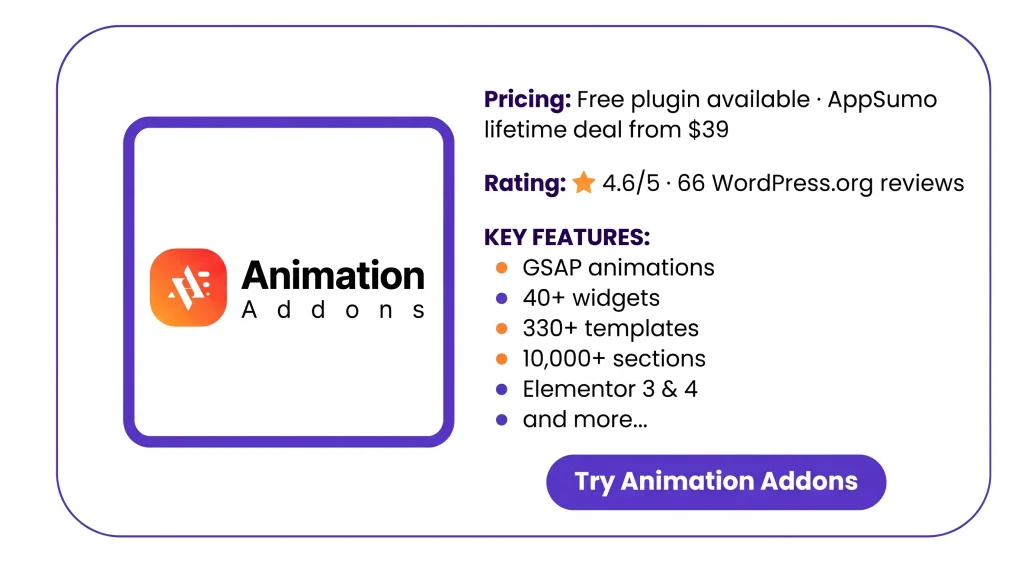
Animation Addons is a plugin for WordPress and Elementor. It lets you add GSAP effects with no code. You can make text move and add scroll effects.
You get 40+ Elementor 4 widgets and 330+ site templates. It also has 10,000+ page sections to choose from. It helps web designers build sites with motion.
How to Install and Use Animation Addons?
Setting up Animation Addons is easy. Just follow these steps:
- Go to WordPress → Plugins → Add New.
- Search for Animation Addons. Click Install, then Activate.
- Open Animation Addons → Setup. Turn on the tools you need.
- Open a page in Elementor. Add a widget and edit it.
For Pro users: Keep the free plugin active. Upload the Pro ZIP file and enter your license key.
KEY Features of Animation Addons
Animation Addons gives you tools to build and add motion to Elementor sites. Here are its main features and how to use them.
No-Code GSAP Animations
Animation Addons Pro lets you add smooth motion with no code. You can make text, images, and sections move as users scroll.
To use it, go to Animation Addons → Extensions and turn on Regular Animation. Then open a page in Elementor and pick an element. Choose an effect, set its speed, and preview it.
40+ Elementor 4 Atomic Widgets
Animation Addons has 40+ widgets for Elementor 4. You can add menus, forms, sliders, and post grids. These tools help you build pages with no code.
To use them, open a page in Elementor. Pick a widget and add it to your page. Then use the Style tab to change how it looks.
Website and Section Templates
Animation Addons has 330+ website templates and 10,000+ ready-made sections. These help you build pages from a design that’s already made.
To use them, go to Animation Addons → Starter Templates. Pick a design, preview it, and click Import. Then add your own text, images, and colors.
Elementor 3 and 4 Support
Animation Addons works with both Elementor 3 and 4. It has 102 classic widgets for Elementor 3 and 40+ Atomic Widgets for Elementor 4.
Your old Elementor 3 pages will still work. You can use the new Elementor 4 widgets without rebuilding those pages. One license covers both versions.
Animation Addons Pros and Cons
Animation Addons has useful tools, but it has some limits. Here are the main pros and cons to help you decide.
Pros
- Saves Time.
- No Coding Needed.
- Easy Site-Wide Changes.
- Fewer Plugins to Manage.
- More Engaging Websites.
- Keeps Old Sites Working.
Cons
- Elementor Required.
- GSAP Requires Pro.
- Animation Builder Quirks.
- Possible Theme Conflicts.
Who Is Animation Addons Best For?
- Web Designers: Create custom website layouts with smooth text, image, and scroll effects without writing complex code.
- Freelancers: Save time on client projects by using ready-made templates instead of building every page from scratch.
- Web Design Agencies: Build and manage multiple client websites while keeping colors, fonts, and designs consistent across pages.
- WordPress Developers: Add advanced GSAP animations directly in Elementor without spending time writing custom JavaScript.
- Elementor 3 Users: Keep existing websites running while getting access to the new tools and widgets in Elementor 4.
Animation Addons AppSumo Pricing Plan
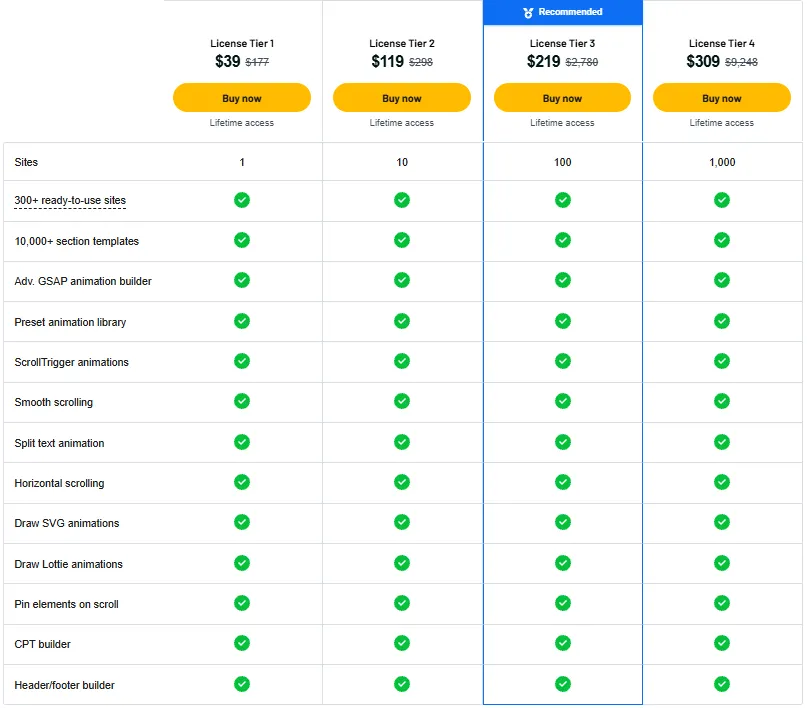
License Tier 1 – $39
- 1 website
- 300+ website templates
- 10,000+ sections
- GSAP animation builder
- Animation presets
- ScrollTrigger effects
- Smooth scrolling
- Split-text animation
- Horizontal scrolling
- SVG animations
- Lottie animations
- Scroll pinning
- Custom post type builder
- Header/footer builder
License Tier 2 – $119
- All Tier 1 features
- 10 websites
License Tier 3 – $219
- All Tier 2 features
- 100 websites
License Tier 4 – $309
- All Tier 3 features
- 1,000 websites
5 Best Animation Addons Alternatives 2026
Looking for other tools like Animation Addons? Here are five options for building and adding motion to WordPress sites.
1. HappyAddons
HappyAddons is an Elementor plugin with GSAP effects, widgets, and ready-made designs. It’s a good fit if you need both design tools and animations.
- Starting Price: Free; Lifetime from $149
- Pros: GSAP effects, 400+ presets, and live copy.
- Cons: Advanced GSAP effects need Pro.
- KEY Difference: More focus on widgets and ready-made designs.
2. Motion.page
Motion.page helps you add custom motion to websites without code. You can make text move, add scroll effects, and set up page transitions.
- Starting Price: €149/year; monthly price not verified.
- Pros: More control over motion and support for many platforms.
- Cons: No full library of Elementor widgets and templates.
- KEY Difference: Works beyond WordPress and Elementor.
3. The Plus Addons
The Plus Addons give you more tools to build Elementor sites. You can make menus, forms, page layouts, and designs with motion.
- Starting Price: Free; Lifetime from $139
- Pros: 120+ widgets, templates, and WooCommerce tools.
- Cons: Works only with Elementor.
- KEY Difference: Focuses more on building full websites.
4. UiCore Animate
UiCore Animate is a free WordPress plugin for adding motion to Elementor sites. It helps you add scroll effects, page transitions, and moving backgrounds.
- Starting Price: Free
- Pros: Ready-made effects, smooth scrolling, and page transitions.
- Cons: More focused on motion than full site design.
- KEY Difference: Free tools for adding motion to pages.
5. Premium Addons
Premium Addons gives Elementor users more ways to design pages. It has Lottie effects, parallax, scroll effects, and ready-made layouts.
- Starting Price: Free; Lifetime from $111
- Pros: 90+ widgets, templates, and motion effects.
- Cons: Some advanced tools need Pro.
- KEY Difference: More focus on a wide range of design tools.
Final Verdict: Is It Worth Buying?
Animation Addons is worth a look if you use Elementor. It helps you add smooth GSAP effects without coding. Its widgets and ready-made designs can also save time.
However, you need Pro for advanced animations. Some users have also reported theme conflicts. The AppSumo lifetime deal may suit those who build client sites. But if you only need a basic site with no motion, you may not need it.