Plutio Lifetime Deal: Manage Clients, Projects and Payments
Plutio helps you run your business from one place. Freelancers, agencies, and small businesses can use it. You can manage clients, projects, tasks, contracts, and payments.
The best part is how its tools work together. When a client signs a proposal, Plutio can create a project on its own. You can then track tasks, log work hours, and send invoices without switching apps.
Plutio also has Super Work AI to help with daily tasks. You can create client portals, share files, chat with clients, and set up your workspace to fit your needs.
KEY Features of Plutio
Plutio makes work easier by keeping its tools connected. Here are the key features that help you save time.
Manage Clients from Proposal to Payment
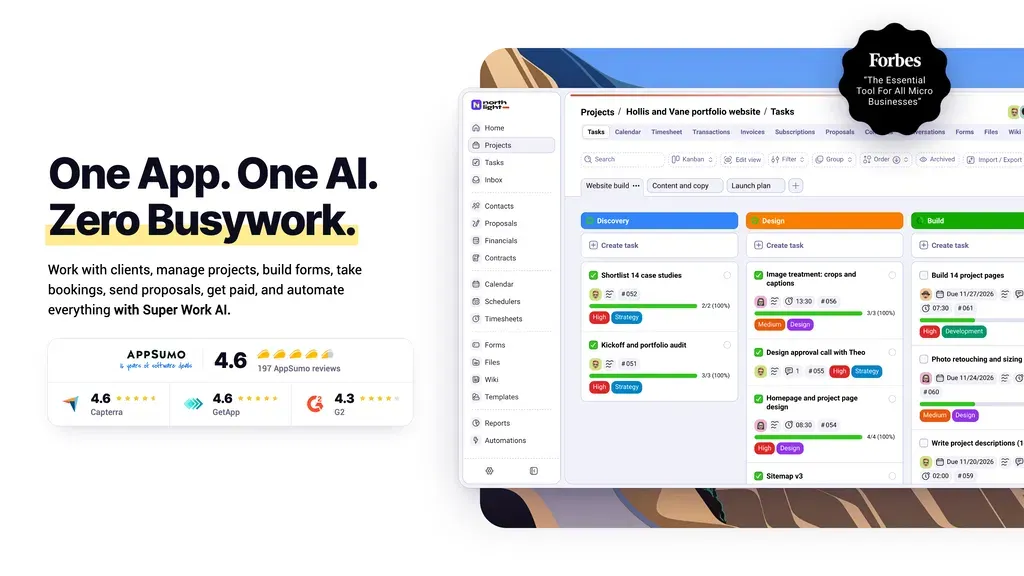
Plutio helps you manage clients from start to finish. You can send proposals, offer packages, get signatures, and collect payments. Everything stays in one place.
The best part is how each step works together. When a client signs a proposal, Plutio can create an invoice and start a project. Clients can also check their work, files, and invoices through their own portal.
How to Use: Open Proposals and pick a template. Add your services, set prices, and send it to your client. You can also set up automatic invoices and project creation. Once they sign, Plutio can handle the next steps.
Automate Client Workflows
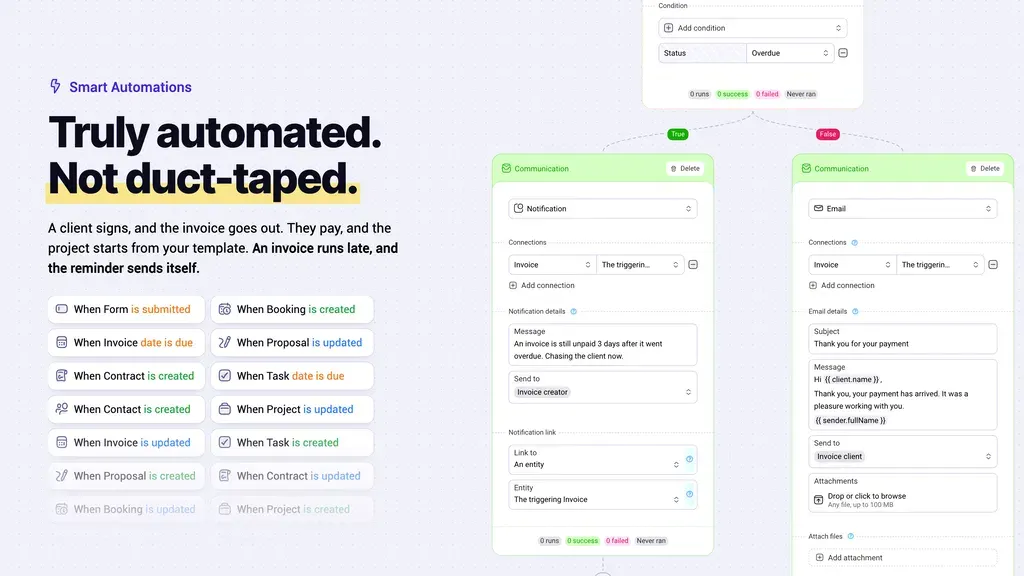
Plutio helps you save time on tasks you do often. You can set up rules to send invoices, create tasks, and follow up with clients.
For example, when a client signs a proposal, Plutio can send an invoice. Once they pay, it can start a project and give tasks to your team. It can also send reminders for late payments.
How to Use: Open Automations and set up a new workflow. Choose what starts it, like a signed proposal. Then pick what happens next. Save and turn it on, and Plutio will run those steps for you.
Get Answers and Complete Tasks with Super Work AI
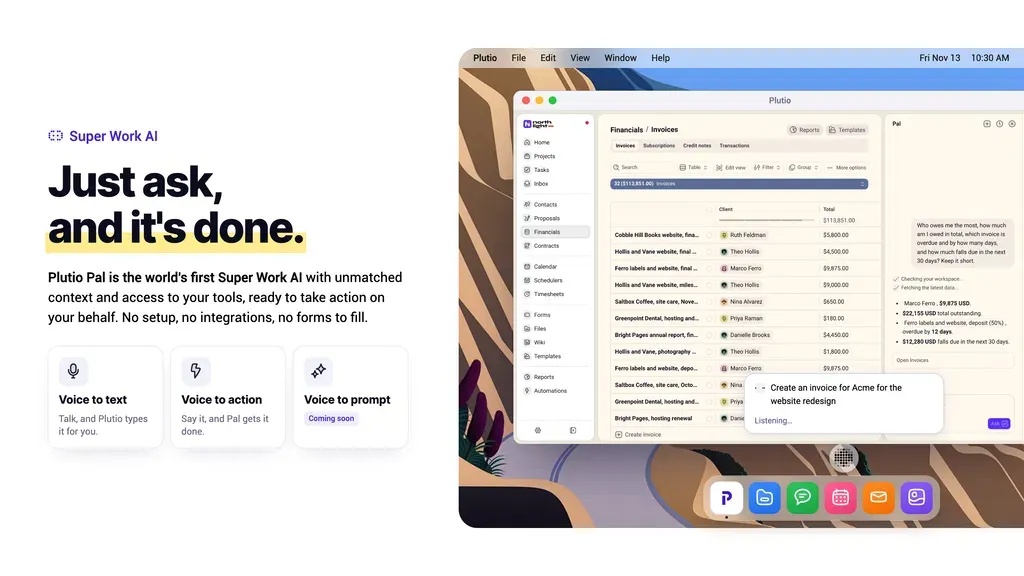
Plutio has an AI helper called Pal. It helps you find details and get daily work done. You can ask about clients, projects, invoices, and past work.
For example, you can ask Pal to find unpaid invoices. It can also create invoices, manage meetings, and send messages. Just tell Pal what you need, and it can do the work for you.
How to Use: Open Plutio Pal in your workspace. Type a question or say “Hey Pal” to give a task. You can ask it to create an invoice or find overdue tasks. Pal uses your workspace data to help you.
Customize Plutio to Fit Your Workflow
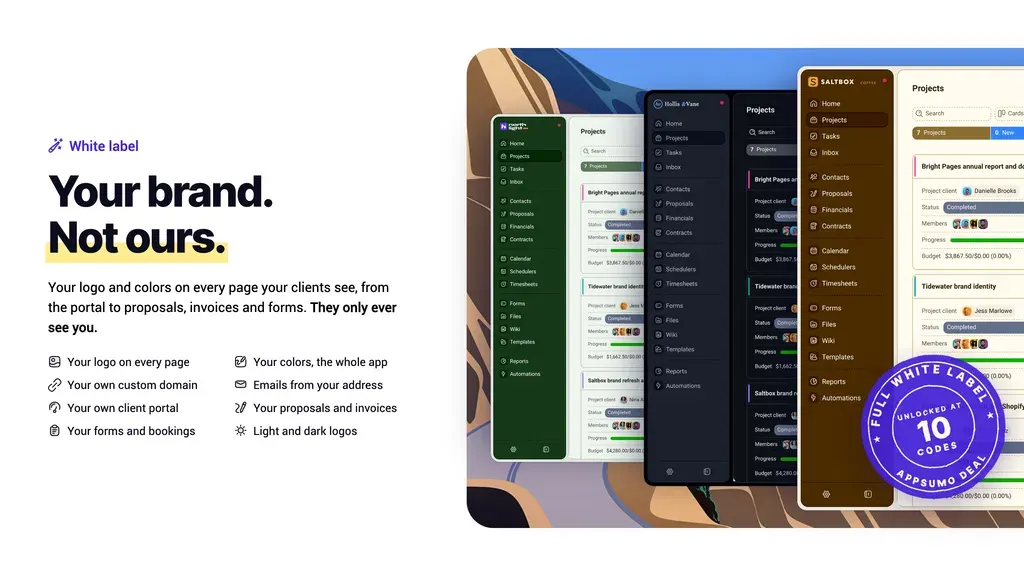
Plutio lets you set up your workspace your way. You can change colors, add your logo, and pick which tools to show.
You can also add custom fields and change the main menu. Plus, you can choose what your team and clients can see. This keeps your workspace neat and easy to use.
How to Use: Open Settings and go to Branding. Add your logo and pick your colors. Then use the Main Menu to arrange your tools. You can also add custom fields and set roles for your team.
Plutio Pros and Cons
Plutio has some good points and a few limits. Here are its main pros and cons to help you choose.
Pros
- Save Time on Daily Tasks.
- Manage Everything in One Place.
- Faster Client Onboarding.
- Better Team Collaboration.
- Keep Clients Updated.
- Find Information Faster.
Cons
- Limited Team and Client Access.
- Extra Cost for White-Label Branding.
- Monthly AI and Automation Limits.
- Reported App Bugs.
- Mixed Customer Support.
Who Is Plutio Best For?
- Freelancers: Useful for managing client projects, sending proposals, tracking work hours, and collecting payments in one place.
- Creative Agencies: Helps teams share tasks, track project progress, and keep client work on schedule.
- Consultants: Great for sending contracts, booking meetings, and managing client work from start to finish.
- Coaches: Help manage client bookings, share files, and keep track of ongoing work with clients.
- Small Business Owners: Useful for managing client records, invoices, daily tasks, and teamwork without switching apps.
Plutio AppSumo Pricing Plan
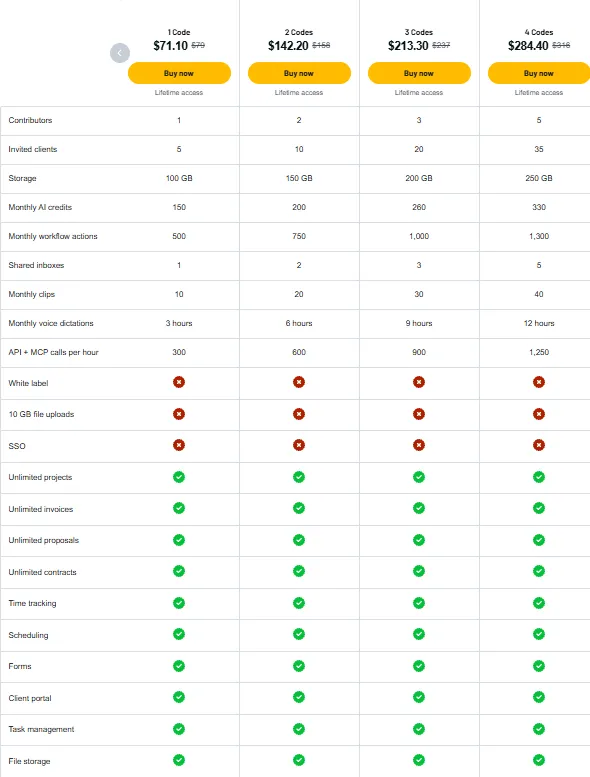
License Tier 1 — $71.10
Features:
- 1 team member
- 5 invited clients
- 100 GB storage
- 150 AI credits/month
- 500 automation actions/month
- 1 shared inbox
- 10 screen clips/month
- 3 hours of voice typing/month
- 300 API + MCP calls/hour
- Unlimited projects
- Unlimited proposals
- Unlimited contracts
- Unlimited invoices
- Task and time tracking
- Meeting bookings
- Forms and client portals
- File storage and sharing
License Tier 2 to 10
Plutio also has License Tiers 2 through 10, starting at $142.20 and going up to $711 as a one-time payment. Higher tiers give you more team members, clients, storage, AI credits, and automation actions. License Tier 10 also unlocks full white-label branding, 10 GB file uploads, and SSO, with unlimited access to some features under fair-use rules.
5 Best Plutio Alternatives 2026
Here are five Plutio alternatives to help you manage clients, projects, and payments.
1. SuiteDash
SuiteDash helps agencies run their work in one place. You can manage clients, projects, bills, and client portals.
- Starting Price: $199 one-time (Lifetime Deal)
- Free Trial: 14 days
- Pros: CRM, client portals, automation, and custom branding.
- Cons: One lifetime key allows only 3 staff members.
- Key Difference: Its lifetime deal is based on the Pinnacle plan.
2. Bonsai
Bonsai helps freelancers manage client work and payments. You can also track time and keep projects on track.
- Free Plan: Limited use after you downgrade.
- Starting Price: $15/user/month
- Pros: CRM, project management, and time tracking.
- Cons: Invoices and contracts require a higher plan.
- Key Difference: You pay per user, not per workspace.
3. Agiled
Agiled helps small teams manage clients and projects. It also handles invoices and daily business tasks.
- Starting Price: $29/month
- Free Trial: 14 days
- Pros: CRM, project tracking, billing, and AI tools.
- Cons: The Starter plan limits projects and invoices.
- Key Difference: It also has tools for managing staff.
4. Dubsado
Dubsado helps service businesses manage client work. You can handle bookings, contracts, bills, and follow-ups.
- Starting Price: $35/month
- Free Trial: 21 days
- Pros: Client forms, contracts, invoices, and portals.
- Cons: Scheduling and automation need the Premier plan.
- Key Difference: It focuses more on new client setup than project tracking.
5. HoneyBook
HoneyBook helps small businesses manage clients and bookings. You can send contracts, collect payments, and track client work.
- Starting Price: $36/month
- Free Trial: Available
- Pros: Client portals, proposals, and online payments.
- Cons: Only available in the US, Canada, the UK, and Australia.
- Key Difference: It focuses more on bookings and payments than on detailed task tracking.
Final Thoughts – Plutio Review 2026
What I like most about Plutio is how everything connects. You can send proposals, manage projects, and collect payments in one place. This saves time and makes daily work much easier.
Plutio also has useful tools like automation, client portals, and Super Work AI. These help you save time, keep clients updated, and handle tasks with less effort. With its AppSumo lifetime deal, Plutio is worth checking out.