Kaptr.me Lifetime Deal: Turn Websites Into AI Dashboards
Kaptr.me is a simple tool that helps you track data from many websites in one place. You can save charts, prices, tables, and parts of web pages on a dashboard called a Kapboard.
You can update all your saved data with one click. This saves you from checking each website again. It also works on sites where you are logged in, without sharing your passwords.
Kaptr.me also uses AI to build dashboards, find data, and answer questions. It works with ChatGPT and Google Workspace. You can use it to track competitors, check business data, and create client reports.
KEY Features of Kaptr.me
Kaptr.me helps you save and track web data in one place. Here are its key features and how to use them.
Capture Any Website, Even Behind Login
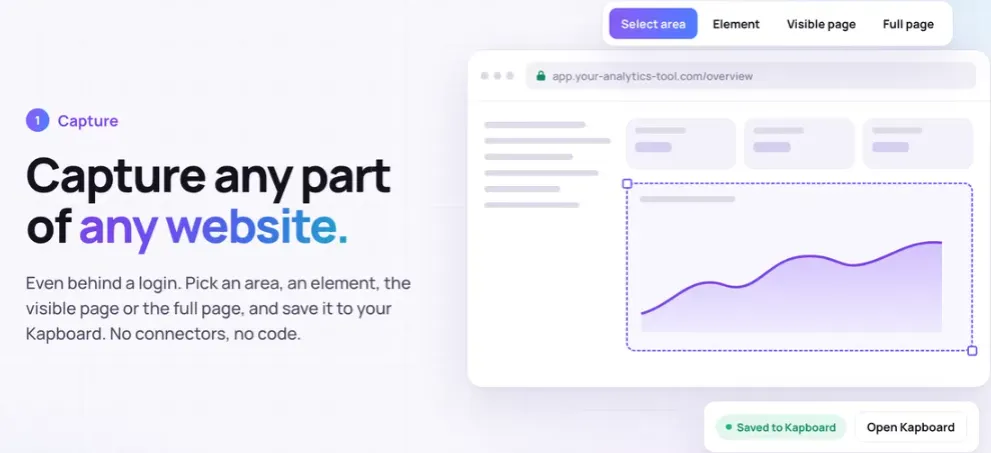
Kaptr.me lets you capture charts, prices, tables, or parts of any webpage. It also works on sites where you’re logged in, like your CRM, analytics, or ad accounts.
To get started, open a website and click the Kaptr.me extension. Choose Select Area to capture a specific part. Or use Element to capture a full chart or table. You can also capture the whole page.
Next, save the capture to your Kapboard. You can refresh it later while you’re signed in. Your passwords stay safe in your browser.
This makes it easy to track data from many websites in one place.
Refresh and Track Website Changes
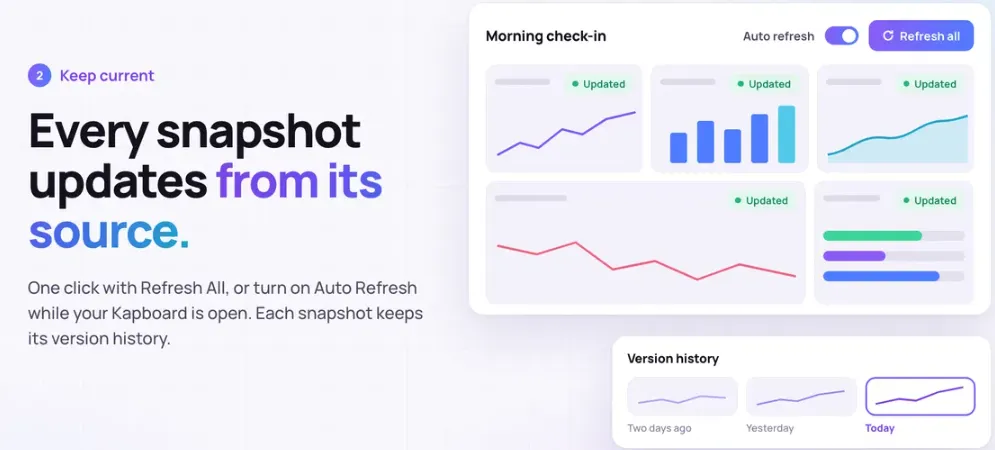
Kaptr.me helps keep your saved website data up to date. You can refresh charts, prices, and other details without taking new screenshots.
To use it, open your Kapboard and click Refresh on any snapshot. Or click Refresh All to update the whole board. You can also set Auto Refresh to update your data at set times while the board is open.
The Version History feature lets you compare old and new snapshots. This helps you see what has changed over time.
With AppSumo Tier 2 or higher, AI snapshots can refresh in the cloud. This works even when your computer is off. Each cloud refresh costs 1 AI credit.
Build Dashboards and Ask Questions with AI
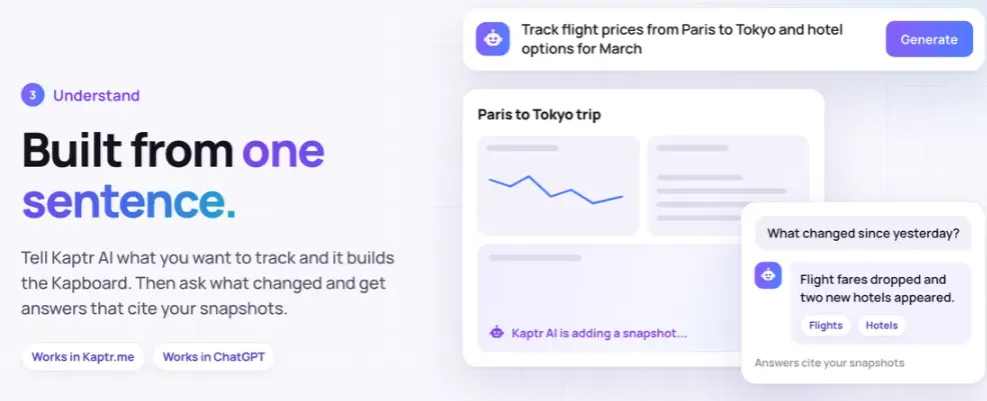
Kaptr.me uses AI to build dashboards and find web data. You can also ask questions about the data on your Kapboard.
To get started, open your Kapboard and select Kaptr AI. Type what you want to track, like a product price or market chart. Kaptr Fast or Kaptr Vision finds the right page and saves the data to your board.
Next, use Ask AI to ask about your saved data. It gives you answers with links to the snapshots. This lets you check where each answer came from.
With AppSumo Tier 2 or higher, you also get Kaptr Agent. It can browse websites, set filters, and find results that match your needs.
Use Dashboards in ChatGPT, Google Workspace, and Web
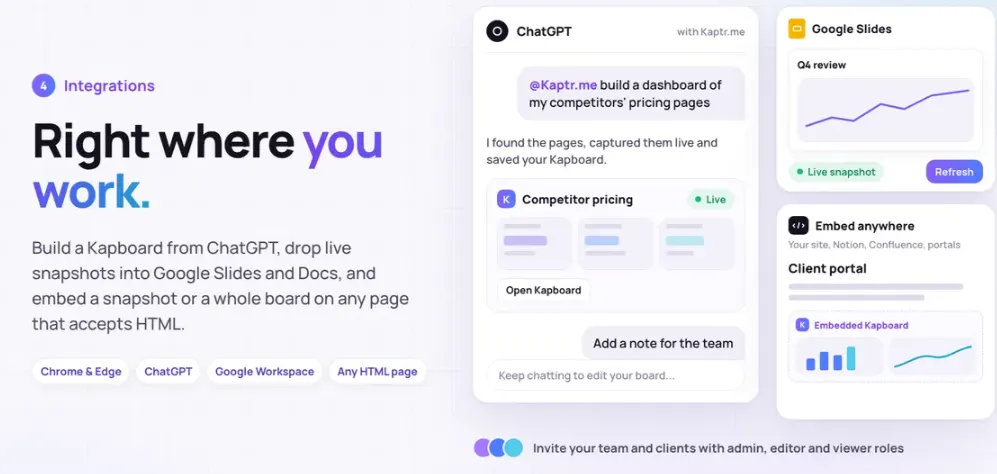
Kaptr.me lets you create and share dashboards through ChatGPT, Google Workspace, and websites. You can use your saved data in reports, slides, or client pages.
To use it with ChatGPT, type @Kaptr.me and say what you want to track. Kaptr.me finds the right pages and builds your Kapboard in the chat.
With Google Workspace, you can add live snapshots to Google Slides and Docs. Install the add-on, choose your snapshots, and click Refresh All to update them. This feature starts from AppSumo Tier 2.
You can also embed Kapboards on websites, Notion, or client pages. This lets others see fresh data without new screenshots.
Kaptr.me Pros and Cons
Kaptr.me has useful features, but it also has some limits. Here are its main pros and cons to help you decide.
Pros
- All Key Data in One Place.
- Less Manual Work.
- Easy Change Tracking.
- Quick Answers from Data.
- Easier Team and Client Sharing.
- Private and Safe Login Access.
Cons
- Website Compatibility Issues.
- Browser-Dependent Auto Refresh.
- Limited Browser Support.
- Monthly AI Credit Limits.
- External AI Data Processing.
Who Is Kaptr.me Best For?
- Digital Marketers: Good for tracking competitor prices, online ads, and website traffic in one place.
- Marketing Agencies: Helps keep client reports, charts, and key business data up to date.
- Sales Teams: Useful for checking company news, stock prices, and job openings before client meetings.
- Finance Professionals: Helps track stock prices, market trends, and other key data from many sites.
- Recruiters: Good for tracking job openings, salary trends, and which companies are hiring.
Kaptr.me AppSumo Pricing Plan
Kaptr.me has four lifetime plans on AppSumo. Pay once and get monthly AI credits for life.
License Tier 1 – Starter ($59)
Features:
- 1 team seat
- 3 Kapboards
- 6 snapshots per board
- 3 saved versions per snapshot
- 200 AI credits/month
- 3,000 API requests/month
- Capture sites behind logins
- AI dashboards with Fast and Vision
- Ask AI with source links
- ChatGPT integration
- One-click and auto refresh
- Text, shapes, and drawing tools
- Public and private sharing
- Board embeds and image downloads
- Chrome and Edge extension
- Mobile-friendly board layout
License Tier 2 – Pro ($139)
Features:
- Includes everything in License Tier 1
- 3 team seats
- 10 Kapboards
- 12 snapshots per board
- 6 saved versions per snapshot
- 500 AI credits/month
- 15,000 API requests/month
- Kaptr Agent
- AI Thinking mode
- Google Workspace add-on
- Scheduled cloud AI refresh
- Live team editing with roles
- Watermark-free embeds
License Tier 3 – Business ($299)
Features:
- Includes everything in License Tier 2
- 5 team seats
- 30 Kapboards
- 18 snapshots per board
- 15 saved versions per snapshot
- 1,200 AI credits/month
- 50,000 API requests/month
- Custom public links and Google indexing
- PDF exports
- White label with custom domain
- Use your own AI API key
- Meeting and screen recording with AI recaps
- YouTube, Vimeo, and Loom embeds
License Tier 4 – Agency ($499)
Features:
- Includes everything in License Tier 3
- 10 team seats
- 99 Kapboards
- 99 snapshots per board
- 29 saved versions per snapshot
- 3,000 AI credits/month
- 75,000 API requests/month
Final Thoughts – weDocs Review 2026
weDocs makes it easy to create and manage help docs on WordPress. You can keep guides, FAQs, and product docs in one place. Live search helps visitors find answers fast. AI tools also help you write content with less effort.
You can change how your docs look and keep full control of your content. With these useful tools and the AppSumo lifetime deal, weDocs is worth considering for building a WordPress help center.