Swft Connect Lifetime Deal: Digital Cards and Lead Capture
Swft Connect helps you create and share digital business cards. You can add your contact details, website, social links, and booking calendar to one profile.
You can share your card using a QR code, NFC card, or Apple and Google Wallet. Others can view your card and share their details without an app.
You can also update your card anytime, collect leads, and manage team cards from one place.
How Does Swft Connect Work?
Swft Connect works in four easy steps:
- Create Your Card: Sign up and add your name, photo, phone number, website, and social links.
- Share Your Card: Share it with a QR code, NFC card, or Apple and Google Wallet. No app is needed.
- Collect Contacts: Others can save your details or share theirs. Swft Connect saves their info so you can reach out later.
- Update Anytime: Change your details whenever you want. Your shared cards will show the new info right away.
KEY Features of Swft Connect
Swft Connect helps you create and share digital cards, collect leads, and manage your team. Here are its four key features and how to use them.
Create Custom Digital Business Cards
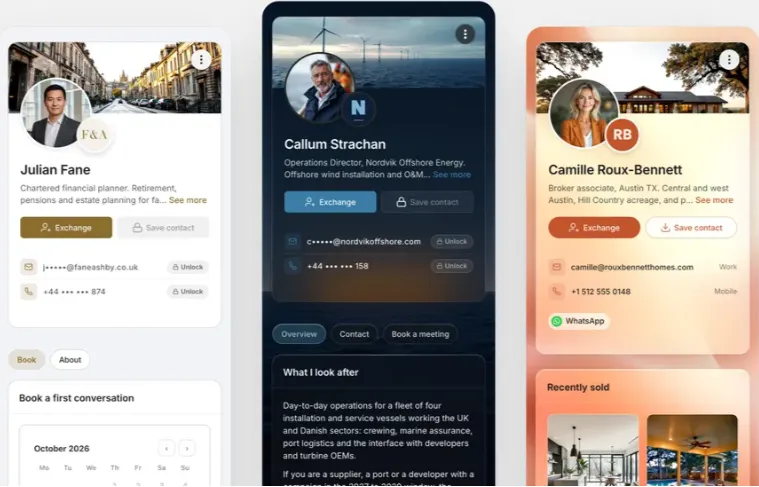
Swft Connect lets you make a digital business card with your own style. Add your photo, logo, contact details, social links, videos, and booking calendar.
To start, sign in and create your card. Add your details, pick a layout, and choose how it looks. You can also add buttons for calls or meeting bookings.
You can edit your card at any time. All shared cards will show your new details right away.
Share Your Business Card Instantly
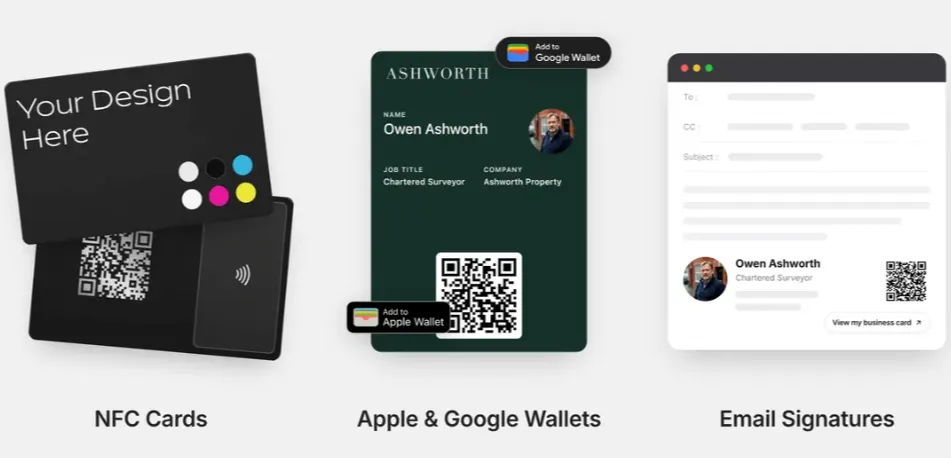
Swft Connect lets you share your business card in seconds. Use a QR code, NFC card, Apple or Google Wallet, or a link.
Just show your QR code or tap your NFC card on someone’s phone. You can also send your card link by email, WhatsApp, or social media.
Others don’t need an app to view your card. They can open it in their browser and save your details right away.
Manage Teams and Sync Leads
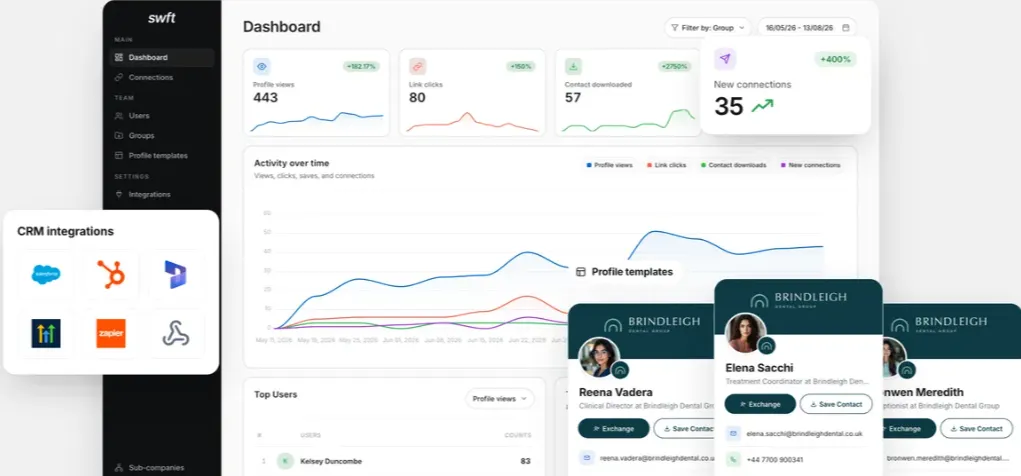
Swft Connect helps you manage all your team cards in one place. You can add users, create groups, and keep every card on-brand.
To start, open your company dashboard and add your team. Set up card templates, manage users, and track new leads.
You can also connect tools like HubSpot, Salesforce, or GoHighLevel. New leads can go straight to your CRM, so your team can follow up easily.
White Label and Sell Under Your Brand
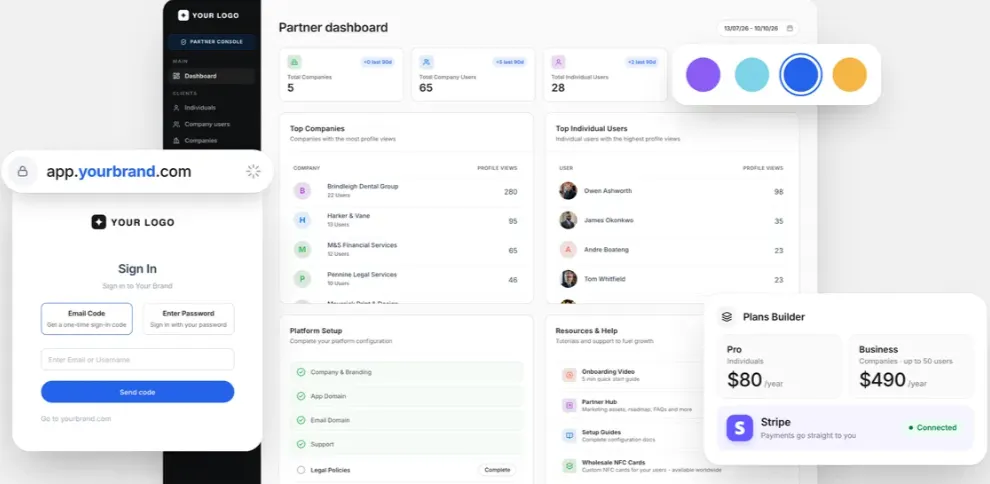
Swft Connect lets you sell digital business cards under your own brand. Add your logo, colors, domain, and app name. Your clients will see your brand, not Swft Connect.
To start, choose License Tier 4 and set up your brand. Add client accounts, set your own prices, and manage them from one dashboard.
You can also sell custom NFC cards. This helps agencies and resellers offer digital business cards as a service.
Swft Connect Pros and Cons
Swft Connect has some good points, but it also has a few limits. Here are the main pros and cons based on its features and user reviews.
Pros
- Faster Contact Sharing.
- Easy Lead Collection.
- No More Card Reprinting.
- Simple Team Management.
- Automatic CRM Updates.
- Less Paper Waste.
- New Reselling Opportunities.
Cons
- No Native Mobile App.
- Limited Design Flexibility.
- Higher Tiers for Advanced Features.
- NFC Cards Cost Extra.
Who Is Swft Connect Best For?
- Freelancers and Consultants: Share your work, contact details, and booking links so new clients can learn about your services and get in touch.
- Sales Professionals: Collect contact details at meetings or events, save new leads, and reach out to them later.
- Small Business Owners: Share your business details with new customers and update your contact info without printing new cards.
- Business Teams: Manage all staff cards in one place, keep them on-brand, and track leads from your team.
- Agencies and Resellers: Sell digital business cards under your own brand, manage client accounts, and set your own prices.
Swft Connect AppSumo Pricing Plan
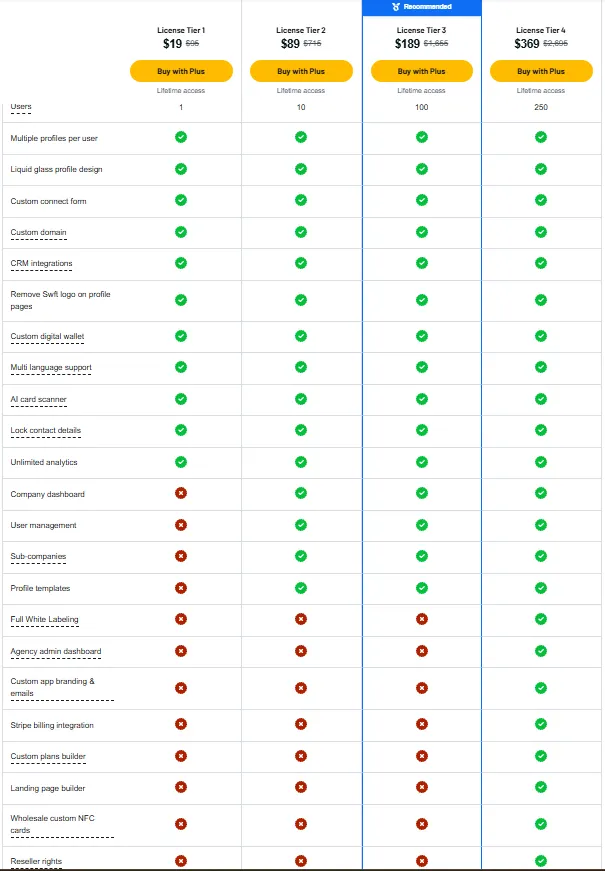
License Tier 1 – $19
Users: 1
Features:
- Multiple card profiles
- Liquid Glass design
- Custom contact forms
- Custom domain
- CRM integrations
- Remove Swft logo
- Custom wallet cards
- Multiple languages
- AI card scanner
- Lock contact details
- Unlimited analytics
License Tier 2 – $89
Users: 10
Features:
- All License Tier 1 features
- Company dashboard
- Team management
- Sub-companies
- Profile templates
License Tier 3 – $189
Users: 100
Features:
- All License Tier 2 features
- Up to 100 users
License Tier 4 – $369
Users: 250
Features:
- All License Tier 3 features
- Full white labeling
- Agency dashboard
- Custom app branding and emails
- Stripe billing
- Custom plan builder
- Landing page builder
- Wholesale NFC cards
- Reseller rights
Deal Terms: Swft Connect Lifetime access with a one-time payment. AppSumo Plus membership is required. Activate within 60 days of purchase. Refunds are available within 60 days.
Final Thoughts – Swft Connect Review 2026
Swft Connect makes it easy to share business details and collect new leads. It keeps digital cards, contacts, CRM tools, and team cards in one place.
You can update your card at any time and track new leads with ease. The Swft Connect Lifetime Deal starts at just $19. It’s a simple way to manage business contacts without monthly fees.