WP Reset Lifetime Deal – Reset and Restore WordPress Sites
WP Reset is a WordPress plugin made by WebFactory. It helps you reset, clean, or fix your site. You don’t need to install WordPress again. You can reset the whole site or remove old content and settings.
Did an update or design change go wrong? You can use a saved snapshot to go back. WP Reset has Free and Pro versions. Pro adds auto snapshots, cloud storage, and plugin and theme sets. It also has an Emergency Recovery Script. This can help when you can’t log in.
The WP Reset Lifetime Deal is on AppSumo. You pay once for Pro access. But WP Reset does not replace a full site backup plugin.
KEY Features of WP Reset
Snapshots and Automatic Snapshots

You can save a snapshot before making changes to your site. If an update breaks something, just click Restore Snapshot to go back.
With WP Reset Pro, you don’t need to do this by hand. It takes snapshots before plugin updates, theme updates, and site resets. You can also save them to the cloud and auto-delete old ones to save space.
Just remember that snapshots are not full website backups.
Plugin and Theme Collections
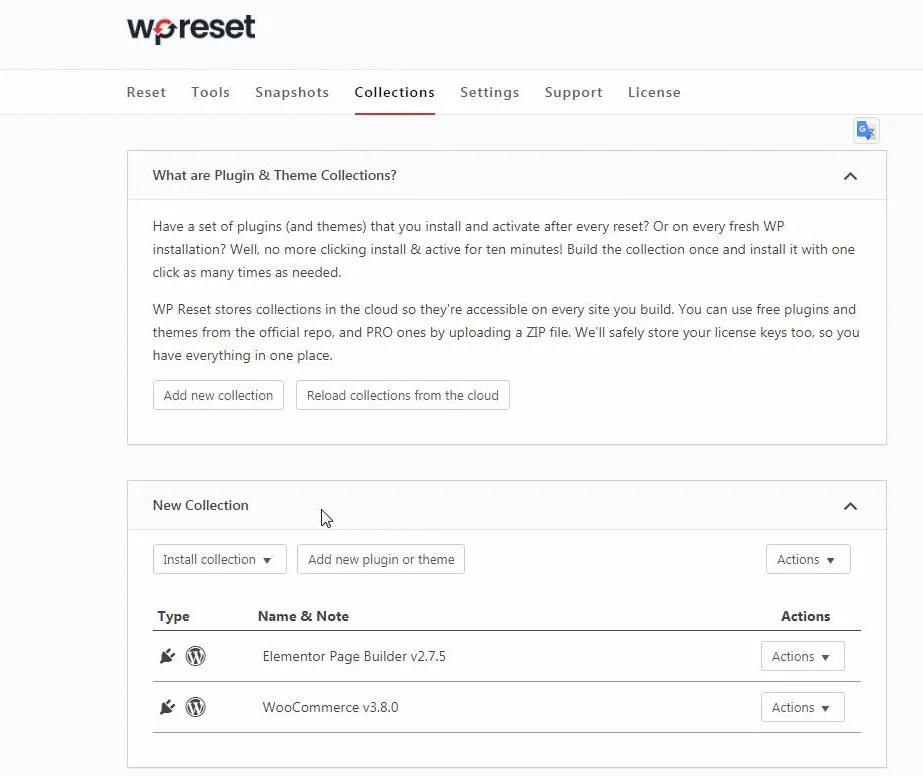
Adding the same plugins and themes to each new site takes time. WP Reset Pro makes this easy with Collections.
You can save your favorite plugins and themes in one set. Then add them to a new or reset site with one click. It works with free plugins and paid ZIP files.
Your sets stay in the cloud, so you can use them on other sites. You can also save your license keys safely.
Emergency Recovery Script
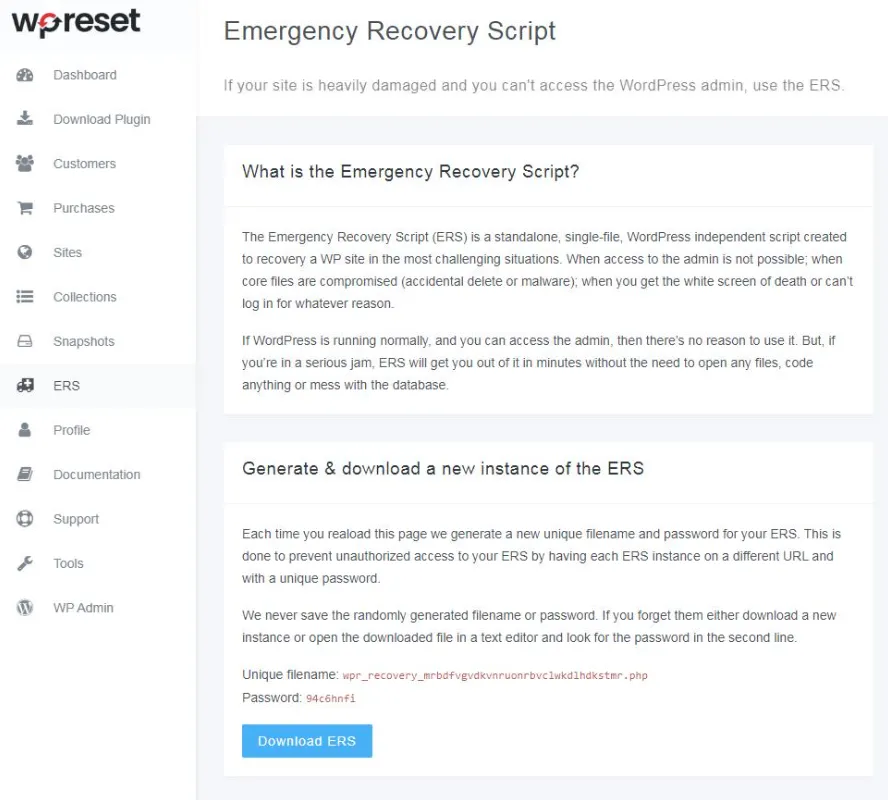
A plugin or theme can sometimes break your site. You may even lose access to your WordPress dashboard. WP Reset Pro’s Emergency Recovery Script can help fix this.
It works on its own, even when WordPress won’t load. You can turn off plugins, disable themes, fix broken WordPress files, or add a new admin account. Just open it with a secure link and password.
Site Reset and Cleaning Tools
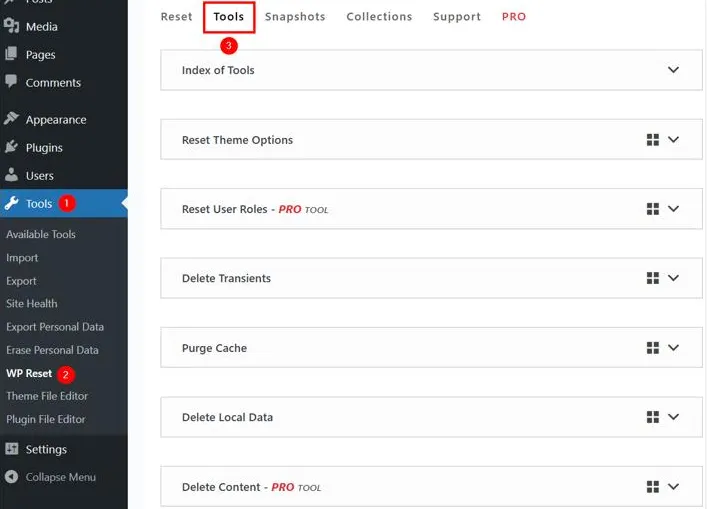
WP Reset helps you start fresh without installing WordPress again. The Site Reset tool clears posts, pages, and settings. But it keeps your plugin and theme files.
You can also clean up parts of your site. For example, you can remove old posts, widgets, unused plugins, or cache with a few clicks.
Just check what each tool will delete first. Some changes can’t be undone without a saved backup.
Nuclear Site Reset
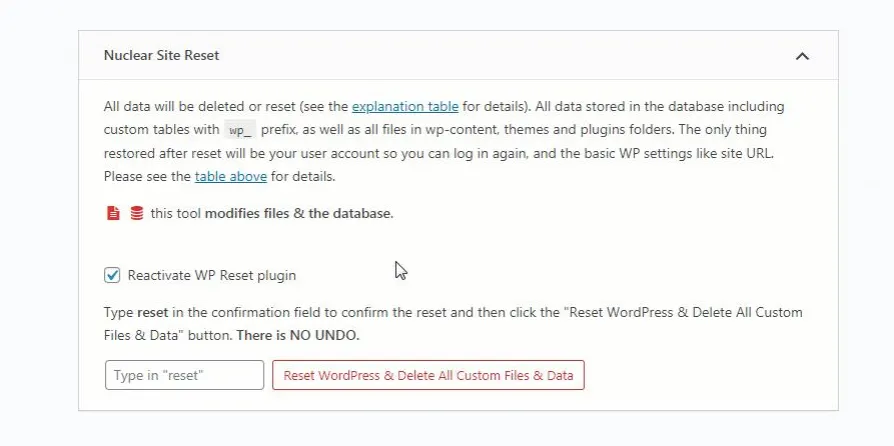
Want a fresh start? WP Reset Pro’s Nuclear Site Reset wipes almost everything from your site. It removes posts, pages, plugins, themes, uploads, and stored data.
You get a fresh WordPress site. Your admin account and basic site settings stay, so you can log in again.
But be careful. This tool deletes a lot of data. Always make a full backup first.
Cloud Storage and Centralized Dashboard
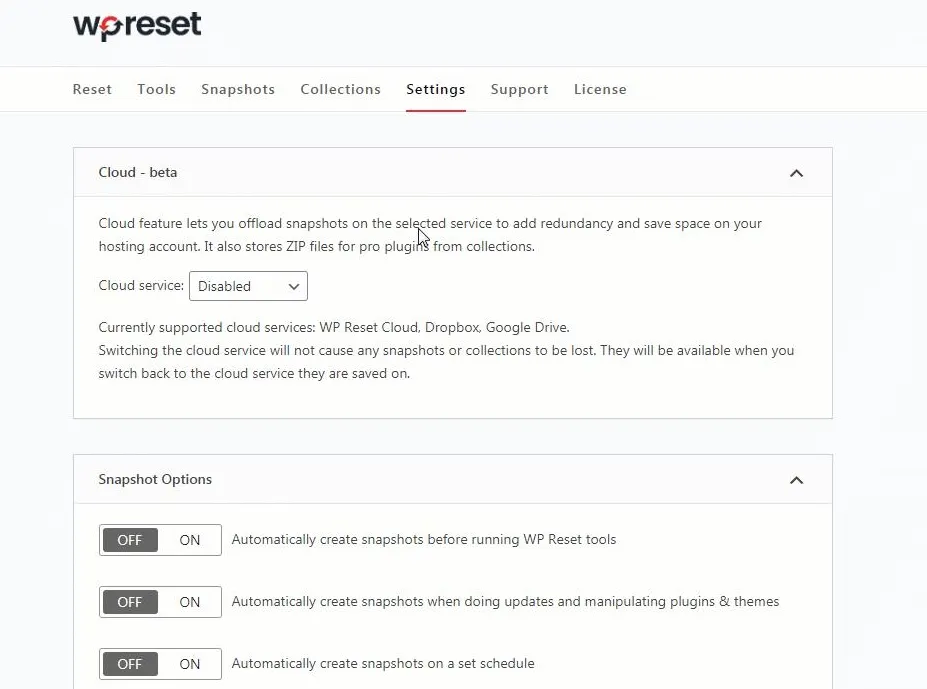
WP Reset Pro lets you save snapshots and plugin collections in the cloud. You can use WP Reset Cloud, Google Drive, Dropbox, or pCloud. This helps save space on your web host.
The WP Reset Dashboard puts all your sites in one place. You can manage licenses, check snapshots, and use saved collections across your sites. It’s handy if you manage more than one WordPress site.
White Labeling and Rebranding
WP Reset Pro lets you hide WebFactory’s logos and links from the plugin. You can also hide the license tab so clients can’t change the license settings.
This is useful if you build sites for clients. It keeps the plugin free of WebFactory’s branding. Higher AppSumo tiers also offer full rebranding.
WP Reset Free vs. Pro: What’s the Difference?
WP Reset has both Free and Pro versions. Free lets you reset your site, clean up data, and save snapshots by hand. Pro adds auto snapshots, cloud storage, and more tools to fix and manage your sites.
Here is a brief overview of the key differences:
| Features | Free | Pro |
|---|---|---|
| Site Reset | ✅ | ✅ |
| Basic Cleaning Tools | ✅ | ✅ |
| Manual Snapshots | ✅ | ✅ |
| Nuclear Site Reset | ❌ | ✅ |
| Automatic Snapshots | ❌ | ✅ |
| Cloud Storage | ❌ | ✅ |
| Plugin & Theme Collections | ❌ | ✅ |
| Emergency Recovery Script | ❌ | ✅ |
| Centralized Dashboard | ❌ | ✅ |
| White Labeling | ❌ | ✅ |
AppSumo WP Reset Pricing Plan
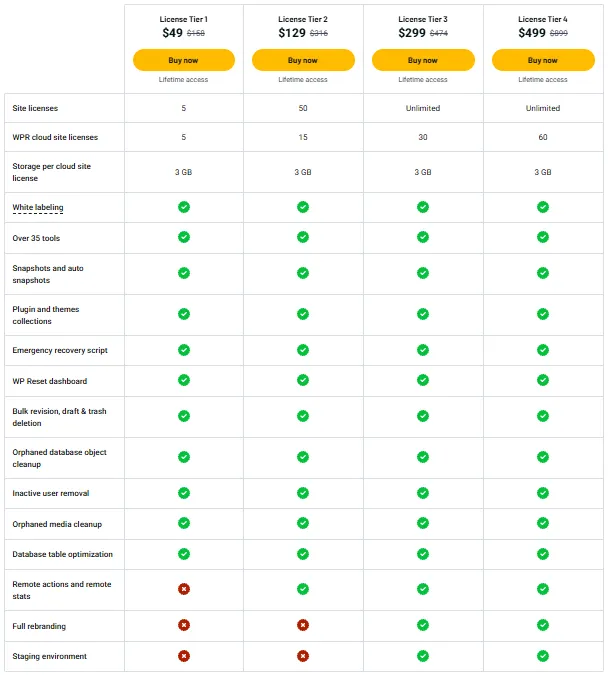
License Tier 1 – $49 (One-Time)
Features:
- 5 WordPress site licenses
- 5 cloud licenses (3 GB each)
- 35+ tools for WordPress
- Manual and auto snapshots
- Save plugin and theme sets
- Emergency Recovery Script
- WP Reset Dashboard
- White labeling
- Bulk delete drafts, revisions, and trash
- Clean up unused database items and media
- Remove inactive users
- Optimize database tables
License Tier 2 – $129 (One-Time)
Features:
- Everything in License Tier 1
- 50 site licenses
- 15 cloud licenses
- Remote site actions and stats
License Tier 3 – $299 (One-Time)
Features:
- Everything in License Tier 2
- Unlimited site licenses
- 30 cloud licenses
- Full rebranding
- Staging environment
License Tier 4 – $499 (One-Time)
Features:
- Everything in License Tier 3
- 60 cloud licenses
WP Reset Pros and Cons
Pros
- Quick Site Recovery: If an update breaks your site, restore an earlier snapshot. This can save hours of manual fixes.
- Faster Site Testing: Test new plugins, themes, or settings without worry. When you’re done, reset your test site and start fresh.
- Less Setup Work: Use your saved plugin and theme sets on new sites. You won’t need to install each one by hand.
- Emergency Site Access: Even if your WordPress dashboard stops working, recovery tools can help you find and fix certain issues.
- Helpful Customer Support: Several users praised the team for quick replies and useful help. Some received help with setup and cloud storage issues.
Cons
- Not a Full Backup: Snapshots don’t save your whole site, including all media and files.
- High Snapshot Storage: Some users say snapshots take up too much database space, mainly on large sites.
- Limited Cloud Space: Each cloud site has a 3 GB limit, which may not fit large snapshots.
- Permanent Data Loss: Nuclear Reset removes your site’s content, plugins, themes, and files, which you may need later.
Who Is WP Reset Best For?
- WordPress Beginners: Try new themes or plugins and go back if something goes wrong.
- Freelance Web Designers: Build client sites faster without adding the same plugins and themes each time.
- WordPress Developers: Test site changes and start fresh when working on new projects.
- Web Design Agencies: Manage client sites, licenses, and snapshots from one dashboard.
- Website Managers: Update sites and restore an earlier state if an update causes issues.
Final Verdict: Is WP Reset Lifetime Deal Worth It?
Yes, the WP Reset Lifetime Deal is worth a look if you often build, test, or manage WordPress sites. It saves setup time and helps you fix issues after failed updates. Plans start at $49 for lifetime access, which is good value for regular users.
But WP Reset is not a full backup tool. Each cloud site has a 3 GB storage limit, and large snapshots can use a lot of server space. If you only need basic reset tools, the Free version may be enough.
Overall, this is a useful tool for anyone who frequently works with WordPress.