BreezeDoc Lifetime Deal – Send, Sign, and Track PDFs
BreezeDoc is a simple tool for signing documents online. It was built by the AppSumo Originals team. It helps freelancers, agencies, and small businesses manage contracts. You can send files, collect legally binding signatures, and track them online.
BreezeDoc also offers templates, multiple signers, and email reminders. You can send invoices and get paid through Stripe or PayPal. It’s a simple, low-cost choice compared to DocuSign and Adobe Sign.
BreezeDoc Key Features
E-Signatures and Multiple Signers
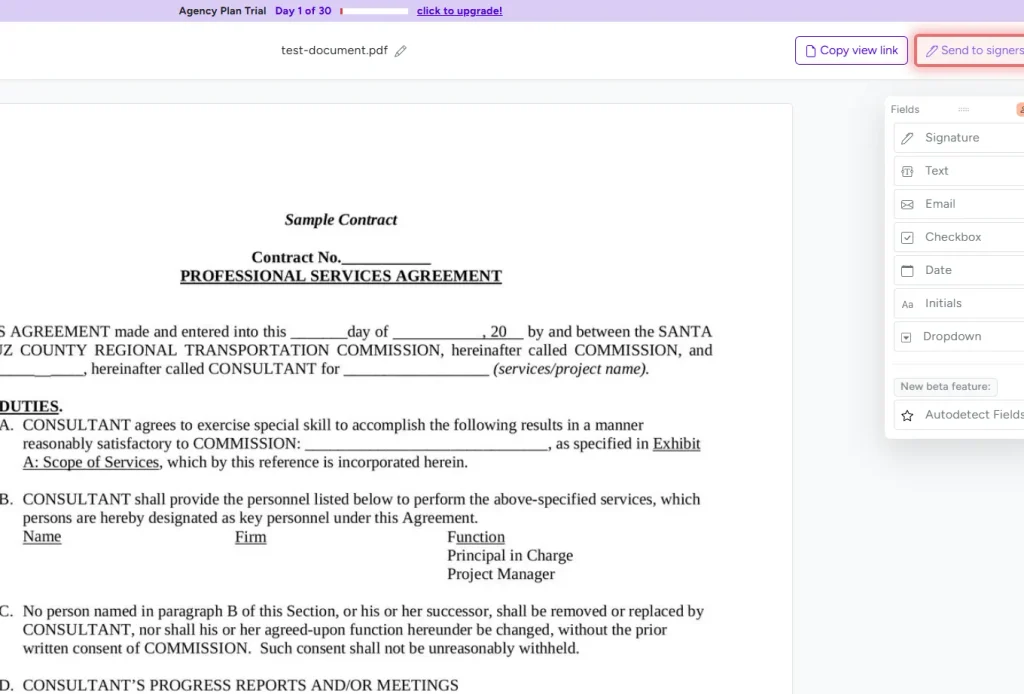
BreezeDoc lets you collect legally binding e-signatures from one or more people. You can add boxes for signatures, initials, text, dates, and checkmarks to any PDF. Each signer gets their own fields in a different color.
Clients can type, draw, or upload their signatures. They can sign on any device, with no account needed.
BreezeDoc also lets several people sign the same file. Each person signs in turn. Once all have signed, BreezeDoc sends the final PDF to everyone.
Reusable Document Templates
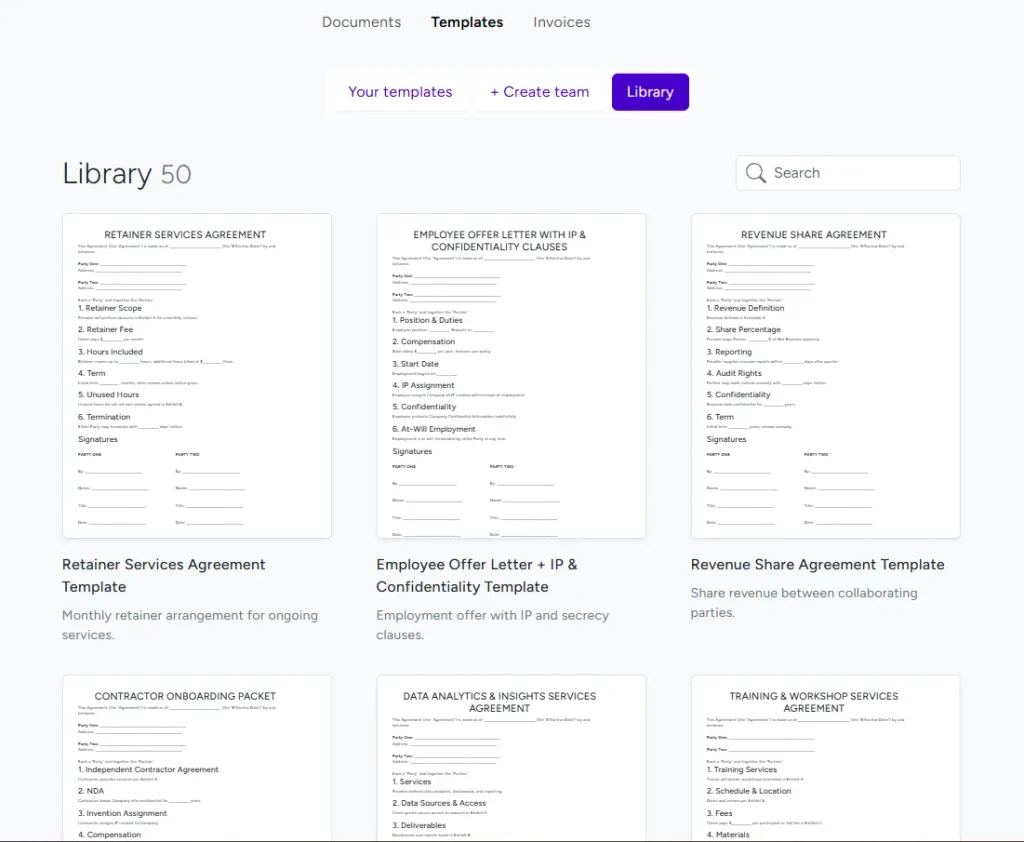
BreezeDoc saves time with templates you can use again. You can choose ready-made templates for NDAs, business contracts, and more. You can also upload your own files as templates.
Just add the signing fields once and save the template. When you need it again, create a new document from it. You can change the details before you send it.
The best part? You can create unlimited templates, even on the free plan. This saves time when you send similar contracts to many clients.
Document Tracking, Audit Trails, and Email Reminders
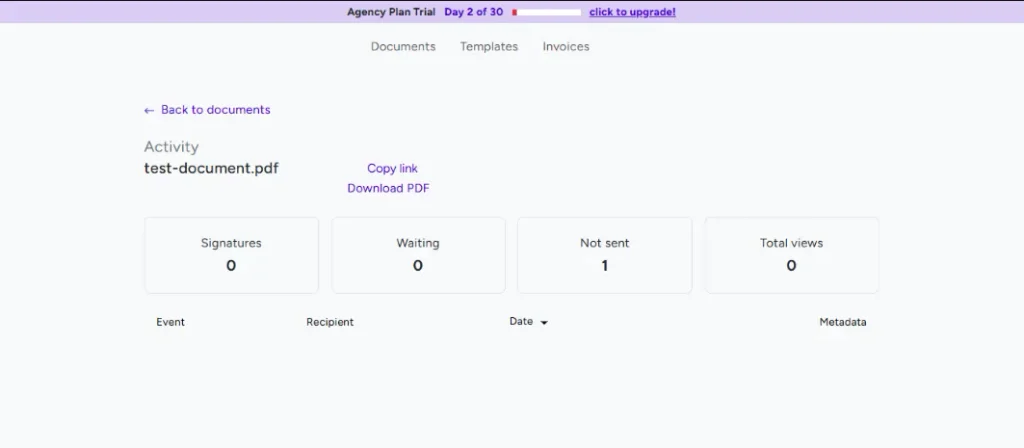
BreezeDoc lets you track your documents in real time. You can see when a file is sent, opened, or signed. The activity log shows each step. You can also save the full audit trail as a PDF.
Need to remind a client to sign? BreezeDoc can send email reminders every three days, up to three times. You can also edit the email subject and message.
These email tools come with the Individual and Agency plans. They help you track files and save time on follow-ups.
Invoicing and Payment Collection
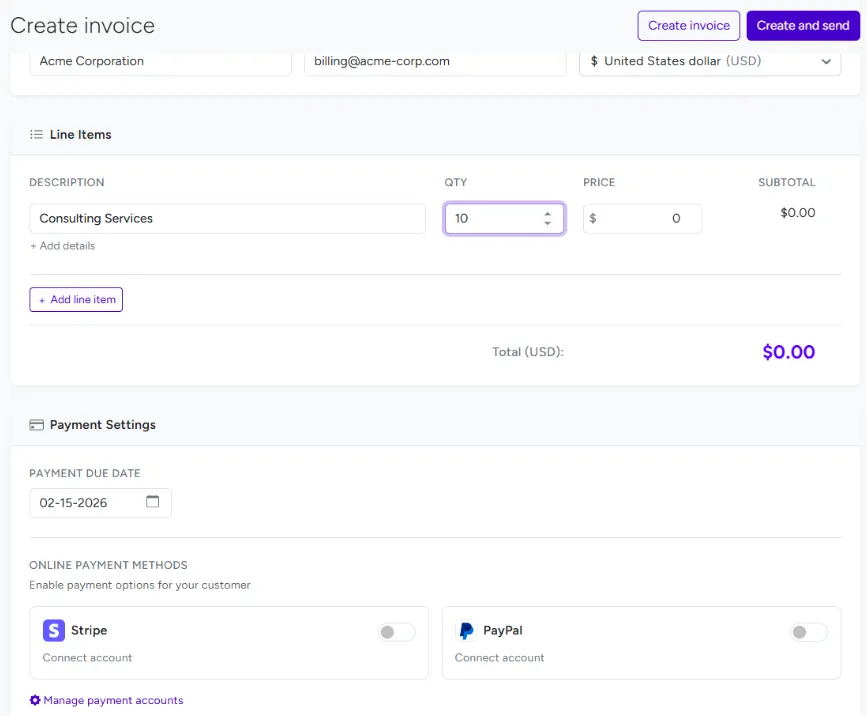
BreezeDoc lets you create invoices and get paid online. You can send an invoice after a client signs a contract. You can also send one on its own.
Add your client’s details, fees, due dates, and discounts. Then send the invoice by email or share a link. Clients can pay through Stripe or PayPal without an account.
You can track when an invoice is sent, viewed, or paid. All plans include invoicing, even the free plan. PayPal works on all plans, but Stripe needs a paid plan.
Team Collaboration, Custom Branding, and Integrations
BreezeDoc helps teams work together with its Agency plan. You can add up to 10 team members. They can share files and templates. You can also set roles to control who can view, edit, or send files.
Want to use your own logo? The Agency plan lets you add it to emails and signing pages. It also removes BreezeDoc branding. The Individual plan shows less branding but does not remove it.
Both paid plans offer API and Zapier access. You can link BreezeDoc to other apps and set up tasks to run on their own. However, native webhooks are not yet available.
How to Send and Sign Documents With BreezeDoc?
BreezeDoc makes it easy to send and sign contracts online. Just follow these five steps.
- Upload Your File: Log in and go to Documents. Click “Add new document” to upload a PDF or Word file. You can also use a ready-made template.
- Add Signers and Fields: Add the people who need to sign. Drag and drop boxes for signatures, text, dates, and initials. Set the right fields for each signer.
- Send for Signing: Click “Send to signers” and choose “Send via email.” Add each person’s name and email. Then click “Send for signature.”
- Get the File Signed: Each signer gets an email with a link. They can type, draw, or upload their signature. No account is needed. Just click “Finalize” and “Confirm and sign the document.”
- Track and Download: See who has opened or signed the file. Once everyone signs, BreezeDoc emails the signed PDF to everyone.
That’s it! You can send and sign files online. No need to print or scan a single page.
BreezeDoc AppSumo Lifetime Deal
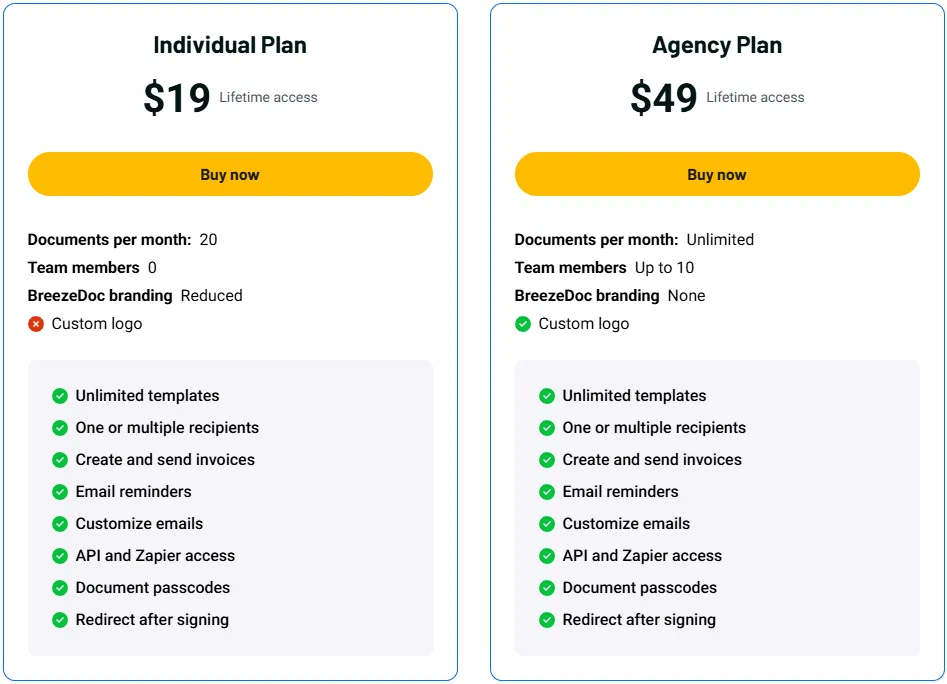
Individual Plan – $19
Features:
- Send up to 20 documents per month
- No team members
- Unlimited templates and multiple signers
- Create and send invoices
- Set email reminders and edit emails
- Connect apps with API and Zapier
- Add passcodes and redirect users after signing
- Less BreezeDoc branding; no custom logo
Agency Plan – $49
Features:
Everything in the Individual Plan, with these upgrades:
- Send unlimited documents each month
- Add up to 10 team members
- Add your logo to emails and documents
- Remove all BreezeDoc branding
BreezeDoc Pros and Cons
BreezeDoc is easy to use and costs less than many other signing tools. However, it has some limitations that are worth noting.
Pros
- Easy to Use: Clean design and simple signing tools.
- Low-Cost Lifetime Deal: Pay once, starting at $19.
- Multiple Signers: Clients can sign without an account.
- Unlimited Templates: Save and reuse contracts with ease.
- Document Tracking: See when files are opened or signed.
- Built-in Invoicing: Send bills and get paid online.
- Team Support: Add up to 10 users on the Agency plan.
Cons
- Basic Editing Tools: Not ideal for complex documents.
- Monthly Limit: Individual plan allows only 20 documents.
- Email Issues: Users reported failed emails. BreezeDoc says it fixed a related bug in August 2026.
- Field Issues: Some users struggle to place and align fields.
- Compliance Limits: Not HIPAA-compliant or fully GDPR-compliant.
- Language Limits: The app’s interface supports only English.
BreezeDoc Customer Reviews: What Are Real Users Saying?
BreezeDoc has a 3.71 out of 5 rating from 170 AppSumo reviews. Users share both good and bad feedback.
Many users like its clean design, easy signing tools, and low price. Some say it’s great for basic contracts with no monthly fees. Others praise the support team for fixing bugs fast.
However, some users report email issues, limited editing tools, and trouble placing fields. A few also mention slow support and problems with certain browsers.
BreezeDoc says it fixed an email bug in August 2026. But it’s not clear if all email issues are gone.
Overall, BreezeDoc works well for basic signing needs. But it may not suit users who need more advanced tools.
5 Best BreezeDoc Alternatives in 2026
Looking for a BreezeDoc alternative? SignWell, BoldSign, Dropbox Sign, Zoho Sign, and Signaturely are five options worth exploring. Each has different features, prices, and limits.
1. SignWell
SignWell is an online signing tool for freelancers and small teams. You can send contracts, collect signatures, and track files. Paid plans let you send as many documents as you need.
- Starting Price: Free; paid plans start at $10/month (billed yearly).
- Pros: Unlimited signing on paid plans, templates, audit logs, and API tools.
- Cons: Free plan limits you to 3 documents and 1 template per month.
- SignWell vs BreezeDoc: SignWell has no document limit on paid plans. BreezeDoc has a one-time fee.
2. BoldSign
BoldSign helps you send, sign, and track files online. You can use templates, set email reminders, and check signer details. It can also help find fields that need to be filled in.
- Starting Price: Free; paid plans start at $5/user/month (billed yearly).
- Pros: 25 free envelopes per month, audit logs, signer checks, and mobile apps.
- Cons: Free plan has only 2 templates and no extra team members.
- BoldSign vs BreezeDoc: BoldSign has more tools for signer checks and field setup. BreezeDoc is simpler and has lifetime pricing.
3. Dropbox Sign
Dropbox Sign, once called HelloSign, helps you sign and manage contracts online. It works with Dropbox, Google Drive, and other business apps. You can also track each step of the signing process.
- Starting Price: Free; Essentials starts at $15/month (billed yearly).
- Pros: Unlimited signing requests on paid plans, templates, audit logs, and cloud app links.
- Cons: Paid plans have monthly fees. Team tools require higher plans.
- Dropbox Sign vs BreezeDoc: Dropbox Sign works well with cloud apps. BreezeDoc can cost less over time with its lifetime deal.
4. Zoho Sign
Zoho Sign helps you send contracts and collect signatures online. You can track files, send reminders, and set up signing tasks. It also works with Zoho apps and cloud storage tools.
- Starting Price: Free; Standard starts at $10/user/month (billed yearly).
- Pros: 5 free envelopes per month, audit logs, email reminders, and mobile apps.
- Cons: Standard limits you to 25 envelopes per user each month. Unlimited envelopes require the $16/user/month Professional plan (billed yearly).
- Zoho Sign vs BreezeDoc: Zoho Sign has more tools to manage tasks. It works well with Zoho apps. BreezeDoc has a one-time price.
5. Signaturely
Signaturely is a simple tool for signing contracts online. You can send files, use templates, and track signatures. It also works with popular cloud storage apps.
- Starting Price: Free; Personal starts at $20/month (billed yearly).
- Pros: Easy signing, email reminders, audit logs, and cloud storage links.
- Cons: Free plan allows 1 request per month. Personal allows 5 requests and 1 template per month.
- Signaturely vs BreezeDoc: Signaturely works with more cloud storage apps. BreezeDoc costs less over time and has unlimited templates.
Final Verdict
Is BreezeDoc worth it in 2026? Yes, for simple document signing! Its clean design makes it easy to use. You can sign files, reuse templates, track documents, and send invoices.
The $19 lifetime deal gives you great value. The $49 Agency plan adds unlimited documents and team tools.
Overall, BreezeDoc is a smart, low-cost choice for online signing. You pay once and skip monthly fees.