NudgeForMe Lifetime Deal: Find Missed Email Follow-Ups
Have you ever sent an important email but failed to follow up on it later? The ‘NudgeForMe’ lifetime deal helps you identify emails that are still awaiting a response. Furthermore, it drafts follow-up emails for you—right inside your inbox.
You can use this for sales-related tasks, client work, and matters awaiting approval. Review each draft, make any necessary adjustments, and send it off. If someone responds, ‘NudgeForMe’ automatically stops any further follow-ups.
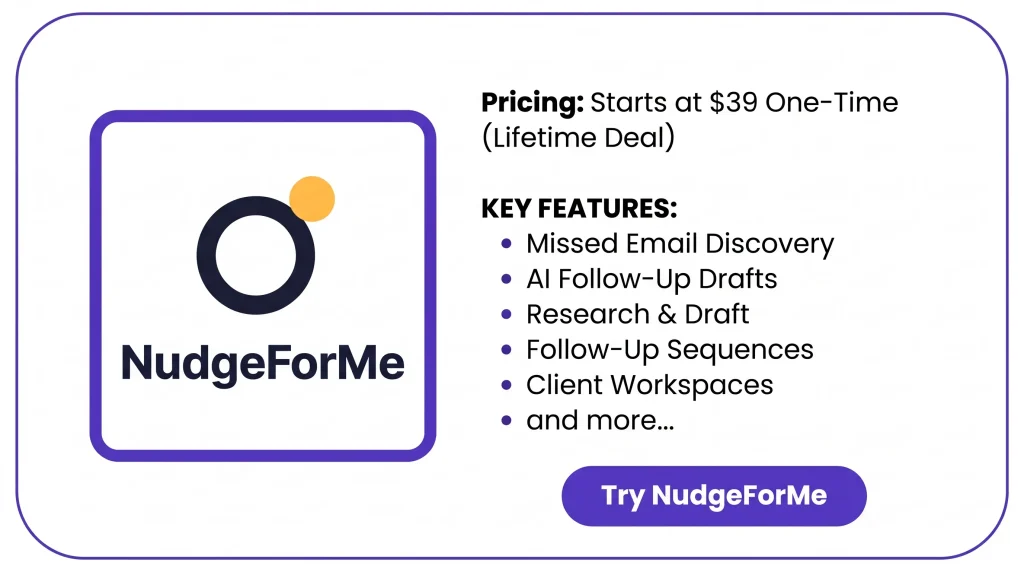
KEY Features of NudgeForMe
NudgeForMe helps you easily manage email follow-ups. Below are its key features and an explanation of how they work.
Discover
NudgeForMe scans sent emails to find chats that need a reply. It skips closed threads, newsletters, and emails that need no follow-up.
Draft the useful ones
NudgeForMe writes follow-up emails based on past chats. It saves them as drafts in your inbox. You can review, edit, or send each one.
Research & Draft
NudgeForMe uses Apollo, Cleanlist, and web search to find fresh details. On Plans 4 and 5, it uses this data to write more personal follow-ups.
Sequences
NudgeForMe lets you set up follow-up emails and choose when to send them. It checks for replies and stops the next emails once someone responds.
Workspaces
NudgeForMe lets you manage follow-ups for different clients, teams, or businesses. Each workspace keeps its own emails and settings separate.
Pros of NudgeForMe
- Fewer Missed Opportunities: Old client emails, sales deals, and proposals can get lost. NudgeForMe helps you find them, even months later.
- Less Manual Work: You spend less time searching old emails or writing follow-ups. NudgeForMe drafts new messages based on past chats.
- More Personal Follow-Ups: Your follow-ups can use details from past emails and fresh research. This helps each message feel more natural and fit the person you’re emailing.
- Better Follow-Up Control: You choose which emails to send and which to skip. NudgeForMe also stops future follow-ups once someone replies.
- Easier Client Management: You can keep follow-ups for each client, business, or team in its own workspace. This helps you manage their emails without mixing things up.
Cons of NudgeForMe
- Irrelevant Suggestions: NudgeForMe may flag emails that don’t need a reply. You may need to check and dismiss them yourself.
- Missed External Replies: NudgeForMe may miss replies from phone calls, LinkedIn, or other email threads. This could lead to unwanted follow-ups.
- No Cold Outreach: NudgeForMe only works with past email chats. You can’t use it for cold emails or bulk outreach.
- Limited Auto-Sending: Plans 1 and 2 can’t send follow-ups on their own. You’ll need to send each email yourself.
Who Is NudgeForMe Best For?
- Sales Professionals: Keep track of sales deals, demo requests, and price quotes when leads stop replying.
- Business Founders: Follow up on investor talks, business deals, and partnerships that have gone quiet.
- Agencies and Consultants: Stay on top of client feedback, project approvals, missing files, and unpaid bills.
- Customer Success Teams: Keep track of new clients, renewals, support issues, and questions that still need answers.
- Recruiters and Hiring Teams: Follow up with job seekers about interviews, job offers, and hiring decisions.
NudgeForMe AppSumo Pricing Plan
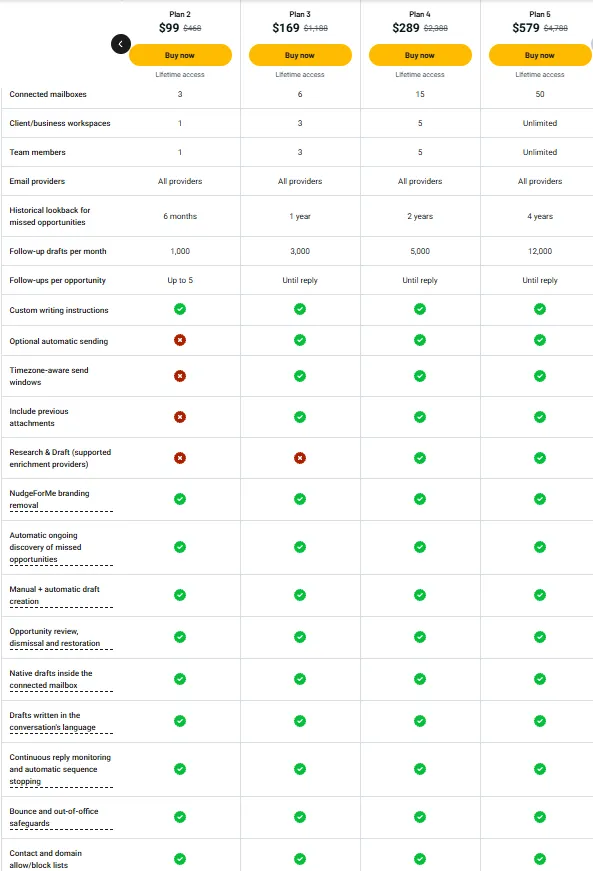
License Tier 1 – $39 (One-Time)
Features:
- 1 Gmail or Outlook mailbox
- 1 workspace
- 1 team member
- 3-month email history
- 250 drafts/month
- Up to 3 follow-ups per thread
- Automatic missed email detection
- Manual and automatic draft creation
- Review, edit, send, or dismiss drafts
- Restore dismissed emails
- Drafts in your mailbox
- Multilingual follow-ups
- Reply tracking and auto-stopping
- Bounce and out-of-office protection
- Contact and domain blocking
- No NudgeForMe branding
License Tier 2 – $99 (One-Time)
Features:
- All License Tier 1 features
- 3 connected mailboxes
- All supported email providers
- 6-month email history
- 1,000 drafts/month
- Up to 5 follow-ups per thread
- Custom writing instructions
License Tier 3 – $169 (One-Time)
Features:
- All License Tier 2 features
- 6 connected mailboxes
- 3 workspaces
- 3 team members
- 1-year email history
- 3,000 drafts/month
- Follow-ups until reply
- Optional automatic sending
- Timezone-based sending
- Previous email attachments
License Tier 4 – $289 (One-Time)
Features:
- All License Tier 3 features
- 15 connected mailboxes
- 5 workspaces
- 5 team members
- 2-year email history
- 5,000 drafts/month
- Research & Draft
- Apollo, Cleanlist, and web research
License Tier 5 – $579 (One-Time)
Features:
- All License Tier 4 features
- 50 connected mailboxes
- Unlimited workspaces
- Unlimited team members
- 4-year email history
- 12,000 drafts/month
Final Thoughts – NudgeForMe Review 2026
What I like most about NudgeForMe is how it finds old emails you may have missed. It writes follow-up drafts and tracks replies. Once someone replies, it stops future follow-ups.
You don’t need to check old email threads one by one. NudgeForMe helps you keep track of important chats. With lifetime access starting at just $39, it’s worth a look if you want an easier way to manage email follow-ups.