Voicina Lifetime Deal – Dub Videos in 125+ Languages 2026
Making a video is easy. But sharing it in other languages takes more work. You need transcripts, subtitles, translations, and voiceovers. Using many tools makes the process harder.
That’s why Voicina caught my eye. It brings these tools into one place. You can add subtitles and translate videos into 125+ languages. You can also dub videos with a cloned voice. It offers live captions and translation for meetings and events.
The Voicina Lifetime Deal starts at $69 on AppSumo. It includes 1,000 credits each month. But each feature uses credits at a different rate. Let us find out about its features, price, and limitations. This will help you decide if Voicina fits your needs.
KEY Features of Voicina
Transcription
Voicina turns audio and video into text. It adds speaker labels, punctuation, and timestamps for each word. You can search, edit, remove filler words, and export the text.
Subtitles
Voicina creates timed subtitles for audio and video. You can change the text, timing, fonts, colors, and position. You can also add captions to videos or export subtitle files.
Translation & dubbing in 125+ languages
Voicina translates audio, video, and subtitles into 125+ languages. It keeps the original meaning and tone. It also creates dubbed speech that matches the video’s timing.
Voiceover
Voicina turns written scripts into speech using AI voices. You can pick a voice, create the audio, and export it as MP3 or WAV.
Voice library & voice cloning
Voicina has hundreds of voices and accents to choose from. You can also clone a speaker’s voice with permission. The cloned voice can be used across languages and projects.
Real-time sessions
Voicina adds live captions, translation, and dubbing to meetings and events. You can start a live session in your browser. People can read translated captions or hear dubbed speech.
Summaries without rewatching
Voicina uses AI to sum up transcripts, subtitles, and dubbed content. It can also find key points and action items.
Review together, in real time
Voicina lets you invite team members to review your work. They can compare versions and leave comments at exact points in the video.
REST API access
Voicina offers API access for transcripts, subtitles, voiceovers, and text-to-speech. These tasks use credits from your account. Live sessions are only available in the web app.
Pros of Voicina
- Less Tool Switching: You can manage text, captions, translations, and voiceovers in one place. No need to move files between different tools.
- Reach More Languages: You can share videos and audio in 125+ languages. People can also follow live events with captions or dubbed speech in their own language.
- Keep Your Original Voice: Dubbed videos can still sound like the original speaker. This helps keep the same familiar voice across languages.
- Consistent Brand Style: You can use the same fonts, colors, and caption styles. This keeps your videos looking the same across languages.
- Easier Team Reviews: Your team can leave comments at exact points in videos. This helps everyone find issues and review changes before posting.
- Less Time Rewatching: AI summaries help you find key points and tasks. You can also check key decisions without watching the full video.
- More Ways to Reuse Content: You can turn podcasts, meetings, and recorded talks into text. This makes it easier to create show notes, quotes, and blog posts.
Cons of Voicina
- High Dubbing Credit Usage: A full dub uses 75 credits per minute. Tier 1 has 1,000 monthly credits, enough for about 13 minutes.
- Limited Free Plan: The free plan allows only one transcription. You can’t test voice cloning, dubbing, or live sessions.
- No Direct Meeting Integrations: Voicina doesn’t link directly with Zoom, Google Meet, or Microsoft Teams. You must run live sessions in its web app.
- 60-Day File Retention: Voicina deletes uploaded files and generated speech after 60 days. So you can’t use it for long-term file storage.
Who is Voicina best for?
- Content Creators: Video creators can add subtitles, translate clips, and dub videos for people who speak other languages.
- Podcasters: Podcast hosts can turn episodes into text, create show notes, and dub shows using their own cloned voice.
- Online Course Creators: Teachers and coaches can add subtitles and translate lessons so students can learn in their own language.
- Marketing Agencies: Agencies can create subtitles, translate client videos, and review content as a team before posting.
- Event Organizers: Event hosts can offer live captions and voice translation so guests can follow talks in their own language.
Voicina AppSumo Pricing Plan
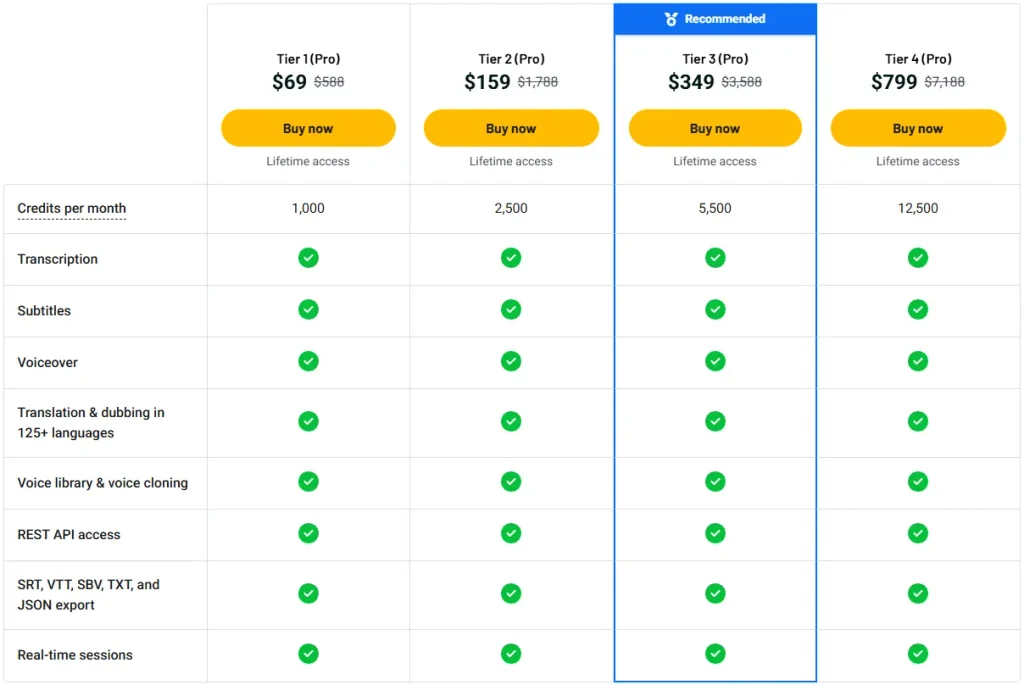
Voicina Pricing Plans
Pricing Source: AppSumo (Lifetime Deal)
License Tier 1 (Pro) – $69
Features:
- 1,000 credits/month
- Audio and video transcription
- Custom video subtitles
- AI voiceovers
- Translation and dubbing in 125+ languages
- Voice library and voice cloning
- REST API access
- SRT, VTT, SBV, TXT, and JSON exports
- Live captions, translation, and dubbing
- All future plan updates
License Tier 2 (Pro) – $159
Features:
- Includes everything in License Tier 1
- 2,500 credits/month
License Tier 3 (Pro) – $349
Features:
- Includes everything in License Tier 2
- 5,500 credits/month
License Tier 4 (Pro) – $799
Features:
- Includes everything in License Tier 3
- 12,500 credits/month
Deal Terms: One-time payment, 60-day refund policy, activation within 60 days, and no code stacking. You can upgrade or downgrade between tiers.
5 Best Voicina Alternatives 2026
‘Voicina’ is not the only tool for video translation and dubbing. Here are five other tools.
1. Maestra
Maestra is an AI tool for transcripts, subtitles, voiceovers, and live translation. It works with videos, meetings, and live events in 125+ languages.
- Starting Price: $12 for 60 pay-as-you-go credits. Paid transcription plans start at $23/month, billed yearly.
- Pros: AI subtitles, voice cloning, video dubbing, live translation, and team tools.
- Cons: Transcripts, subtitles, voiceovers, and live tools have separate pricing plans.
- Compared to Voicina: Maestra works with Zoom, Google Meet, and Teams. Voicina uses one credit pool but runs live sessions in its own web app.
2. Kapwing
Kapwing is an online video editor with AI subtitles, translation, and dubbing. It suits creators who want to edit videos and translate them into other languages.
- Starting Price: $16/month, billed yearly, or $24/month with monthly billing.
- Pros: Video editing, custom subtitles, AI dubbing, voice cloning, and lip sync.
- Cons: Dubbing works in 40+ languages. Custom voice cloning needs the Business plan.
- Compared to Voicina: Kapwing focuses on video editing. Voicina supports more languages and offers live translation for events.
3. Rask AI
Rask AI helps users translate and dub videos into 135+ languages. It also supports multiple speakers, voice cloning, and lip sync.
- Starting Price: $39/month, or about $28/month when billed yearly.
- Pros: AI dubbing, multiple speakers, lip sync, and video translation in 135+ languages.
- Cons: The Creator plan allows only 25 minutes per month. Voice cloning works in fewer languages than video translation.
- Compared to Voicina: Rask AI focuses on video translation and lip sync. Voicina also supports live captions, translation, and dubbing for events.
4. ElevenLabs
ElevenLabs is an AI voice tool for text-to-speech, voice cloning, and dubbing. It suits creators who mainly need AI voices and audio in other languages.
- Starting Price: Free plan available. Paid plans start at $6/month.
- Pros: AI voices, voice cloning, speech-to-text, and dubbing in 90+ languages.
- Cons: It lacks Voicina’s full subtitle styling and live meeting translation tools in one place.
- Compared to Voicina: ElevenLabs focuses on AI voices. Voicina also handles subtitles, video translation, and live sessions.
5. Descript
Descript is a video and podcast editor. You can edit recordings by changing their text. It also supports AI subtitles, voice cloning, translation, and dubbing.
- Starting Price: $16/month, billed yearly, or $24/month with monthly billing.
- Pros: Text-based editing, AI subtitles, audio cleanup, voice cloning, and dubbing.
- Cons: Translation and dubbing in 30+ languages require the Business plan. It starts at $65/month with monthly billing.
- Compared to Voicina: Descript focuses on video and podcast editing. Voicina supports translation and dubbing in 125+ languages, plus live sessions.
Final Thoughts – Voicina Review 2026
What I like most about Voicina is how much it puts in one place. You can turn videos into text, add custom subtitles, and translate content into 125+ languages. You can also dub videos with your own cloned voice. I like how the same voice can be used across languages.
The Voicina Lifetime Deal starts at $69 on AppSumo. It gives you 1,000 credits each month and future plan updates. You can manage all this work without using many tools.
Overall, I think Voicina is worth a look. Its mix of AI tools, language support, and one-time pricing makes it an appealing choice.