
Writeseed Lifetime Deal – AI Writing and SEO Tools
Writing blog posts takes time. You need to find keywords, plan your content, and check SEO. That’s why Writeseed caught my eye. It brings AI writing, SEO tools, and different AI models into one place.
I like how you can start with just one keyword. Writeseed helps you plan and write a full blog post. You can change the outline and use SEO tips. But the AI can make mistakes, so you may need to edit the text.
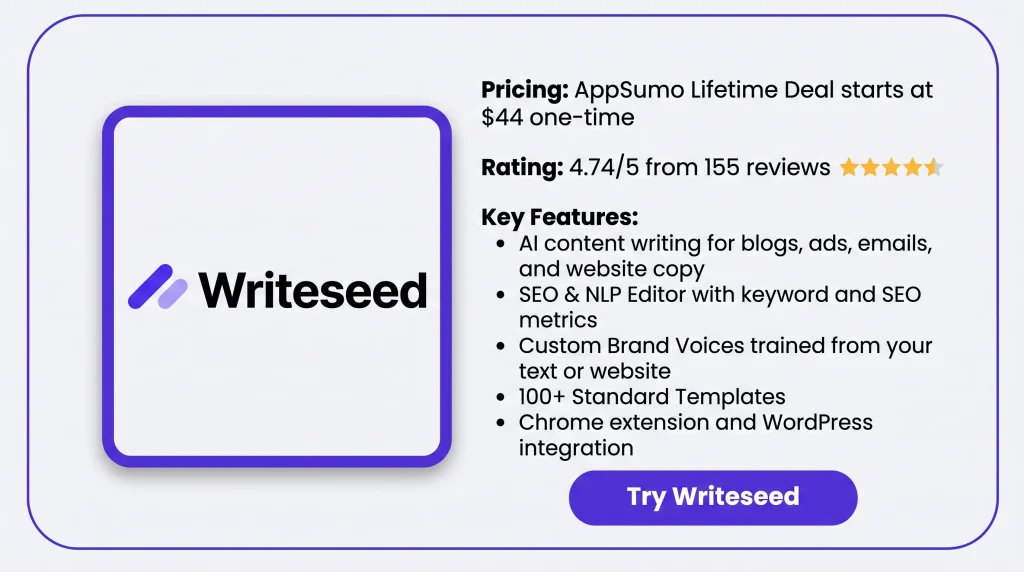
The Writeseed Lifetime Deal starts at just $44 on AppSumo. But is it worth buying? Let us explore this by looking at its features, price, pros and cons, and reviews from actual users.
Features of Writeseed Lifetime Deal
1,000+ word long-form articles
Enter a keyword or topic to get started. Then pick a title, edit the outline, and let Writeseed write the full post.
Batch Article Writer
This tool lets you write up to 30 articles at once. Just add a list of keywords to get started.
SEO & NLP Editor
This editor shows SEO scores and keyword use. It also suggests related terms and tracks your score as you edit.
Custom Brand Voices
You can upload your own text or add your website link. Writeseed then uses your writing style across its templates.
All AI Models Platform
Writeseed offers AI models like GPT, Claude, Gemini, and Llama. You can choose a model to write content or chat with AI.
100+ Standard Templates
Writeseed has templates for emails, ads, product descriptions, and social media posts. Just pick a template, add your topic, and choose a tone.
AI Post Writer
You can create social media posts, such as LinkedIn posts. Writeseed also lets you design and schedule posts in one place.
AI Image Generator
You can create AI images with text prompts. Just enter what you want, make the image, and download it.
Chrome Extension
The Chrome extension lets you use Writeseed on sites like Gmail and WordPress. Type a command with “++” in a text field to make the AI write.
Pros of Writeseed
- Faster Content Creation: You can turn a simple idea into a full blog post. It also helps you get started when you feel stuck. This gives you more time to edit your work.
- Easier SEO Writing: You can find useful keywords for your blog posts. Writeseed also shows what you need to change. This helps you make your content more search-friendly before you publish it.
- Consistent Writing Style: Your blog posts, emails, and social media posts can match your style. This helps you keep the same tone without much manual editing.
- Smoother Content Workflow: You can write posts, make images, and plan content in one place. You can also write right inside Gmail and WordPress. This means less need to switch between apps.
- Multilingual Content Creation: You can write blog posts and other content in many languages. This helps you share your ideas with people who speak different languages.
Cons of Writeseed
- Long-Form Editing Needed: Some AI-written posts have blank sections or go off-topic, so you may need to edit them.
- AI Image Limitations: Some users say the images don’t match their topics or come in limited sizes.
- WordPress Category Limits: You can’t pick WordPress categories right from the post scheduler.
- Lower-Tier Limits: Tier 1 has a 20,000-word monthly limit, while AI images start at Tier 3.
Who is Writeseed Best For?
- Bloggers: Turn keywords into full blog posts and check SEO before you publish.
- Content Writers: Use AI models to write for clients and keep each brand’s style the same.
- Social Media Managers: Write LinkedIn and other social posts, pick a tone, and plan when to post.
- Copywriters: Use ready-made templates to write ads, emails, product details, and website text.
- WordPress Site Owners: Write blog posts in batches and set them to go live on WordPress.
Writeseed Lifetime Deal Pricing
License Tier 1 – $44
- 20,000 words per month
- Articles with 1,000+ words
- 50+ AI writing templates
- SEO and keyword tools
- SEO-approved and safe content
- Pro-Writer and Chrome extension
- Free stock photos and .doc downloads
- Works on mobile and desktop
License Tier 2 – $88
- Includes everything in License Tier 1
- Unlimited words per month
License Tier 3 – $132
- Includes everything in License Tier 2
- 300 AI images per month
- Unlimited WordPress use
License Tier 4 – $176
- Includes everything in License Tier 3
- Unlimited AI images per month
License Tier 5 – $220
- Includes everything in License Tier 4
- Keywords Pro Tool
- SEO Reports
License Tier 6 – $264
- Includes everything in License Tier 5
- Unlimited GPT Image 2 use
- Prompt Pro Chrome Extension
5 Best Writeseed Alternatives 2026
Looking for a tool like Writeseed? Writesonic, Jasper AI, Copy.ai, Scalenut, and Rytr are five options to try. Each helps with AI writing but has a different focus.
Writeseed vs Writesonic
Writesonic is an AI writing and SEO tool for bloggers and marketers. It helps you write blog posts, check site SEO, and track your brand in AI search results.
- Starting Price: $79/month, billed yearly.
- Pros: AI writing, SEO tools, site audits, and AI search tracking.
- Cons: The Starter plan limits you to 15 AI articles per month.
- Key Difference: Writesonic puts more focus on SEO and AI search, while Writeseed focuses more on content writing.
Writeseed vs Jasper AI
Jasper AI is an AI writing tool for marketing teams. It helps you write blogs, emails, ads, and social posts. You can also keep the same brand voice across your content.
- Starting Price: $69/month per seat, or $59/month with yearly billing.
- Pros: Brand Voice, marketing tools, and AI agents for marketing tasks.
- Cons: The Pro plan has one user seat and two Brand Voices.
- Key Difference: Jasper focuses on brand content and marketing, while Writeseed has built-in SEO and keyword tools.
Writeseed vs Copy.ai
Copy.ai helps teams write content and handle marketing tasks. You can use different AI models to write text. Higher plans also let you set up tasks that run on their own.
- Starting Price: $29/month, or $24/month with yearly billing.
- Pros: Unlimited chat words, AI model choices, and five user seats on the Chat plan.
- Cons: Workflow credits are only in much higher-priced plans.
- Key Difference: Copy.ai focuses on team chat and work tasks, while Writeseed focuses on writing and SEO.
Writeseed vs Scalenut
Scalenut is an AI writing and SEO tool for bloggers and website owners. It helps you find keywords, write posts, and check old content. You can also track how your site appears in AI search.
- Starting Price: $59/month, with lower rates on yearly plans.
- Pros: Keyword research, AI writing, content checks, and AI search tracking.
- Cons: The monthly Starter plan allows five new articles and five updates per month.
- Key Difference: Scalenut focuses more on SEO and GEO, while Writeseed has more types of writing tools.
Writeseed vs Rytr
Rytr is an AI writing tool for short and simple tasks. It helps you write emails, captions, and social media posts. You can also choose different tones for your text.
- Starting Price: Free plan available; paid plans start at $7.50/month with yearly billing.
- Pros: 40+ writing use cases, writing tones, and a Chrome extension.
- Cons: The free plan limits you to 10,000 characters per month, and writing in many languages requires Premium.
- Key Difference: Rytr focuses on short daily writing tasks, while Writeseed also supports long articles, SEO research, and WordPress posts.
Final Thoughts – Writeseed Review 2026
Overall, Writeseed puts useful AI writing tools in one place. What I like most is how it turns a simple keyword into a full blog post. You can also check SEO scores and edit your text in the same place.
The Brand Voice feature is another highlight for me. You can also pick from different AI models, make images, and manage WordPress posts. This makes the whole writing process much easier.
The Writeseed Lifetime Deal starts at just $44 with a one-time payment. I think it’s worth a look if you want a simpler way to create and manage content.


