TimeTuna Lifetime Deal – Branded Booking Pages
Your booking page is often the first thing a new client sees. They see it before you even say hello. If it looks plain and boring like every other page, it hurts your brand.
TimeTuna fixes that for you. You can add your own video background and your own colors. Your page looks like yours, not some random form.
If you want info on the TimeTuna Lifetime deal and TimeTuna Review, you’ve come to the right place. TimeTuna launched this deal on AppSumo at a big discount, and this post covers every detail.
You’ll see what TimeTuna can do. You’ll learn if the lifetime deal is worth your money. You’ll also learn who TimeTuna fits best. Coaches, consultants, freelancers, and small agency owners should keep reading.
By the end, you’ll know what TimeTuna offers. You’ll know if it’s the right fit for you. Just remember, this deal won’t stay at this price forever. Don’t wait too long to check it out.
The Features of TimeTuna Lifetime Deal
Calendar Sync
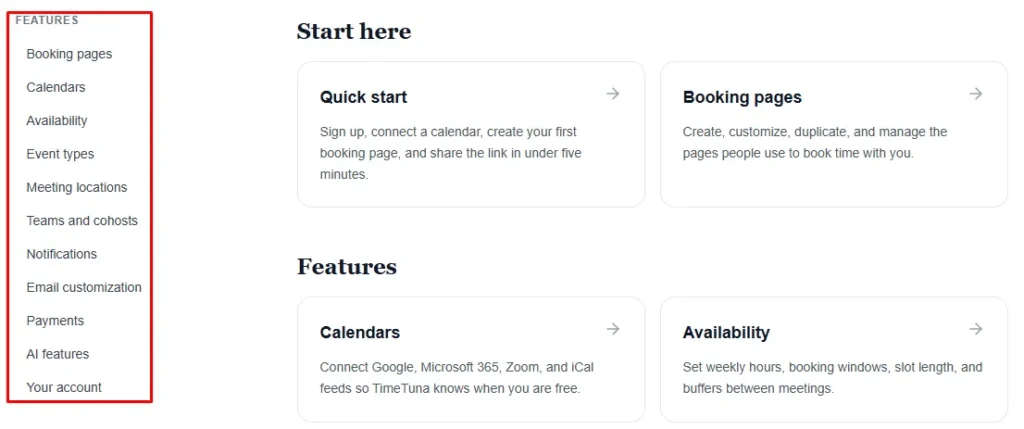
This feature links your calendar with Google, Microsoft, and iCal. It syncs in real time. It checks your busy times. Guests can only book slots when you are free.
Custom Branding
This feature lets you add a video, YouTube link, or image as your background. You can also add your own avatar and logo. Your page then matches your look.
Multiple Durations
This feature lets you list more than one meeting length. You can offer 15, 30, or 60 minutes. Guests pick the length that fits their needs.
Video Meetings
This feature creates a Google Meet, Teams, or Zoom link automatically. It happens for every booking. The link appears the moment a guest confirms a time.
Reminders & Notifications
This feature sends a confirmation right after a booking is made. It also sends an email reminder before the meeting starts.
Custom Domains
This feature lets your booking page load from your own domain. You skip the standard TimeTuna link. HTTPS gets set up automatically.
Multi-Host Scheduling
This feature can send bookings to different hosts. It uses a round-robin pattern. It can also show one combined set of open times from every host.
Team Accounts
This feature lets teammates work together on shared booking pages. Everyone stays under the same TimeTuna plan.
Custom Emails
This feature lets you rewrite the emails guests receive. This covers confirmation, reminder, reschedule, and cancellation emails. You can edit the subject, body, and reply-to address.
Webhooks & Zapier
This feature can trigger an action when a booking is made, changed, or cancelled. It connects to Zapier. Zapier links TimeTuna to more than 6,000 other apps.
The Pros of TimeTuna Lifetime Deal
- A Better First Impression: Your booking page shows your own video background and branding. It can even run on your own domain. A new client sees your style from the very first click.
- Fewer No-Shows: Guests get a confirmation right after booking. They also get an email reminder before the meeting. This makes them less likely to forget or skip the call.
- No Double-Booked Meetings: Your calendar syncs in real time with Google, Microsoft, or iCal. Guests can never pick a time you are already busy.
- Faster Booking Decisions: Guests can choose from three recommended slots. They skip scanning your whole calendar. This helps them pick a time faster.
- Less Manual Work Setting Up Calls: A video meeting link gets created on its own for every booking. You never have to send one by hand.
- Payment Before the Meeting Starts: Guests pay through Stripe before their slot is confirmed. You are not left chasing payment after the call.
- One Page for Every Purpose: You can run separate booking pages for different meeting types. Each page keeps its own setup. Nothing gets mixed together.
The Cons of TimeTuna Lifetime Deal
- No CRM Integration: TimeTuna’s own comparison page says CRM tools like HubSpot are “not on TimeTuna’s roadmap yet.” Sales teams using a CRM will need another workaround.
- Coaching Tools Still Missing: Client packages, e-contracts, and ICF hour logging are marked “Coming soon.” Coaches who need these extras won’t find them yet.
- Lighter On Advanced Automation: A verified AppSumo reviewer said heavy operations users may want to compare TimeTuna against other established platforms. It may not fit teams needing deep automation.
- Payments Locked to Higher Tier: Payments, your own logo, and team support require Tier 2 or higher. Tier 1 buyers cannot accept client payments yet.
Who is TimeTuna best for?
- Coaches: A coach can turn on paid bookings. A client’s session locks in only after payment clears. This cuts down on no-shows.
- Founders: A founder can set a custom video background and their own domain. Their booking link then looks like part of their brand, not a generic form.
- Consultants: A consultant can add custom form fields to the booking page. Guests then share context before the call even starts.
- Small Agency Owners: An agency owner can create multiple booking pages for different services. Each page keeps its own availability and branding.
- Small Teams: A small team can use round-robin scheduling. New bookings are routed across teammates automatically. No lead sits without a host.
TimeTuna AppSumo Pricing Plan
License Tier 1 — $39 (Lifetime Deal)
Features:
- 1 seat
- Pick any image or video for your background
- Your page shows your best three open times
- Build unlimited booking pages
- Connect several calendars at once
- Get auto meeting links for Google Meet, Teams, and Zoom
- Add custom questions to your form
- Split meetings across hosts, or use round-robin
- Run your page on your own domain
- Send events out through webhooks
- Connect the page to Zapier
- Edit your confirmation and reminder emails
- Add text reminders with your own Twilio account
- Keep a small “Made with TimeTuna” note
- Made for one person
License Tier 2 — $99 (Lifetime Deal)
Features:
- Everything from Tier 1, plus:
- 3 seat
- Take payments through Stripe
- Remove the note and add your own logo
- Bring your team on, with support
- Room for three people
License Tier 3 — $199 (Lifetime Deal)
Features:
- Same features as Tier 2
- 10 seat
- Built for a bigger team, up to ten people
Final Thoughts – TimeTuna Review 2026
A plain booking link doesn’t help your brand. TimeTuna fixes this. You get branded video backgrounds and your own domain. Your calendar syncs in real time, so no one double-books you. Meeting links get created for you. You can accept payments through Stripe. Teams can use round-robin scheduling. This fits coaches, founders, and consultants. The TimeTuna Lifetime Deal is worth a look if you want a better booking page.