SheetXAI Lifetime Deal – Automate Spreadsheets with AI
You spend hours on sheets every week. You type long formulas and copy data by hand. You want your sheet to understand you. You don’t want to lose your whole day. SheetXAI lets you talk to your sheet. You type in plain English, and it works fast.
You clean messy data using SheetXAI. You build reports too, and you pull data from PDFs. You never write a single formula. You want the SheetXAI Lifetime deal facts. You want an honest SheetXAI Review too. You’ve come to the right place.
The SheetXAI Lifetime deal launched on AppSumo. It comes with a strong discount, and this post shares every deal detail.
This post covers every SheetXAI feature. You’ll see the real AppSumo pricing, and you’ll see SheetXAI in real use. You’ll learn if SheetXAI is worth your money, and you’ll learn who SheetXAI is built for.
By the end, you’ll know it all. You can decide if SheetXAI fits your work. This SheetXAI deal won’t last long. Keep reading before the price goes up.
The Features of SheetXAI Lifetime Deal
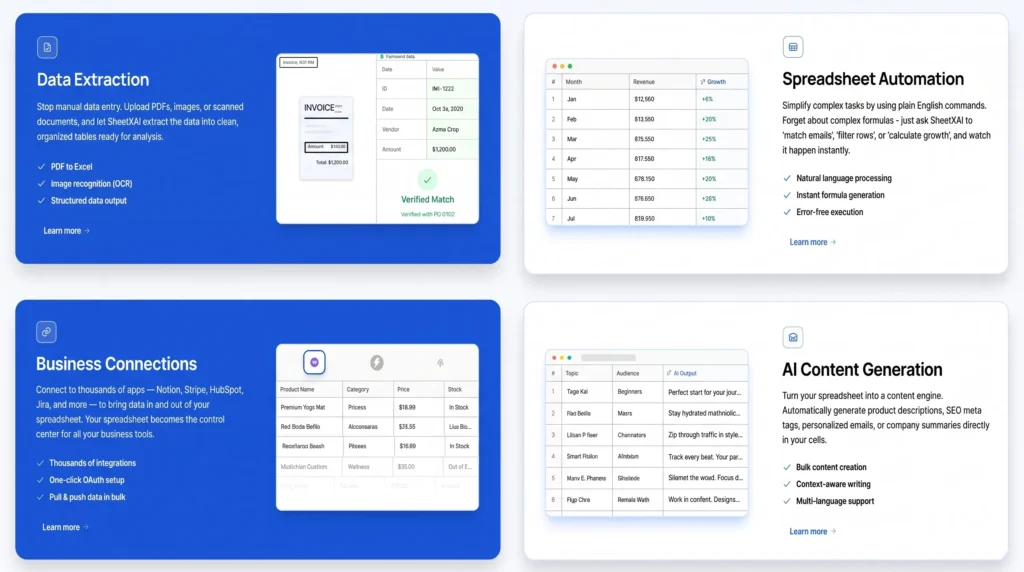
Data Extraction
You upload PDFs, images, or scans. SheetXAI pulls out the data. It puts the data into clean tables.
Spreadsheet Automation
You type a plain English request. You can ask it to match emails. Or you can ask it to filter rows. SheetXAI then does the task. You skip writing any formula.
Business Connections
SheetXAI links to many apps. This includes Notion, Stripe, HubSpot, and Jira. You can pull data into your sheet. You can also push data out.
AI Content Generation
SheetXAI writes content for you. This includes descriptions and SEO tags. It can write emails too. It can write summaries too. This content lands right in your cells.
The Pros of SheetXAI Lifetime Deal
- No More Manual Data Entry: PDFs and scans turn into rows. You skip typing this by hand.
- No Formula Knowledge Needed: You type your request in plain English. You skip hard formulas.
- One Central Workspace: Data flows in from other apps. This includes Notion and Stripe. It also includes HubSpot and Jira. You skip switching between tools.
- Content Ready Inside Cells: Content shows up in your cells. You skip using another app.
The Cons of SheetXAI Lifetime Deal
- Mixed Results on Tasks: Some tasks can give mixed results. This can happen with the same command.
- Results Vary By Model: Output quality depends on the model. Lighter models often give weaker results.
- Advanced Features Take Time: Some features take time to learn. You need practice to use them well.
- Excel Access Costs Extra: Excel access needs an extra add-on. This add-on is not in the base price.
Who is SheetXAI best for?
- Freelancers and Solopreneurs: They track leads alone. They manage invoices too. They build lists without extra help.
- Marketing Agencies: They run content calendars in one place. They run SEO checks too. They build client reports in the same sheet.
- Ecommerce Store Owners: They sync their WooCommerce catalog. They write product text fast. They skip manual updates.
- Sales Teams: They score leads in their sheet. They verify emails too. They write outreach in the same place.
- Financial Analysts: They pull live market data. They process invoices fast. They build models without new apps.
SheetXAI AppSumo Pricing Plan
License Tier 1 — $39 (was $180)
Features:
- You bring your own AI key. This tier has no built-in credits.
- The Google Sheets AI agent works inside your sheet.
- You skip formulas. You type what you want in plain English.
- You get deeper analytics and insights on your data.
- You set up bulk actions. Repeat tasks run on their own.
- You turn on content writing right inside your cells.
- The AI can search the live web for you.
- You link your sheet to other apps you use.
License Tier 2 — $129 (was $540)
Includes License Tier 1, plus:
- You write content in bulk, row by row.
- You turn text into audio across many rows.
- You build video content in bulk.
- You create images across many rows at once.
- You scrape website data in bulk.
- The AI reviews and analyzes images for you.
- You sharpen and enlarge images with no extra tools.
- You turn documents into usable sheet rows.
- You pick from over 100 AI models.
License Tier 3 — $199 (was $900) Recommended
Includes License Tier 2, plus:
- You get 2 more seats than Tier 2. That’s 5 licenses total.
License Tier 4 — $299 (was $4,500)
Includes License Tier 3, plus:
- You get 20 more seats than Tier 3. That’s 25 licenses total.
Available Add-Ons (can be added to any tier)
- You can add Excel access for $29 more. This charge won’t be refunded alone.
- You can add 5,000 credits for $59. The cap is 50,000. This purchase can’t be refunded.
Final Thoughts – SheetXAI Review 2026
Spreadsheets should not eat up your day. Formulas and slow typing often do just that. SheetXAI fixes this. You clean data, write content, and link apps. You do it all in plain English. It works inside Excel and Sheets. It saves real time. It skips the learning curve. It fits solo users and agencies too. The SheetXAI Lifetime Deal starts at $39. It’s a smart one-time buy for busy spreadsheet users.